
wangjc683/galley
wangjc683/galley has 74 GitHub stars and 14 forks. GitHot measured 0 stars in 24 hours and +1 in 7 days. Last checked 2026-11-16 23:40 UTC. Last push 2026-11-03.
Measured star growth
- in 24h
- 0
- in 7 days
- +1
- in 15 days
- Collecting history
- in 1 month
- Collecting history
Net star changes over overlapping periods, not daily totals. Missing measurements are left blank. Stars measure attention, not software quality.
About
Less harness. More model. A lightweight local AI assistant. / 极简 harness 的本地全能 AI 助理。
AIREADME.md
Original
A lightweight, general-purpose personal assistant that lives on your computer: a thin harness that leans on the model itself, built to get better with every model release.
Download · Quick Start · Tour · Docs · 中文



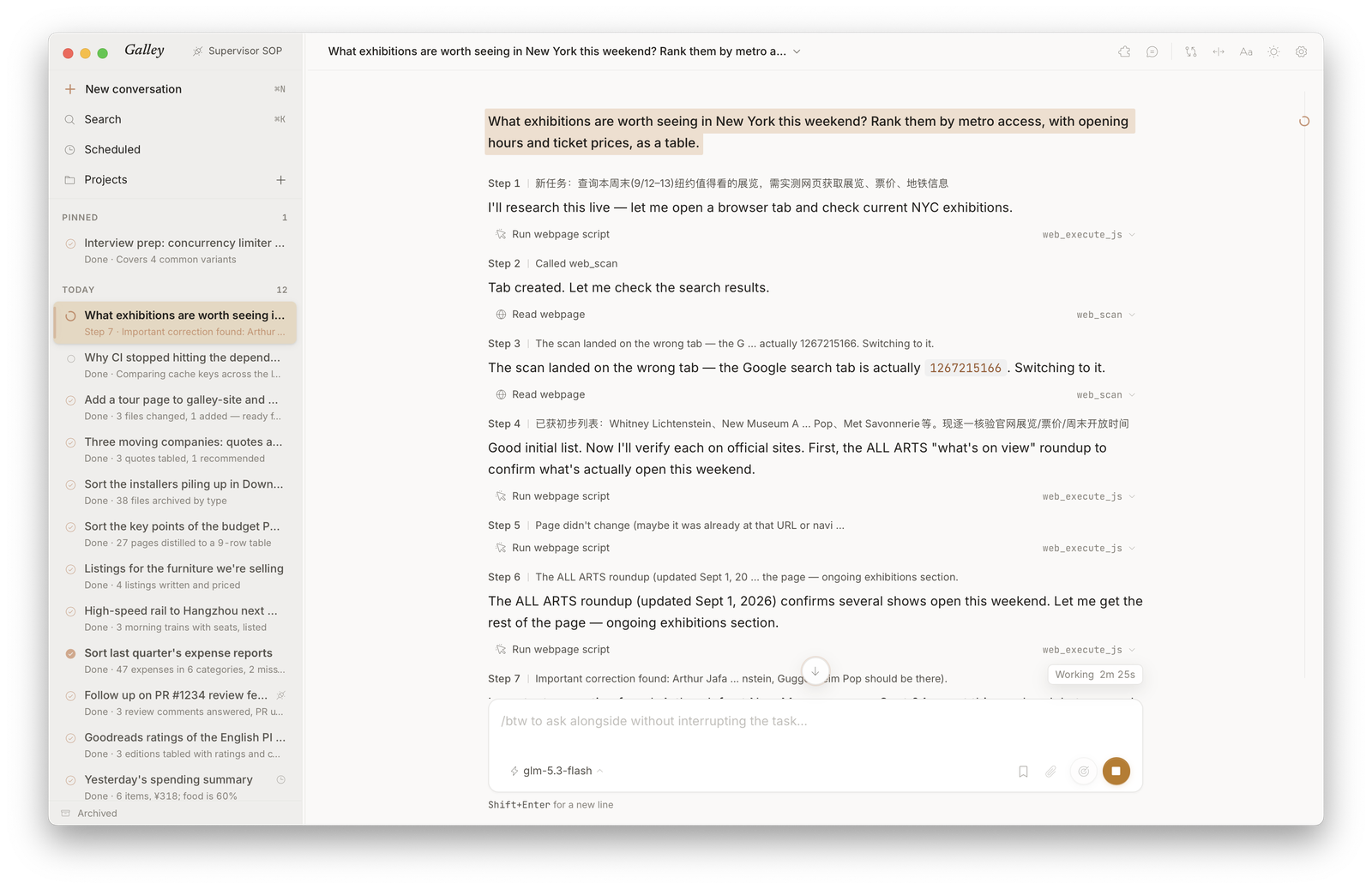
Follows your system appearance — light or dark.
What Is Galley
Galley is a personal assistant that runs on your own computer.
- It does the work — terminal, files, and the browser you're already signed into: booking tickets, checking orders, filling in forms, the jobs a cloud assistant can't reach, done right on your machine.
- One person to talk to — longer jobs it hands off, then comes back to tell you how they went; what you'll want reminding of, it keeps track of.
- A bet on the model — the harness is deliberately thin, so every model upgrade makes Galley better; what it remembers and learns stays on your computer and comes with you when you switch models.
Highlights
One assistant who always reports back
- 💬 Main chat — one conversation that's always there: just say what you need, as in a messaging app. Its face in the sidebar moves, so you can tell at a glance whether it's busy or free.
- 🧑💼 Hands off, checks, reports back — longer jobs go to subtasks in the workbench. When one finishes or gets stuck, the assistant wakes up to check the result against what was asked, sends it back if it falls short, and tells you in a line or two once it's good. A subtask's questions come to the assistant first, and it answers the ones it can.
- 📝 To-dos and reminders it sets itself — mention that "the materials are due next Wednesday," and it decides whether to make that a to-do and when to remind you; say "no need" and it's cancelled. The to-do panel opens beside any conversation: you just tick things off, and tell the assistant the rest.
- 🗂️ Runs Galley for you — it starts conversations, creates projects, tidies up into the archive, and sets one-off reminders on its own, then tells you how to undo it. API keys, sign-ins, and the browser extension stay yours; it tells you where to fill them in.
- 📱 iPhone app (in development) — talk to the same assistant from your phone. It keeps working on your computer; the phone connects back through an end-to-end encrypted relay that only ever sees ciphertext.
Gets real work done
Powered by the bundled engine — a derivative work of GenericAgent, shipped inside the installer, ready on first launch.
- 🖥️ System-level execution — terminal, files, keyboard and mouse, screen vision, even a phone over ADB: from looking things up to getting them done.
- 🌐 Your real browser — load the bundled extension into Chrome or Edge once, and it works in the browser you're already signed into. No re-login.
- 🧬 Self-evolving skills — every new task it solves becomes a reusable skill; skills and memory grow on your machine and come with you when you switch models.
- 💰 Token efficiency, measured — dense context instead of long: 100% on Lifelong AgentBench with 3–6× fewer input tokens than leading agents (paper). The default window is 90K.
- 🔌 Any model, including local ones — sign in with ChatGPT to use your plan, or bring your own API key: presets from Anthropic and OpenAI to DeepSeek, Kimi, and GLM, any compatible endpoint, Ollama with no key; reasoning effort per conversation.
- 📖 Reading panel — files it writes open beside the conversation: Markdown, code, images, CSV as a table. Add files or images from the composer; review a Git repository's changes read-only, unified or split.
The workbench, and more ways in
The workbench is where the team does its work: jobs the assistant hands off run here, and you can open conversations of your own to dig into a project.
- 🧭 Projects + parallel sessions — point a Project at a folder, a code repo or a document directory, and let several sessions advance around it in parallel.
- 🔧 Transparent runs — watch the reasoning stream in; every step opens to its full arguments and result, and a finished run folds into one line.
- ⏰ Scheduled tasks — a prompt that runs daily, weekly, or monthly in a new session, its result waiting in the sidebar; or just ask the assistant to set one up. Galley needs to be running and can launch at login.
- 📨 IM Channels — find it on WeChat, Feishu, Telegram, or Discord too, sharing long-term memory with the desktop; longer jobs go to desktop sessions, and it tells you when they're done.
- 🤖 Outside agents — Claude Code, Codex, and other agents work the same sessions and projects through the stable
galleyCLI, at the same table as you and the assistant. - 💾 Background + search — close the window and Galley stays in the menu bar / tray, notifies you when work finishes; ⌘K (Ctrl+K on Windows) searches every past conversation, and ⌘F (Ctrl+F) finds within the open one.
A Quick Tour
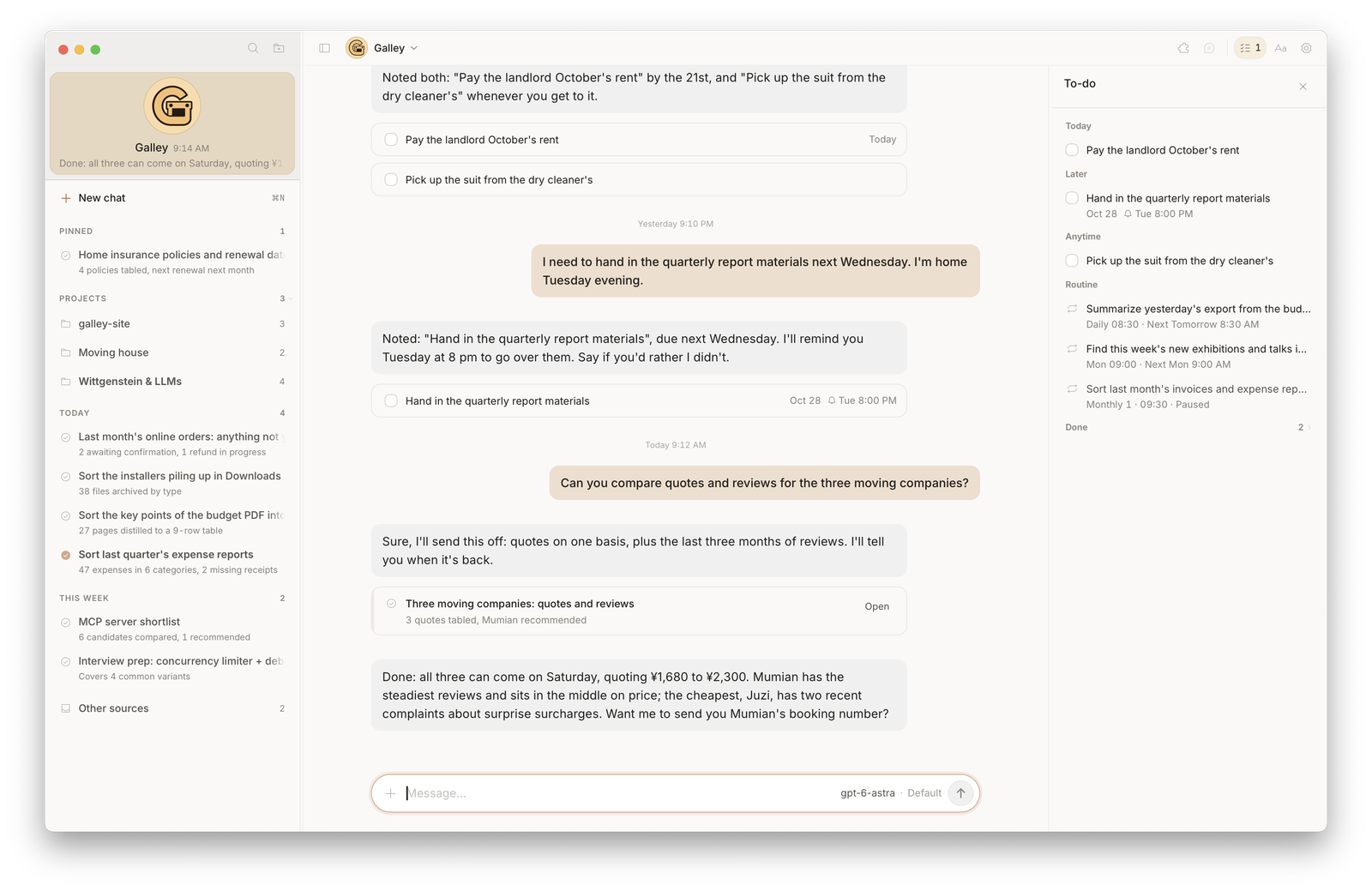 To-do — what it keeps track of for you, open beside any conversation |
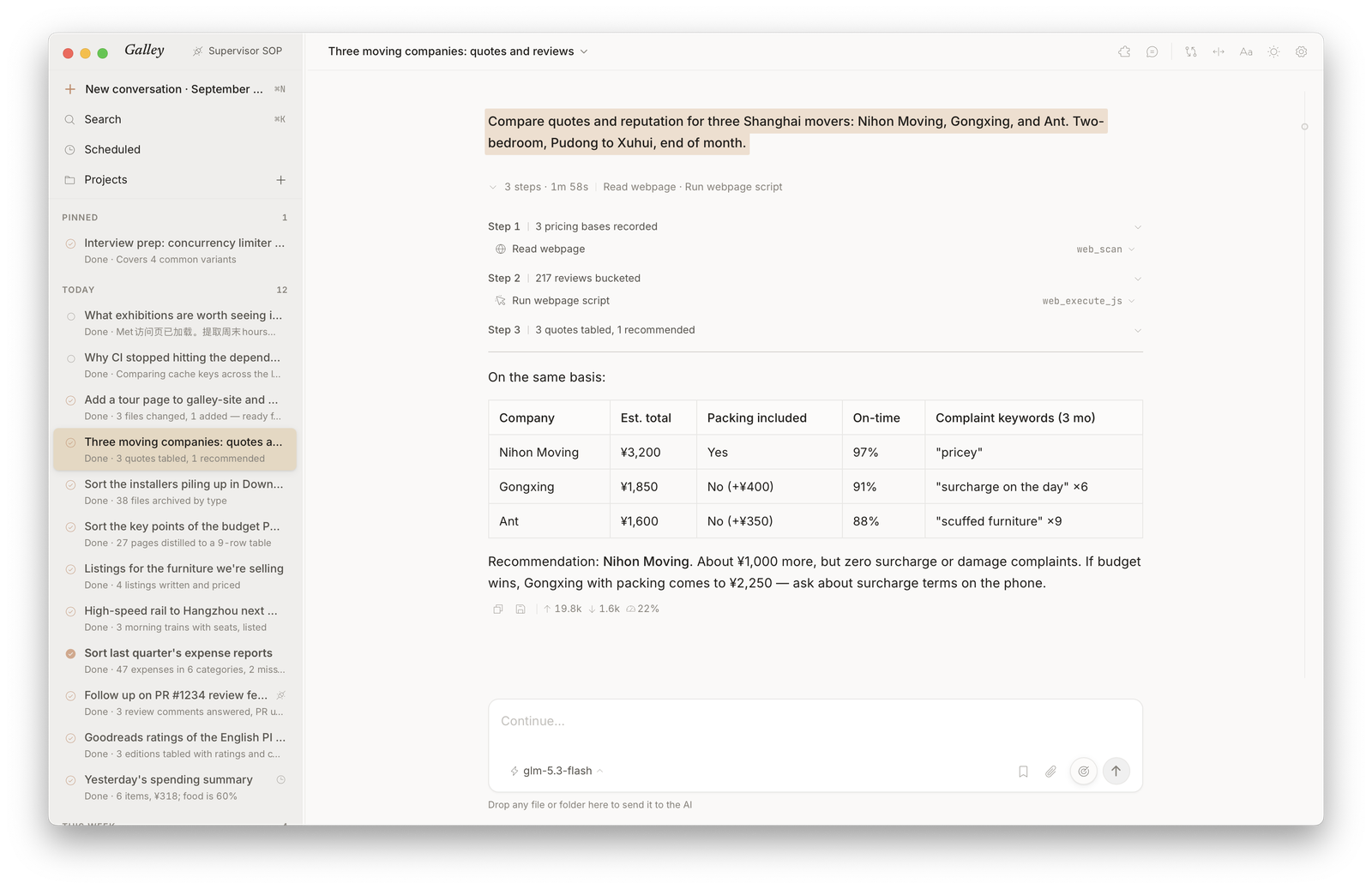 Workbench — the jobs the assistant hands off run here, every step in view |
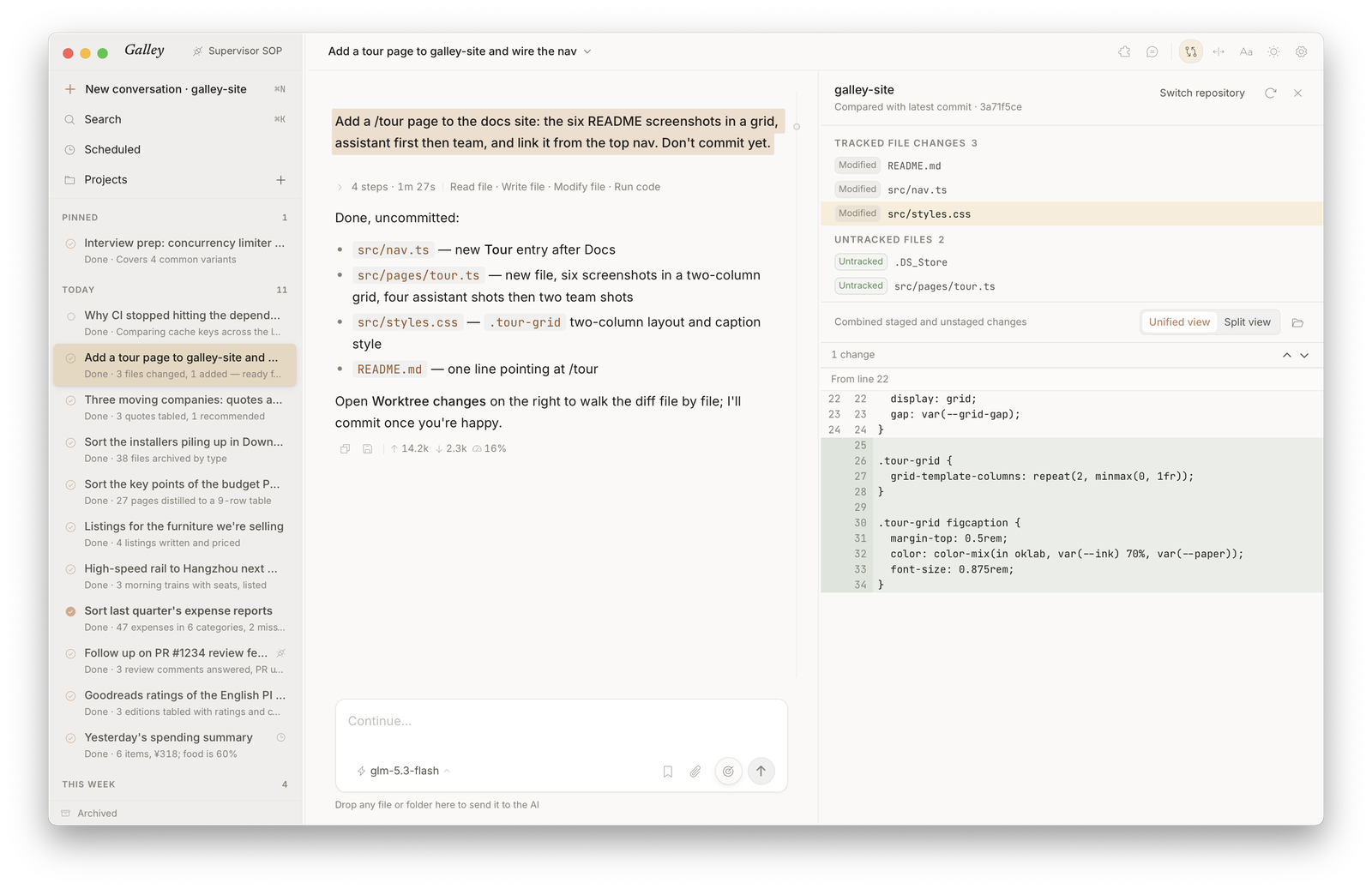 Reading panel — review worktree changes beside the conversation |
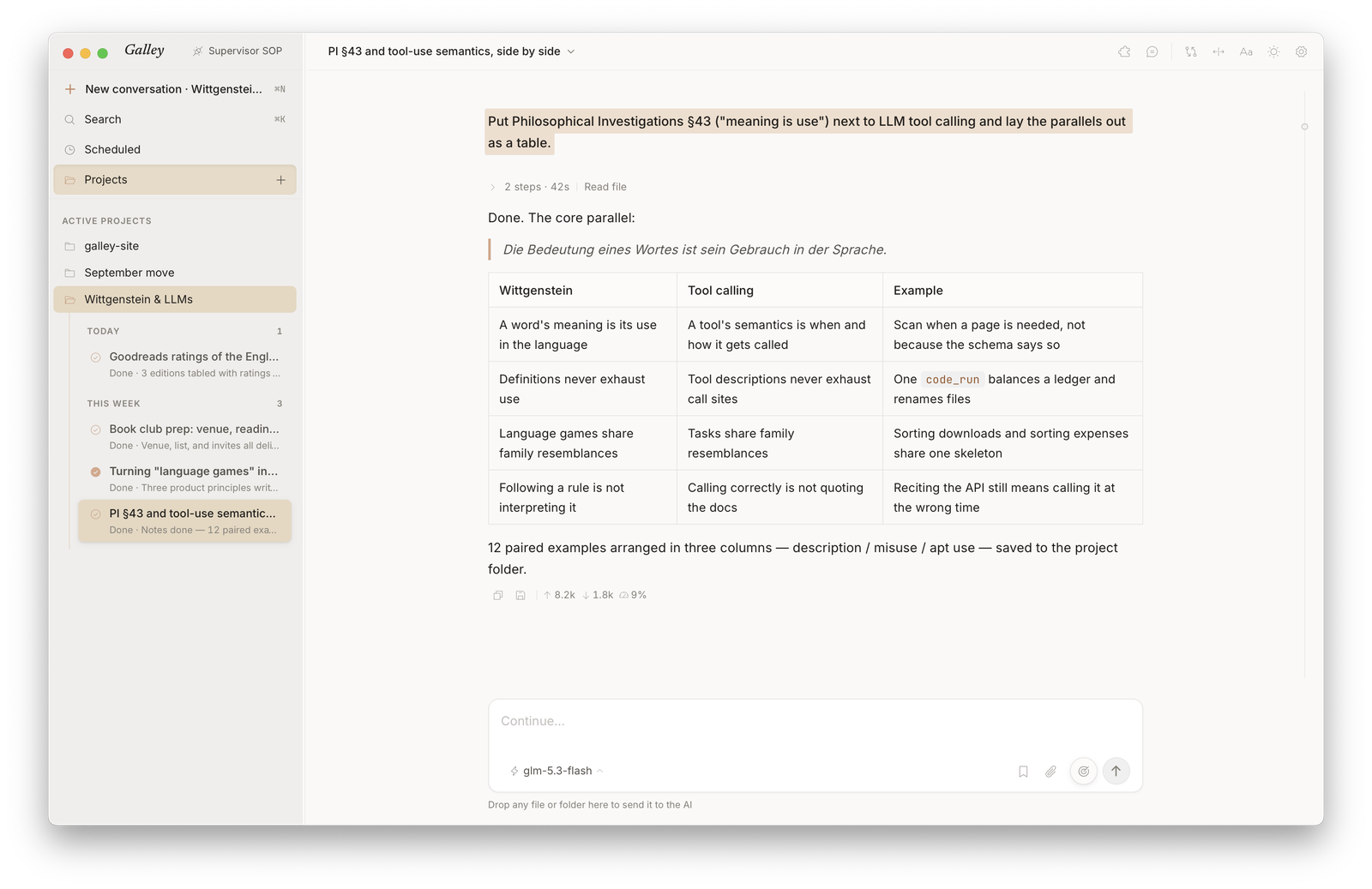 Projects — sessions advancing around one project |
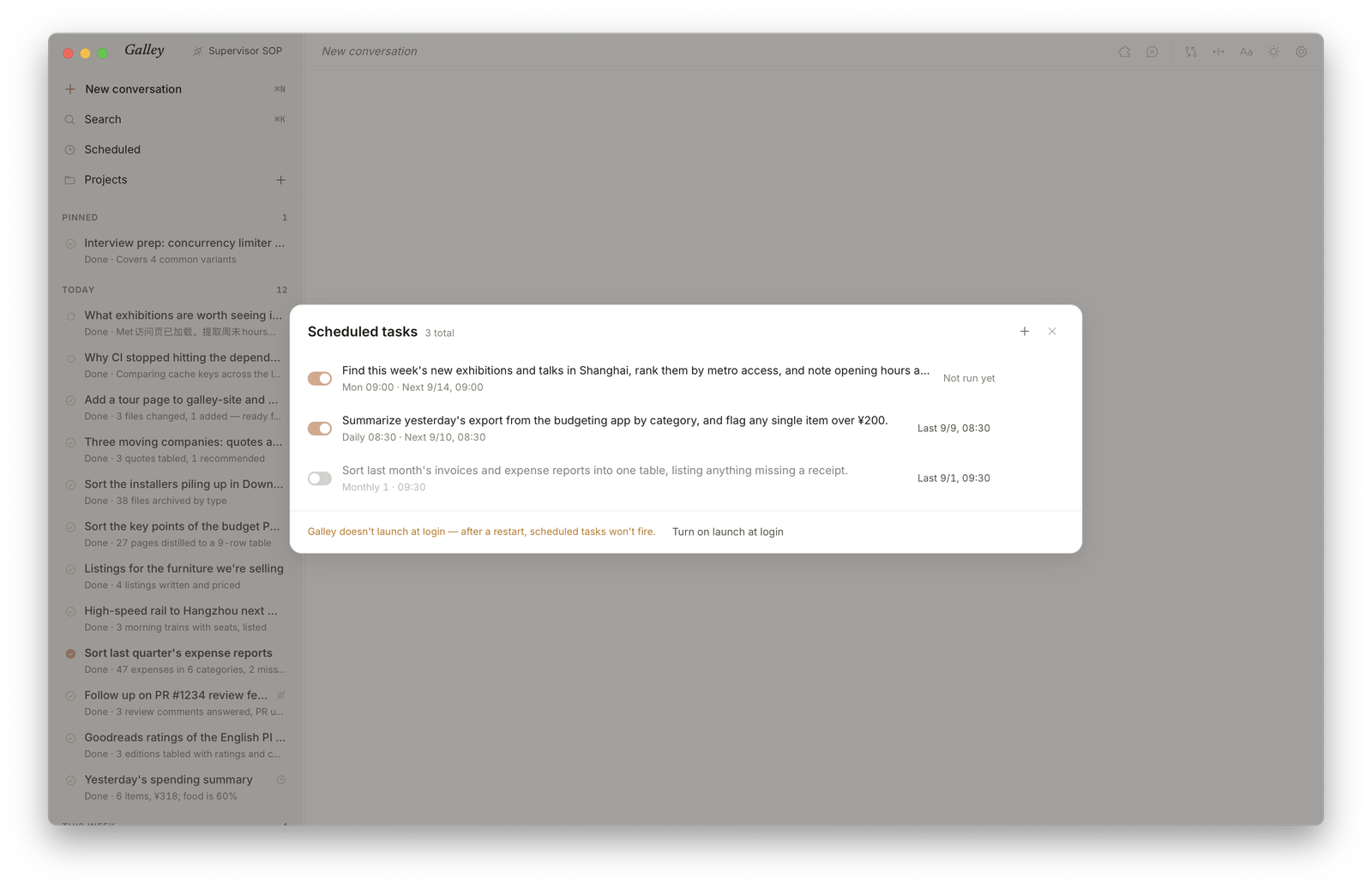 Scheduled tasks — a prompt that runs itself every morning |
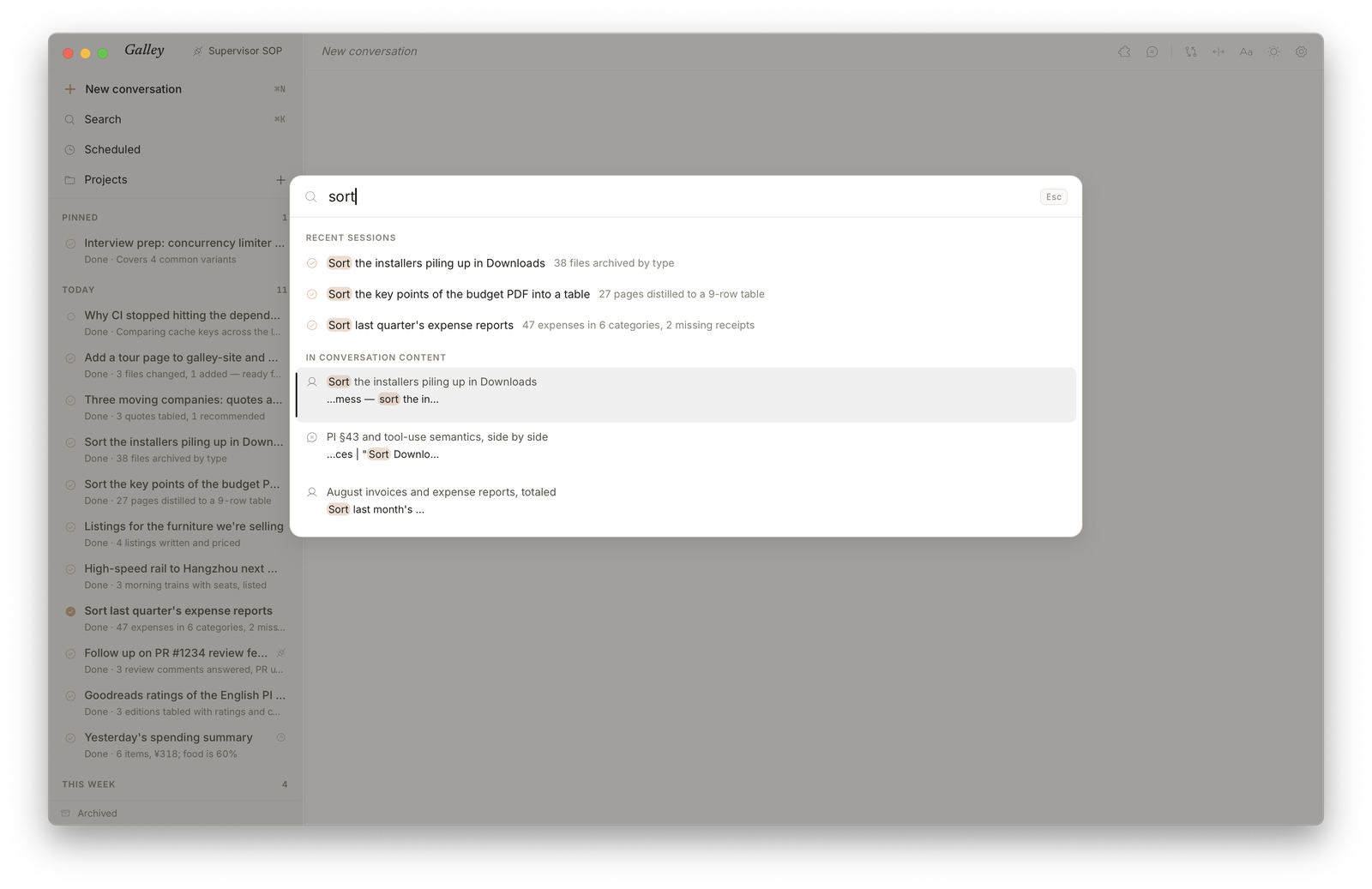 ⌘K — every past conversation, straight to the matching line |
Quick Start
Decide how you'll connect a model first. Presets for ChatGPT, OpenAI, Anthropic, DeepSeek, Kimi for Coding, MiniMax, OpenRouter, SiliconFlow, Xiaomi MiMo, and Zhipu GLM are built in, with the endpoint prefilled: ChatGPT signs in with your ChatGPT account and uses your Plus / Pro plan; the others take an API Key. For any other OpenAI- or Anthropic-compatible endpoint, pick Custom and enter its URL; a local server such as Ollama needs no key.
- Download Galley — the macOS / Windows installer from Releases.
- Configure a model — on first launch, pick a provider and paste your API Key (or sign in with ChatGPT); the connection is tested automatically.
- Start using it — click "Start using Galley" to open the main chat (a ChatGPT sign-in takes you straight there), and just tell it what you need.
| Platform | Installer |
|---|---|
| macOS Apple Silicon | filename contains macOS_aarch64.dmg |
| macOS Intel | filename contains macOS_x64.dmg |
| Windows x64 | filename contains Windows_x64-setup.exe |
Install notes
Galley is not code-signed yet. If macOS blocks the first launch, run:
xattr -dr com.apple.quarantine /Applications/Galley.app
On Windows, when SmartScreen says the publisher is unknown, choose "More info" → "Run anyway".
If you already have a GenericAgent environment, choose the GA folder from Settings → Runtime → More → Connect external GA. Once attached, Galley stays strictly read-only and never touches your external GA's code, memory, SOP, or mykey.py. The main chat (the assistant and its to-dos), Browser Control, and Channels run on the bundled engine only, and the providers under Settings → Models serve the bundled engine; an external GA keeps using its own mykey.py.
Outside Agents
Galley's assistant runs its team through the galley CLI; outside agents such as Claude Code or Codex can plug into the same CLI as a Supervisor Agent to inspect, continue, and start sessions. In the running GUI, open Settings → Agent:
| Button | What it does |
|---|---|
| Copy SOP | Copies the short galley-supervisor-sop.md, so your Agent can inspect, continue, start, split, and wait for Galley work; advanced details live in the Supervisor reference |
| Open Agent API docs | Under Advanced options: opens the full command reference, JSON schemas, and exit codes |
| Install galley command | Under Advanced options (macOS): puts galley on your PATH for you and your scripts; the SOP doesn't need it |
You don't need to learn the CLI yourself — tell your Supervisor Agent what you want in natural language and let it operate Galley. The copied SOP is a lightweight hot path; detailed commands and advanced orchestration stay in the reference and Agent API. Claude Code users can install the same SOP as a skill: galley-supervisor (a Codex copy lives under .agents/skills/).
Work scales to the right container instead of becoming one giant prompt:
- Simple requests — read from or follow a single session;
- Project / folder work — bind a workspace with Project Workspace and run sessions in parallel.
Show CLI examples
When Galley is running, a Supervisor Agent on the same machine can dispatch tasks through galley:
# What's running right now? (`live.busy` on each row is the truthful signal;
# `live.askPending` means the session is waiting on a question)
galley status
galley sessions list

# Start a new session to follow up on a PR
galley session new --project=proj_work \
  --supervisor=ga-claude-1 --reason="follow up on PR review" \
  "look at the feedback on #1234"

# Complex task: use one Project to hold a group of sessions
galley project create "Release readiness review" \
  --supervisor=ga-claude-1 --reason="parallel release-risk review"

galley session new "Read-only check of app identity, data directory, SQLite migrations, and backup risks. Output risks with evidence." \
  --project=<project-id> --supervisor=ga-claude-1 --reason="check data safety"

galley session new "Read-only check of packaging, release workflow, bundled resources, and version bumps. Output a release blocker checklist." \
  --project=<project-id> --supervisor=ga-claude-1 --reason="check release packaging"

galley project follow <project-id> --tail=80 --until-idle --final-show

# Follow one session, or wait until its run ends
galley session follow <id>
galley session wait <id> --until-idle --timeout=600

# Switch model / archive / restore
galley llm set <id> "another model name"
galley session archive <id> --supervisor=ga-claude-1 --reason="done"
galley session restore <id>
Write commands take --supervisor and --reason; with --supervisor set, the work is recorded as via=supervisor (otherwise via=cli). Sessions and messages created through the CLI, with or without --supervisor, carry a Galley CLI mark in the sidebar and the conversation (what Galley itself writes through the CLI is marked Galley, and scheduled tasks get a clock), so the human can see at a glance what came from an agent. The --supervisor label is still recorded in origin; the interface does not show it.
Full command reference, JSON schemas, and exit codes live in the Agent API docs.
Architecture
The GUI and the CLI are peer frontends — not a GUI wrapping a CLI, but two equals each talking directly to the same Rust Core: the GUI from inside the app, the CLI over a local socket. Core is the single authority, owning the main chat, session / Project state, to-dos and scheduled tasks, SQLite writes, and every Python process Galley runs; by default those run on the bundled engine, ready out of the box.
flowchart TB
  GUI["Galley GUI<br/>Tauri · React"] -- in-process --> Core
  CLI["Galley CLI<br/>Rust"] -- "local socket · named pipe<br/>no TCP · no token" --> Core
  Core["Galley Core<br/>Rust<br/>main chat<br/>sessions<br/>projects<br/>to-dos<br/>scheduled tasks<br/>SQLite"]
  Core --> R["Session runners<br/>one per session"]
  Core --> IM["IM channels<br/>one per app"]
  Core --> BB["Browser bridge<br/>resident"]
  R & IM & BB --> GA["Galley-managed<br/>GenericAgent<br/>Galley patches<br/>runtime prompt<br/>CPython 3.11"]
All three kinds of process run Python. When you attach an external GA, session runners use it instead, and IM channels and the browser bridge stay off.
Tech stack: Tauri v2 + React 19 + TypeScript 5.8 + Tailwind v4 / Rust (Galley Core + Galley CLI) / Python (runner, wraps GenericAgent) / SQLite + FTS5 trigram
More docs: Architecture · Contributing · Docs index
Under the Hood
A few design choices that aren't in the feature list but shape Galley's engineering quality:
Show the six design choices
Peer frontends, not a GUI wrapping a CLI. The GUI and CLI each reach the Rust Core on their own, so neither depends on the other. Closing the window leaves Core, its sessions, and the CLI running in the background. Neither the assistant nor the chat apps needed a protocol of their own: the main chat's assistant and each IM channel hand off work and check progress through the same CLI an outside Supervisor uses.
The Rust Core is the single authority. The state machines for sessions / Projects, scheduled tasks, SQLite writes, and every child process converge in one place. Frontends read projections and send intents; they hold no writable state, which removes multi-end state drift at the root.
A local-first security model. Inter-process traffic runs over a Unix socket (
0600) or a Windows named pipe, localhost only, no token, no TLS — because the trust boundary is "the same user on the same machine." Not forcing network-style auth onto a local tool is a deliberate subtraction.The Agent API is a versioned public contract. CLI output carries a
schemaVersion; within a version, changes are additive only, and a breaking change takes a new version — the current one is3, and every command that didn't change still answers1and2. Write commands record who asked and why (via/supervisor/reason). A Supervisor can program against it with confidence.Discipline at the dual-runtime boundary. The default is the bundled engine (CPython 3.11 and dependencies included, ready out of the box); when attaching an external GenericAgent, Galley stays strictly read-only — it never touches the external GA's code, memory, SOP, or
mykey.py, so your existing environment stays clean.A persistence layer built to evolve. SQLite is the authoritative store; before applying ordered migrations, an upgrade backs up the whole data directory. Past sessions are indexed with FTS5 trigram so even Chinese substrings are searchable, staying resident in the background and instantly searchable when you return.
Why "Galley"?
A ship's galley is both kitchen and workbench. Everyone comes there for a different reason, but the table is the same table.
Galley is that shared table: you talk to the assistant here, the assistant runs its team in the workbench, and outside agents that plug in through the CLI sit at the same table. Sessions, history, and every step are one shared record, not separate worlds.
Galley started as a workbench for GenericAgent. The first two letters of our name are a quiet bow to where we came from.
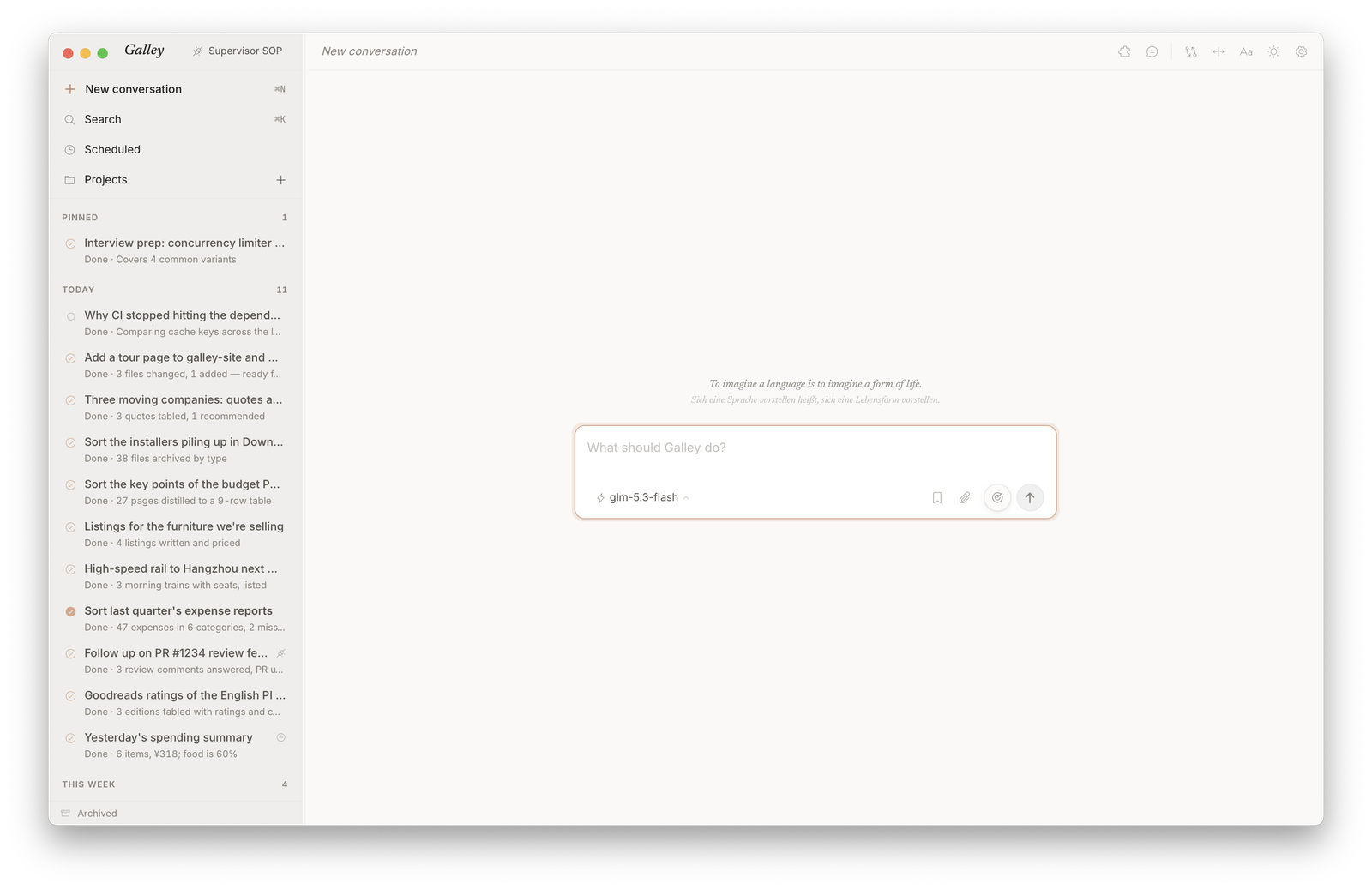
Every new conversation opens on an epigraph — this one from the Investigations.
Contributing / Building From Source
git clone https://github.com/wangjc683/galley
cd galley
pnpm --dir gui install
./scripts/bundle-python.sh mac-arm64   # or mac-x64 / win-x64: stages the bundled Python once
pnpm --dir gui tauri dev               # desktop dev mode
Prerequisites, the checks CI runs, runner tests, installer and standalone CLI builds are in CONTRIBUTING.md.
Acknowledgments
Galley's engine is a derivative work of lsdefine/GenericAgent — a minimal, self-evolving agent framework grown from ~3K lines of seed code. Galley would not exist without that clean foundation.