
wagoodman/dive has 54,700 GitHub stars and 2,011 forks. GitHot measured +4 stars in 24 hours. Last checked 2026-11-05 21:39 UTC. Last push 2026-10-30.
A tool for exploring each layer of a Docker image
What you can do
- docker - the Docker engine (the default). Images missing locally are pulled through the docker API, with credentials from your docker config. DOCKER_HOST, DOCKER_CONTEXT and the current docker context are honored
- docker-archive - a docker save tarball on disk, or an OCI archive (docker-tar is an alias)
- oci-archive - an OCI image layout tarball on disk
- oci-dir - an OCI image layout directory on disk
Measured star growth
- in 24h
- +4
- in 7 days
- Collecting history
- in 15 days
- Collecting history
- in 1 month
- Collecting history
Net star changes over overlapping periods, not daily totals. Missing measurements are left blank. Stars measure attention, not software quality.
README.md
Originaldive


A tool for exploring a Docker image, layer contents, and discovering ways to shrink the size of your Docker/OCI image.
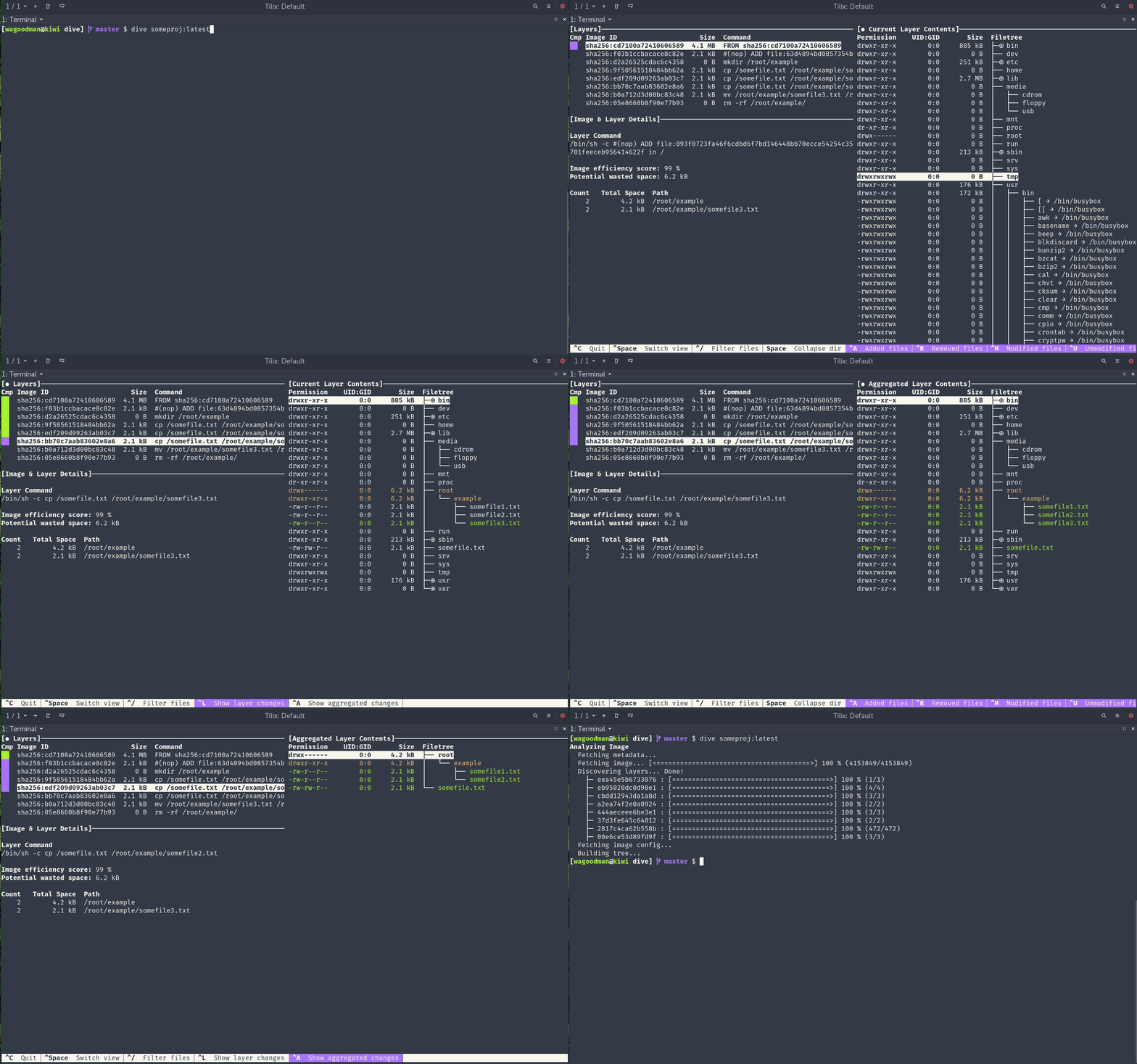
To analyze a Docker image simply run dive with an image tag/id/digest:
dive <your-image-tag>
or you can dive with Docker directly:
alias dive="docker run -ti --rm  -v /var/run/docker.sock:/var/run/docker.sock docker.io/wagoodman/dive"
dive <your-image-tag>

# for example
dive nginx:latest
or if you want to build your image then jump straight into analyzing it:
dive build -t <some-tag> .
Building on macOS (supporting only the Docker container engine):
docker run --rm -it \
      -v /var/run/docker.sock:/var/run/docker.sock \
      -v  "$(pwd)":"$(pwd)" \
      -w "$(pwd)" \
      -v "$HOME/.dive.yaml":"$HOME/.dive.yaml" \
      docker.io/wagoodman/dive:latest build -t <some-tag> .
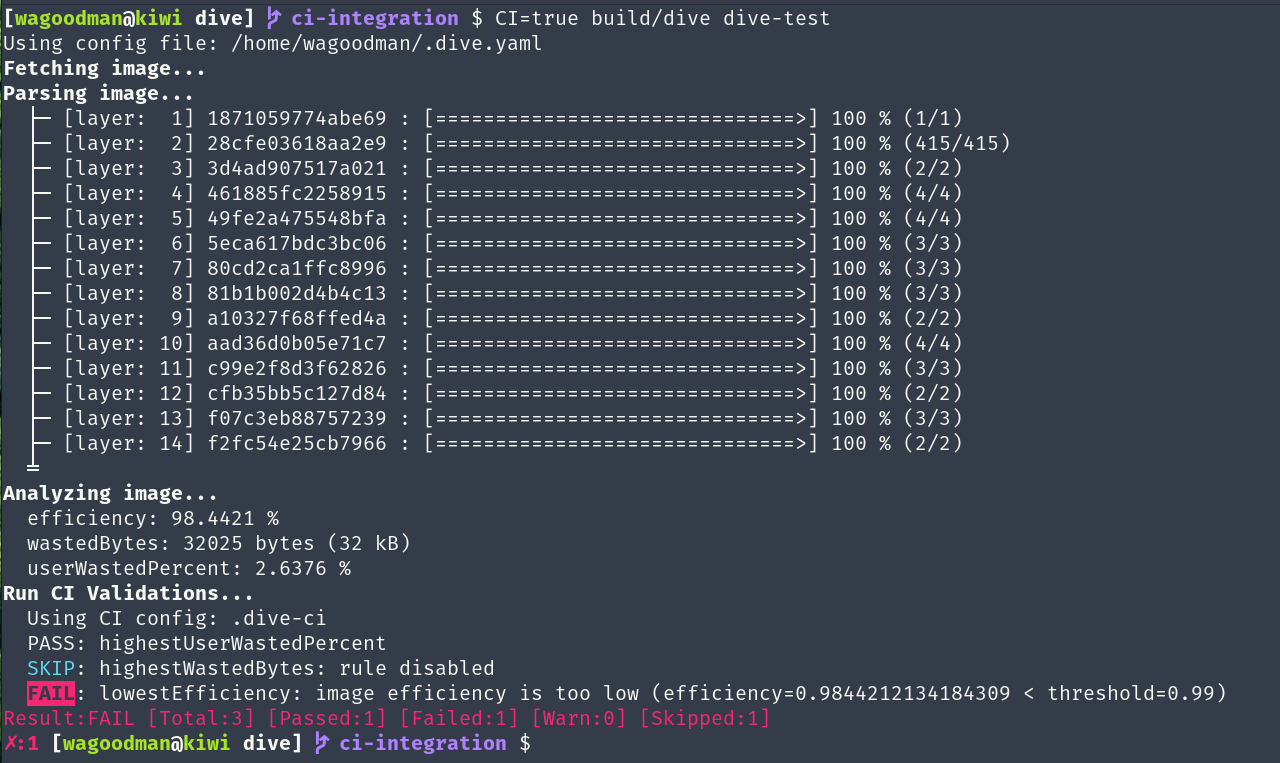
Additionally you can run this in your CI pipeline to ensure you're keeping wasted space to a minimum (this skips the UI):
CI=true dive <your-image>
This is beta quality! Feel free to submit an issue if you want a new feature or find a bug :)
Basic Features
Show Docker image contents broken down by layer
As you select a layer on the left, you are shown the contents of that layer combined with all previous layers on the right. Also, you can fully explore the file tree with the arrow keys.
Indicate what's changed in each layer
Files that have changed, been modified, added, or removed are indicated in the file tree. This can be adjusted to show changes for a specific layer, or aggregated changes up to this layer.
Estimate "image efficiency"
The lower left pane shows basic layer info and an experimental metric that will guess how much wasted space your image contains. This might be from duplicating files across layers, moving files across layers, or not fully removing files. Both a percentage "score" and total wasted file space is provided.
Quick build/analysis cycles
You can build a Docker image and do an immediate analysis with one command:
dive build -t some-tag .
You only need to replace your docker build command with the same dive build
command.
CI Integration
Analyze an image and get a pass/fail result based on the image efficiency and wasted space. Simply set CI=true in the environment when invoking any valid dive command.
Multiple Image Sources and Container Engines Supported
With the --source option, you can select where to fetch the container image from:
dive <your-image> --source <source>
or prefix the image with a <source>:// scheme:
dive <source>://<your-image>
The file based sources also take the <source>:<path> form other anchore tools use (e.g. dive oci-dir:./layout).
For every other source a single colon is read as an image name and tag, so dive docker:dind analyzes the
docker:dind image.
| Source | Reads the image from |
|---|---|
docker |
the Docker engine (the default). Images missing locally are pulled through the docker API, with credentials from your docker config. DOCKER_HOST, DOCKER_CONTEXT and the current docker context are honored |
podman |
Podman. On linux the local store is read directly (no socket needed, see containers-storage, and a short name like myapp also finds podman's localhost/myapp), falling back to the podman socket. On macOS the running podman machine's API socket is used (found through podman machine inspect); CONTAINER_HOST=unix://... overrides it, ssh connections are refused |
docker-archive |
a docker save tarball on disk, or an OCI archive (docker-tar is an alias) |
oci-archive |
an OCI image layout tarball on disk |
oci-dir |
an OCI image layout directory on disk |
registry |
a registry, without a container engine (credentials from your docker config). Registries on private IP addresses are refused, since they would be reached over plain http |
containerd |
the containerd daemon (CONTAINERD_NAMESPACE selects the namespace) |
containers-storage |
the local podman/buildah store (linux only, see below) |
auto |
detect it: files on disk first, then docker, podman, containerd and containers-storage, then a registry pull. The source it picked is reported, since an image no local engine has quietly comes from a registry (Docker Hub for a short name). Only valid for --source, not as a scheme |
For a multi-platform image, --platform picks the variant to analyze (e.g. --platform linux/arm64). A docker save
tarball holds a single platform, dive reports when it doesn't match.
containers-storage support is compiled in only with the containers_image_openpgp build tag, which the linux
release builds (and the docker image) have. Without it the source reports that it isn't available. To build it
yourself: go build -tags containers_image_openpgp,exclude_graphdriver_btrfs ./cmd/dive.
JSON export
--json <path> skips the UI and writes the analysis to a file. Each layer's id is the layer's diff ID (the same value as digestId).
Installation
Ubuntu/Debian
Using debs:
DIVE_VERSION=$(curl -sL "https://api.github.com/repos/wagoodman/dive/releases/latest" | grep '"tag_name":' | sed -E 's/.*"v([^"]+)".*/\1/')
curl -fOL "https://github.com/wagoodman/dive/releases/download/v${DIVE_VERSION}/dive_${DIVE_VERSION}_linux_amd64.deb"
sudo apt install ./dive_${DIVE_VERSION}_linux_amd64.deb
Using snap:
sudo snap install docker
sudo snap install dive
sudo snap connect dive:docker-executables docker:docker-executables
sudo snap connect dive:docker-daemon docker:docker-daemon
[!CAUTION] The Snap method is not recommended if you installed Docker via
apt-get, since it might break your existing Docker daemon.
RHEL/Centos
DIVE_VERSION=$(curl -sL "https://api.github.com/repos/wagoodman/dive/releases/latest" | grep '"tag_name":' | sed -E 's/.*"v([^"]+)".*/\1/')
curl -fOL "https://github.com/wagoodman/dive/releases/download/v${DIVE_VERSION}/dive_${DIVE_VERSION}_linux_amd64.rpm"
rpm -i dive_${DIVE_VERSION}_linux_amd64.rpm
Arch Linux
Available in the extra repository and can be installed via pacman:
pacman -S dive
Mac
If you use Homebrew:
brew install dive
If you use MacPorts:
sudo port install dive
Or download the latest Darwin build from the releases page.
Windows
If you use Chocolatey
choco install dive
If you use scoop
scoop install main/dive
If you use winget:
winget install --id wagoodman.dive
Or download the latest Windows build from the releases page.
Go tools
Requires Go version 1.26 or higher (add -tags containers_image_openpgp,exclude_graphdriver_btrfs on linux for containers-storage support).
go install github.com/wagoodman/dive@latest
Note: installing in this way you will not see a proper version when running dive -v.
Nix/NixOS
On NixOS:
nix-env -iA nixos.dive
On non-NixOS (Linux, Mac)
nix-env -iA nixpkgs.dive
X-CMD
x-cmd is a toolbox for Posix Shell, offering a lightweight package manager built using shell and awk.
x env use dive
Docker
docker pull docker.io/wagoodman/dive
# or alternatively
docker pull ghcr.io/wagoodman/dive
When running you'll need to include the Docker socket file:
docker run --rm -it \
    -v /var/run/docker.sock:/var/run/docker.sock \
    docker.io/wagoodman/dive:latest <dive arguments...>
Docker for Windows (showing PowerShell compatible line breaks; collapse to a single line for Command Prompt compatibility)
docker run --rm -it `
    -v /var/run/docker.sock:/var/run/docker.sock `
    docker.io/wagoodman/dive:latest <dive arguments...>
Note: depending on the version of docker you are running locally you may need to specify the docker API version as an environment variable:
DOCKER_API_VERSION=1.37 dive ...
or if you are running with a docker image:
docker run --rm -it \
    -v /var/run/docker.sock:/var/run/docker.sock \
    -e DOCKER_API_VERSION=1.37 \
    docker.io/wagoodman/dive:latest <dive arguments...>
if you are using an alternative runtime (Colima etc) then you may need to specify the docker host as an environment variable in order to pull local images:
export DOCKER_HOST=$(docker context inspect -f '{{ .Endpoints.docker.Host }}')
CI Integration
When running dive with the environment variable CI=true then the dive UI will be bypassed and will instead analyze your docker image, giving it a pass/fail indication via return code. Currently there are three metrics supported via a .dive-ci file that you can put at the root of your repo:
rules:
  # If the efficiency is measured below X%, mark as failed.
  # Expressed as a ratio between 0-1.
  lowestEfficiency: 0.95

  # If the amount of wasted space is at least X or larger than X, mark as failed.
  # Expressed in B, KB, MB, and GB.
  highestWastedBytes: 20MB

  # If the amount of wasted space makes up for X% or more of the image, mark as failed.
  # Note: the base image layer is NOT included in the total image size.
  # Expressed as a ratio between 0-1; fails if the threshold is met or crossed.
  highestUserWastedPercent: 0.20
You can override the CI config path with the --ci-config option.
KeyBindings
| Key Binding | Description |
|---|---|
| Ctrl + C or Q | Exit |
| Tab | Switch between the layer and filetree views |
| Ctrl + F | Filter files |
| ESC | Close filter files |
| PageUp or U | Scroll up a page |
| PageDown or D | Scroll down a page |
| Up or K | Move up one line within a page |
| Down or J | Move down one line within a page |
| Ctrl + A | Layer view: see aggregated image modifications |
| Ctrl + L | Layer view: see current layer modifications |
| Space | Filetree view: collapse/uncollapse a directory |
| Ctrl + Space | Filetree view: collapse/uncollapse all directories |
| Ctrl + A | Filetree view: show/hide added files |
| Ctrl + R | Filetree view: show/hide removed files |
| Ctrl + M | Filetree view: show/hide modified files |
| Ctrl + U | Filetree view: show/hide unmodified files |
| Ctrl + B | Filetree view: show/hide file attributes |
| PageUp or U | Filetree view: scroll up a page |
| PageDown or D | Filetree view: scroll down a page |
UI Configuration
No configuration is necessary, however, you can create a config file and override values:
# where to load an image without a scheme from: docker, podman, docker-archive, oci-archive, oci-dir, registry,
# containerd, containers-storage or auto
container-engine: docker
# platform to select from a multi-platform image (e.g. linux/arm64), empty means the source's default
platform: ""
# deprecated and has no effect (kept so existing configs still load), same for the --ignore-errors flag
ignore-errors: false
log:
  enabled: true
  path: ./dive.log
  level: info

# Note: you can specify multiple bindings by separating values with a comma.
# Note: UI hinting is derived from the first binding
keybinding:
  # Global bindings
  quit: ctrl+c
  toggle-view: tab
  filter-files: ctrl+f, ctrl+slash
  close-filter-files: esc
  up: up,k
  down: down,j
  left: left,h
  right: right,l

  # Layer view specific bindings
  compare-all: ctrl+a
  compare-layer: ctrl+l

  # File view specific bindings
  toggle-collapse-dir: space
  toggle-collapse-all-dir: ctrl+space
  toggle-added-files: ctrl+a
  toggle-removed-files: ctrl+r
  toggle-modified-files: ctrl+m
  toggle-unmodified-files: ctrl+u
  toggle-filetree-attributes: ctrl+b
  page-up: pgup,u
  page-down: pgdn,d

diff:
  # You can change the default files shown in the filetree (right pane). All diff types are shown by default.
  hide:
    - added
    - removed
    - modified
    - unmodified

filetree:
  # The default directory-collapse state
  collapse-dir: false

  # The percentage of screen width the filetree should take on the screen (must be >0 and <1)
  pane-width: 0.5

  # Show the file attributes next to the filetree
  show-attributes: true

layer:
  # Enable showing all changes from this layer and every previous layer
  show-aggregated-changes: false
dive will search for configs in the following locations:
$XDG_CONFIG_HOME/dive/*.yaml$XDG_CONFIG_DIRS/dive/*.yaml~/.config/dive/*.yaml~/.dive.yaml
.yml can be used instead of .yaml if desired.
Explore related projects
codecrafters-io/build-your-own-x
Master programming by recreating your favorite technologies from scratch.
560,257 starspublic-apis/public-apis
A collective list of free APIs
496,526 starsmorluto/rea
Reverse engineer anything with agents, from app behavior down to native binaries.
435,816 starsopenclaw/openclaw
The AI that really does things. Any OS. Any Platform. The lobster way. 🦞
394,017 stars