
w0ng/vim-hybrid
w0ng/vim-hybrid has 1,490 GitHub stars and 232 forks. GitHot measured 0 stars in 24 hours. Last checked 2026-11-08 05:08 UTC. Last push 2023-08-26.
A dark color scheme for Vim
Measured star growth
- in 24h
- 0
- in 7 days
- Update delayed
- in 15 days
- Update delayed
- in 1 month
- Update delayed
Net star changes over overlapping periods, not daily totals. Missing measurements are left blank. Stars measure attention, not software quality.
README.md
Originalhybrid.vim
A dark colour scheme for Vim that combines the:
- Default palette from Tomorrow-Night.
- Reduced contrast palette from Codecademy's online editor.
- Syntax group highlighting scheme from Jellybeans
- Vimscript from Solarized
Updates
- 05/01/2016: Replaced
let g:hybrid_use_Xresources = 1in favour oflet g:hybrid_custom_term_colors = 1 - 05/01/2016: Added
let g:hybrid_reduced_contrast = 1
Requirements
- gVim 7.3+ on Linux, Mac and Windows.
- Vim 7.3+ on Linux and Mac, using a terminal that supports 256 colours.
Installation
Copy colors/hybrid.vim to:
~/.vim/colors/hybrid.vimor alternatively, use a plugin manger such as vim-plug, NeoBundle, Vundle, or Pathogen.
Add to ~/.vimrc:
set background=dark
colorscheme hybrid
Define custom terminal colours (recommended)
Due to the limited 256 palette, colours in Vim and gVim will still be slightly different.
In order to have Vim use the same colours as gVim (the way this colour scheme is intended) define the basic 16 colours in your terminal.
Linux users: rxvt-unicode, xterm
Add the default palette to ~/.Xresources:
https://gist.github.com/3278077

or alternatively, add the reduced contrast palette to ~/.Xresources:
https://gist.github.com/w0ng/16e33902508b4a0350ae

Add to ~/.vimrc:
let g:hybrid_custom_term_colors = 1
let g:hybrid_reduced_contrast = 1 " Remove this line if using the default palette.
colorscheme hybrid
OSX users: iTerm
Import the default colour preset into iTerm:
https://raw.githubusercontent.com/w0ng/dotfiles/master/iterm2/hybrid.itermcolors
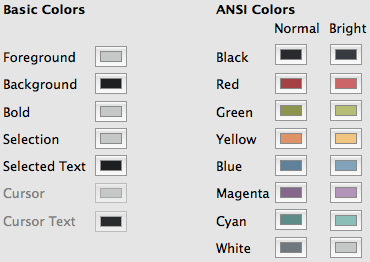
or alternatively, import the reduced contrast color preset into iTerm:
https://raw.githubusercontent.com/w0ng/dotfiles/master/iterm2/hybrid-reduced-contrast.itermcolors

Add to ~/.vimrc:
let g:hybrid_custom_term_colors = 1
let g:hybrid_reduced_contrast = 1 " Remove this line if using the default palette.
colorscheme hybrid
Screenshots
Default palette on Linux


Reduced contrast palette on OSX


Explore related projects
codecrafters-io/build-your-own-x
Master programming by recreating your favorite technologies from scratch.
561,103 starspublic-apis/public-apis
A collective list of free APIs
497,339 starsmorluto/rea
Reverse engineer anything with agents, from app behavior down to native binaries.
444,048 starsopenclaw/openclaw
The AI that really does things. Any OS. Any Platform. The lobster way. 🦞
394,214 stars