
volume-em/empanada-napari
volume-em/empanada-napari has 38 GitHub stars and 20 forks. GitHot measured 0 stars in 24 hours and 0 in 7 days. Last checked 2026-11-11 07:23 UTC. Last push 2026-10-30.
Panoptic segmentation algorithms for 2D and 3D electron microscopy in napari
Measured star growth
- in 24h
- 0
- in 7 days
- 0
- in 15 days
- Update delayed
- in 1 month
- Update delayed
Net star changes over overlapping periods, not daily totals. Missing measurements are left blank. Stars measure attention, not software quality.
README.md
Originalempanada-napari
[!IMPORTANT] New Version 1.2 Announcement!
- New Models:
- NucleoNet: A base model for EM instance nucleus segmentation
- DropNet: A base model for EM Lipid Droplet instance segmentation
- New modules
- Archive Model - archives the model into a hidden archive folder
- Create Tiles - Split big images winto small tiles (with Mask/ optional)
- Merge Tiles - Opposite of split tiles, create full image from tiles created by create tiles
- Morph labels - applies morphological operations to labels
- Count labels - counts and lists the label IDs within the dataset
- Filter labels - removes small pixel/voxel area labels or labels touching the image boundaries
- Export and import a model - export or import locally saved model files to use within empanada-napari
- Updated modules
- 2D Inference - now allows ROI inference and filling holes in segmentation label maps
- 3D Inference - allows erosion, dilation and fill holes in segmentation to help tackle big split merge errors
- Export segmentations - now allows 3D segmentations to be exported as a single .tiff image
- Pick and save finetune/training patches - now allows paired grayscale and label mask images to create training patches
- Split label - now allows users to specify new label IDs
- Updated documentation
- Check out the updated documentation here!
The paper describing this work is now available on Cell Systems.
Documentation for the plugin, including more detailed installation instructions, can be found here.
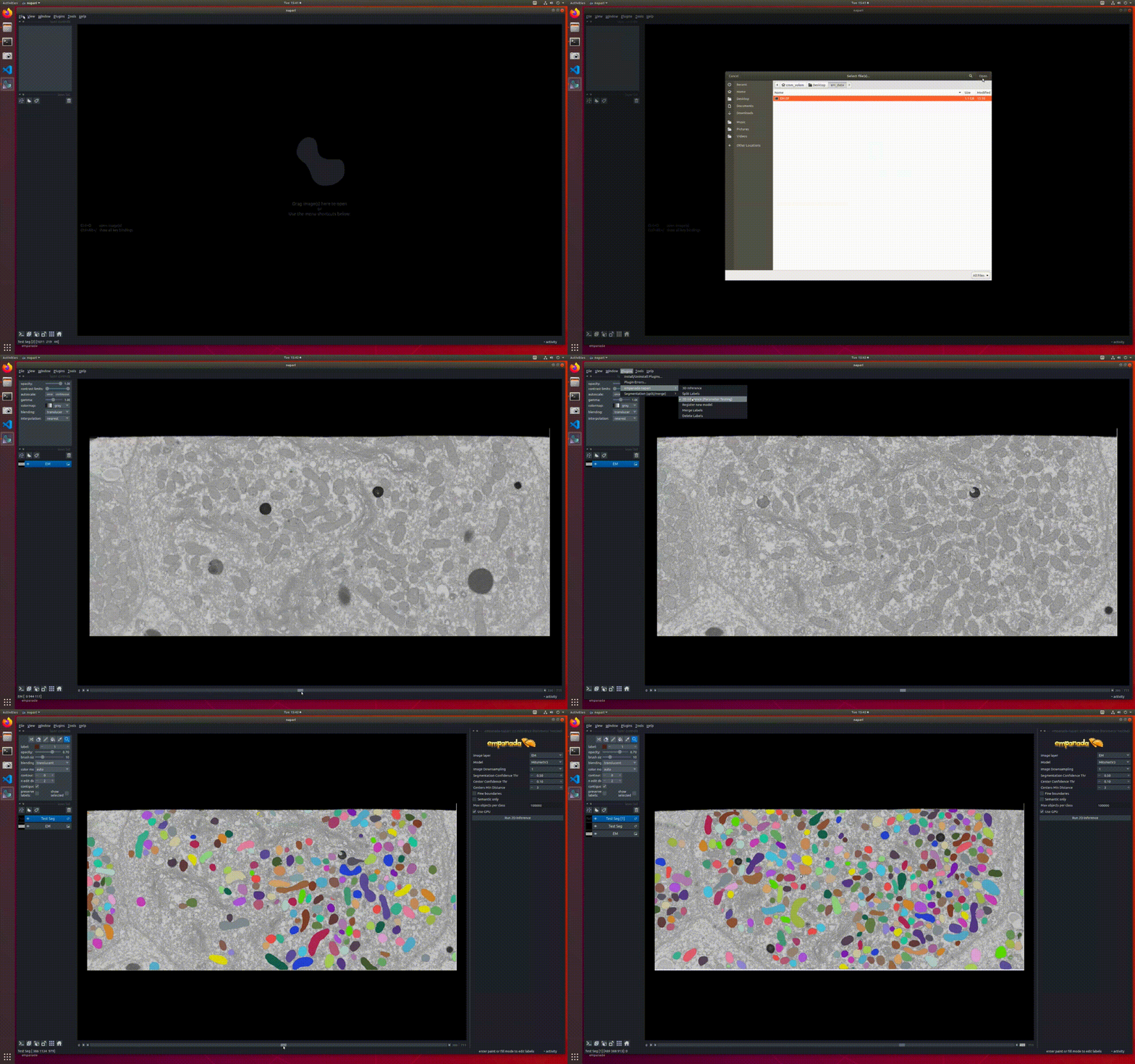
empanada is a tool for deep learning-based panoptic segmentation of 2D and 3D electron microscopy images of cells. This plugin allows the running of panoptic segmentation models trained in empanada within napari. For help with this plugin please open an issue, for issues with napari specifically raise an issue here instead.
Implemented Models
- MitoNet: A generalist mitochondrial instance segmentation model.
Example Datasets
Volume EM datasets for benchmarking mitochondrial instance segmentation are available from EMPIAR-10982.
Installation
New Users
empanada-napari works with Python 3.10–3.13 and napari<=0.6.6.
pip
Use this on macOS, or anywhere you are not already in a conda environment.
python3 -m venv empanada-env
source empanada-env/bin/activate
python -m pip install -U pip
pip install "napari[all]==0.6.6"
pip install empanada-napari
conda
Install napari and PyTorch from conda-forge first. The plugin's pip install then keeps that conda PyTorch, which shares OpenMP with conda napari.
conda create -n empanada-env -c conda-forge python=3.11 "napari=0.6.6" pytorch torchvision
conda activate empanada-env
pip install empanada-napari
Launch napari:
napari
Look for empanada-napari under the "Plugins" menu.
Returning Users
If you installed napari into a virtual environment as suggested in the original release documentation, be sure to activate it and uninstall the old empanada-napari.
pip uninstall empanada-napari
Then install the newest version:
pip install empanada-napari
GPU Support
Note: Apple Silicon GPUs are supported through torch's MPS backend when available. The setup instructions below only apply to NVIDIA GPUs on Windows and Linux.
As for any deep learning models, having a GPU installed on your system will significantly increase model throughput (although we ship CPU optimized versions of all models with the plugin).
This plugin relies on torch for running models. If a GPU was found on your system, then you will see that the "Use GPU" checkbox is checked by default in the "2D Inference" and "3D Inference" plugin widgets. Or if when running inference you see a message that says "Using CPU" in the terminal that means a GPU is not being used.
Make sure that GPU drivers are correctly installed. In terminal or command prompt:
nvidia-smi
If this returns "command not found" then you need to install the driver from NVIDIA. Instead, if if the driver is installed correctly, you may need to switch to the GPU enabled version of torch.
First, uninstall the current version of torch:
pip uninstall torch
Then install torch >= 1.10 using conda for your system. This command should work:
conda install pytorch cudatoolkit -c pytorch
Citing this work
If you use results generated by this plugin in a publication, please cite:
@article { Conrad2023,
    author = {Conrad, Ryan and Narayan, Kedar},
    title = {Instance segmentation of mitochondria in electron microscopy images with a generalist deep learning model trained on a diverse dataset},
    journal = {Cell Systems},
    year = {2023},
    month = {Jan},
    day = {18},
    publisher = {Elsevier},
    volume = {14},
    number = {1},
    pages = {58-71.e5},
    issn = {2405-4712},
    doi = {10.1016/j.cels.2022.12.006},
    url = {https://doi.org/10.1016/j.cels.2022.12.006}
}
Explore related projects
tensorflow/tensorflow
An Open Source Machine Learning Framework for Everyone
201,505 starshuggingface/transformers
🤗 Transformers: the model-definition framework for state-of-the-art machine learning models in text, vision, audio, and multimodal models, for both inference and training.
168,815 starsAUTOMATIC1111/stable-diffusion-webui
Stable Diffusion web UI
165,289 starsComfy-Org/ComfyUI
The most powerful and modular diffusion model GUI, api and backend with a graph/nodes interface. The fastest local inference engine in the world.
146,271 stars