
vnotex/vnote
vnotex/vnote has 13,031 GitHub stars and 1,296 forks. GitHot measured -2 stars in 24 hours. Last checked 2026-11-06 22:49 UTC. Last push 2026-11-04.
A pleasant note-taking platform with native speed, majoring in Markdown, MindMap, Typst, and plain text.
Measured star growth
- in 24h
- -2
- in 7 days
- Update delayed
- in 15 days
- Update delayed
- in 1 month
- Update delayed
Net star changes over overlapping periods, not daily totals. Missing measurements are left blank. Stars measure attention, not software quality.
README.md
OriginalVNote


A pleasant note-taking platform.
For more information, please visit VNote's Home Page.

Description
VNote is a Qt-based, free and open source note-taking application. It combines note management with an excellent editing experience across multiple document formats.
VNote runs on Linux, Windows, and macOS, and requires Qt 6.9+. Qt 5.15 and Windows 7 are no longer supported.
Supported formats
VNote is more than a Markdown editor — these formats are supported today:
- Markdown (
.md,.mkd,.rmd,.markdown): write, edit, and preview Markdown notes - Typst (
.typst): write and edit typeset documents with the native Typst editor and live PDF preview - Plain text and source code (
.txt,.log,.py,.cpp,.js,.json,.yaml, and more): edit text notes, logs, code, and configuration files - Mind maps (
.mmm,.emind): create and edit mind maps with the native mind-map editor - PDF (
.pdf): read PDF documents with the built-in viewer
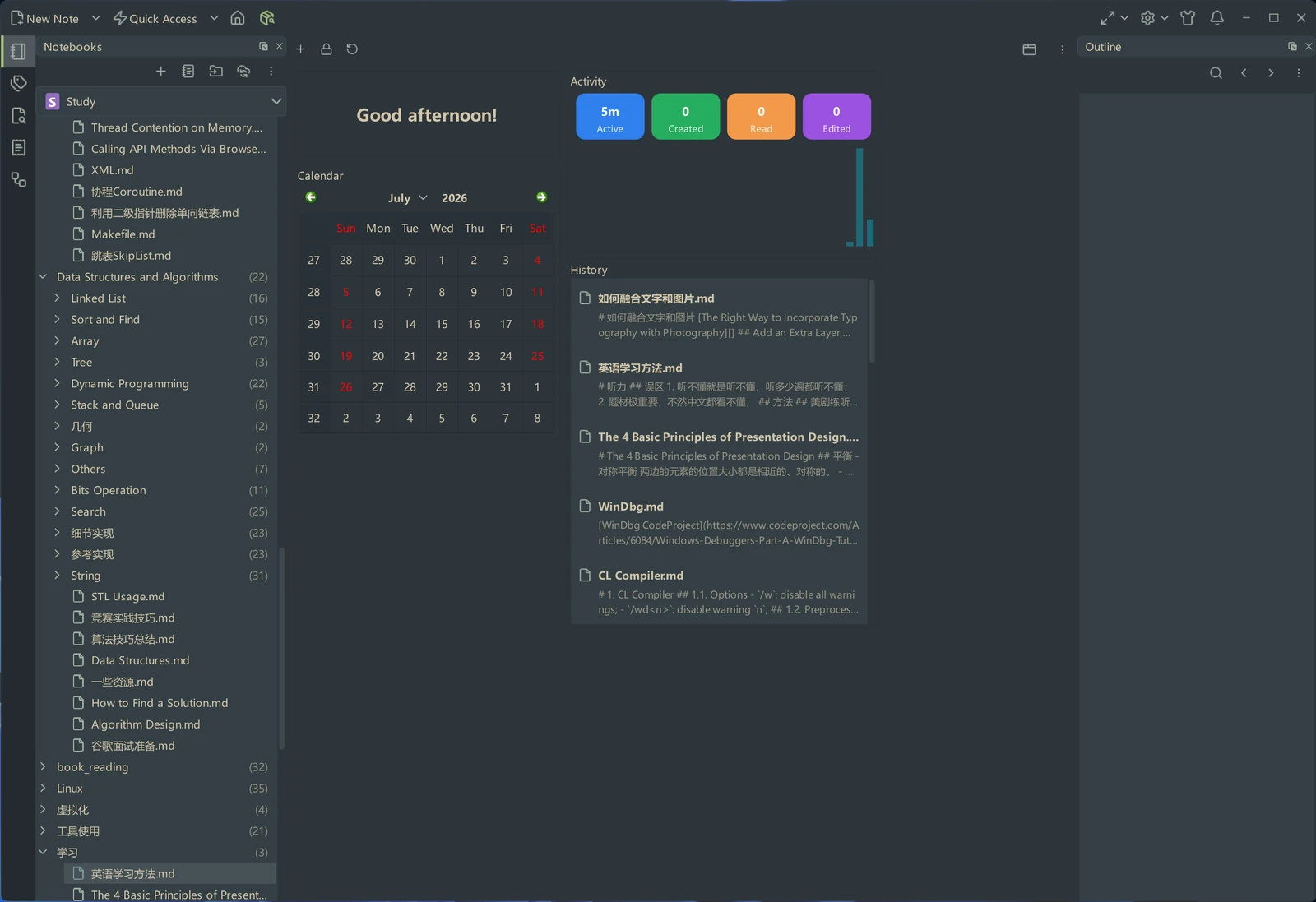
Downloads
Continuous builds on master branch could be found at the Continuous Build release.
Latest stable builds could be found at the latest release or Gitee release
Supports
- GitHub Issues;
- Email:
tamlokx at gmail.com;
Thank users who donated to VNote!
Development
Prerequisites
- Git, CMake 3.21+, Ninja, Python 3, and a C++20-capable compiler (the syntax indexer uses C++20; VNote uses C++17)
- Qt 6.9+ development packages, including Core5Compat, SVG, WebChannel, WebEngineWidgets, PDF, LinguistTools, and matching Qt Gui private headers
- On Windows: Visual Studio's Desktop development with C++ workload and Windows SDK, with a 64-bit MSVC Qt kit (the development setup uses Qt 6.10.3 MSVC2022 64bit)
- Rustup and the Rust version pinned in
rust-toolchain.toml
(currently 1.99.0); use the
x86_64-pc-windows-msvchost for the Windows kit above - Optional: clang-format for the formatting hooks
Initialize the checkout
After cloning the repository, run the initialization script to set up your development environment:
Linux/macOS:
bash scripts/init.sh
Windows:
scripts\init.cmd
This script will:
- Initialize and update all git submodules
- Install pre-commit hooks for automatic code formatting with clang-format
- Set up the vtextedit submodule pre-commit hook
Install the Typst build toolchain
VNote requires the native Typst backend. Install Rustup first, then install the pinned Rust toolchain. These commands assume Rustup's default installation location.
Windows (PowerShell, no PATH change required):
& "$env:USERPROFILE/.cargo/bin/rustup.exe" toolchain install 1.99.0 --profile minimal
Push-Location libs/vtextedit/tools/typst-backend
& "$env:USERPROFILE/.cargo/bin/cargo.exe" --version
& "$env:USERPROFILE/.cargo/bin/rustc.exe" --version
Pop-Location
Linux/macOS:
rustup toolchain install 1.99.0 --profile minimal
(cd libs/vtextedit/tools/typst-backend && cargo --version && rustc --version)
CMake builds the locked Rust dependencies into the vtextedit_typst shared library,
linked by VTextEdit and bundled with VNote. No separate typst CLI or Tinymist
installation is required. The first build needs network access to fetch dependencies.
Qt Creator
- Open the root
CMakeLists.txtand select a kit matching your Qt and compiler architecture. On Windows, select Desktop Qt 6.10.3 MSVC2022 64bit if installed. - Under Projects > Build Settings, use Ninja and separate fresh build directories,
such as
build-typst-debugandbuild-typst-release. Do not reuse a stale build cache from another toolchain. - In Initial Configuration, add this Windows CMake parameter for both profiles:
For a custom Cargo installation, use its actual executable path. On Linux/macOS, ensure Cargo is on Qt Creator's build environment PATH, or set the same CMake variable to its executable path. Initial Configuration applies to a new build directory; an already configured directory needs its current CMake configuration updated too.-DVTEXTEDIT_CARGO_EXECUTABLE:FILEPATH=%{Env:USERPROFILE}/.cargo/bin/cargo.exe - Add
-DVNOTE_BUILD_TESTS:BOOL=ONto the Debug profile if you want the VNote tests. Configure, then build the vnote and lrelease targets; select vnote to run/debug. The Typst shared library is a build dependency, not a separate run target. - Open a
.typstnote in VNote and check that its preview renders. To smoke-test the Windows library directly from the repository root:python scripts/e2e/smoke_typst_package.py --library build-typst-release/src/vtextedit_typst.dll
Typst runs on bounded background threads inside VNote. Timeouts discard results but cannot forcibly stop native calls; shutdown waits for active calls to return. The shared library is required at startup, and native compiler faults can affect VNote.
For a second VNote process, --no-single-instance skips locking/IPC but does not isolate
user data. Follow the isolated GUI smoke recipe
when testing with a disposable profile and notes.
For more development guidelines, see AGENTS.md.
License
VNote is licensed under GNU LGPLv3.
Bundled third-party material and the notices its licenses require — the Lucide (ISC/MIT) and IconPark (Apache-2.0) icon sets — are recorded in THIRD-PARTY-NOTICES.md.
Explore related projects
n8n-io/n8n
Fair-code workflow automation platform with native AI capabilities. Combine visual building with custom code, self-host or cloud, 400+ integrations.
209,754 starslanggenius/dify
Build Agentic workflows, RAG pipelines, with rich AI model and tool support on one collaborative workspace. Deploy on cloud, VPC, or self-hosted, so teams move from prototype to production without rebuilding the stack.
160,568 starsmicrosoft/PowerToys
Microsoft PowerToys is a collection of utilities that supercharge productivity and customization on Windows
140,669 starsstablyai/orca
Orca is the place for working with a fleet of agents (e.g. Grok Bot, Claude Code). Run any coding agent with your own subscription. Available on desktop, mobile and remote runtime.
118,357 stars