
vineetchoudhary/tuya-local-key
vineetchoudhary/tuya-local-key has 93 GitHub stars and 3 forks. GitHot measured 0 stars in 24 hours. Last checked 2026-11-17 04:33 UTC. Last push 2026-11-13.
What you can do
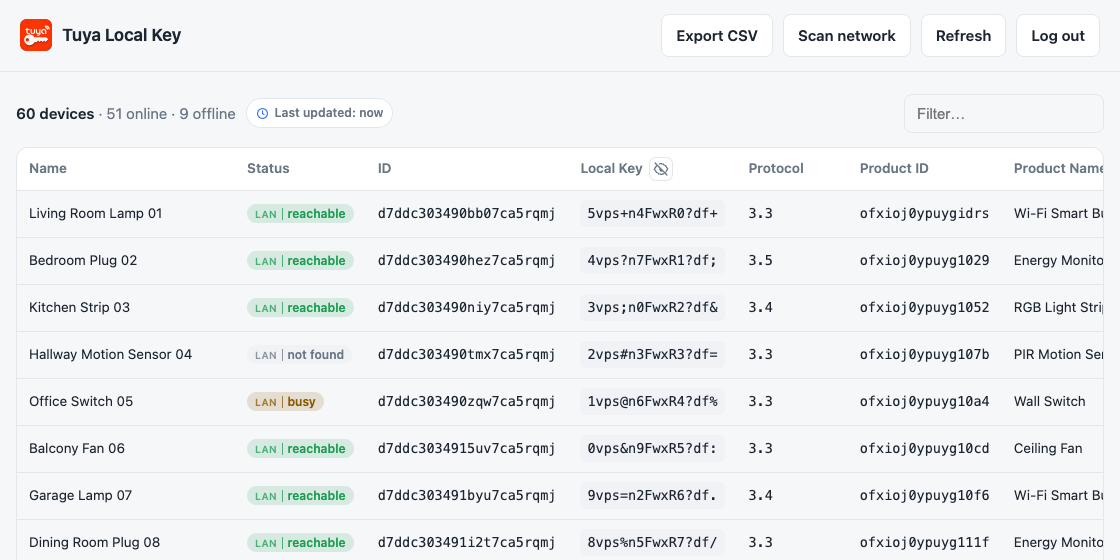
- View and copy local keys, device details, Node IDs, and data points.
- Find local IP addresses and protocol versions, including across VLANs.
- Detect changed keys, IP addresses, protocol versions, and devices.
- Search, filter or exclude devices, export CSV, and keep an encrypted cache across restarts.
Measured star growth
- in 24h
- 0
- in 7 days
- Collecting history
- in 15 days
- Collecting history
- in 1 month
- Collecting history
Net star changes over overlapping periods, not daily totals. Missing measurements are left blank. Stars measure attention, not software quality.
About
Get tuya local keys and complete device information for every tuya device via QR code login (no tuya Developer account required). Features a Web UI for Home Assistant and Docker, plus a CLI.
Self-hostedREADME.md
Original


Tuya Local Key
Retrieve local keys for your Smart Life / Tuya devices with QR-code login. No Tuya IoT developer account or cloud project is needed. Use the web UI with Docker or Home Assistant, or run the CLI locally.
Features
- View and copy local keys, device details, Node IDs, and data points.
- Find local IP addresses and protocol versions, including across VLANs.
- Detect changed keys, IP addresses, protocol versions, and devices.
- Search, filter or exclude devices, export CSV, and keep an encrypted cache across restarts.
- Get setup values for tuya-local, localtuya, and tinytuya.
- Troubleshoot local connections with a guided check, network scan, and suggested next steps.
- Read current values over the local network and compare them with the saved cloud snapshot.
- Download a support report for troubleshooting.
Quick Start
Home Assistant
On Home Assistant OS, add this repository, then install and start Tuya Local Key from the app store. Open it from the sidebar and log in.

Docker Compose
Run from this repository using docker-compose.yml:
docker compose up -d
Open http://localhost:8000 and log in.
Docker
Run the published Docker image:
docker run -d --name tuya-local-key -p 8000:8000 -v tuya-session:/data ghcr.io/vineetchoudhary/tuya-local-key:latest
Open http://localhost:8000, enter your Smart Life user code, then scan and confirm the QR code in the app.
The web UI has no authentication by default. For access beyond localhost, set both AUTH_USERNAME and AUTH_PASSWORD and read the security guidance.
CLI
Run from this repository:
./setup.sh
.venv/bin/python tuya_devices.py
Follow the QR login prompts. See the CLI guide for options.
Documentation
- Installation — Home Assistant, Docker, Docker Compose, and source setup.
- Using the app — QR login, device details, local integrations, and Bluetooth devices.
- Network scanning — Local IPs, protocol versions, VLANs, gateways, and scan statuses.
- Caching and changes — Saved devices, offline snapshots, and change detection.
- Configuration — Environment variables and security.
- CLI — Terminal setup, commands, and flags.
- Troubleshooting — Common login, key, and connection issues.
- Screenshots — Light and dark previews.
- Frontend structure: Templates, stylesheets, JavaScript modules, and development checks.
License
Tuya Local Key is licensed under the Apache License, Version 2.0. See NOTICE for attribution information.
Support
If this project has been useful to you, consider supporting its continued development.
Thank you for supporting open source! 🙏