
vilbeyli/VQEngine
vilbeyli/VQEngine has 733 GitHub stars and 35 forks. Star changes are not measured yet. Last checked 2026-11-09 11:27 UTC. Last push 2025-07-06.
Multi-threaded DirectX12 renderer w/ HDR, PBR & Multi-monitor support
Measured star growth
- in 24h
- Update delayed
- in 7 days
- Update delayed
- in 15 days
- Update delayed
- in 1 month
- Update delayed
Net star changes over overlapping periods, not daily totals. Missing measurements are left blank. Stars measure attention, not software quality.
README.md
Original
| master | dev |
|---|---|
VQEngine
VQEngine is a multi-threaded DirectX12 renderer for prototyping of rendering techniques and experimenting with cutting edge technology.
See Releases to download the source & pre-built executables.
Screenshots
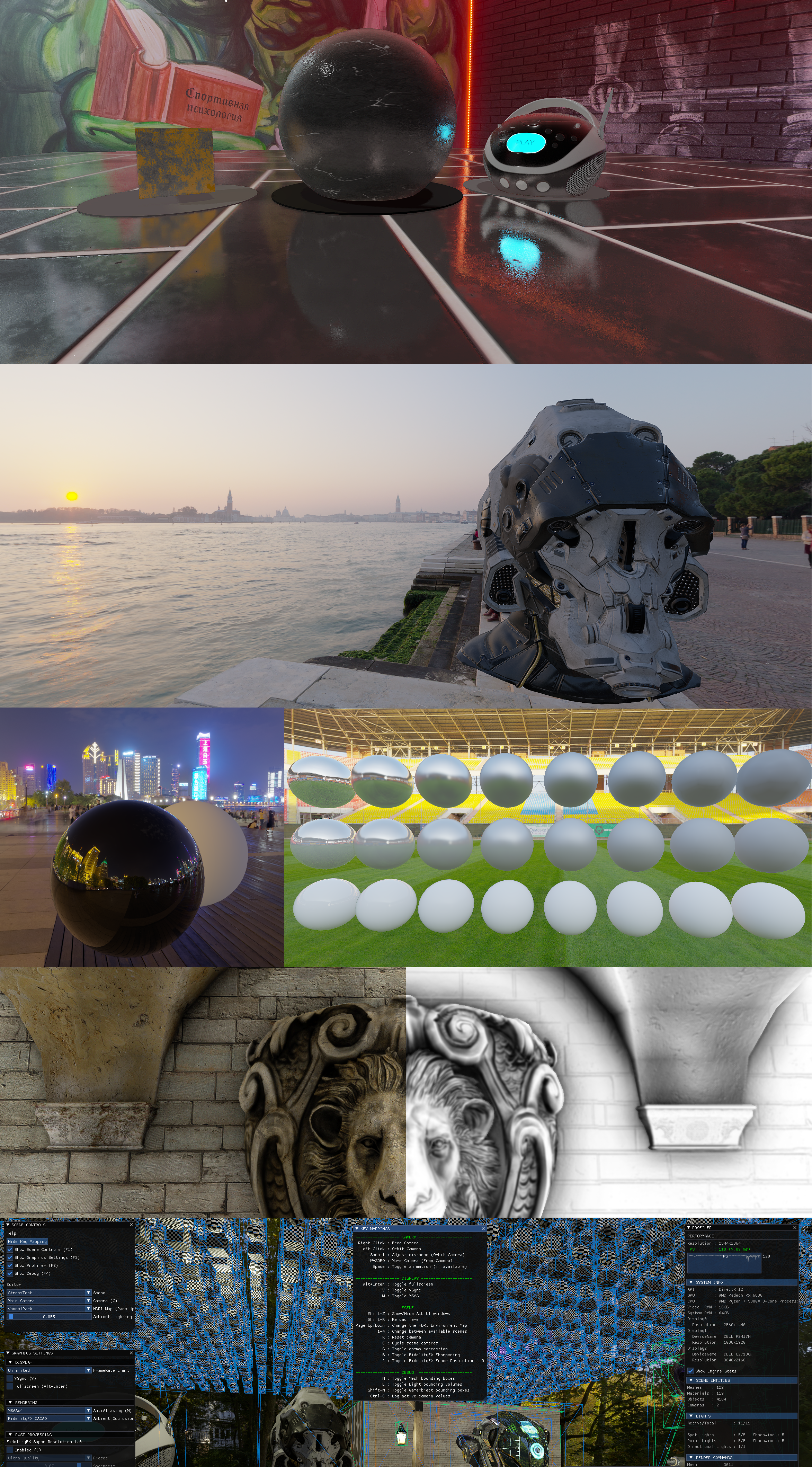
Data-driven (XML) Scenes & glTF Model Loading, HDRI Environment Maps, UE4's PBR model w/ IBL, ImGui UI & debug drawing, AMD FidelityFX CACAO, CAS, FSR1, SSSR, DNSR, SPD
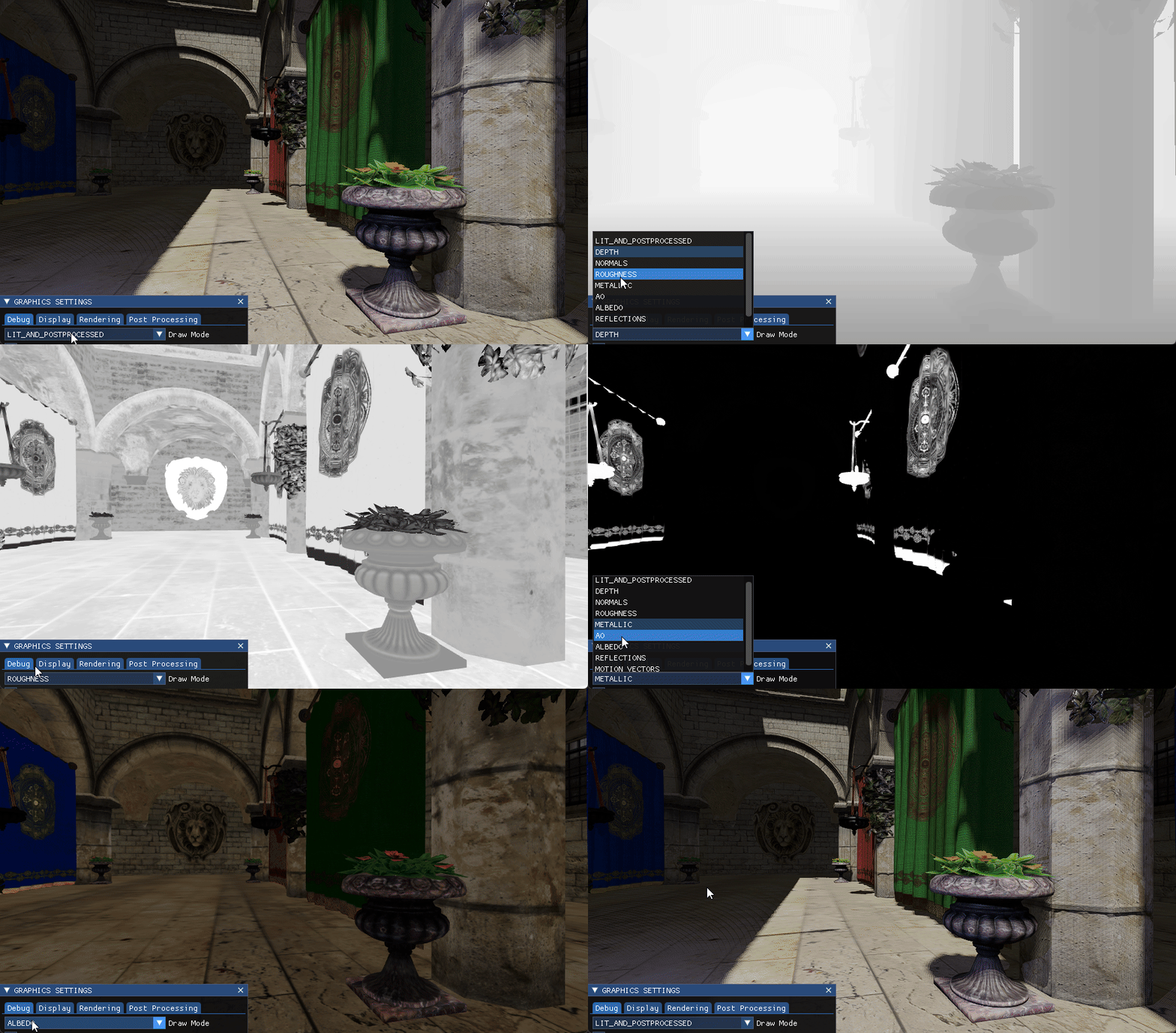
Debug draw modes
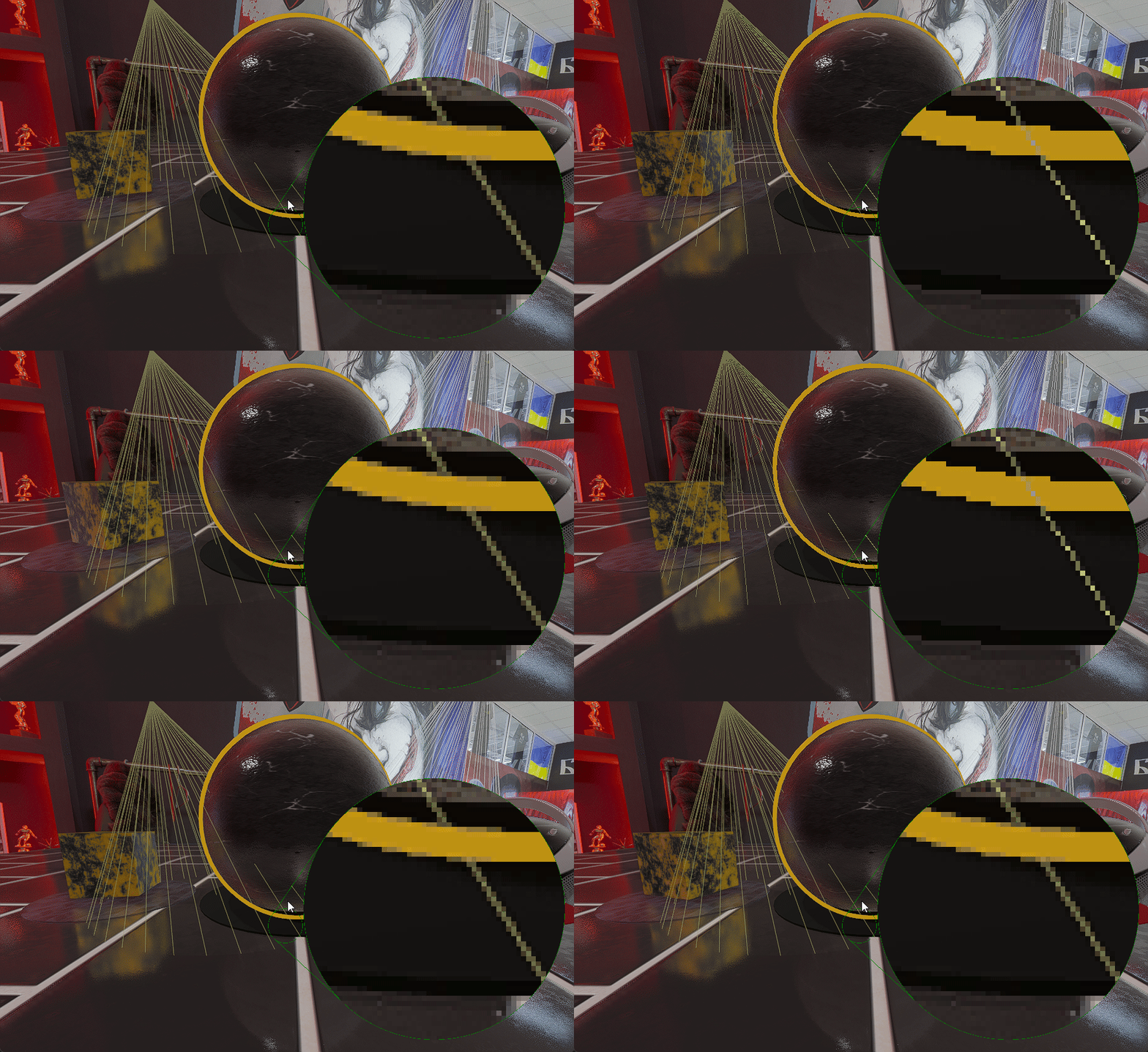
Object selection, light bounds, magnifier
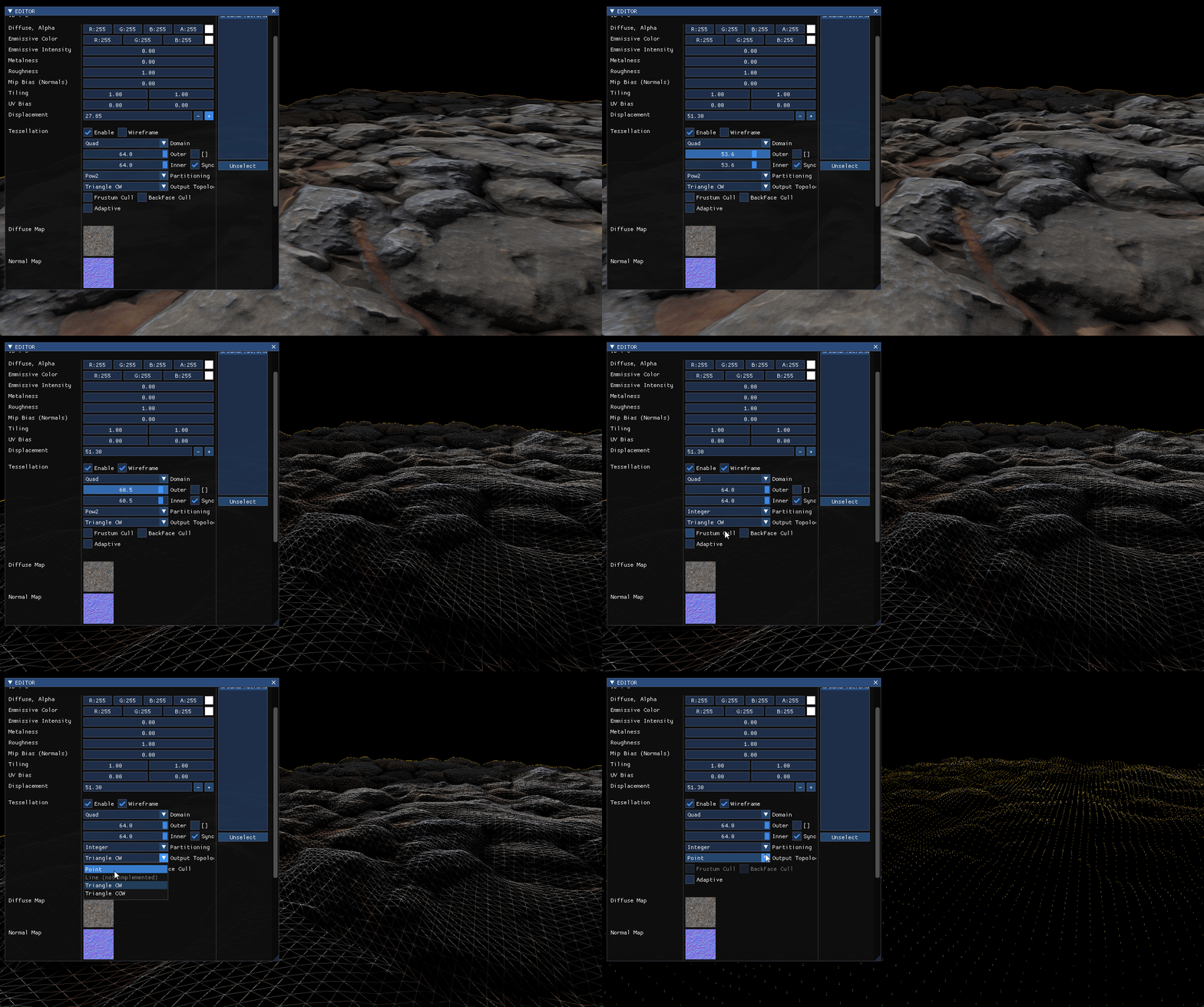
Tessellation pipeline drawing a single large quad domain mesh w/ heightmap
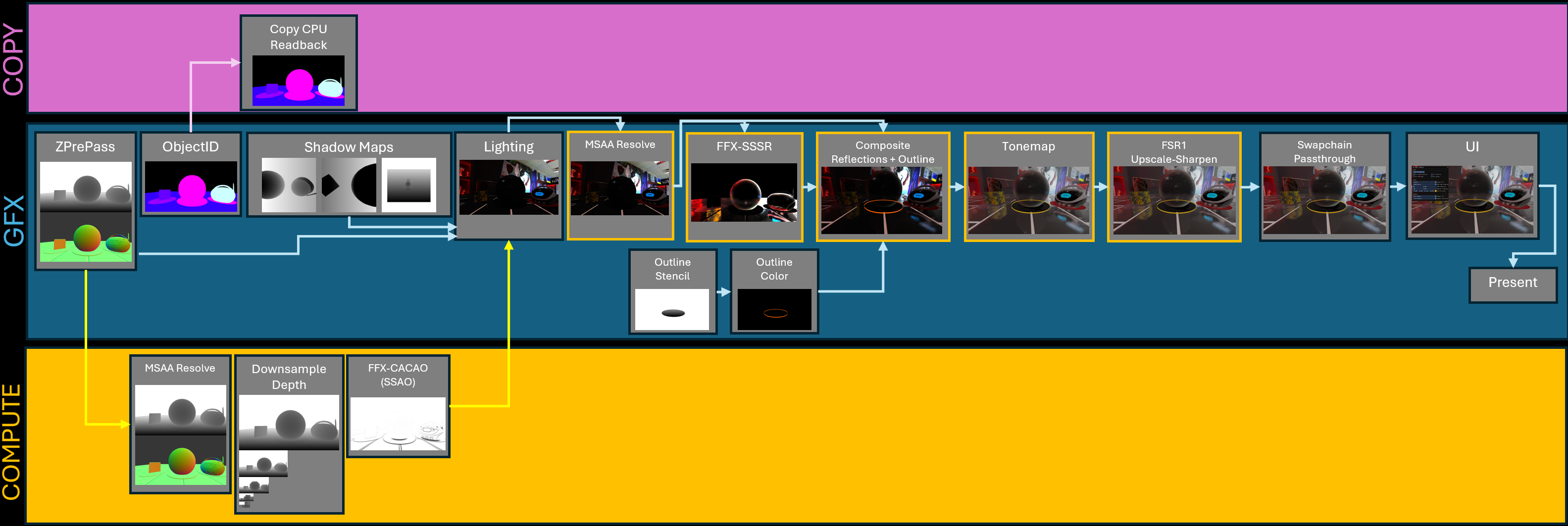
How a frame is rendered by VQEngine
Command list & queue management: rendering, background (lower prio) gpu tasks and dedicated presentation queue
The dedicated presentation queue, can be toggled on/off from settings

Radeon Graphics Profiler capture from the stress test scene showcasing async compute
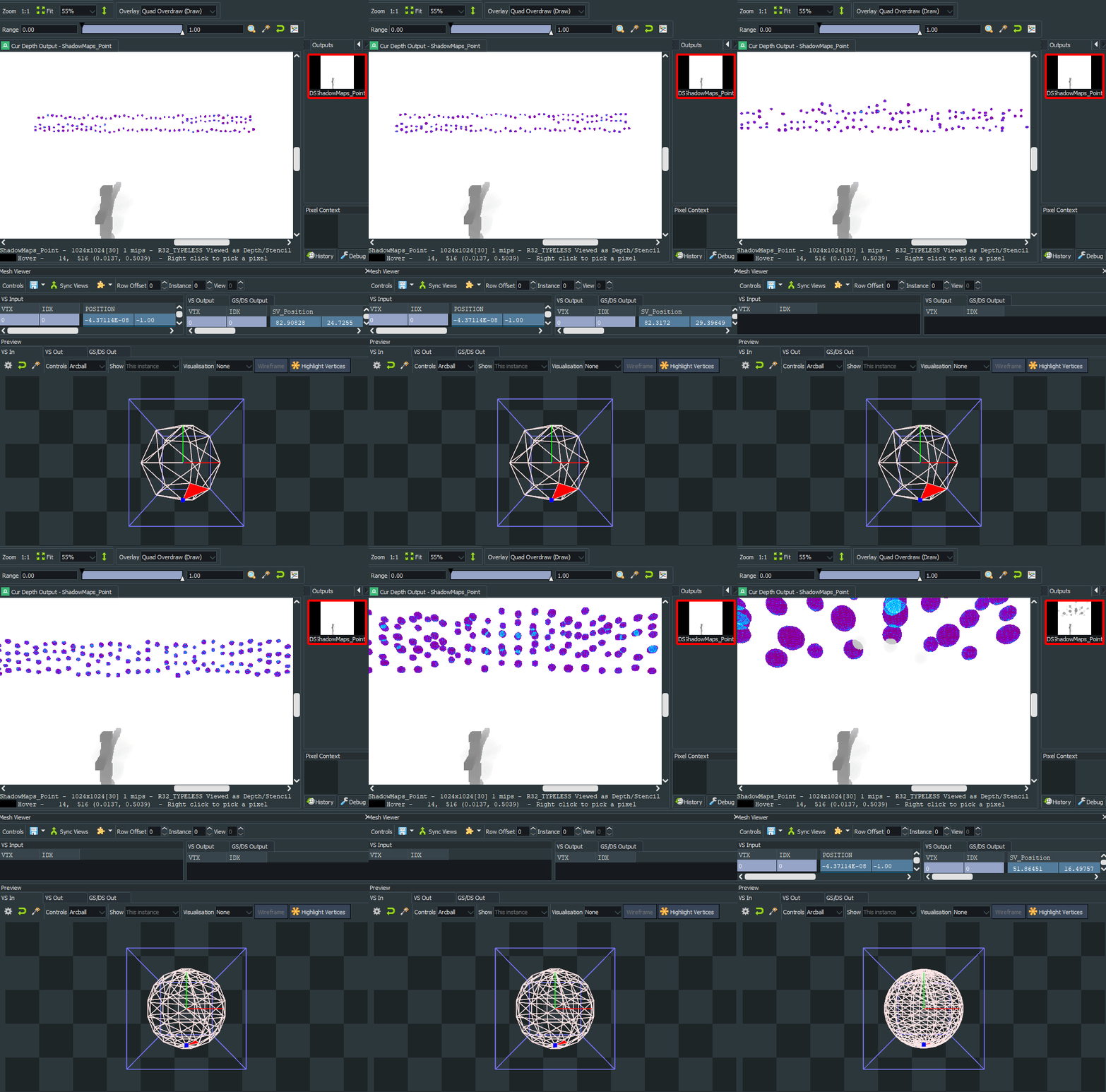
Instanced rendering w/ LODs
Features
Graphics
- Physically-based Rendering (PBR)
- BRDF
- NDF : Trowbridge-Reitz GGX
- G : Smith
- F : Fresnel_Schlick / Fresnel_Gaussian
- Image-based Lighting (IBL) w/ prefiltered environment cubemaps from HDRI Haven
- Load-time diffuse & specular irradiance cubemap convolution
- BRDF
- Lighting & Shadow maps
- Point / Spot / Directional Lights
- PCF Shadows
- Reflections
- Ambient Occlusion
- Anti Aliasing
- MSAA x4
- PostProcess
- FidelityFX - Single Pass Downsampler (SPD)
- Tonemapping & Gamma correction
- FidelityFX - Contrast Adaptive Sharpening (CAS)
- FidelityFX - Super Resolution 1.0
- Async Compute & Copy queue support
- Tessellation Pipeline
- Triangle & Quad domains
Display
- HDR display support with scRGB HDR pipeline
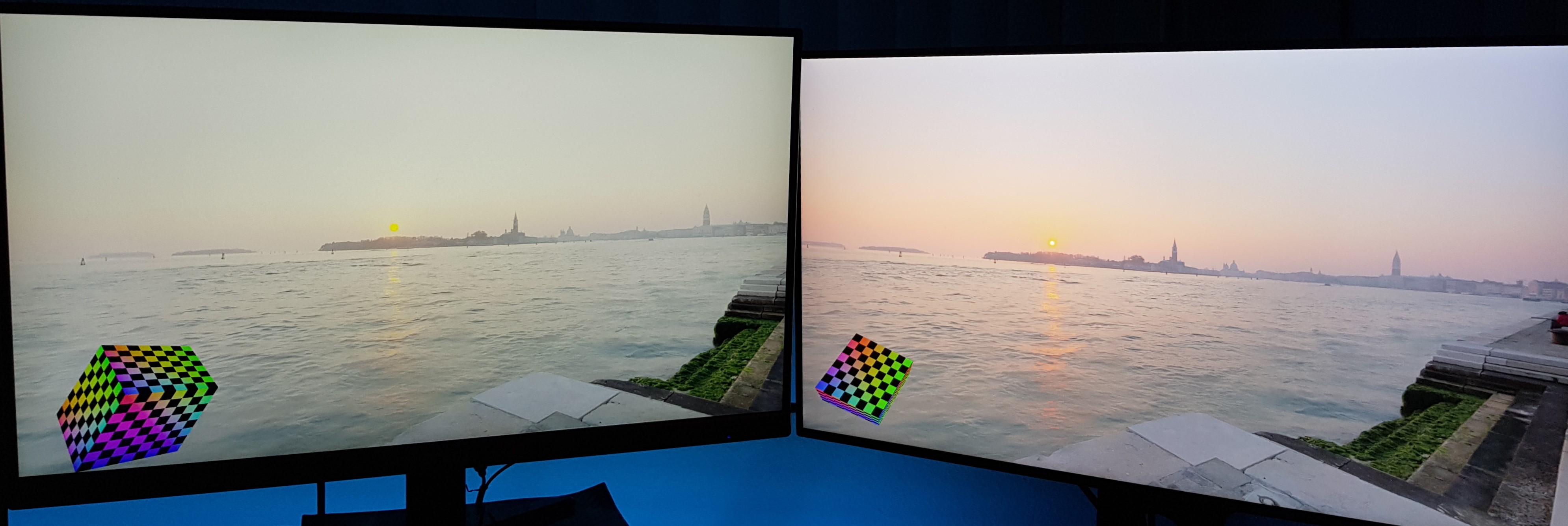
- Multiple window & monitor support
- Refresh Rate
- Custom
- Auto (1.33 x monitor refresh rate)
- Unlocked
- VSync
- Alt+Enter Borderless Fullscreen
Engine
- Multi-threading
- Worker threads
- Parallel command list recording
- Frustum Culling
- Asset loading
- PSO & Shader compilation
- Main + Simulation threads to decouple OS events from the update loop
- Worker threads
- glTF 2.0 model loading
- Shader system
- Shader cache
- Multi-threaded shader compilation
- Shader Model 5.0 (DXBC) & 6.0 (DXIL)
- Editor for Materials, Lights & Transforms
- Automated build & testing scripts
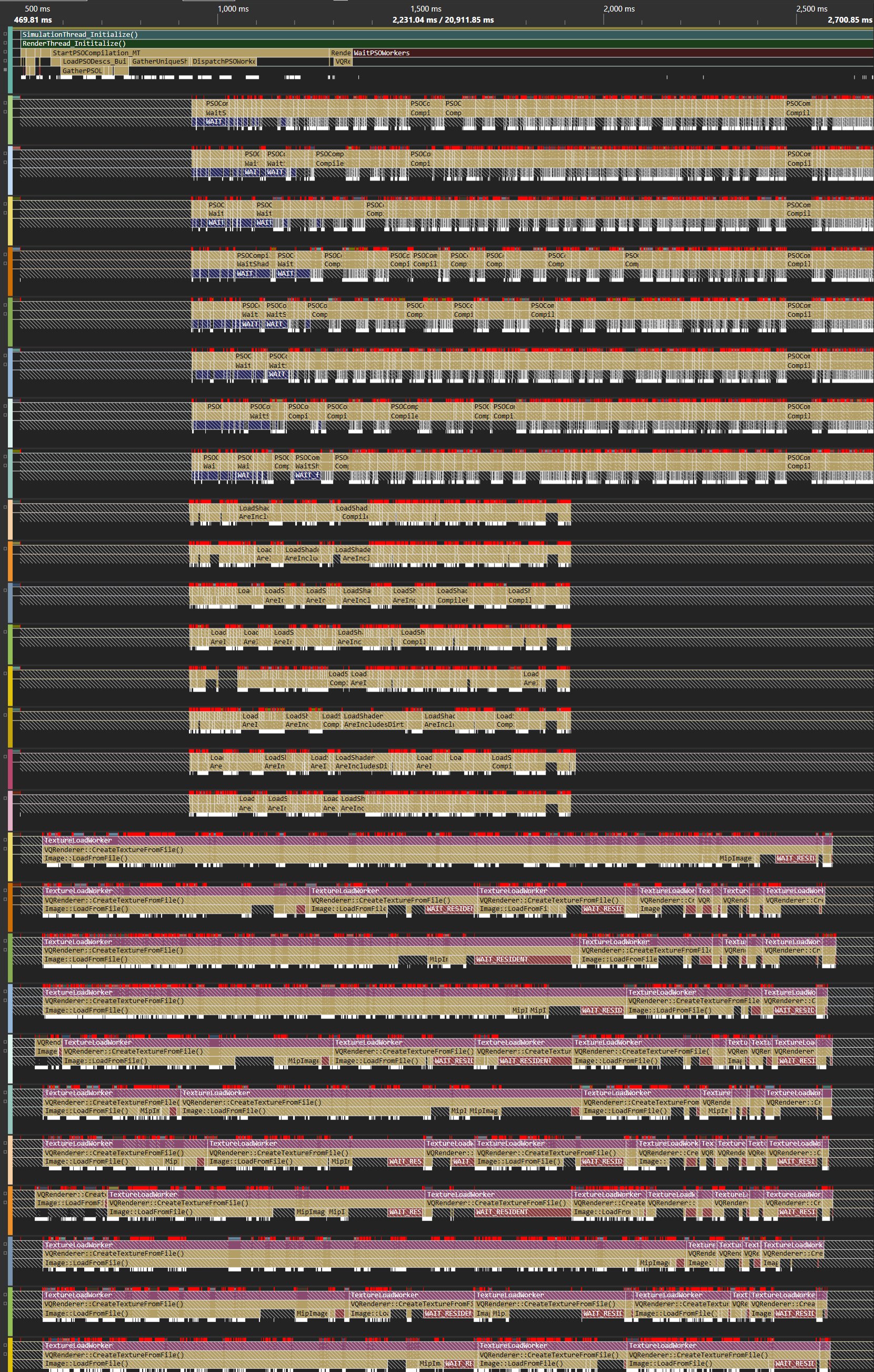
Multi-threaded loading: Textures, Shaders & PSOs. Not shown: Models
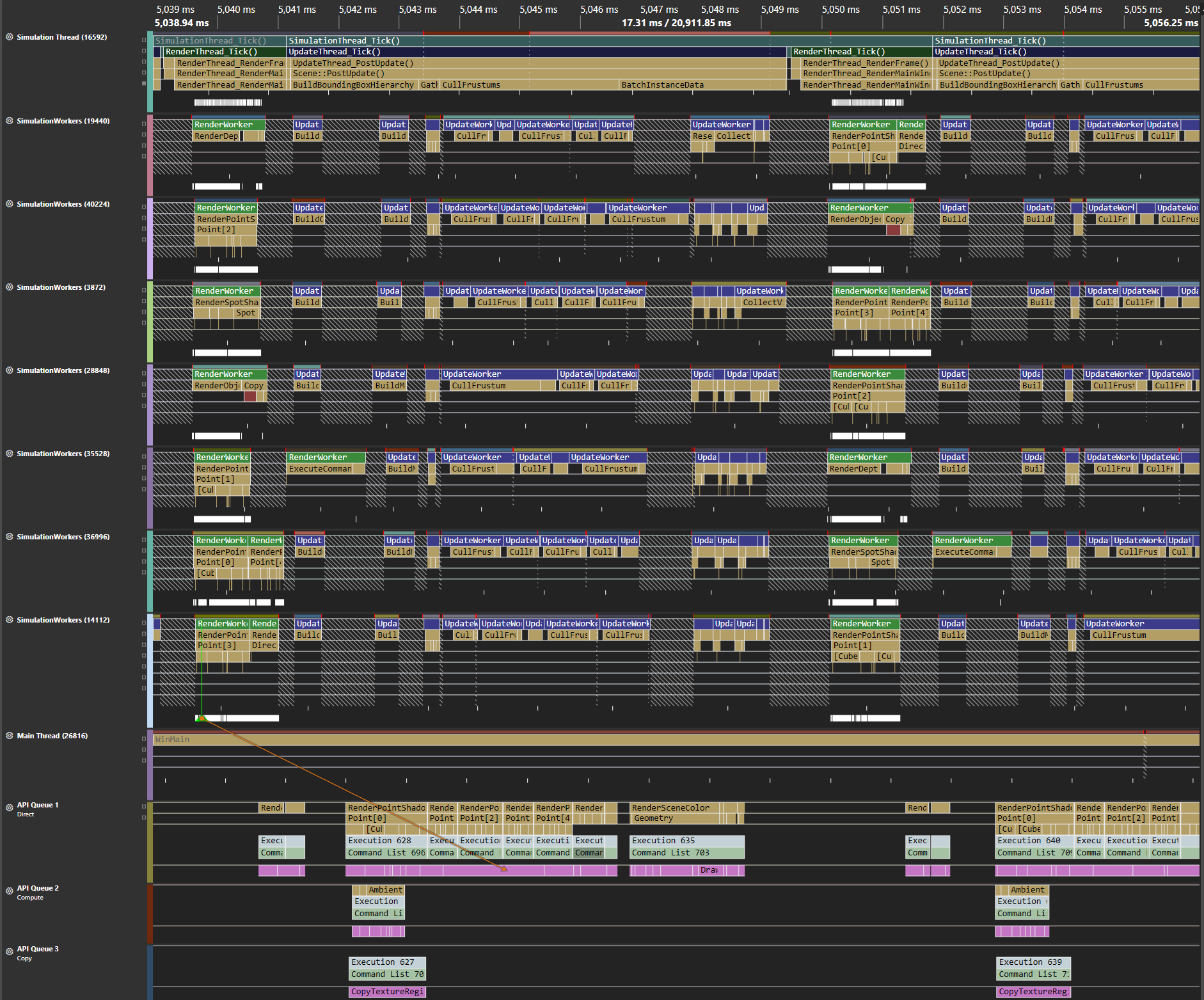
Multi-threaded simulation: Frustum culling & parallel command list recording
Build
Make sure to have pre-requisites installed
- CMake 3.24
- Visual Studio 2022
- Windows 10 SDK 10.0.20348 OR Windows 11 SDK 10.26100.0
To download the PBR & HDRI textures, run
Scripts/DownloadAssets.bat
Then, run one of the build scripts in Build/ folder,
GenerateSolutions.batto build from source with Visual StudioVQE.slncan be found inBuild/SolutionFilesdirectory
PackageEngine.batto build and package the engine in release mode and open_artifactsfolderVQE.execan be found inBuild/_artifactsdirectory
Run
Make sure to have installed
- MSVC v143 - VS 2022 C++ x64/x86 build tools
- A DX12-capable GPU
Double click VQE.exe.
Or, if you're using a terminal
VQE.exe -LogConsolefor logging displayed on a consoleVQE.exe -LogFile="FileName.txt"to write out to a file.
Controls
| Key | |
|---|---|
| WASD+EQ | Camera movement |
| Left Click | Pick object |
| Right Click | Hold to look around |
| F1 | Toggle Scene Controls |
| F2 | Toggle Profiler |
| F3 | Toggle Settings |
| F4 | Toggle Editor |
| Page Up/Down | Change Environment Map |
| 1-4 | Change scenes 1 - Default Scene 2 - Sponza 3 - Geometry Test Scene 4 - Stress Test Scene |
| Shift+R | Reload level |
| C | Change scene camera |
| V | Toggle VSync |
| M | Toggle MSAA |
| G | Toggle tonemapping gamma |
| J | Toggle FidelityFX-SuperResolution1 |
| B | Toggle FidelityFX-CAS |
| N | Toggle object bounding boxes |
| Shift+N | Toggle mesh bounding boxes |
| Alt+Enter | Toggle Fullscreen |
Settings
VQE can be configured through Data/EngineConfig.ini file
| Graphics Settings | |
|---|---|
ResolutionX=<int> |
Sets application render resolution width |
ResolutionY=<int> |
Sets application render resolution height |
VSync=<bool> |
Toggles VSync based on the specified <bool> |
AntiAliasing=<bool> |
Toggles MSAA based on the specified <bool> |
MaxFrameRate=<int> |
Sets maximum frame rate to the specified <int> |
HDR=<bool> |
Toggles HDR swapchain & HDR display support |
| Engine | |
|---|---|
Width=<int> |
Sets application main window width |
Height=<int> |
Sets application main window height |
DisplayMode=<Windowed/Fulscreen> |
Sets Sets application main window mode: Windowed or Fullscreen |
Command Line
VQE supports the following command line parameters:
| CMD Line Parameter | Description |
|---|---|
-LogConsole |
Launches a console window that displays log messages |
-LogFile=<string> |
Writes logs into an output file specified by %FILE_NAME%. Example: VQE.exe -LogFile=Logs/log.txt will create Logs/ directory if it doesn't exist, and write log messages to the log.txt file |
-Test |
Launches the application in test mode: The app renders a pre-defined amount of frames and then exits. |
-TestFrames=<int> |
Application runs the sepcified amount of frames and then exits. Used for Automated testing. Example: VQE.exe -TestFrames=1000 |
-W=<int> -Width=<int> |
Sets application main window width to the specified amount |
-H=<int> -Height=<int> |
Sets application main window height to the specified amount |
-ResX=<int> |
Sets application render resolution width |
-ResY=<int> |
Sets application render resolution height |
-FullScreen |
Launches in fullscreen mode |
-Windowed |
Launches in windowed mode |
-VSync |
Enables VSync |
-VSync=<bool> |
Sets Specified VSync State |
-AntiAliasing or -AA |
Enables MSAA |
-TripleBuffering |
Initializes SwapChain with 3 back buffers |
-DoubleBuffering |
Initializes SwapChain with 2 back buffers |
Note: Command line parameters will override the EngineSettings.ini values.
Scripts
| File | |
|---|---|
ProjectFiles.bat |
What it does - Initializes the submodule repos - Runs CMake to generate visual studio solution files in Build/SolutionFiles directory - Launches Visual Studio Flags - noVS : Updates/Generates VQE.sln without launching a Visual Studio instance Example : GenerateSolutions.bat -noVS while VS is open to update solution files after modifying CmakeLists.txt without closing/relaunching VS |
PackageEngine.bat |
What it does - Runs GenerateSolutions.bat if the visual studio solution doesn't exist - Builds the engine in Release configuration - Moves build output into Build/_artifacts folder Flags -Clean : Runs Clean on VQE.sln projects before building -DebugOnly : Builds the Debug binaries only -Debug : Builds Debug binaries in addition to Release -RelWithDebInfo : Builds the Release binaries with Debug info in addition to Release Note: Release build is always on by default, unless -DebugOnly is specified Example: PackageEngine.bat -Clean -Debug -RelWithDebInfo will build all configurations after running Clean and copy the binaries into Build/_artifacts folder |
TestVQE.bat |
What it does - Runs VQE.exe with testing parameters, making the engine exit after rendering specified number of frames (1000 default). Flags -Debug: Tests the Debug build in addition to the Release build |
3rd-Party
Explore related projects
ytdl-org/youtube-dl
Command-line program to download videos from YouTube.com and other video sites
141,527 starsexcalidraw/excalidraw
Virtual whiteboard for sketching hand-drawn like diagrams
135,396 starsgodotengine/godot
Godot Engine – Multi-platform 2D and 3D game engine
119,942 starsmrdoob/three.js
JavaScript 3D Library.
117,983 stars