
video-db/videodb-capture-quickstart
video-db/videodb-capture-quickstart has 29 GitHub stars and 4 forks. GitHot measured 0 stars in 24 hours. Last checked 2026-11-14 09:45 UTC. Last push 2026-08-12.
Measured star growth
- in 24h
- 0
- in 7 days
- Collecting history
- in 15 days
- Collecting history
- in 1 month
- Collecting history
Net star changes over overlapping periods, not daily totals. Missing measurements are left blank. Stars measure attention, not software quality.
About
Give your agents real time desktop perception. Stream screen, microphone, and system audio for live context and actions.
Creative & MediaREADME.md
Original




VideoDB Capture SDK
Give your AI eyes and ears — capture and understand what's happening on any desktop in real-time.
Explore the docs »
View Examples
·
Quick Start
·
Report Bug
Table of Contents
- What is VideoDB Capture?
- What You Can Build
- Architecture
- Core Concepts
- What You Get
- Installation
- Prerequisites
- Quick Start
- Community & Support
What is VideoDB Capture?
A real-time desktop capture SDK that lets your AI see and hear what's happening on a user's screen.
VideoDB Capture gives AI agents eyes and ears—stream screen, mic, and system audio for real-time processing, delivering structured insights (transcripts, visual descriptions, semantic indexes) in under 2 seconds.
How it works:
- Your backend creates sessions and mints short-lived tokens (API key stays secure on server)
- Desktop client streams media using the token (never sees your API key)
- VideoDB Cloud runs AI processing and delivers events via webhooks + WebSocket
- You control what AI pipelines to run (transcription, visual indexing, audio indexing)
🎬 What You Can Build
The flow: Backend creates session & token → Desktop streams media → Webhooks trigger AI → You get live events
Featured Applications
Each app below is fully functional and can be run locally. They demonstrate different use cases:
| App | Use Case | What It Does |
|---|---|---|
| Pair Programmer | 👁️ Agentic Skill for Coding Agents | Turn your coding agent into a screen aware, voice aware, context rich collaborator. Works with Claude Code, Cursor, Codex, and other skill compatible agents. |
| Focusd | 📊 Productivity Tracking | Records your screen all day, understands what you're working on, generates session summaries and daily recaps with actionable insights. |
| Call.md | 💼 Meeting Intelligence | Real-time AI meeting assistant with dual-channel transcription, live assists, MCP integration, and automated summaries. |
| Bloom | 🎥 Screen Recording | Local-first screen recorder with AI processing. Record, upload to VideoDB, and query with natural language. |
| Open Record & Replay | 🤖 Agent Skill Creation | Record desktop workflows once and compile them into reusable AI-agent skills for reliable replay. |
| Chess Lens | ♟️ Real-Time Chess Coaching | Screen-aware chess coaching with instant engine tips, AI explanations, and session history. |
Quickstart Examples
| App | Description |
|---|---|
| Node.js Quickstart | ⚡ Minimal example to get started fast |
| Python Quickstart | 🐍 Python version of quickstart |
💡 New to VideoDB? Start with the Node.js Quickstart or Python Quickstart to understand the basics, then explore the featured apps.
Architecture
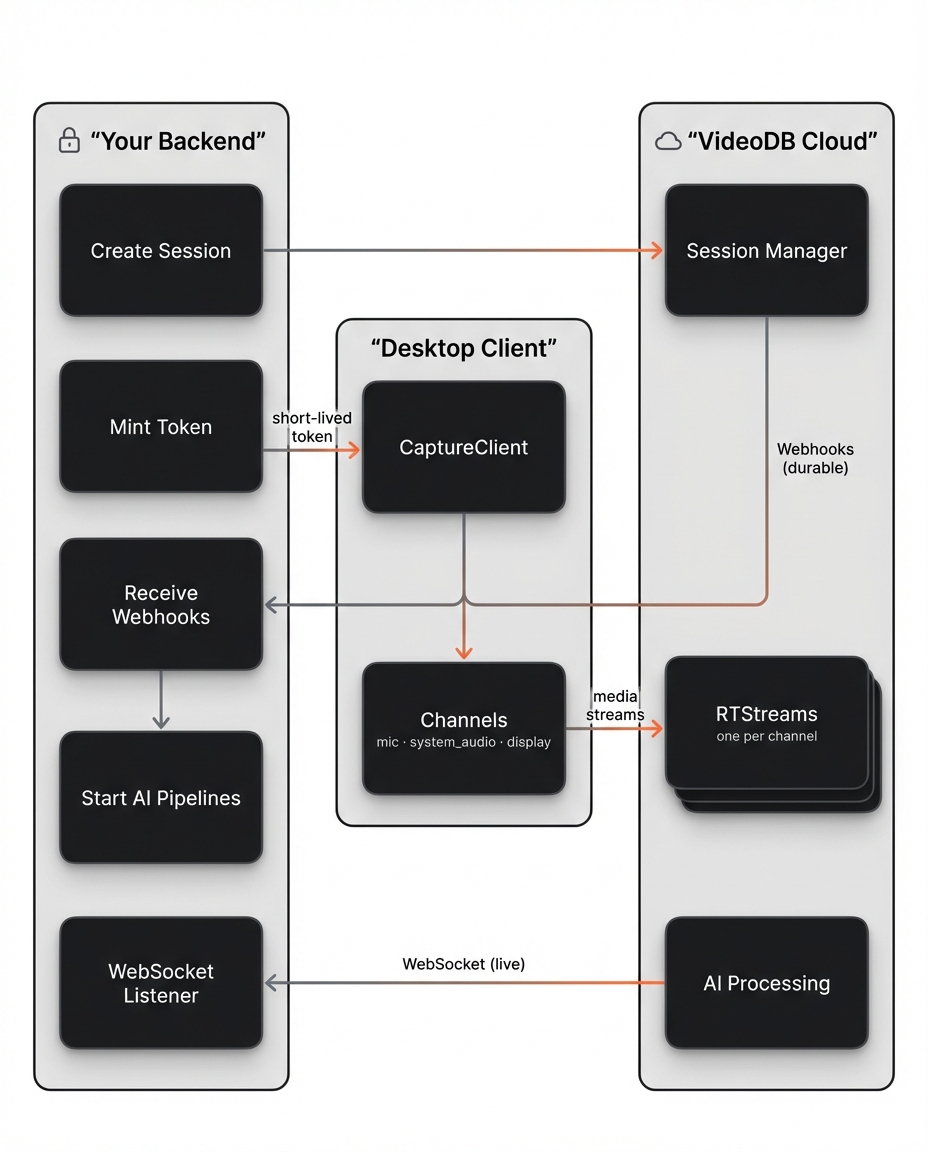
Key insight: You control the AI. When you get the capture_session.active webhook, you decide which RTStreams to process and what prompts to use.
Core Concepts
- Backend: Creating sessions & minting tokens (secure, server-side)
- Desktop Client: Capturing & streaming media (client-side, uses session token)
- Control Plane: Webhooks for durable session lifecycle events (
active,stopped,exported) - Realtime Plane: WebSockets for live transcripts, indexes, and UI updates
- CaptureSession (
cap-xxx): Container for one capture run - RTStream (
rts-xxx): Real-time stream per channel where you start AI pipelines - Channel: Recordable source like
mic:default,system_audio:default,display:1
What You Get
Your backend receives real-time structured events:
{"channel": "transcript", "data": {"text": "Let's schedule the meeting for Thursday", "is_final": true}}
{"channel": "scene_index", "data": {"text": "User is viewing a Slack conversation..."}}
{"channel": "audio_index", "data": {"text": "Discussion about scheduling a team meeting"}}
All events include timestamps. Build timelines, search past moments, or trigger actions in real-time.
Installation
# Node.js
npm install videodb

# Python
pip install "videodb[capture]"
Prerequisites
- Get an API Key: Sign up at console.videodb.io
- Set Environment Variable:
export VIDEO_DB_API_KEY=your_api_key
🚀 Quick Start
The SDK works in a 4-step flow:
Step 1: Backend Creates Session
Node.js
import { connect } from 'videodb';
const conn = connect();
const ws = await conn.connectWebsocket();
await ws.connect();

const session = await conn.createCaptureSession({
  endUserId: "user_abc",
  callbackUrl: "https://your-backend.com/webhooks/videodb",
  wsConnectionId: ws.connectionId,
  metadata: { app: "my-app" }
});

const token = await conn.generateClientToken(600);
console.log({ sessionId: session.id, token });
Python
import videodb
conn = videodb.connect()

session = conn.create_capture_session(
    end_user_id="user_abc",
    collection_id="default",
    callback_url="https://your-backend.com/webhooks/videodb",
    metadata={"app": "my-app"}
)

token = conn.generate_client_token(expires_in=600)
print(f"Session: {session.id}, Token: {token}")
Step 2: Desktop Starts Capture
The desktop client uses the token to stream media. It never sees your API key.
Node.js
import { CaptureClient } from 'videodb/capture';

const client = new CaptureClient({ sessionToken: token });

await client.requestPermission('microphone');
await client.requestPermission('screen-capture');

const channels = await client.listChannels();
const micChannel = channels.mics.default;
const displayChannel = channels.displays.default;

await client.startSession({
  sessionId: session.id,
  channels: [
    {
      channelId: micChannel.id,
      type: 'audio',
      record: true,
      transcript: true
    },
    {
      channelId: displayChannel.id,
      type: 'video',
      record: true
    }
  ]
});
Python
import asyncio
from videodb.capture import CaptureClient

async def main():
    client = CaptureClient(client_token=token)

    await client.request_permission("microphone")
    await client.request_permission("screen_capture")

    channels = await client.list_channels()
    mic = channels.mics.default
    display = channels.displays.default

    mic.store = True
    display.store = True

    await client.start_session(
        capture_session_id=session.id,
        channels=[mic, display],
        primary_video_channel_id=display.id
    )

asyncio.run(main())
Step 3: Backend Triggers AI Pipelines
VideoDB sends webhooks when the session is active. Use this to start AI processing.
Node.js
// Webhook handler: Start AI on active streams
if (payload.event === "capture_session.active") {
  const cap = await conn.getCaptureSession(payload.capture_session_id);

  // Start transcription on mic
  const mic = cap.getRtstream("mics")[0];
  await mic.startTranscript();
  await mic.indexAudio({ prompt: "Extract action items" });

  // Start visual indexing on screen
  const screen = cap.getRtstream("displays")[0];
  await screen.indexVisuals({ prompt: "Describe screen activity" });
}
Python
# Webhook handler: Start AI on active streams
if payload["event"] == "capture_session.active":
    cap = conn.get_capture_session(payload["capture_session_id"])

    # Start transcription on mic
    if mics := cap.get_rtstream("mic"):
        mics[0].start_transcript()
        mics[0].index_audio(prompt="Extract action items")

    # Start visual indexing on screen
    if displays := cap.get_rtstream("screen"):
        displays[0].index_visuals(prompt="Describe screen activity")
Step 4: Backend Receives Live Events
Connect via WebSocket to consume real-time transcripts and insights.
Node.js
const ws = await conn.connectWebsocket();
await ws.connect();

// Receive live events
for await (const ev of ws.receive()) {
  if (ev.channel === "transcript") {
    console.log(`Transcript: ${ev.data.text}`);
  }
}
Python
ws_wrapper = conn.connect_websocket()
ws = await ws_wrapper.connect()

# Receive live events
async for ev in ws.receive():
    if ev["channel"] == "transcript":
        print(f"Transcript: {ev['data']['text']}")
Community & Support
- Docs: docs.videodb.io
- Issues: GitHub Issues
- Discord: Join community
- Console: Get API key
Made with ❤️ by the VideoDB team
Explore related projects
ytdl-org/youtube-dl
Command-line program to download videos from YouTube.com and other video sites
141,559 starsexcalidraw/excalidraw
Virtual whiteboard for sketching hand-drawn like diagrams
135,665 starsgodotengine/godot
Godot Engine – Multi-platform 2D and 3D game engine
120,120 starsmrdoob/three.js
JavaScript 3D Library.
118,359 stars