
vibeinging/dsh-desktop
vibeinging/dsh-desktop has 490 GitHub stars and 22 forks. GitHot measured +1 stars in 24 hours. Last checked 2026-11-10 04:39 UTC. Last push 2026-11-06.
DeepSeek Harness Desktop App: a local AI desktop workspace for DSH Sessions, projects, files, web research, plugins, and Office artifacts.
Measured star growth
- in 24h
- +1
- in 7 days
- Collecting history
- in 15 days
- Collecting history
- in 1 month
- Collecting history
Net star changes over overlapping periods, not daily totals. Missing measurements are left blank. Stars measure attention, not software quality.
README.en.md
OriginalDSH Desktop
DSH Desktop Bundle Edition — official DSH Web, community plugins, and desktop capabilities in one ready-to-use app.
Conversations, files, Git, terminals, tasks, Worktrees, and the plugin market share one DSH Profile.





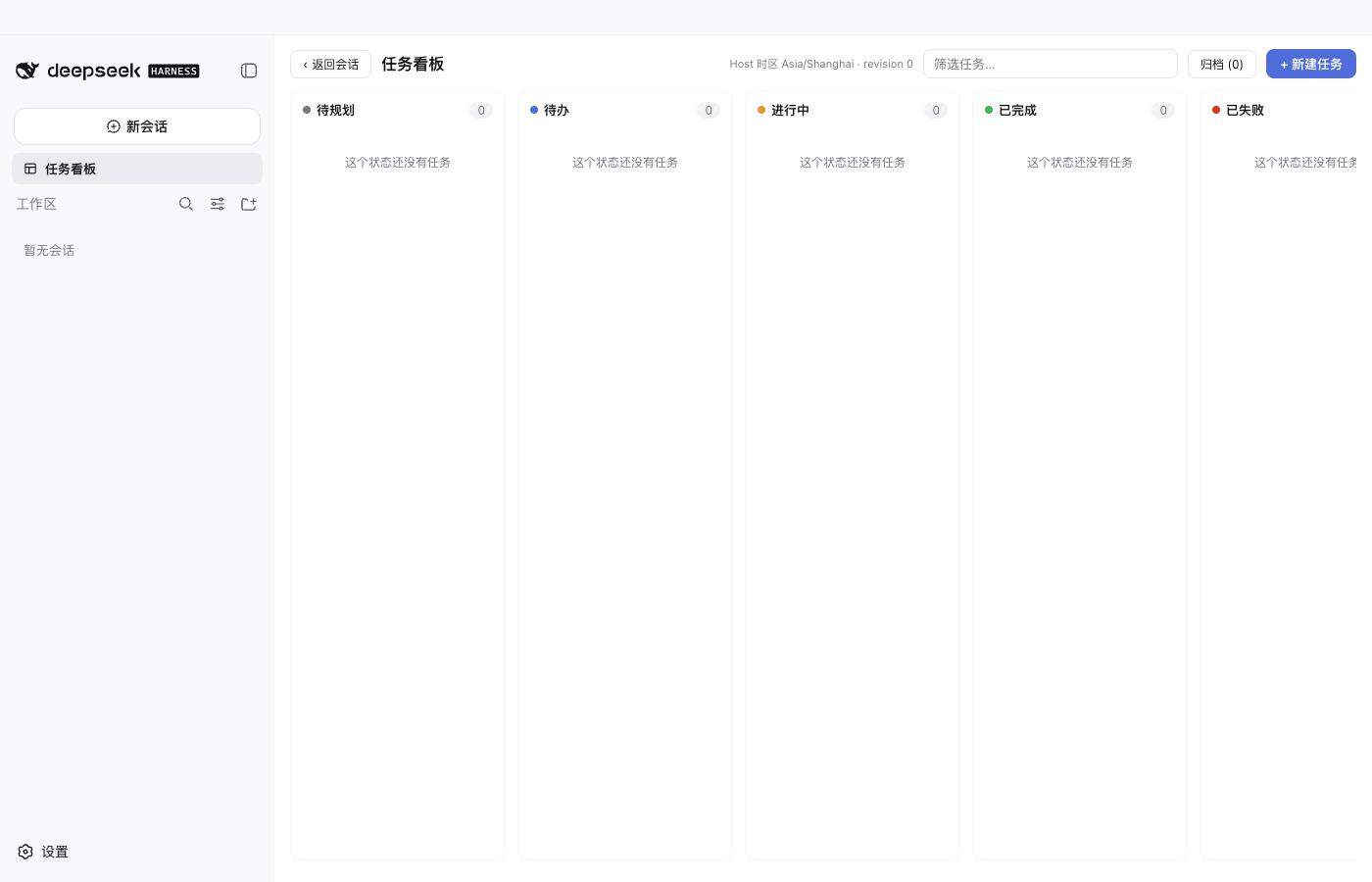
DSH Desktop (Bundle Edition) is a community-maintained desktop distribution. It runs the official DeepSeek Harness npm runtime and dsh-web-app directly, with a curated set of pinned community Bundles. There is no second Chat implementation or separate plugin database to maintain: the app starts from one official DSH Profile.
Website · Download the latest release · Mobile remote · Get started · Install plugins
Download
| Platform | Install | Status |
|---|---|---|
| macOS Apple Silicon | Download the .dmg and drag it to Applications |
Developer ID signed and Apple notarized |
| Windows x64 | Download the .exe, then choose the install scope and app directory |
Use the artifacts published on the current Release page |
| Linux x64 | AppImage | Invite-only testing, tracked in Linux support issue #19 |
| macOS Intel | No formal installer yet | Run from source |
Direct download links and file sizes are listed on the website download page; first-run questions (Gatekeeper, SmartScreen, API keys, slow downloads) are covered in the website FAQ.
The app directory contains only the installed application. Profiles, plugins, Sessions, and other DSH data use a separate data directory; changing the app location does not move or delete that data.
Ready on first launch
Official conversations and AgentsThe main window is official DSH Web. DSH owns Sessions, Agents, Tools, Skills, MCP, settings, and history; the app does not maintain a second Chat surface. |
Better Sidebar workbenchFiles, code and Markdown editing, Git, terminals, web pages, and extension tabs are built in. Version 0.18.0-alpha.0 targets the current alpha SDK while retaining multi-repository and Worktree support, Vue editing, and local Markdown images. |
Plugin marketDiscover, install, update, disable, and remove plugins from official settings. The UI, CLI, and app restart all use the same Profile state. |
Tasks, attachments, and WorktreesA task board, file and folder attachments, Git Worktrees, project tools, Office output, and structured results are independent Bundles that can be composed as needed. |
Desktop Host and recoveryThe app owns windows, native file selection, updates, startup, and recovery. Formal builds ask before downloading, check the Profile, and install; Profile or Client failures open recovery. |
Reproducible defaultsNew Profiles initialize offline from pinned packaged artifacts. Normal startup does not rewrite an existing Profile or silently restore plugins the user removed. |
Mobile remote accessAfter signing in and enabling this computer, continue the same Workspace and Session from Android, Remote Web, or another Desktop. The Host creates outbound connections only and opens no public listening port. |
Explicit service boundaryA third-party service currently provides accounts, the device directory, signaling, and relay. See the mobile remote guide for connection methods, security boundaries, and removal. |
Interface
Conversations, questions, and approvals
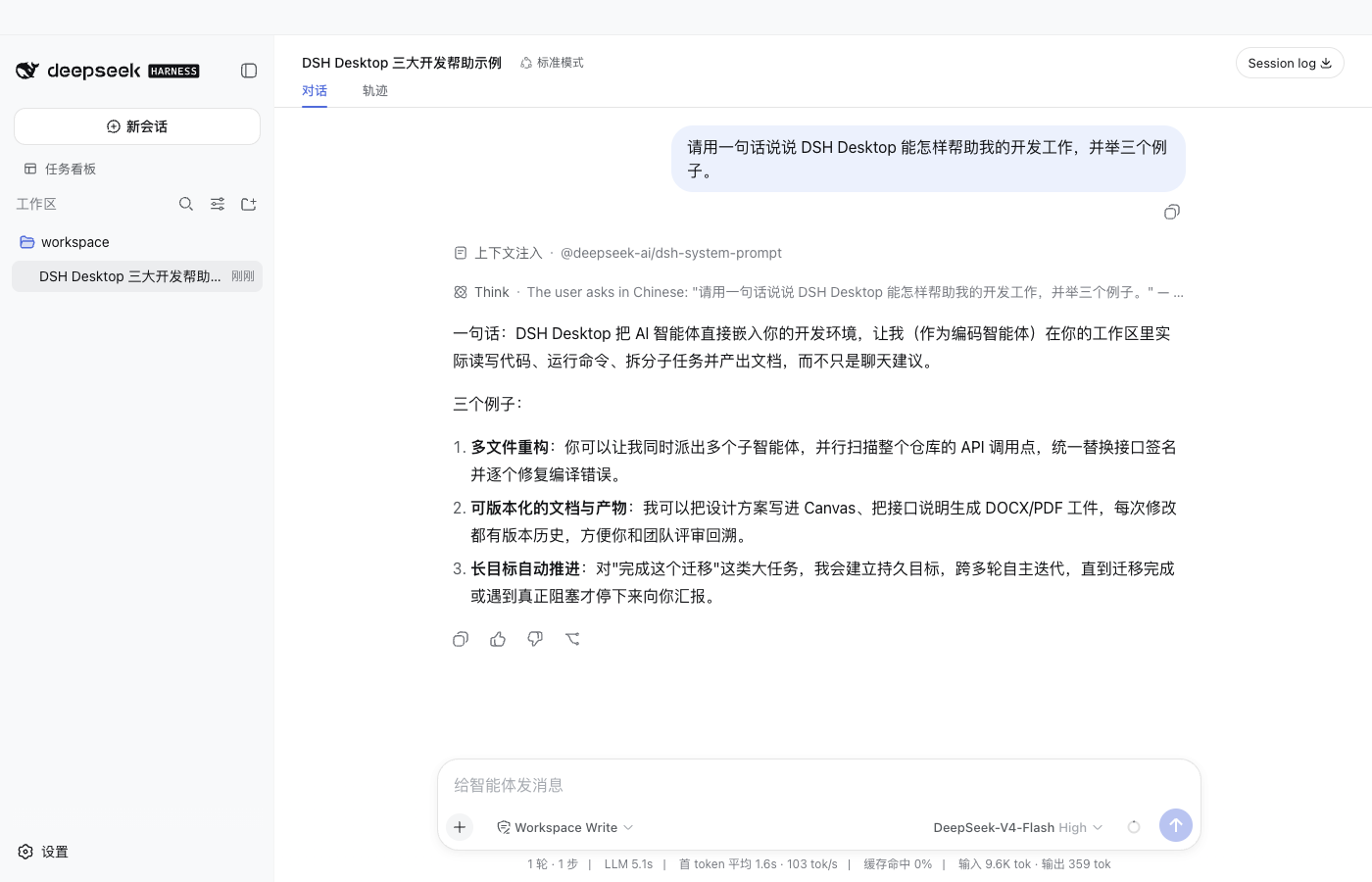
Conversations, tool approvals, question cards, queued messages, and history replay stay in the official Session.
Plugin market in official settings
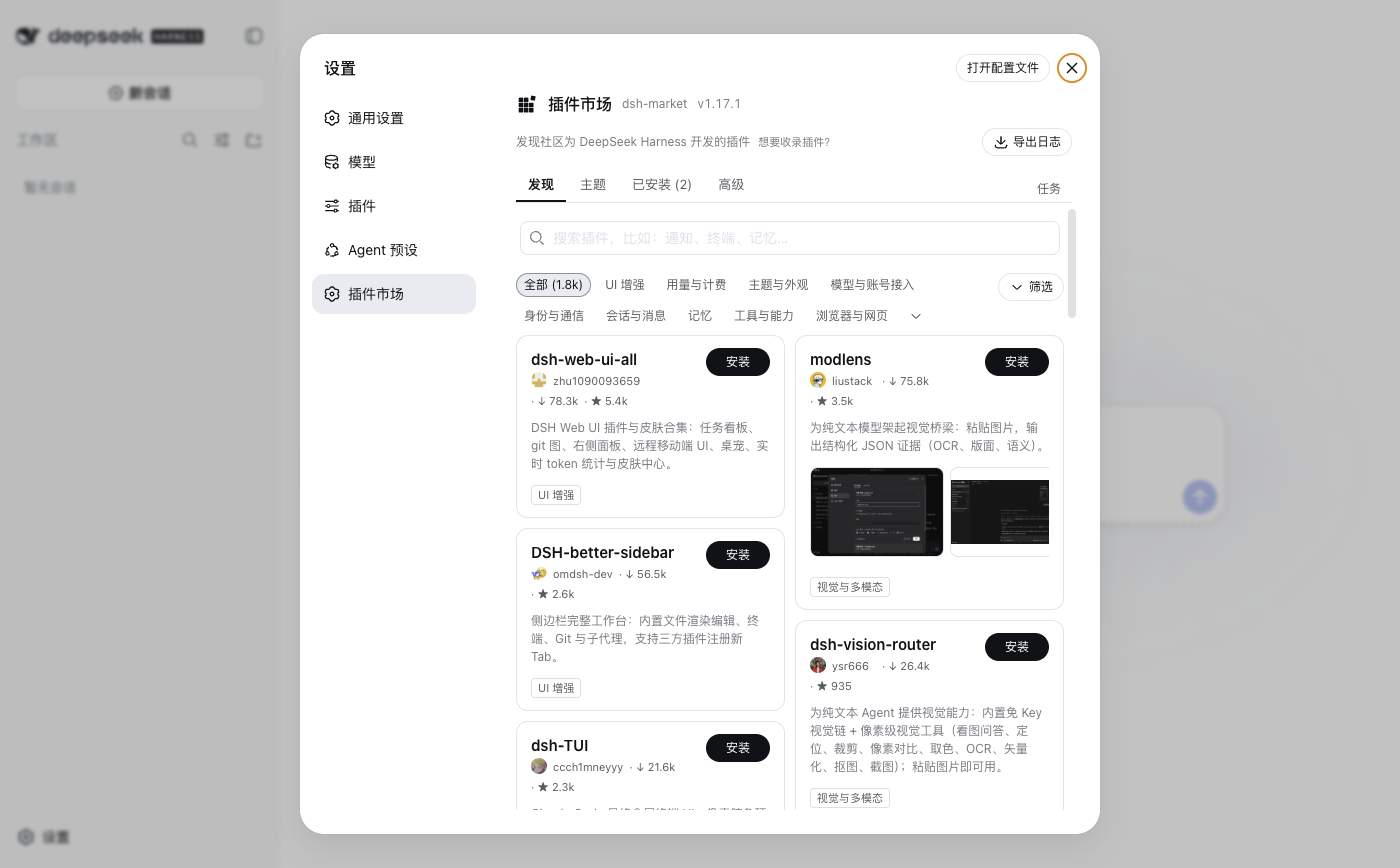
The market uses the official settings Slot. It neither replaces settings nor creates a second plugin database.
Git Worktree workspace
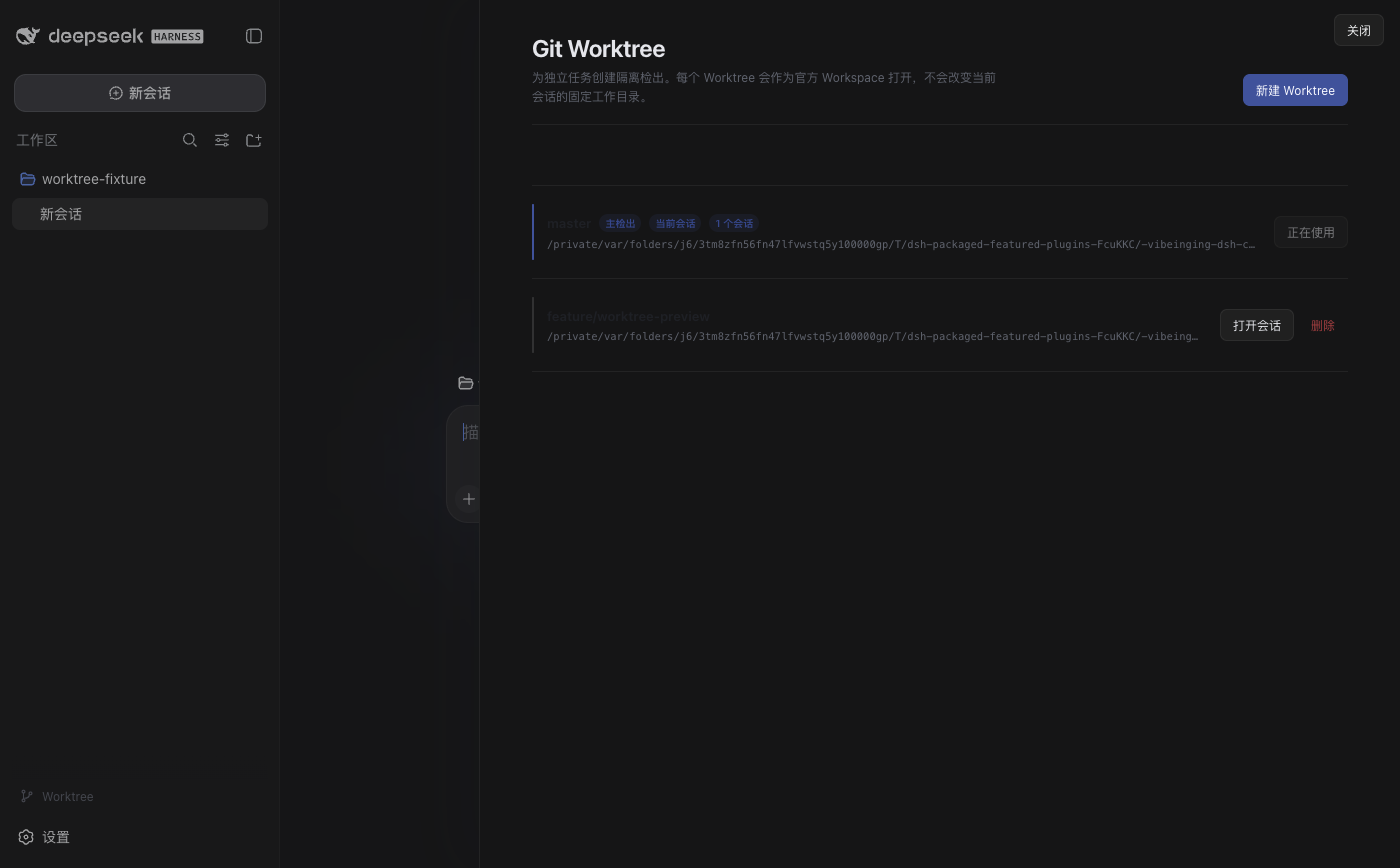
Create an isolated Worktree from the active Session directory and open an official Session for the new workspace.
Bundled by default: mobile remote access
New Profiles include the exactly pinned [email protected], shipped alongside the DSH 0.1.5-rc.1 trial line. Open Remote in the sidebar, sign in, and enable remote access for this computer. You can then use Remote Web, the Android app, or another Desktop to open the same Host Workspaces and Sessions, continue conversations, send images, and respond to permission requests.
- Network boundary: the Host creates outbound connections only and opens no public listening port; Remote tries LAN, P2P, TURN, and Relay in order, and every path carries Noise IK encrypted application traffic.
- Account and data: the default currently uses the third-party
dsh.r2049.cnaccount, device directory, signaling, and relay service; device identity and credentials stay underDSH_HOME. Remote access is unavailable until you sign in and enable the current computer. - Authorized devices: they control the Harness through a fixed API allowlist while the Agent can still run tools under its normal permissions; no direct Shell, PTY, or general file RPC is exposed.
- Removal: existing Profiles receive this default once after an upgrade; disabling or removing it prevents later app updates from restoring it.
dsh plugin --profile web remove ds-harness-remote
The project does not yet provide a supported self-hosted Server, and its independent cryptographic review, real cross-network two-device coverage, and long-running stability validation remain incomplete. Remove the Bundle if remote access is not needed. The desktop package applies a SHA-256-bound compatibility projection to that fixed tarball without modifying official DSH or the upstream repository source. See the remote access guide for connection, security, and removal details.
The mobile remote capability comes from ds-harness-remote, open-sourced by liguobao; this project ships its pinned 0.4.1 by default. Special thanks to the original author for open-sourcing the Bundle and to DeepSeek Harness Remote Web for providing the remote entry point and supporting services currently available to the community, allowing DSH Desktop users to continue working from a phone or browser.
Bundled by default: conversation window teams
New Profiles include @vibeinging/[email protected]. It lets DSH conversation windows collaborate directly:
- Message another window: tell the current window "hand this to
window name", and the message lands as a real DSH message in the target window — visible there, durable, and clickable back to its source. - Make a window the captain: create a set of role windows, assign them tasks and dependencies, let members report back as real messages, and adjust work in plain language without tracking IDs.
All team and window state is read and written through the official Session API in the current Profile; the plugin opens no external network connections. Remove it when not needed:
dsh plugin --profile web remove @vibeinging/dsh-session-teams
Why this route
| Concern | DSH Desktop approach |
|---|---|
| Depending on a private front end | Load official Web and the official npm runtime directly, without a private Chat fork |
| Using community plugins | UI, Tools, and workflows keep using official Bundles, Services, and Slots |
| Avoiding split plugin state | The official Profile is the sole authority for the market, settings, and CLI |
| Trusting the defaults | Pin versions, integrity, permissions, dependencies, licenses, and offline artifacts |
| Limiting native access | Files, windows, and Browser Workspace use a small Session-bound method surface |
| Preserving configuration at startup | Existing Profiles keep user choices; failures preserve the Profile and open recovery |
| Preserving plugins during app updates | A read-only Profile check runs first; disabled or removed Bundles are not restored |
Electron is a thin desktop Host. Agents, Sessions, and the plugin system remain in DSH, while product capabilities are Bundles whenever possible. Portable plugins can therefore serve compatible official Web Profiles and DSH Desktop; only operating-system features require an explicit desktop-adapter.
Getting started
- Download a supported installer from Releases.
- Start the app and choose a working directory or create a Session directly.
- Open files, Git, or a terminal from the sidebar, and attach files or folders from the composer.
- Open Settings → Plugin Market when you need more capabilities.
Model credentials are managed by DSH settings and the local environment. API keys are never written to this README, screenshots, or the plugin manifest.
Installing more plugins
Most users should use Settings → Plugin Market. The market shows source, version, compatibility, and permissions. A visible listing is not automatically reviewed or bundled by this project, so inspect upstream documentation before installation.
The official CLI operates on the same Profile:
dsh plugin --profile web add -w <package>@<exact-version> --save-exact --ignore-scripts
dsh plugin --profile web remove <package>
A plugin that follows the official DSH Bundle and dshClient contracts does not need a DSH Desktop rewrite. Plugins that require windows, native dialogs, or Browser Workspace must explicitly use the narrow desktop Host and report missing capabilities in other hosts.
Optional example: skin center
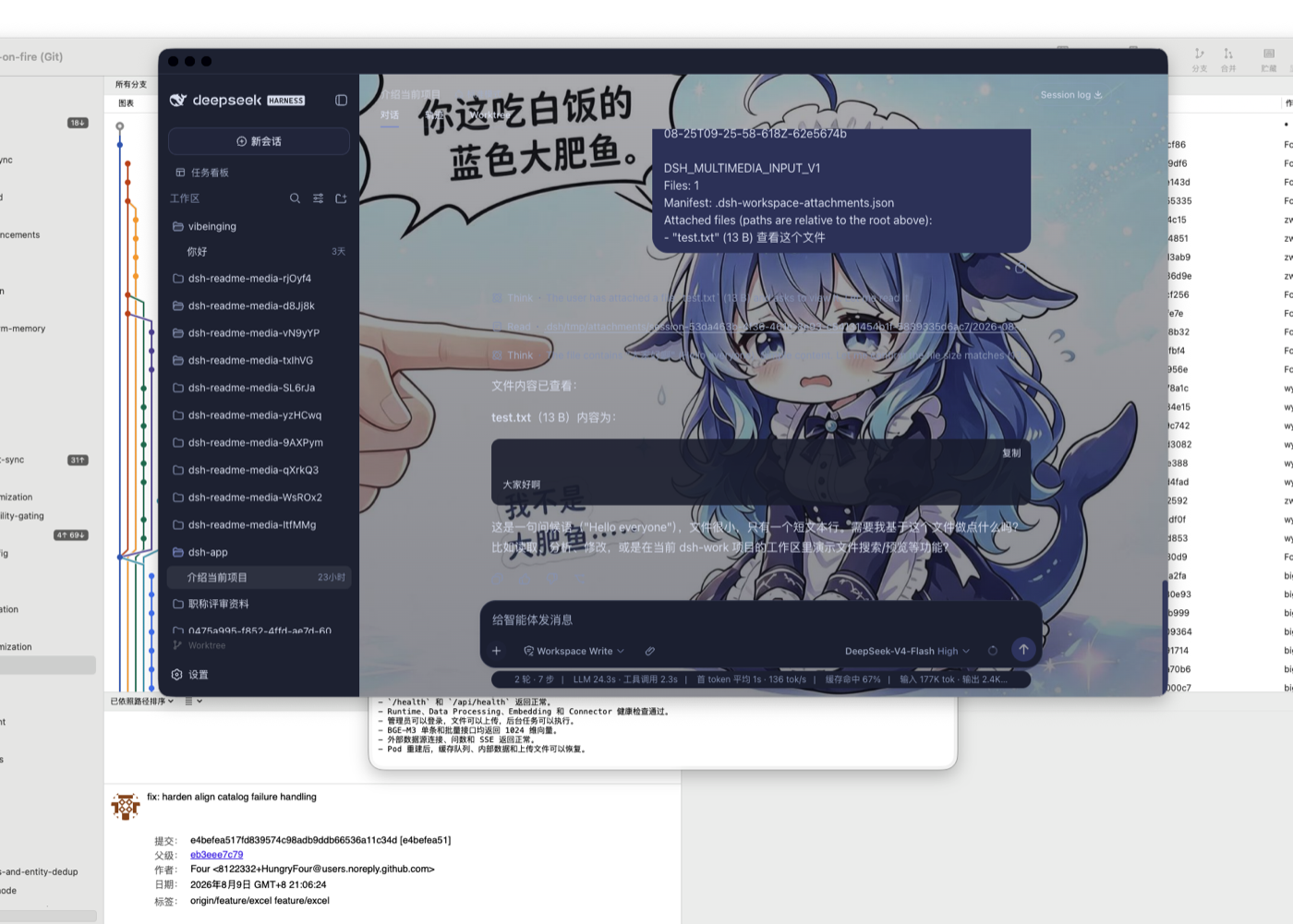
The app keeps the official Web look by default. For a personalized interface, install the community-maintained skin center (@linxin666/dsh-client-ui-skin-center) from the plugin market: dozens of skins can be tried instantly, applied to disk, and reverted to the official look at any time.
dsh plugin --profile web add @linxin666/dsh-client-ui-skin-center
Skin assets carry their own upstream licenses (some CC BY-NC-SA or including character copyrights), so the skin center is not bundled by default; users opt in via the plugin market.
Default plugins
New Profiles include Better Sidebar, dshmarket, the task board, attachment input, Git Worktree, mobile remote access, session window teams, project tools, Canvas, Office output, structured results, and model inheritance. Every manageable Bundle can be disabled or removed.
View the 16 Bundles installed in a new Profile
| Default Bundle | Type | Declared permissions | Official management | Source |
|---|---|---|---|---|
@vibeinging/dsh-work-product-host-ipc |
desktop-adapter | dsh-work-parent-ipc, browser-workspace-host, file-dialog-host, window-host | desktop foundation; uninstall is not offered | local package |
@vibeinging/dsh-desktop-profile-host |
desktop-adapter | dsh-profile-filesystem, controlled-pnpm-runtime, dsh-cli-runtime | desktop foundation; uninstall is not offered | local package |
@vibeinging/dsh-desktop-chrome |
desktop-adapter | no Host permission | dsh plugin --profile web remove @vibeinging/dsh-desktop-chrome |
local package |
@vibeinging/dsh-project-tools |
desktop-adapter | product-host | dsh plugin --profile web remove @vibeinging/dsh-project-tools |
local package |
@vibeinging/dsh-canvas-tools |
desktop-adapter | product-host | dsh plugin --profile web remove @vibeinging/dsh-canvas-tools |
local package |
@vibeinging/dsh-structured-ui-tools |
desktop-adapter | product-host | dsh plugin --profile web remove @vibeinging/dsh-structured-ui-tools |
local package |
@vibeinging/dsh-model-inheritance |
portable | no Host permission | dsh plugin --profile web remove @vibeinging/dsh-model-inheritance |
local package |
@vibeinging/dsh-product-bridge |
desktop-adapter | product-host | dsh plugin --profile web remove @vibeinging/dsh-product-bridge |
local package |
@vibeinging/dsh-office-tools |
desktop-adapter | office-artifact-host | dsh plugin --profile web remove @vibeinging/dsh-office-tools |
local package |
@vibeinging/dsh-client-ui-worktree |
portable | no Host permission | dsh plugin --profile web remove @vibeinging/dsh-client-ui-worktree |
local package |
@linxin666/dsh-client-ui-task-board |
portable | read current DSH Session, Workspace, and completion history, write task ledger and run records under DSH_HOME, start DSH Session tasks from user actions or Host cron, optionally start a fixed cross-platform sleep-prevention helper | dsh plugin --profile web remove @linxin666/dsh-client-ui-task-board |
upstream repository |
ds-harness-remote |
portable | connect to the external dsh.r2049.cn account, device directory, signaling, TURN, and Relay services, allow authorized Web, Android, or Desktop devices on the same account to read and control the current Harness Workspace, Session, models, permissions, settings, and credential writes, store long-lived X25519 device identity keys and device credentials under DSH_HOME, serve remote requests through a fixed Harness API allowlist without direct Shell, PTY, or general file RPC; the Harness Agent can still run tools under its normal permissions | dsh plugin --profile web remove ds-harness-remote |
upstream repository |
dsh-multimedia-webui-input |
portable | read files and folders explicitly selected by the user, write attachments under .dsh/tmp/attachments in the active Session workspace, remove only plugin-owned attachment directories after a second user confirmation | dsh plugin --profile web remove dsh-multimedia-webui-input |
upstream repository |
dsh-better-sidebar |
portable | read, search, create, modify, and delete files in the current Session workspace, run Git operations in the current Session workspace, start and stop local terminal processes; model-facing terminal tools are disabled by default, open user-entered web pages or external editors and receive files explicitly uploaded by the user, when enabled by the user, register the sidebar_open model tool to open workspace files, folders, or HTTP(S) pages in the current Session sidebar; disabled by default | dsh plugin --profile web remove dsh-better-sidebar |
upstream repository |
dshmarket |
portable | read and modify dependencies, Bundle order, and enabled state in the active DSH Profile, install, update, and remove user-confirmed plugins through controlled pnpm, access the plugin catalog, npm, GitHub, and user-configured WebDAV or Gist services, export or import backups that contain Profile configuration | dsh plugin --profile web remove dshmarket |
upstream repository |
@vibeinging/dsh-session-teams |
portable | read, route and relay messages and tasks across visible conversation windows in the current profile, including sub-agent handoff, write team, task and visible-window relay state through the official Session API in the Profile session store, create top-level conversation windows on demand and compose sub-agent teams scheduled with the current workspace, model, and permissions | dsh plugin --profile web remove @vibeinging/dsh-session-teams |
upstream repository |
See Plugin market selection and desktop integration for the selection, permission, and offline boundaries.
Run from source
Node.js 24 or later is required:
git clone https://github.com/vibeinging/dsh-desktop.git
cd dsh-desktop
npm install
npm run doctor
npm run dev:electron
Build a local macOS Apple Silicon app:
npm run package:mac:dir
open "release/mac-arm64/DSH Desktop.app"
Local directory builds are for development. End-user signed installers are published through GitHub Releases.
Data and permissions
- Profiles, plugins, Sessions, and local runtime data are stored under
~/.dshby default, can be changed withDSH_DATA_ROOT, and remain independent of the app directory. - Official Web has no product preload, Node access, or general IPC.
- Files and directories enter the active Session only after explicit user selection or a declared plugin permission.
- Plugin startup failure does not silently rewrite the original Profile; recovery can retry, start safely, remove a problem plugin, and export filtered diagnostics.
- Formal builds check this project's public GitHub Releases and download or install only after user confirmation.
- Third-party Bundles, native binaries, and visual assets retain their upstream licenses and redistribution terms.
See the privacy notice, security policy, and third-party notices.
Difference from the official desktop and other community desktops
DSH Desktop chooses one official Web interface, one official Profile authority, curated community Bundles, and a narrow Native Host. It does not build a second full front end; it makes the desktop experience a reliable distribution of the DSH plugin ecosystem.
Versus the official desktop (@deepseek-ai/dsh-desktop): the official project maintains its own Electron shell inside the DeepSeek Harness repository — no listening ports, version-locked to the DSH runtime, and using a dedicated profiles/desktop — but as of this writing it has not published public installers. The two are complementary and can coexist: the official desktop is the minimal core experience from DeepSeek, while DSH Desktop is installable today and ships a fixed, verified bundle lineup that packages the plugin market, version compatibility, and desktop capabilities into a complete distribution. They use separate Profile directories, so installing both side by side does not interfere. This project also tracks the official shell and is validating a bundle edition built on top of it.
Other community projects: DSH Desktop by anywhere-labs is another independent community distribution with more emphasis on a complete desktop shell and cross-platform client experience. dataelement/dsh-desktop is also an independent community project. Their code, releases, and product routes are separate; users can choose by interface, plugin model, and available platform artifacts.
Related projects
| Project | Relationship |
|---|---|
| dsh-website | Official website of this project (DSH Desktop Station · dshdesktopstation.com) |
| DeepSeek Harness | Agent, Session, Tool, Skill, MCP, Profile, and official Web runtime |
| Official desktop (apps/desktop) | DeepSeek's official Electron shell, maintained in the upstream repository |
| Cordis | Plugin foundation |
| DSH Better Sidebar | Default workspace sidebar, editor, Git, and terminal |
| dsh-market | Default plugin market |
| dsh-session-teams | Default conversation window teams Bundle (maintained here, @vibeinging/dsh-session-teams) |
| dsh-web | Upstream community ecosystem repository for the task board and skin center (Apache-2.0) |
| ds-harness-remote | Upstream of the default mobile remote Bundle (maintained by liguobao, includes the Remote Web and Android entry points) |
| dshfind | DSH learning, sharing, and plugin discovery community |
Relationship to DeepSeek Harness
DSH Desktop is an independent community project built on the DeepSeek Harness and Cordis plugin systems. “DeepSeek Harness” is used only to describe compatibility and technical origin. This project has no affiliation, partnership, authorization, or endorsement from DeepSeek.
License
Project code is released under the MIT License. Sources and redistribution terms for third-party components, pinned tarballs, native binaries, and visual assets are listed in THIRD_PARTY_NOTICES.md.
Explore related projects
freeCodeCamp/freeCodeCamp
freeCodeCamp.org's open-source codebase and curriculum. Learn math, programming, and computer science for free.
458,826 starsdonnemartin/system-design-primer
Learn how to design large-scale systems. Prep for the system design interview. Includes Anki flashcards.
377,475 starsreact/react
The library for web and native user interfaces.
252,467 starsvuejs/vue
This is the repo for Vue 2. For Vue 3, go to https://github.com/vuejs/core
212,625 stars