
via007/bilibili-rag
via007/bilibili-rag has 1,364 GitHub stars and 102 forks. GitHot measured +3 stars in 24 hours and +6 in 7 days. Last checked 2026-11-11 22:45 UTC. Last push 2026-09-27.
B站收藏夹RAG知识库:收藏不吃灰,B 站收藏夹 → 语音转写 → 向量检索 → 对话问答
Measured star growth
- in 24h
- +3
- in 7 days
- +6
- in 15 days
- Update delayed
- in 1 month
- Update delayed
Net star changes over overlapping periods, not daily totals. Missing measurements are left blank. Stars measure attention, not software quality.
README_EN.md
OriginalBilibili RAG: Turn Bilibili Favorites into a Chat-Ready Knowledge Base
English | Chinese
Bilibili RAG turns your Bilibili favorite folders into a searchable, source-traceable personal knowledge base. It syncs videos from your favorites, transcribes audio, builds a local vector index, supports RAG-based chat, and exports raw transcripts or AI-organized notes as Markdown.
It is useful for interviews, talks, courses, public lectures, technical videos, podcast-style videos, meeting recordings, and any long-form video collection you want to review or reuse.
Core flow: Bilibili favorites -> ASR transcript -> vector search -> RAG chat -> Markdown notes
Features
- QR-code login for Bilibili and favorite-folder syncing
- Audio-to-text transcription with DashScope ASR
- Multi-part Bilibili video ingestion, processed part by part
- Semantic retrieval with vector search
- RAG chat with source-traceable answers
- Markdown export for raw transcripts and AI-organized notes
- Local SQLite + ChromaDB storage
- Docker Compose setup for running the frontend and backend together
- OpenClaw Skill for querying a local Bilibili RAG service from an agent workflow
Screenshots and Demo
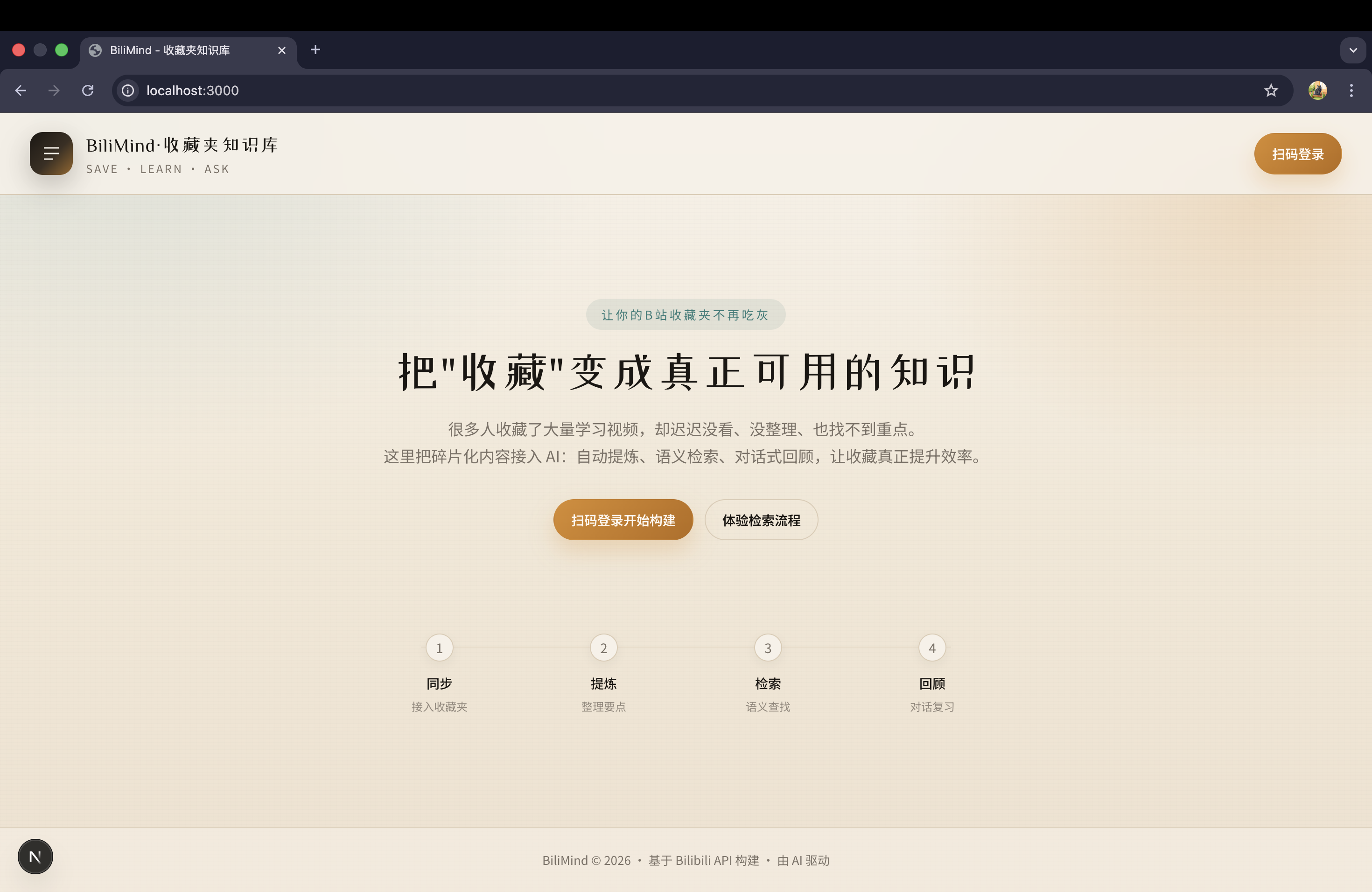
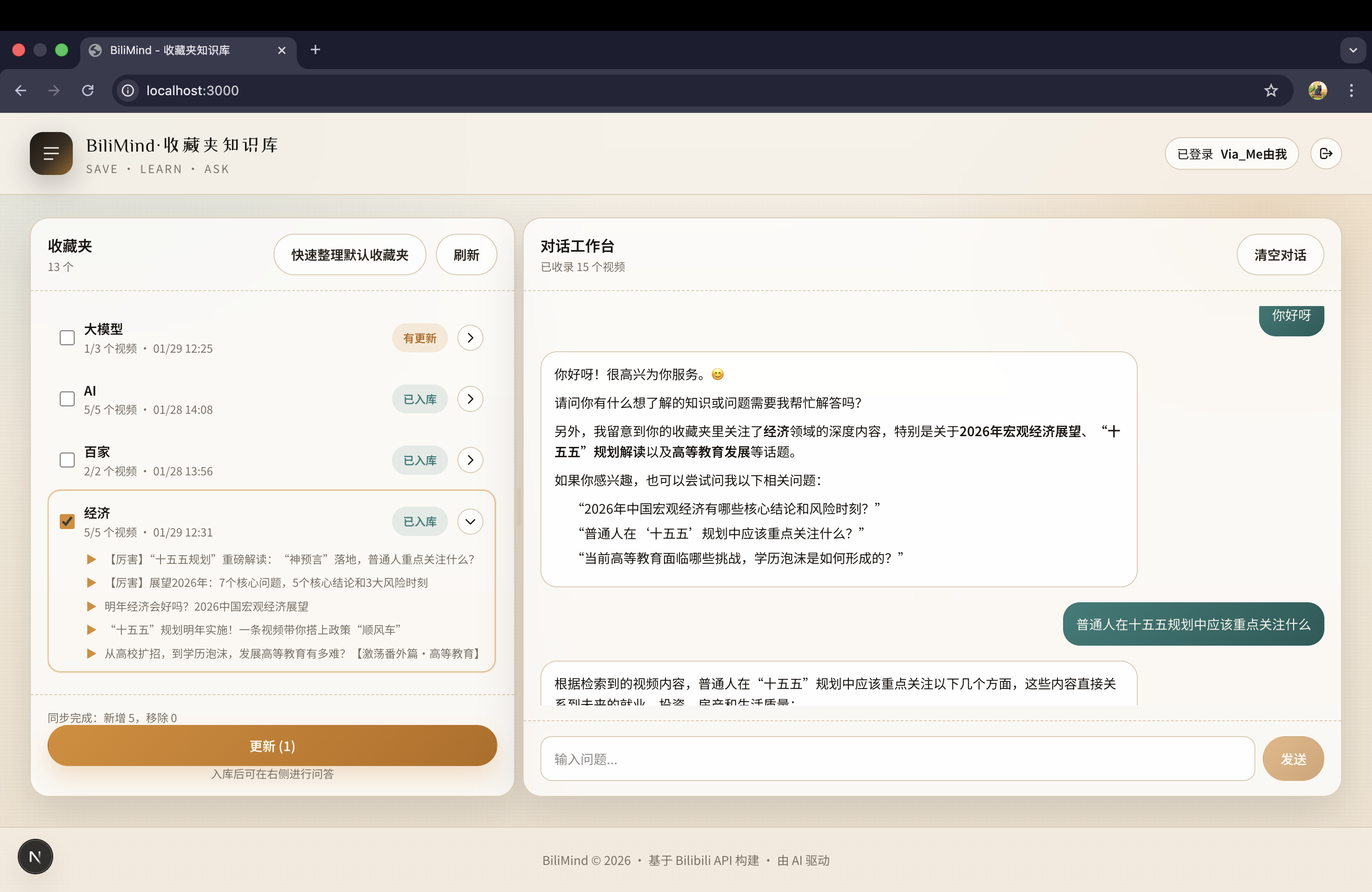
Bilibili demo video: https://b23.tv/bGXyhjU
🌐 Try It Online
Try BiliMind online → · Get 100 credits on your first QR-code login
Start with a favorite folder containing just 1–3 short videos (you can create a test folder), then add more after trying video processing, search, and chat. At the current hosted rates, transcribing a 10-minute video costs about 6 credits when transcription is needed; content processing and chat use additional credits. As a rough guide, 100 credits can cover about five such videos and a few questions. Actual usage depends on video length, multi-part videos, whether transcription is needed, and question length; check your credit history on the site.
Self-hosting uses your own model API key and does not use credits from the hosted site.
Star History
Quick Start
Prerequisites
- Python environment, such as Conda
- Node.js and npm for the frontend
ffmpegavailable inPATH- A DashScope / Bailian API key for ASR, embedding, and chat
Install ffmpeg:
# macOS
brew install ffmpeg

# Linux
sudo apt install ffmpeg
For Windows, install an ffmpeg build and add its bin directory to PATH.
1. Install backend dependencies
conda activate bilibili-rag
pip install -r requirements.txt
2. Configure environment variables
cp .env.example .env
Edit .env and set at least your DashScope API key:
DASHSCOPE_API_KEY=your-dashscope-api-key
OPENAI_API_KEY=
OPENAI_BASE_URL=https://dashscope.aliyuncs.com/compatible-mode/v1
LLM_MODEL=qwen3-max
EMBEDDING_MODEL=text-embedding-v4
CHAT_USE_LLM_ROUTER=false
Optional retrieval tuning:
RETRIEVAL_CANDIDATE_K=24
RETRIEVAL_TOP_K=8
RETRIEVAL_MMR_FETCH_K=32
RETRIEVAL_MMR_LAMBDA=0.55
Notes:
.envmust be placed in the project root, not underfrontend/.OPENAI_BASE_URLis used for LLM chat. For DashScope OpenAI-compatible mode, usehttps://dashscope.aliyuncs.com/compatible-mode/v1.DASHSCOPE_API_KEYis used by DashScope ASR and embedding. Embedding is called through the DashScope SDK and does not useOPENAI_BASE_URL.DASHSCOPE_BASE_URLis used only for ASR. Do not use it as the LLM chat endpoint.CHAT_USE_LLM_ROUTER=falseskips an extra router-model call before each answer and improves first-token latency.- Restart the backend after changing
.env. - Never commit real API keys.
3. Start the backend
python -m uvicorn app.main:app --reload
Backend API docs: http://localhost:8000/docs
4. Start the frontend
cd frontend
npm install
npm run dev
Frontend: http://localhost:3000
Docker Compose
For a quick local setup, Docker Compose starts both the backend and frontend. Data is persisted under data/, and logs are written under logs/.
cp .env.example .env
# Edit .env and set at least DASHSCOPE_API_KEY or OPENAI_API_KEY
docker compose up --build
Open:
- Frontend:
http://localhost:3000 - Backend docs:
http://localhost:8000/docs
Stop services:
docker compose down
After changing models or API keys in .env, rebuild and restart:
docker compose up --build
How It Works
- Log in to Bilibili with QR-code authentication.
- Select a favorite folder.
- Fetch video metadata and audio/transcript content.
- Run ASR when transcript content is unavailable.
- Split content into chunks and create embeddings.
- Store metadata in SQLite and vectors in ChromaDB.
- Ask questions, inspect retrieved sources, or export Markdown notes.
For multi-part videos, each part is transcribed separately and then merged into one indexed document. The merged content keeps part headings such as ## P1 ... and ## P2 ..., so answers and exports remain easier to trace.
Markdown Export
The app can export:
- Raw video transcripts
- AI-organized Markdown notes
If a single video has not been ingested yet, the export flow can ingest that video before generating the Markdown output.
OpenClaw Skill
This repository includes a local Skill at:
skills/bilibili-rag-local/SKILL.md
It lets OpenClaw query a locally running Bilibili RAG service through the backend API:
POST /chat/askPOST /chat/searchGET /knowledge/folders/status
Recommended workflow:
- Run the backend locally.
- Sync and ingest the target favorite folders.
- Copy
skills/bilibili-rag-localinto your OpenClaw Skills directory. - Ask questions against specific indexed folders.
ASR Notes
Some Bilibili audio URLs may return 403 because of authentication, expiration, or regional restrictions. When direct audio access fails, the system falls back to:
- Downloading audio locally with cookies
- Converting it to 16 kHz mono audio with
ffmpeg - Uploading the converted audio to DashScope for ASR
Make sure ffmpeg is installed and available in PATH.
Multi-part videos increase ASR time and cost based on the total duration of all parts.
Cost Notes
Model costs may include:
- LLM chat tokens
- Embedding tokens
- ASR audio duration
For first-time setup, test with a short video of around 10 minutes before ingesting a large folder.
Troubleshooting
The api_key client option must be set
The backend did not load a valid API key. Check that .env is in the project root and that DASHSCOPE_API_KEY or OPENAI_API_KEY is set.
What should OPENAI_BASE_URL be for DashScope?
Use:
OPENAI_BASE_URL=https://dashscope.aliyuncs.com/compatible-mode/v1
Do not use https://coding.dashscope.aliyuncs.com/v1, and do not put the ASR DASHSCOPE_BASE_URL here.
DashScope Embedding initialization failed
Install backend dependencies again and restart the backend:
pip install -r requirements.txt
Embedding uses the DashScope SDK and does not automatically switch to OPENAI_BASE_URL.
AllocationQuota.FreeTierOnly
This is an upstream model-service quota error. It usually means the free quota is exhausted or the provider account is configured to use only free quota. Adjust quota or billing settings in the model provider console, or switch to an available model.
I changed .env, but the model did not change
Configuration is loaded when the backend starts. Restart the uvicorn backend service after changing .env.
Search returns no results
Check whether the target favorite folder has been synced and ingested. Also make sure you are asking against the intended folder scope.
Tests
Common local checks:
conda run -n bilibili-rag python -m unittest discover -s test -p 'test_*.py'
conda run -n bilibili-rag python -m compileall app test
git diff --check
Tech Stack
- Backend: FastAPI
- Frontend: Next.js + Tailwind CSS
- LLM orchestration: LangChain
- Model provider: DashScope / OpenAI-compatible chat endpoint
- Vector store: ChromaDB
- Database: SQLite
- ASR: DashScope Paraformer
Project Structure
bilibili-rag/
|-- app/                # Backend API, services, retrieval, ASR
|-- frontend/           # Next.js frontend
|-- data/               # Local database and vector store
|-- assets/             # Screenshots and demo assets
|-- skills/             # OpenClaw Skills
|-- test/               # Unit tests and diagnostic scripts
|-- README.md           # Chinese README
`-- README_EN.md        # English README
License
This project is released under the Apache License 2.0.
Disclaimer
Users are responsible for complying with platform terms, copyright rules, and applicable laws. This project does not grant any rights to Bilibili videos, audio, subtitles, or other third-party content.
Explore related projects
affaan-m/ECC
The agent harness performance optimization system. Skills, instincts, memory, security, and research-first development for Claude Code, Codex, Opencode, Cursor and beyond.
301,871 starsNousResearch/hermes-agent
The agent that grows with you
262,920 starsmultica-ai/andrej-karpathy-skills
A single CLAUDE.md file to improve Claude Code behavior, derived from Andrej Karpathy's observations on LLM coding pitfalls.
232,488 starsfirecrawl/firecrawl
Supercharge your AI agents with data from the web and beyond. Building the library for superintelligence. 🔥
200,932 stars