
vercel-labs/ui has 2,424 GitHub stars and 51 forks. Star changes are not measured yet. Last checked 2026-11-13 08:07 UTC. Last push 2026-11-12.
A library of behaviors for agents to build the next generation of user interfaces.
Measured star growth
- in 24h
- Collecting history
- in 7 days
- Collecting history
- in 15 days
- Collecting history
- in 1 month
- Collecting history
Net star changes over overlapping periods, not daily totals. Missing measurements are left blank. Stars measure attention, not software quality.
README.md
OriginalUI SDK
A library of behaviors for agents to build the next generation of user interfaces.
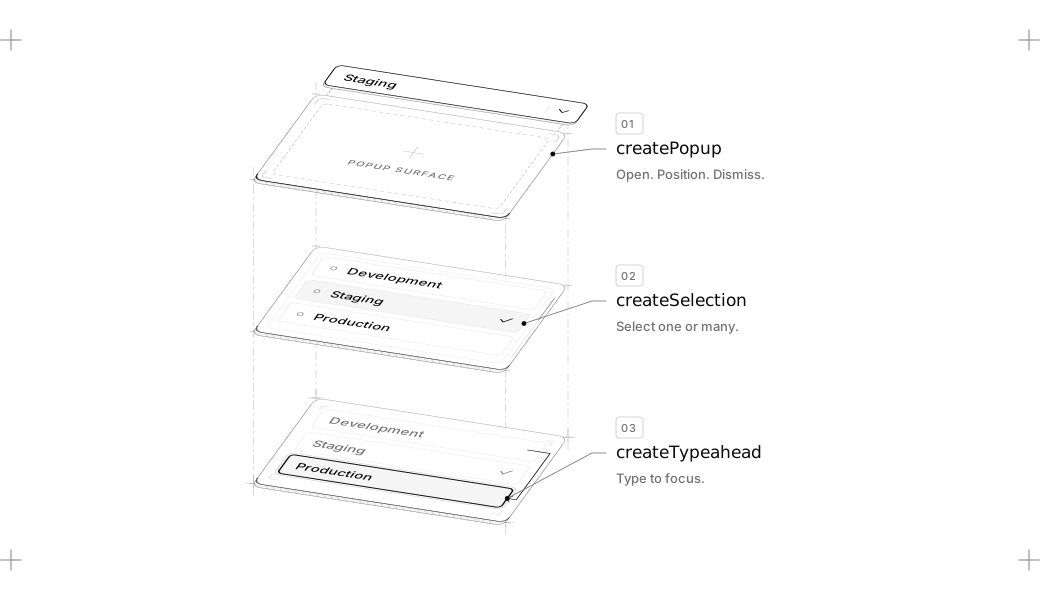
Keyboard navigation, focus, selection, dismissal, popups, drag and drop and the ARIA they need live in @ui-sdk/core, with adapters for React, Vue, Svelte, Solid and Web Components.
Install
UI SDK is in beta. Install core and the adapter for your framework:
npm install @ui-sdk/react @ui-sdk/core
For other frameworks, swap @ui-sdk/react for @ui-sdk/vue, @ui-sdk/svelte, @ui-sdk/solid or @ui-sdk/web.
Then give your agent the UI SDK skill:
npx skills add vercel-labs/ui --skill ui-sdk
Example
Every component in UI SDK is built from behaviors. You start by creating the primitive with behaviors.
Don't worry, you don't need to learn how to write this. Your agents will. And we made them really good at it.
import { createFocusRecovery, definePrimitive } from "@ui-sdk/core"

const searchField = definePrimitive({
  name: "search-field",
  state: () => ({ value: "" }),
  api: (context) => ({
    set: (value: string) => context.store.set({ value }),
    recovery: createFocusRecovery({ fallback: () => context.element("input") }),
  }),
  slots: (slot) => ({
    input: slot({
      attrs: (state) => ({ value: state.value }),
      on: {
        input: (event, { api }) =>
          api.set((event.target as HTMLInputElement).value),
      },
    }),
    clear: slot({
      present: (state) => state.value !== "",
      attrs: () => ({ type: "button" }),
      press: ({ api }) => api.set(""),
      bind: (el, part) => part.api.recovery.bind(el, part),
    }),
  }),
})

export { searchField }
Then render it in your framework with createParts. The parts are the same in all five.
React
import { createParts } from "@ui-sdk/react/primitive"
import { searchField } from "./search-field"

const parts = createParts(searchField, { input: "input", clear: "button" })

const SearchField = parts.Root
const SearchFieldInput = parts.Input
const SearchFieldClear = parts.Clear

function Search() {
  return (
    <SearchField>
      <SearchFieldInput placeholder="Search" />
      <SearchFieldClear>Clear</SearchFieldClear>
    </SearchField>
  )
}

export { Search }
Vue
<script setup lang="ts">
import { createParts } from "@ui-sdk/vue/primitive"
import { searchField } from "./search-field"

const parts = createParts(searchField, { input: "input", clear: "button" })

const SearchField = parts.Root
const SearchFieldInput = parts.Input
const SearchFieldClear = parts.Clear
</script>

<template>
  <SearchField>
    <SearchFieldInput placeholder="Search" />
    <SearchFieldClear>Clear</SearchFieldClear>
  </SearchField>
</template>
Svelte
<script lang="ts">
  import { createParts } from "@ui-sdk/svelte/primitive"
  import { searchField } from "./search-field"

  const parts = createParts(searchField, { input: "input", clear: "button" })

  const SearchField = parts.Root
  const SearchFieldInput = parts.Input
  const SearchFieldClear = parts.Clear
</script>

<SearchField>
  <SearchFieldInput placeholder="Search" />
  <SearchFieldClear>Clear</SearchFieldClear>
</SearchField>
Solid
import { createParts } from "@ui-sdk/solid/primitive"
import { searchField } from "./search-field"

const parts = createParts(searchField, { input: "input", clear: "button" })

const SearchField = parts.Root
const SearchFieldInput = parts.Input
const SearchFieldClear = parts.Clear

function Search() {
  return (
    <SearchField>
      <SearchFieldInput placeholder="Search" />
      <SearchFieldClear>Clear</SearchFieldClear>
    </SearchField>
  )
}

export { Search }
Web Components
Register a custom element for each part:
import { createParts, wrappedButton, wrappedChild } from "@ui-sdk/web"
import { searchField } from "./search-field"

createParts(searchField, {
  root: "search-field",
  input: { tag: "search-field-input", target: wrappedChild("input") },
  clear: { tag: "search-field-clear", target: wrappedButton },
})
Then use them in your HTML:
<search-field>
  <search-field-input><input placeholder="Search" /></search-field-input>
  <search-field-clear><button>Clear</button></search-field-clear>
</search-field>
Contributing
Contributions are welcome. See CONTRIBUTING.md to get the repo running locally and land a change, and use issues to report bugs. By participating, you agree to our Code of Conduct.
Security
Please do not open public issues for security vulnerabilities. Instead, follow SECURITY.md and report responsibly to [email protected].
Beta terms
UI SDK is currently in beta and subject to the Vercel beta terms; the framework, APIs, documentation, and behavior may change before general availability.
Explore related projects
freeCodeCamp/freeCodeCamp
freeCodeCamp.org's open-source codebase and curriculum. Learn math, programming, and computer science for free.
459,068 starsdonnemartin/system-design-primer
Learn how to design large-scale systems. Prep for the system design interview. Includes Anki flashcards.
377,734 starsreact/react
The library for web and native user interfaces.
252,565 starsvuejs/vue
This is the repo for Vue 2. For Vue 3, go to https://github.com/vuejs/core
212,527 stars