
vedatkilic/budsy
vedatkilic/budsy has 42 GitHub stars and 6 forks. GitHot measured +2 stars in 24 hours. Last checked 2026-11-09 07:14 UTC. Last push 2026-10-16.
Control Samsung Galaxy Buds on macOS — a native menu-bar app for battery, ANC, ambient sound, equalizer, touch controls, fit test and firmware updates.
What you can do
- Menu-bar quick panel — battery for each earbud, listen mode (Off / Ambient / Adaptive / ANC), ANC strength, and equalizer at a glance.
- Sound & ANC — ANC strength, ambient volume, custom ambient (per-side level + tone), detect conversations, sidetone, ambient during calls.
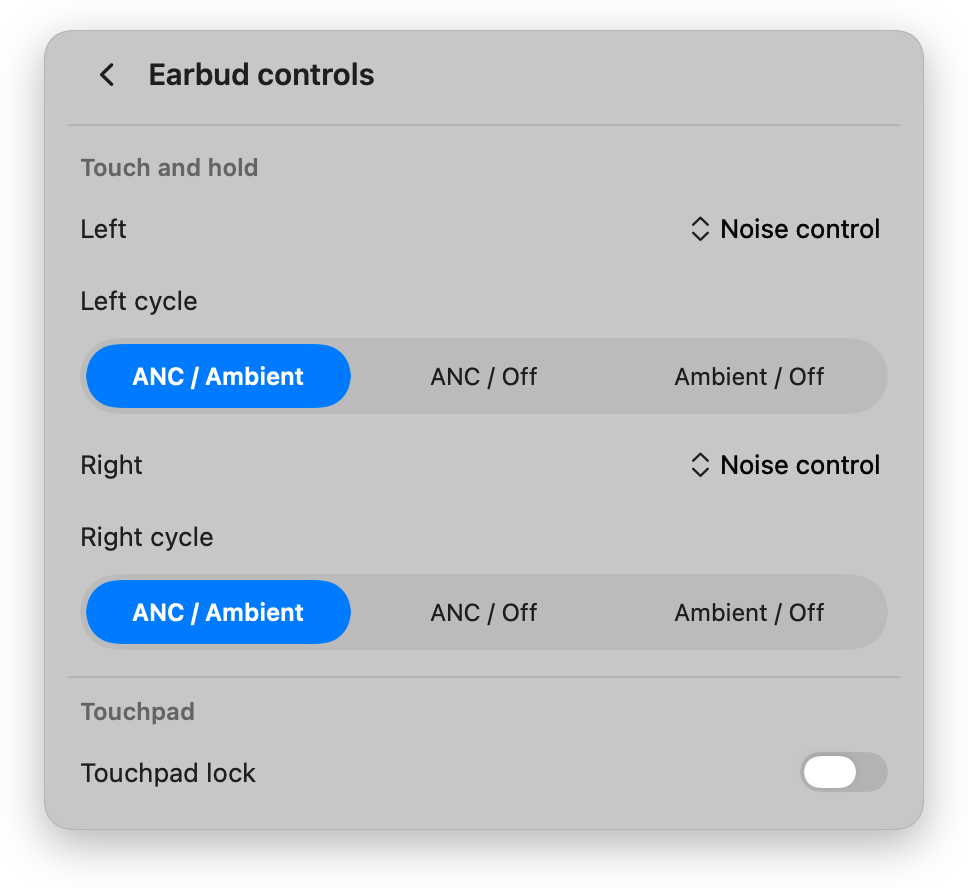
- Earbud controls — touch-and-hold action per side, noise-control cycle, touchpad lock.
- Find My Earbuds — ring both buds, mute one side while you search.
Measured star growth
- in 24h
- +2
- in 7 days
- Update delayed
- in 15 days
- Update delayed
- in 1 month
- Update delayed
Net star changes over overlapping periods, not daily totals. Missing measurements are left blank. Stars measure attention, not software quality.
README.md
OriginalBudsy — Galaxy Buds controls for your Mac
A lightweight, native macOS menu-bar app for Samsung Galaxy Buds. Connect over Bluetooth and control noise cancellation, ambient sound, the equalizer, touch gestures, find-my-earbuds, and more — without leaving your menu bar.
Budsy was previously called "Galaxy Buds for Mac" — same app, new name.
Unofficial. Not affiliated with or endorsed by Samsung. "Galaxy Buds" is a trademark of Samsung Electronics.
Screenshots
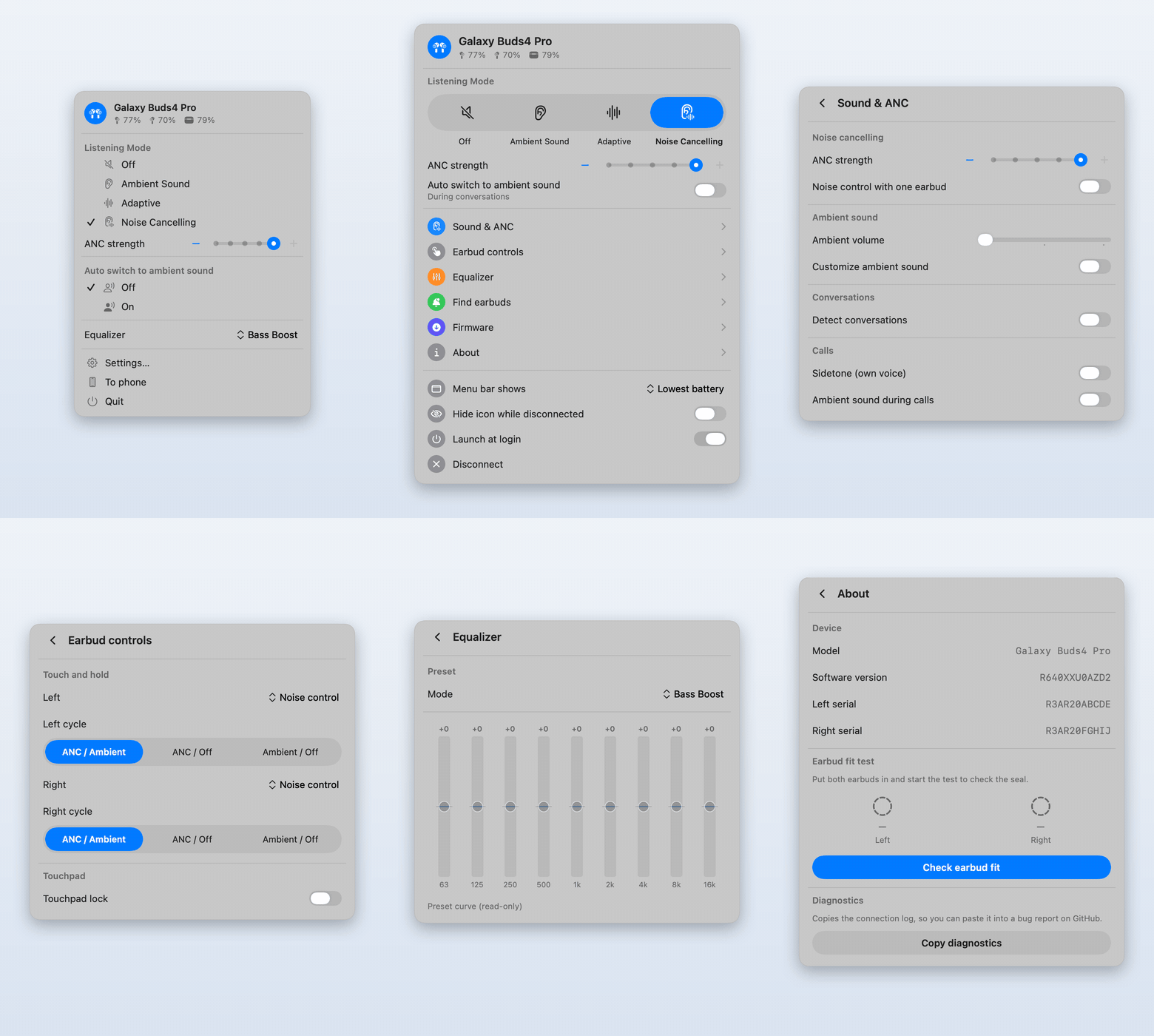
| Menu bar quick panel | Settings |
|---|---|
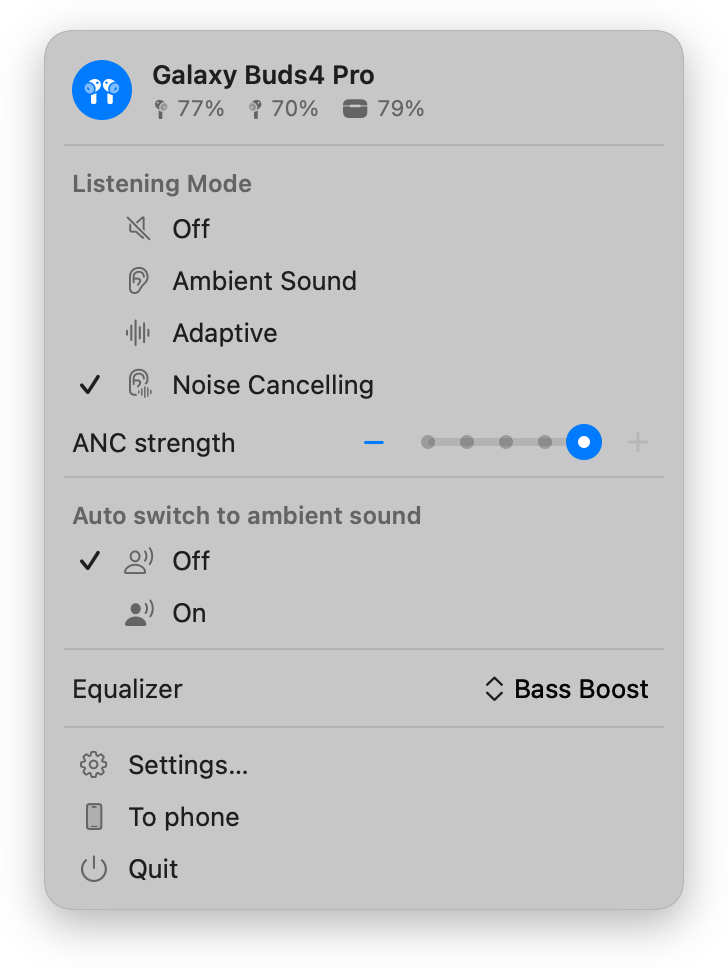 |
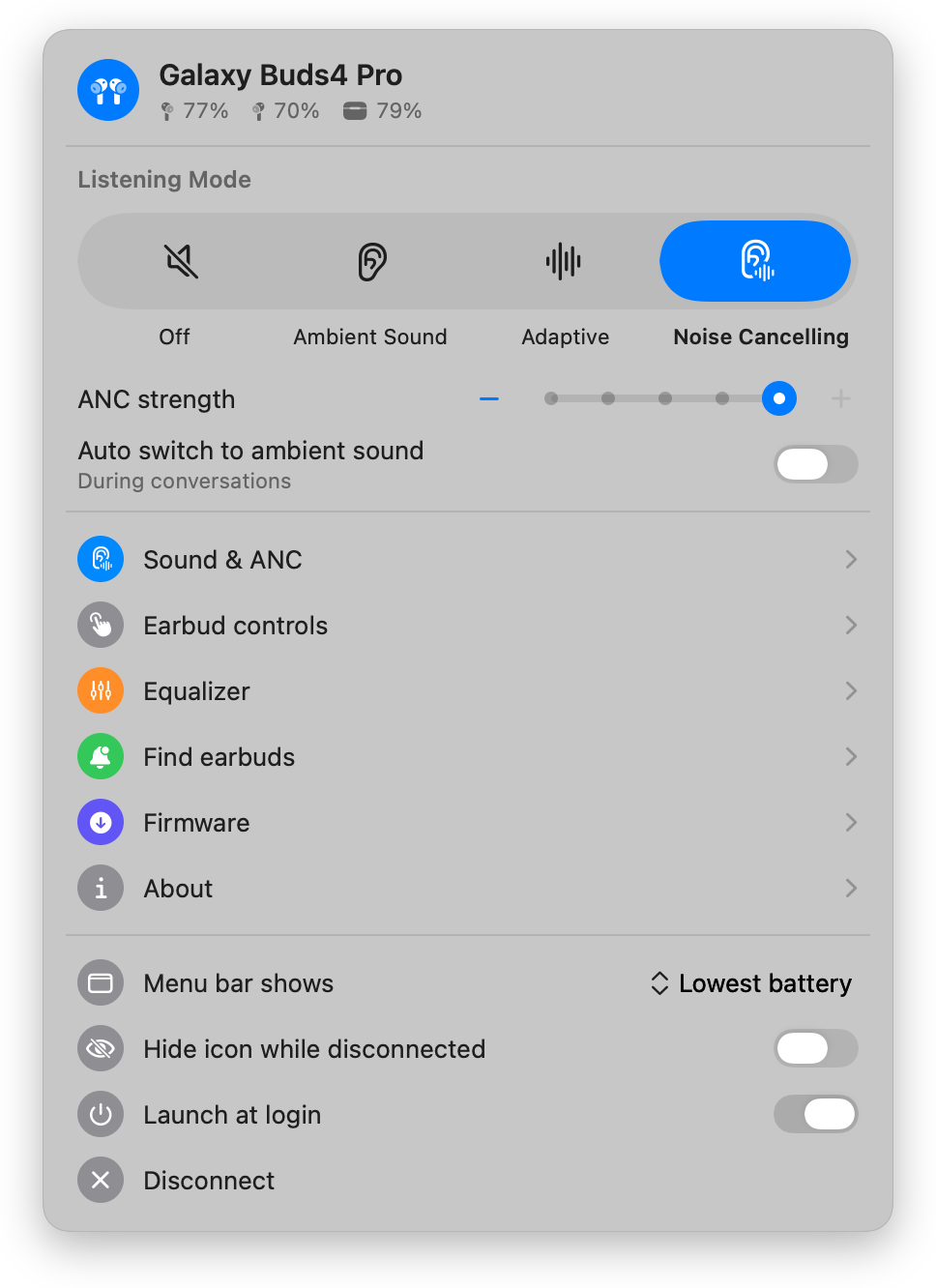 |
| Sound & ANC | Earbud controls |
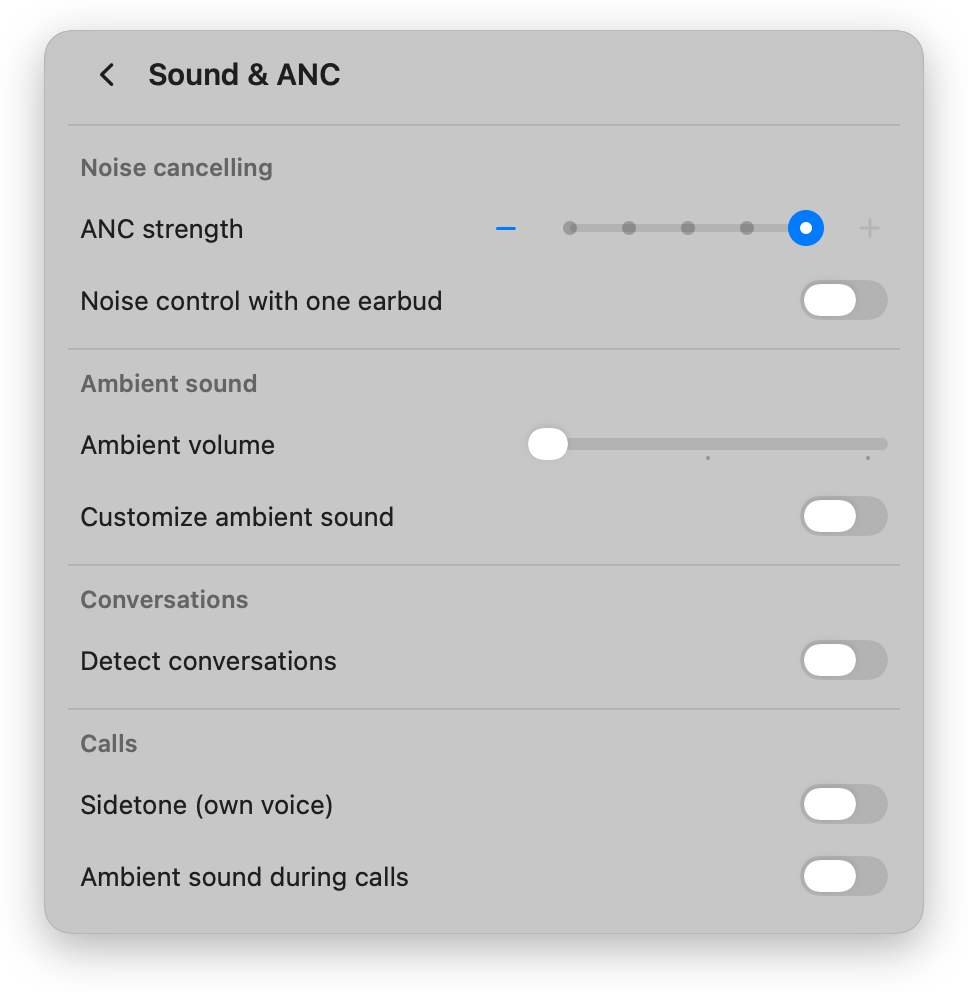 |
 |
Features
- Menu-bar quick panel — battery for each earbud, listen mode (Off / Ambient / Adaptive / ANC), ANC strength, and equalizer at a glance.
- Sound & ANC — ANC strength, ambient volume, custom ambient (per-side level + tone), detect conversations, sidetone, ambient during calls.
- Earbud controls — touch-and-hold action per side, noise-control cycle, touchpad lock.
- Find My Earbuds — ring both buds, mute one side while you search.
- Firmware — checks the community archive of Samsung's official builds and installs a newer one over Bluetooth.
- About / Diagnostics — software version, serial numbers, earbud fit test,
and a copyable connection log for bug reports. The app also logs to the
unified log under the
com.nivorbit.budsysubsystem (Console.app). - Auto-connect when the buds connect, and Launch at login.
- Localized in 11 languages — follows your Mac's language.
Supports Galaxy Buds through Buds4 Pro.
Install
Homebrew
brew tap vedatkilic/tap
brew trust vedatkilic/tap   # Homebrew requires trusting third-party taps once
brew install --cask vedatkilic/tap/budsy
Manual
- Download the latest
Budsy-<version>.dmgfrom Releases. - Open it and drag Budsy into Applications.
- Launch it. The earbud icon appears in your menu bar.
First launch (unsigned app)
The app is open-source and not signed with an Apple Developer certificate, so macOS Gatekeeper blocks it the first time. To allow it:
- Right-click the app → Open → Open, or
- System Settings → Privacy & Security, scroll to the message about "Budsy", and click Open Anyway.
You'll also be asked to allow Bluetooth access — required to talk to the earbuds.
Build from source
Requires Swift 6 / Xcode Command Line Tools on macOS 14+.
git clone https://github.com/vedatkilic/budsy.git
cd budsy
bash build.sh        # builds Budsy.app (ad-hoc signed)
open Budsy.app
Package a distributable disk image:
bash package.sh 1.0.0 # → dist/Budsy-1.0.0.dmg
Xcode project (signing, App Store)
The Xcode project is generated from project.yml with XcodeGen and isn't committed:
brew install xcodegen
xcodegen generate     # → Budsy.xcodeproj
Two configurations: Release (Developer ID, hardened runtime, full feature set) and AppStore (sandboxed, APPSTORE flag — the firmware updater is left out of the Mac App Store build). The Budsy scheme archives for the App Store; Budsy (Developer ID) archives for direct distribution. Set your team under Signing & Capabilities.
For App Review, open budsy://demo puts the app in a demo mode with a stand-in connected device so every screen can be exercised without Galaxy Buds.
How it works
The app speaks the Galaxy Buds SPP/RFCOMM control protocol directly over
IOBluetooth. All UI is SwiftUI; the menu-bar item and windows are AppKit. No
third-party dependencies.
Privacy & transparency
- Fully open-source (MIT) — the entire codebase is in this repository.
- No analytics, no tracking, no telemetry, no network calls. The app only communicates with your earbuds over Bluetooth.
- One permission: Bluetooth, required to talk to the buds. Nothing else.
- No account, no ads, no paid tiers — it's free.
- Built by an independent developer; not affiliated with Samsung.
License
Explore related projects
ytdl-org/youtube-dl
Command-line program to download videos from YouTube.com and other video sites
141,500 starsexcalidraw/excalidraw
Virtual whiteboard for sketching hand-drawn like diagrams
135,396 starsgodotengine/godot
Godot Engine – Multi-platform 2D and 3D game engine
119,840 starsmrdoob/three.js
JavaScript 3D Library.
117,983 stars