
vahapogut/Theft-Detection
vahapogut/Theft-Detection has 34 GitHub stars and 12 forks. GitHot measured 0 in 7 days. Last checked 2026-11-10 23:07 UTC. Last push 2026-10-10.
Real-time AI-powered theft detection system for retail. Detects shoplifting, concealment, and suspicious behavior using YOLOv8 & Computer Vision with a modern web dashboard.
What you can do
- Multiple cameras with automatic reconnection, connection status, last-frame timestamps, and FPS monitoring.
- YOLO object and pose detection with independent tracking for each camera.
- Per-camera confidence thresholds, consecutive-frame requirements, alert cooldowns, and rule toggles.
- Named restricted and loitering zones with individual dwell-time thresholds.
Measured star growth
- in 24h
- Update delayed
- in 7 days
- 0
- in 15 days
- Collecting history
- in 1 month
- Collecting history
Net star changes over overlapping periods, not daily totals. Missing measurements are left blank. Stars measure attention, not software quality.
README.md
OriginalTheftGuard
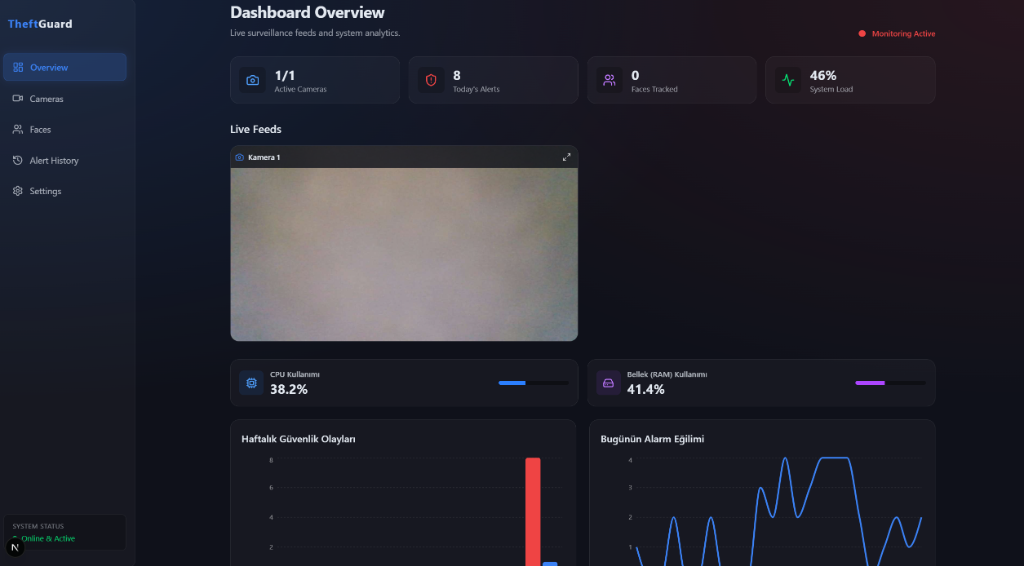
A security dashboard built with Python/FastAPI and Next.js for reviewing suspicious activity, restricted-area intrusions, and loitering in camera feeds.
Features
- Multiple cameras with automatic reconnection, connection status, last-frame timestamps, and FPS monitoring.
- YOLO object and pose detection with independent tracking for each camera.
- Per-camera confidence thresholds, consecutive-frame requirements, alert cooldowns, and rule toggles.
- Named restricted and loitering zones with individual dwell-time thresholds.
- Privacy masks applied before analysis, live streaming, and recording.
- Event review statuses, notes, archive protection, date/camera/type/status filters, and server-side pagination.
- CSV export of all filtered events, JPEG snapshots, and H.264 MP4 clips with pre-event and post-event footage.
- Retention cleanup with a deletion preview and protection for archived evidence.
- Hourly and weekly charts based on actual database records, plus live system resource measurements.
- Administrator, operator, and viewer roles with session checks for the API, WebSockets, and evidence files.
- Face lists and optional email/Telegram notifications with a setting to disable image attachments.
Feature comparison, sources, and limitations
Detections flag suspicious activity for human review. Model output alone does not establish that theft occurred.
Requirements
- Python 3.11 and Node.js 20.9 or newer; Node.js LTS is recommended.
- A C++ compiler and CMake to install
dlib. - FFmpeg with the
libx264encoder for video clips. Availability is shown in Settings. - CPU execution is supported; a CUDA GPU is optional.
Included models: yolov8n.pt and yolov8n-pose.pt. The optional shoplifting.pt model is used when present. Only load model files you trust.
Installation
python3.11 -m venv venv
source venv/bin/activate
python -m pip install 'cmake<4' 'setuptools<81' wheel
python -m pip install -r requirements.txt
cd dashboard
npm ci
cd ..
For a CPU setup, install the PyTorch CPU packages before installing the Python requirements:
python -m pip install torch torchvision --index-url https://download.pytorch.org/whl/cpu
On Windows, activate the virtual environment with venv\Scripts\activate; C++ Build Tools are required. You can use the existing start_system.bat launcher after creating the administrator account below.
First administrator account
There is no default username or password. Run this command from the same working directory and with the same environment variables as the backend:
python manage_users.py create-admin --username vahapogut
The terminal prompts twice for a password using hidden input. At least 12 characters are required. Create additional accounts from the Users page.
python manage_users.py reset-password --username vahapogut
Changing an account's password, role, or active status revokes its existing sessions. The last active administrator cannot be disabled or demoted.
| Role | Permissions |
|---|---|
| Administrator | All pages; camera, detection, face, user, and system settings; evidence cleanup |
| Operator | View live feeds and events; export, review, annotate, and archive events |
| Viewer | View live feeds, events, evidence, and statistics; export CSV |
Running the application
Use two terminals:
# From the repository root, with the Python virtual environment activated
python backend.py
cd dashboard
npm run dev
The dashboard uses port 3000 and the backend uses port 8000. Browser API and WebSocket requests are proxied through the same-origin /api path. The backend listens on 127.0.0.1 by default. Without a physical camera, the dashboard displays a no-signal frame while connection attempts continue automatically.
Run only one backend process per data directory. On restart, interrupted clips are marked as failed while existing evidence files are preserved. An invalid camera configuration is protected from being overwritten; repair cameras.json and restart the application.
Using a separate data directory
THEFTGUARD_DATA_DIR sets the location of settings, camera definitions, the event database, and evidence files. Use the same variable when creating the administrator account. Model files are loaded from the repository root by default.
export THEFTGUARD_DATA_DIR="$PWD/data/runtime"
python manage_users.py create-admin --username vahapogut
python backend.py
The current working directory is used when no data directory is specified. Legacy four-column alerts tables are automatically migrated without discarding records. Camera fields may remain empty for older records that lack this information.
Environment variables
| Variable | Default / purpose |
|---|---|
THEFTGUARD_DATA_DIR |
Current working directory; settings, event database, and evidence |
THEFTGUARD_MODEL_DIR |
Repository root; YOLO model files |
AUTH_DB_PATH |
data/auth.sqlite3 under the data directory; optional account database override |
BIND_HOST, PORT |
127.0.0.1, 8000 |
BACKEND_URL |
Backend address used by the Next.js server; http://127.0.0.1:8000 |
NEXT_PUBLIC_API_URL |
Same-origin /api when empty; optional override for a separate API deployment |
ALLOWED_ORIGINS |
Comma-separated allowed browser origins; default http://localhost:3000,http://127.0.0.1:3000 |
SESSION_COOKIE_SECURE |
false locally; set to true for HTTPS deployments |
SMTP_PASSWORD, TELEGRAM_BOT_TOKEN |
Secrets required when the corresponding notifications are enabled |
For remote access, use HTTPS, set ALLOWED_ORIGINS to the actual dashboard origin, and enable secure session cookies. Camera source addresses are redacted in API responses. Notification credentials are not exposed in API responses or stored in the JSON settings file by the settings API.
Event review and retention
Filter events on the History page, mark them as reviewed or false alarms, add notes, and archive evidence that should be protected. CSV exports include all matching records across every page.
Choose pre-event and post-event clip durations in Settings. Camera counts, the recording queue, and memory buffers are bounded. Capacity limits or a missing encoder are reported instead of being presented as successful recordings.
Retention cleanup is manual. Preview records older than the selected age, then confirm deletion. A preview is valid for 10 minutes and can be used once. Changes to candidate records or files require a new preview. Archived events, shared evidence files, and clips being prepared are protected.
Updating a camera's privacy masks clears its previous clip buffer and cancels unfinished clips. Previously completed evidence files are not modified retroactively.
Validation
# From the repository root
python -m pip install -r requirements-dev.txt
python -m unittest discover -s tests -v
python test_setup.py
python test_pose.py

cd dashboard
npm run lint
npx tsc --noEmit
npm run build
The legacy test_setup.py and test_pose.py scripts may return exit code zero after catching an error. Also check their output for SETUP_SUCCESS and Model loaded successfully. The new tests use temporary databases, synthetic cameras, and mocked notification clients; they send no external notifications.
Contributors
License
Explore related projects
freeCodeCamp/freeCodeCamp
freeCodeCamp.org's open-source codebase and curriculum. Learn math, programming, and computer science for free.
458,970 starsdonnemartin/system-design-primer
Learn how to design large-scale systems. Prep for the system design interview. Includes Anki flashcards.
377,628 starsreact/react
The library for web and native user interfaces.
252,533 starsvuejs/vue
This is the repo for Vue 2. For Vue 3, go to https://github.com/vuejs/core
212,623 stars