
v0lka/c0wrk
v0lka/c0wrk has 35 GitHub stars and 7 forks. GitHot measured 0 stars in 24 hours. Last checked 2026-11-14 20:01 UTC. Last push 2026-11-13.
Measured star growth
- in 24h
- 0
- in 7 days
- Collecting history
- in 15 days
- Collecting history
- in 1 month
- Collecting history
Net star changes over overlapping periods, not daily totals. Missing measurements are left blank. Stars measure attention, not software quality.
About
Desktop R&D AI-agent
AIREADME.md
Originalc0wrk
[!NOTE] Stable beta — c0wrk is stable enough for everyday work, but you may still run into bugs. Features, APIs, and configuration formats can change between releases. If something breaks, please report it — every report helps us make c0wrk better.
c0wrk is for work that won't fit in a single reply — research, coding, writing, anything that takes more than one step to get right. It's a desktop app built so the whole loop — plan, implement, review, revise, and ship — feels like one continuous flow instead of a dozen disconnected tools. And you never hand over control blindly: you review the plan before work starts and approve your definition of "done" before the goal loop runs.
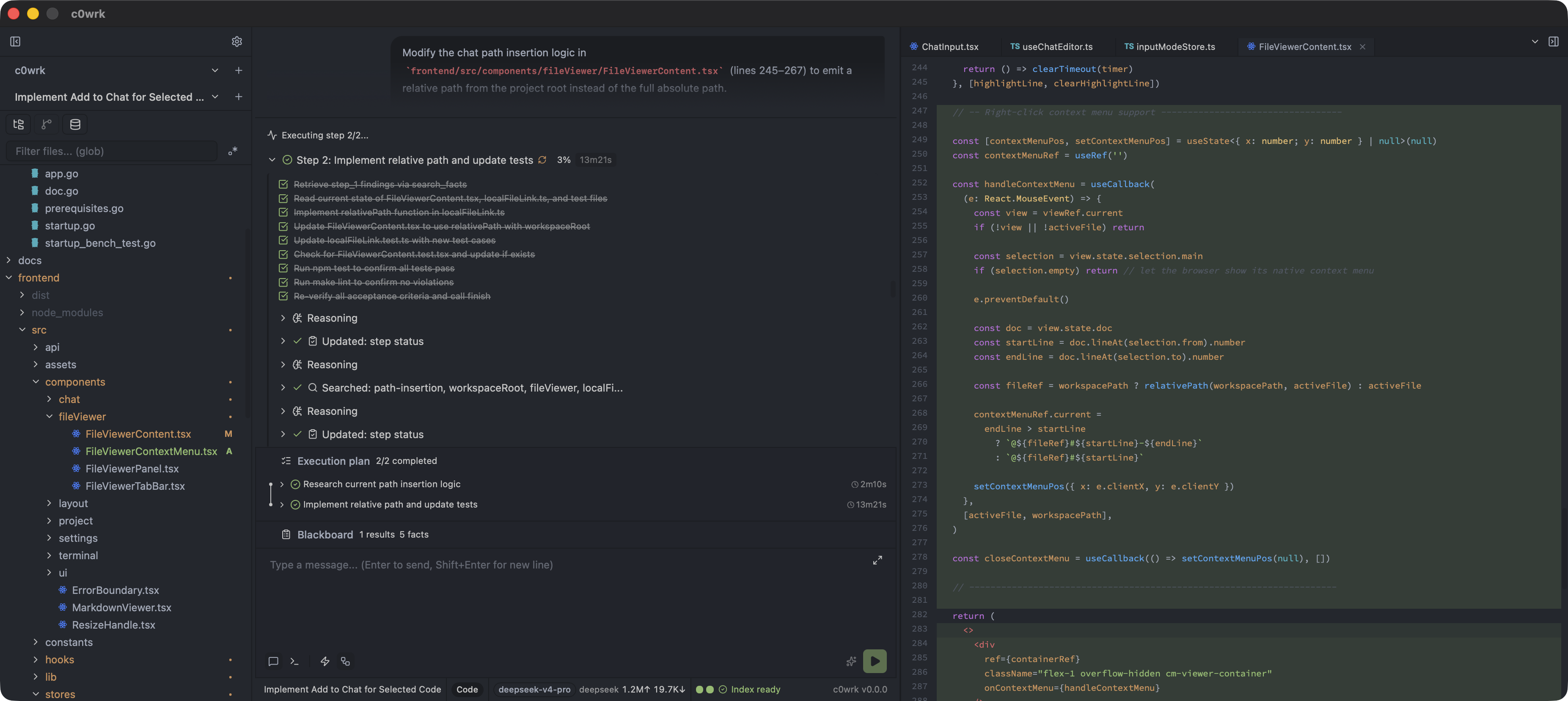
What makes c0wrk different
- One place for the whole build loop. From a task to a shipped change without switching tools: review the plan, let c0wrk implement in parallel, review real diffs with per-hunk and per-file comments, request revisions, then stage, commit, push, inspect branches, and browse a lane graph of history.
- A plan you review before work starts. For non-trivial work, c0wrk maps the task to a graph-based plan. Independent steps run as isolated subagents in parallel; pause creates a resumable checkpoint (ordinary, goal, and delegated work), graceful app shutdown preserves active work, and successful steps are reused on retry while failed, pending, or targeted steps run again.
- Goals that run to the finish. With the
goaloption, c0wrk commits to a concrete, checkable definition of "done" that you approve up front, then keeps working and verifying progress with evidence until the goal is met, blocked, out of budget, or paused. Where other tools' goal modes re-check a condition you typed, c0wrk makes the success condition itself an approved contract before work starts. - Built for more than code. CODE works in a real project with file edits, diffs, git, semantic search, and a per-session terminal. CHAT gives an isolated scratch workspace without git or code-modifying tools. RESEARCH adds a workspace-contained
research/methodology, hypothesis graph, metrics, and seeded skills to every real project — always on, not behind Experimental Features (its own Settings → General toggle defaults on, and in No-Project the panel stays inert). - Layered safety, not just a sandbox. Every tool belongs to a capability group with
allow,user_confirm, ordenypolicy; mutating groups confirm by default. Path containment, symlink checks, a command blocklist (empty by default) plus the deterministic flowsh shell-analysis criteria, untrusted-content framing, and an optional conservative strict judge (the Assisted autonomy posture — a canonical hard reason still forces a confirmation card, and Silent is the opt-in unattended posture) add independent gates. See SECURITY.md. - Your model, your machine. Works with Anthropic, OpenAI, ChatGPT, Kimi, and OpenAI- or Anthropic-compatible endpoints. Hybrid semantic + lexical search respects
.gitignoreand.aiignore, skips oversized or pathological files, and runs embeddings locally through bundled ONNX Runtime. - Self-hosted and corporate-friendly. HTTP/HTTPS proxy support with custom CA certificates and bypass lists for outbound LLM, web, MCP, model-registry, and update traffic. An optional, experimental Model Profiles feature narrows the tool set, swaps in a compact system prompt, tightens sampling, and compacts context earlier for local or mid-size models.
How c0wrk compares to other desktop agents
Compared in August 2026; desktop features move fast, so verify against each product's current docs.
| c0wrk | OpenCode Desktop | Codex Desktop | Claude Code Desktop | |
|---|---|---|---|---|
| Scope | Research + coding + writing | Code-focused | Code-focused | Code-focused |
| Plan review | Reviewable graph (DAG) of parallel subagents | No reviewable plan graph | Summary pane / proposed plan | Linear, read-only Plan mode |
| Goal mode | Up-front approved "done" + evidence self-verification; typed /goal / /goal:N (inline turn budget) arms it per message |
— | /goal persistent objective |
/goal per-turn condition |
| Full build loop in one place | Native: plan → implement → review → revise → commit/push | Partial | Partial | Strong diff review |
| Model freedom | Any OpenAI/Anthropic-compatible + local | Any model | OpenAI only | Anthropic only |
| Local embeddings | Bundled ONNX (offline) | Local-first | Cloud | Cloud |
| License | Open source (MIT) | Open source (MIT) | Proprietary | Proprietary |
Download & install
Prebuilt desktop builds are published on the GitHub Releases page. Builds are currently unsigned — see the per-OS notes below for the one-time workaround.
Every release also publishes SHA256SUMS. The in-app updater downloads over HTTPS, refuses an archive with a missing or mismatched SHA256 entry, stages an install-tree swap, and keeps a .old rollback copy. SHA256 proves that the downloaded archive matches the bytes published with the release; because the artifacts are unsigned, it does not prove release authorship if the release account and checksums are compromised. Updates and automatic checks can be disabled independently in Settings or under updates in ~/.c0wrk/config.yaml.
Each release bundles six platform archives:
| Artifact | Target |
|---|---|
c0wrk-desktop-macos-arm64.zip |
macOS (Apple Silicon) |
c0wrk-desktop-linux-amd64.tar.gz |
Linux (amd64) |
c0wrk-desktop-linux-amd64-cuda13.tar.gz |
Linux (amd64, NVIDIA GPU) |
c0wrk-desktop-linux-amd64-openvino.tar.gz |
Linux (amd64, Intel GPU/NPU) |
c0wrk-desktop-linux-arm64.tar.gz |
Linux (arm64) |
c0wrk-desktop-windows-amd64.zip |
Windows (amd64) |
The ONNX Runtime library and the embedding models ship inside every archive, so vector search works without an extra download on your end.
macOS (Apple Silicon)
Download
c0wrk-desktop-macos-arm64.zipand unzip it.The app is unsigned, so macOS Gatekeeper will block first launch. Clear the quarantine attribute:
xattr -cr /path/to/c0wrk-desktop.appAlternatively, right-click
c0wrk-desktop.app→ Open on first launch, then confirm in the Gatekeeper dialog.Launch
c0wrk-desktop.app.
Linux (amd64 and arm64)
Download
c0wrk-desktop-linux-amd64.tar.gzand extract it:tar -xzf c0wrk-desktop-linux-amd64.tar.gzRun the binary:
./c0wrk-desktopIf the binary can't find
libonnxruntime.so, run it from the extraction directory or add that directory toLD_LIBRARY_PATH.
arm64: download c0wrk-desktop-linux-arm64.tar.gz instead; the steps are
identical to amd64, including the LD_LIBRARY_PATH note if the binary cannot
find libonnxruntime.so.
NVIDIA GPU (cuda13): for GPU-accelerated embeddings on amd64, download
c0wrk-desktop-linux-amd64-cuda13.tar.gz instead of the plain amd64 archive.
The steps are identical, but this variant additionally requires an NVIDIA GPU
with a recent driver and the CUDA 13 runtime (libcudart.so.13, cuBLAS,
cuRAND — on Ubuntu install cuda-toolkit-13-x or the CUDA 13 runtime
packages). Without the CUDA 13 runtime the app still runs; the vector index
falls back to the CPU provider (a warning is logged and shown at startup).
The in-app updater always updates within the same flavor: a cuda13 install
receives cuda13 archives, a regular install receives regular ones — switching
between them means manually installing the other archive.
Intel GPU/NPU (openvino): for GPU/NPU-accelerated embeddings on amd64
Intel hardware (Arc / integrated Xe graphics, NPUs), download
c0wrk-desktop-linux-amd64-openvino.tar.gz instead of the plain amd64
archive. The steps are identical; this variant additionally requires an Intel
GPU with a recent compute-runtime / Level Zero driver stack (libze_intel_gpu.so
— the same requirement as any OpenVINO GPU workload). The archive bundles the
OpenVINO execution-provider plugin and its OpenVINO/TBB runtime libraries next
to the stock CPU ONNX Runtime, so no extra download step is needed. Without a
usable Intel GPU the app still runs; the vector index falls back to the CPU
provider. Like the CUDA flavor, the in-app updater always updates within the
same flavor: an openvino install receives openvino archives — switching
between flavors means manually installing the other archive.
Runtime dependencies (end users only need these shared libraries, not the -dev packages):
# Ubuntu/Debian
sudo apt install libgtk-3-0 libwebkit2gtk-4.1-0
Windows (amd64)
- Download
c0wrk-desktop-windows-amd64.zipand extract it. - The app is unsigned, so Windows SmartScreen may warn "Windows protected your PC". Click More info → Run anyway.
- Run
c0wrk-desktop.exe.
On first launch c0wrk creates its config automatically, then — once all runtime dependencies are in place — opens a dialog to set up an LLM provider.
Contributing
Interested in hacking on c0wrk? Architecture, build instructions, and the release process live in CONTRIBUTING.md.
License
Licensed under the MIT License.
About
Built by the c0wrk team with warmth, love, and c0wrk.