
usecornercase/cornercase-terminal
usecornercase/cornercase-terminal has 40 GitHub stars and 6 forks. GitHot measured 0 stars in 24 hours and +1 in 7 days. Last checked 2026-11-09 19:48 UTC. Last push 2026-11-03.
A terminal multiplexer for projects, git worktrees and coding agents, driven by the mouse
Measured star growth
- in 24h
- 0
- in 7 days
- +1
- in 15 days
- Collecting history
- in 1 month
- Collecting history
Net star changes over overlapping periods, not daily totals. Missing measurements are left blank. Stars measure attention, not software quality.
README.md
Originalcornercase





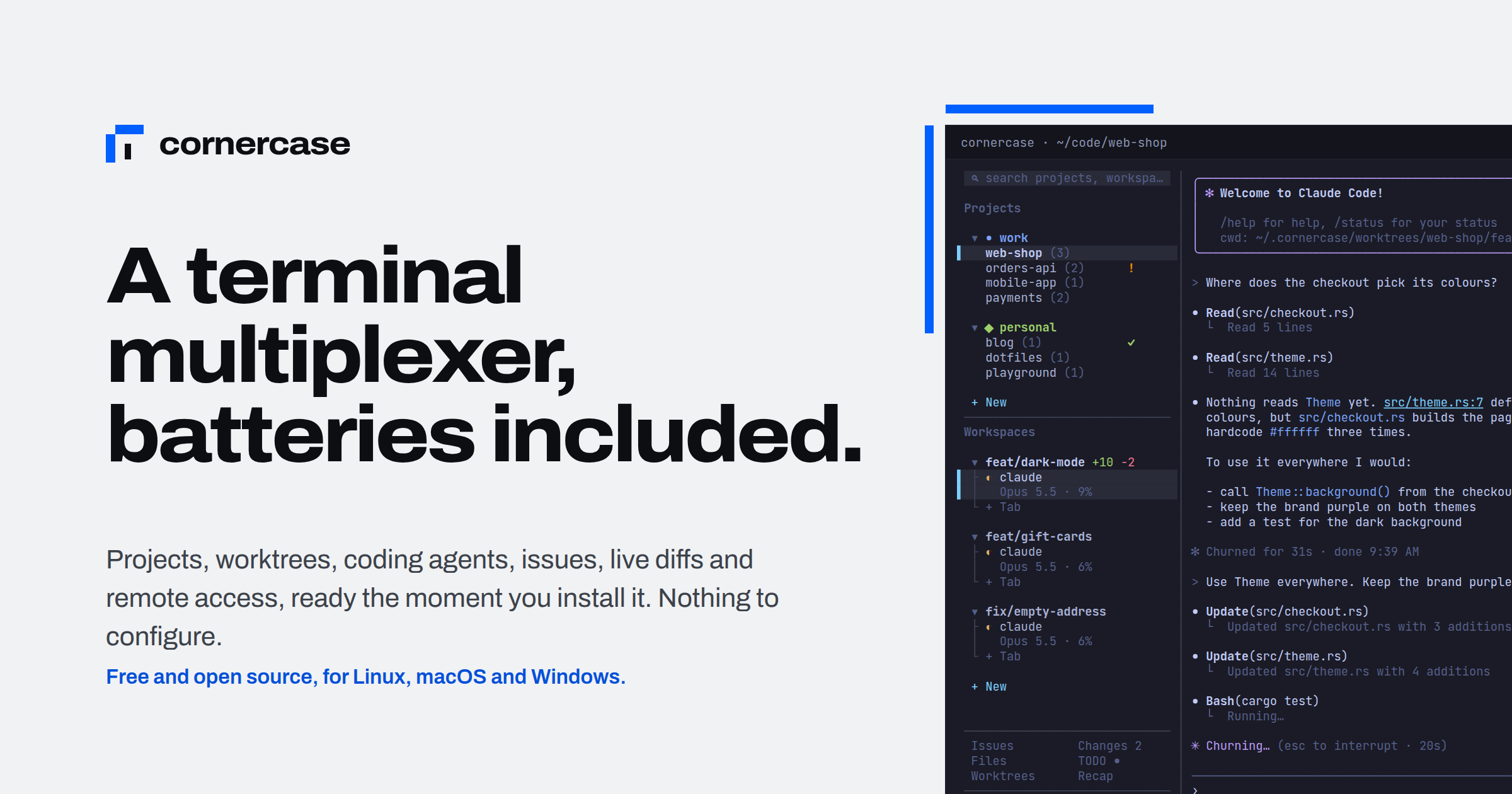
A terminal multiplexer built for running coding agents in parallel. Every agent gets its own git worktree and tab, the sidebar shows which ones are working, waiting or done, the diff sits next to the agent, and a background server keeps everything running when you close the window. Everything is a click: your keyboard stays with the program in the pane.
usecornercase.dev · First steps · Try the live simulation · Discord
Why
Starting ten agents is easy. Keeping up with them is the hard part. cornercase does four things about it:
- From an issue to an agent at work, in one click. Open an issue from GitHub, GitLab, Linear, Jira, Plane, Asana or Shortcut and press
start: cornercase creates a worktree on a branch named after the issue, opens a tab in it and hands the issue to the agent as its first prompt. Claude Code, Codex, Gemini, Vibe, Grok, Cursor, Copilot and nine more. Issues to agents - Every agent in its own corner, all of them in one view. Each agent has its own branch, folder and tab, so two of them never touch the same file. Tabs show who is working
◐(or a spinner, if you pick it), who needs you!and who finished while you were away✓, with the model and how full its context is.!and✓climb to the workspace and project rows, and your terminal notifies you, also over SSH. Projects, workspaces and tabs - The review next to the work. The changes panel shows the workspace's diff as the agent writes it: uncommitted, its commits, or everything since a base branch, or what is uncommitted in every project at once. Hover a hunk to open it in your editor, copy it or hand it back to the agent, stage a file or throw its changes away. The files panel browses, reads and searches the workspace, images included, and a path an agent prints is a link. Changes · Files
- Close the window. Nothing stops. A background server owns the shells.
Quitdetaches,cornercasereattaches, from any terminal or from your phone over SSH, and several windows can show the same session. Sessions
And the cornercase command does all of it from a script, so one agent can run the others. Scripts and agents
Install
Linux and macOS, x86_64 and arm64:
curl -fsSL https://usecornercase.dev/install.sh | sh
Or with Homebrew:
brew install usecornercase/tap/cornercase
cornercase checks GitHub for a new release every hour. When there is one, a ↑ button next to Settings shows what is new and installs it; cornercase update does the same from a shell. Installation
From source
You need Linux or macOS (on macOS, the Xcode Command Line Tools: xcode-select --install), rustup, which installs the Rust version pinned in rust-toolchain.toml on the first build, Zig 0.15.2 on your PATH (exactly this version: it builds Ghostty's terminal core, which refuses any other, so download it from ziglang.org rather than a package manager if in doubt), git, and network access for the first build, which fetches Ghostty's sources.
git clone https://github.com/usecornercase/cornercase-terminal.git
cd cornercase-terminal
cargo install --path . --locked
The first build takes a couple of minutes.
First steps
- Run
cornercase. It starts the server and opens the window. + New→ open project → pick a folder. The project gets a workspace and a shell.Issues→ pick one →start. Or+ New workspacefor a worktree of your own, then typeclaudein its tab.- Watch the icons in the sidebar.
Changesshows the diff,Filesthe code,TODOyour list. Quitcloses the window and leaves everything running.cornercasebrings it back.
Keys always go to the program in the active pane: there are no shortcuts to learn unless you choose a prefix key. Below 90 columns the sidebar folds into a menu bar, so it works on a phone over SSH. The whole walkthrough is in First steps.
From scripts and agents
pane=$(cornercase start claude --worktree fix-login --prompt 'Fix the login form, then commit')
cornercase wait --pane "$pane" --timeout 1800   # until the agent stops: idle, done, pending or waiting
cornercase read --pane "$pane" --last-message   # what it said, from its own transcript
cornercase --help lists every command: open projects and worktrees, split panes, type into them, press keys, wait on one agent or several, follow events as they happen. Teach it to your agents with npx skills add usecornercase/cornercase-terminal --skill cornercase -g. Scripts and agents
Everything else
- Layouts. Projects and workspaces stacked in one column, side by side, or as one tree; groups with an icon and a colour; drag to reorder. Arrange the columns
- Splits. Right-click a pane to split it right or down, drag the dividers to resize, right-drag a pane onto another to move it. Panes and splits
- Search. Any group, project, workspace or tab by name, as you type. Search
- TODO list. One list beside the pane for what comes next. TODO list
- Usage and stats.
Usageshows your agents’ work in parallel, a heatmap and Claude Code/Codex plan limits. Copy a link to a shareable stats card. Usage and stats - Remote machines.
cornercase remote <host>keeps the window on your laptop and the shells and agents on another machine, over your ownssh, and reconnects by itself when the connection drops. Remote machines - A real terminal inside. Panes run on libghostty-vt, Ghostty's terminal core, so nvim, fzf, htop and full-screen agents work as expected, in your terminal's own colours.
- Settings.
Settingsin the sidebar; every change is saved at once to~/.config/cornercase/config.json. Settings and config.json · Files and environment
Contributing
See CONTRIBUTING.md. Questions and ideas are welcome on Discord. The rules for contributors and coding agents are in AGENTS.md, and the design decisions with their reasons in design/, one file per area, listed in DESIGN.md. The website and its documentation live in site/.
License
Licensed under either of
- Apache License, Version 2.0 (LICENSE-APACHE)
- MIT license (LICENSE-MIT)
at your option.
Unless you explicitly state otherwise, any contribution intentionally submitted for inclusion in the work by you, as defined in the Apache-2.0 license, shall be dual licensed as above, without any additional terms or conditions.
Explore related projects
codecrafters-io/build-your-own-x
Master programming by recreating your favorite technologies from scratch.
561,350 starspublic-apis/public-apis
A collective list of free APIs
497,599 starsmorluto/rea
Reverse engineer anything with agents, from app behavior down to native binaries.
446,819 starsopenclaw/openclaw
The AI that really does things. Any OS. Any Platform. The lobster way. 🦞
394,254 stars