
uralys/check-projects
uralys/check-projects has 113 GitHub stars and 2 forks. GitHot measured 0 stars in 24 hours. Last checked 2026-11-15 15:56 UTC. Last push 2026-11-05.
What you can do
- Interactive TUI mode - Navigate projects with a modern terminal UI
- Multi-category organization - Group projects by team, client, or category
- Auto-discovery - Automatically scan directories for git repositories
- Fast concurrent checks - Parallel git status checks
Measured star growth
- in 24h
- 0
- in 7 days
- Update delayed
- in 15 days
- Update delayed
- in 1 month
- Update delayed
Net star changes over overlapping periods, not daily totals. Missing measurements are left blank. Stars measure attention, not software quality.
About
✨ A fast, cross-platform CLI tool to check the git status of multiple projects organized by categories.
Developer ToolsREADME.md
Originalcheck-projects
A fast, cross-platform CLI tool to check the git status of multiple projects organized by categories.
x mozilla
  * M firefox
  ✱ ✚ thunderbird

✔ godot

x gamedev
  ⬆ flying-ones
  * M avindi
Features
- Interactive TUI mode - Navigate projects with a modern terminal UI
- Multi-category organization - Group projects by team, client, or category
- Auto-discovery - Automatically scan directories for git repositories
- Fast concurrent checks - Parallel git status checks
- Smart filtering - Hide clean projects, search by name
- Cross-platform - Single binary for macOS, Linux, and Windows
Quick Start
Install
curl -fsSL https://raw.githubusercontent.com/uralys/check-projects/main/install.sh | sh
Configure
Create ~/check-projects.yml:
categories:
  - name: personal
    root: ~/Projects/personal

  - name: work
    root: ~/Projects/work
    ignore:
      - "*-deprecated"

display:
  hide_clean: true

# Optional: set defaults
use_tui_by_default: false  # Set to true to always use TUI mode
fetch: true                # Set to true to always fetch from remote
Run
# CLI mode (simple output)
check-projects

# TUI mode (interactive)
check-projects --tui

# Fetch from remote before checking
check-projects --fetch
Usage
CLI Mode
check-projects                    # Check all projects
check-projects -v                 # Show all (including clean)
check-projects --category work    # Check specific category
check-projects -f                 # Fetch from remote first
check-projects --fetch            # Same as -f
check-projects -f --yes           # Apply the safe branch fixes without asking
TUI Mode
check-projects --tui
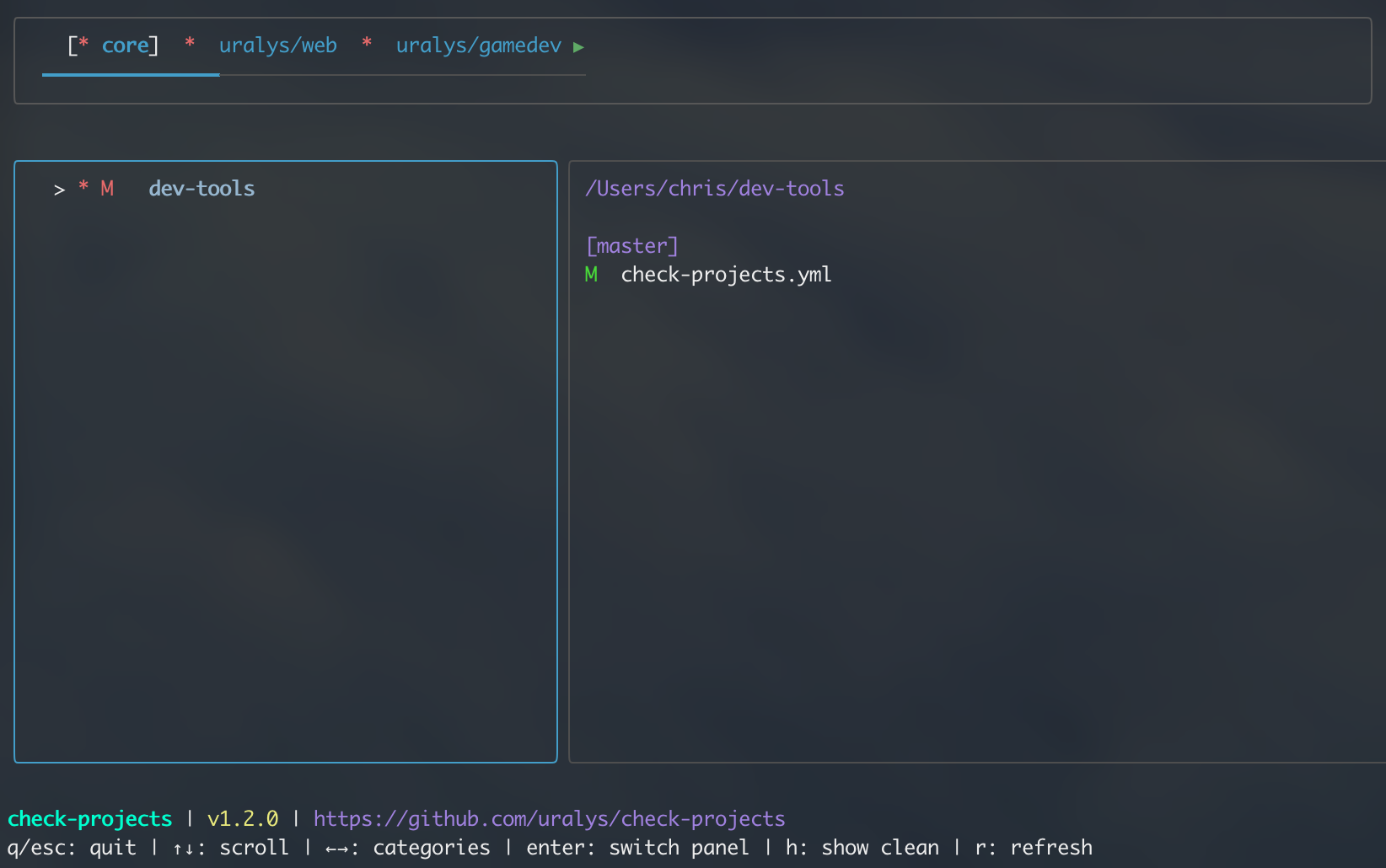
Navigate with ↑↓ • Switch categories with ←→ • Git status shown automatically on right
Status Symbols
✔Clean (synced with remote)⬆Ahead of remote⬆⬆Diverged from remote* MModified files* DDeleted files✱ ✚Untracked files❌Error
Branch Sync
Every local branch with an upstream is checked, not only the current one.
With --fetch, the remote-tracking refs of deleted remote branches are pruned,
and their last tip is kept for the run to tell what the local branch still holds.
| Symbol | State | Fix offered |
|---|---|---|
↓ |
Behind: the remote moved forward | fast-forward |
↻ |
Rewritten: the remote was rebased or force-pushed, the local branch adds nothing | reset onto the remote |
✂ |
Merged: the remote branch was deleted, everything local had been pushed or is in the default branch | delete the branch |
⇅ |
Diverged: local commits are missing from the remote | none, rebase by hand |
✗ |
Gone: the MR was merged and the remote branch deleted, but some local commits are not in the default branch | delete the branch, default no |
"Adds nothing" means the local commits are contained in the target, have patch-identical counterparts (rebase), or leave the target unchanged when merged (squash merge). When only the commit messages match (a rebase that resolved conflicts), the fix is offered with a default of no.
Fixes never merge, never push, and never touch a checkout with uncommitted
changes. Each prompt prints the former tip (was <sha>) so a fix can be undone
with git branch -f <branch> <sha>. Deleting a branch checked out in another
worktree removes that worktree, ignored files included: its default is no.
Without a terminal (script, agent, CI), nothing is applied unless --yes is
given, and --yes only applies the fixes whose default is yes.
Documentation
Development
make deps      # Install dependencies
make build     # Build binary
make test      # Run tests
make lint      # Run linter
License
MIT