
ugurkocde/IntuneDocumentation
ugurkocde/IntuneDocumentation has 63 GitHub stars and 12 forks. GitHot measured 0 stars in 24 hours. Last checked 2026-11-15 22:13 UTC. Last push 2026-11-11.
Measured star growth
- in 24h
- 0
- in 7 days
- Update delayed
- in 15 days
- Update delayed
- in 1 month
- Update delayed
Net star changes over overlapping periods, not daily totals. Missing measurements are left blank. Stars measure attention, not software quality.
About
Generate professional, audit-ready documentation of your Microsoft Intune tenant in minutes. Sign in, pick what to document, export as PDF or Word. Runs entirely in your browser with read-only Graph permissions. Use the free hosted app or self-host with Docker.
Self-hostedREADME.md
OriginalIntune Documentation
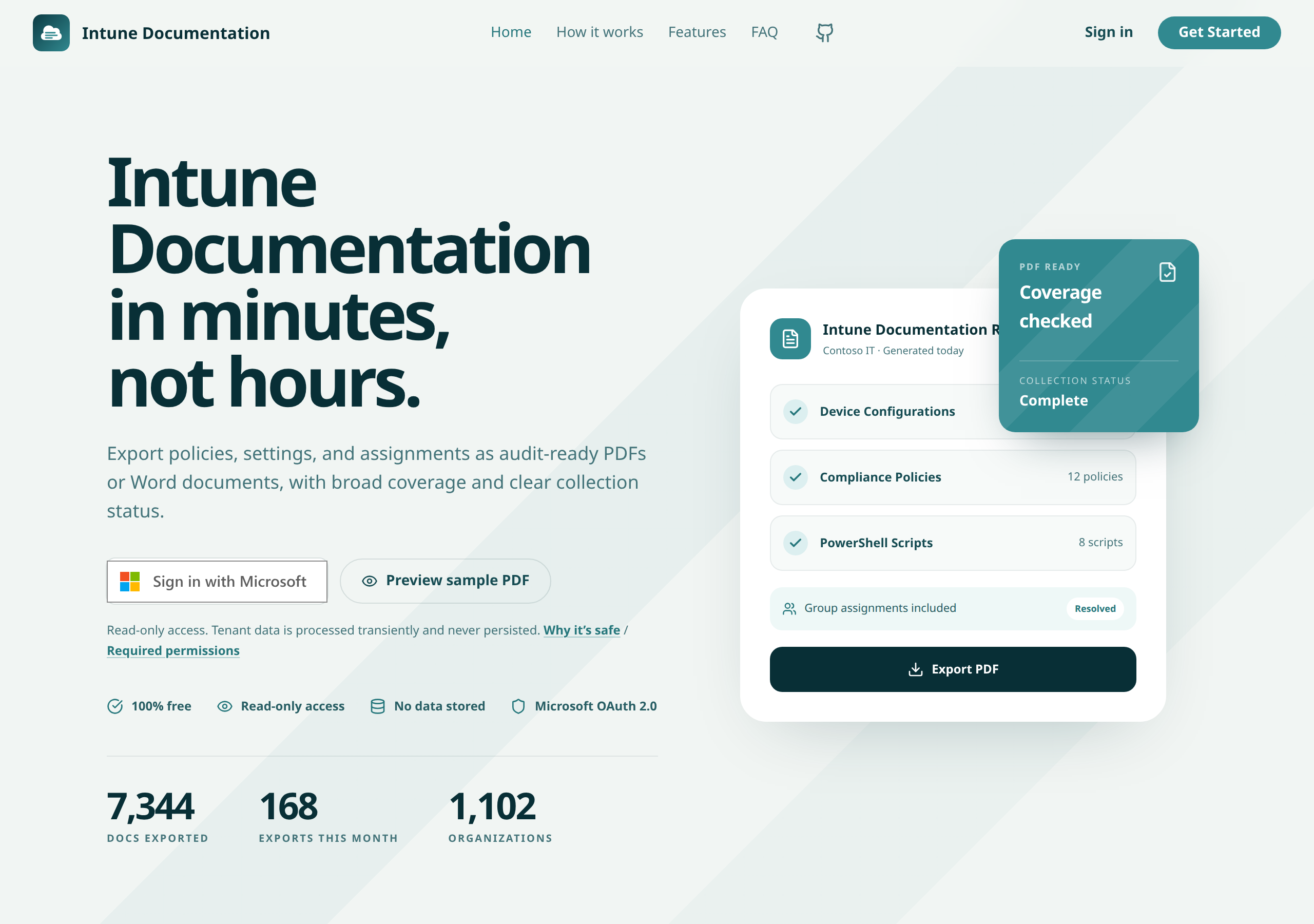
Intune Documentation is a Next.js web app that signs you into your Microsoft Entra tenant with MSAL, reads Intune configuration through delegated, read-only Microsoft Graph permissions, and creates professional PDF and Word documentation in your browser. The application server processes Graph responses transiently during collection and does not persist configuration data.
Endpoint Security policies represented by Microsoft Graph as configuration policies, including policies created through Microsoft Defender for Endpoint security settings management, are handled as ordinary configuration policies. They appear in the existing Settings Catalog list and in the Settings Catalog chapter of PDF and Word exports, using the existing read-only permissions.


Use the hosted version
Go to intunedocumentation.com, sign in, and start documenting your tenant. Step by step guides for both apps are at docs.intunedocumentation.com. On first use, an administrator may need to grant consent for the delegated Microsoft Graph permissions.
Desktop app
The paid desktop app for macOS and Windows collects your Intune configuration on your own machine with your own Entra app registration and exports Word, PDF, and compliance evidence locally. Tenant data and tokens never leave the machine; only license validation reaches our licensing service. See intunedocumentation.com/desktop for plans and downloads, and the documentation for setup and every feature.
The desktop app needs its own app registration with the Mobile and desktop applications platform and the redirect URI http://localhost. This is different from the website's Single-page application registration described below; a SPA registration fails desktop sign-in with AADSTS50011. It also needs Policy.Read.All in addition to the permissions listed below.
To find every policy that configures a setting, open Search settings in the desktop app and search by setting name, value, or technical id; results show the configured value, platform, and assignment of each policy. See the Search settings guide. Sample compliance evidence reports, based on a fictional tenant, are on the compliance page.
To select Windows configurations without including iOS or Android policies, follow the Windows configuration selection guide, which explains how search and selected-item exports work.
Self-host with Docker
Copy
compose.yamlinto a directory on your Docker host.Create a
.envfile next to it:AZURE_AD_CLIENT_ID="your-entra-application-client-id" # Optional. Defaults to "common". AZURE_AD_TENANT_ID="common"Start the container:
docker compose up -dOpen http://localhost:3000.
The image is published as ghcr.io/ugurkocde/intune-documentation with latest, X.Y, and X.Y.Z tags.
Create the Entra app registration
Self-hosted deployments need a public client application registration:
- In the Microsoft Entra admin center, open Identity > Applications > App registrations and select New registration.
- Choose the supported account type:
- Accounts in this organizational directory only for a single-tenant deployment.
- Accounts in any organizational directory if users from multiple tenants will use the deployment.
- Under Authentication, add the Single-page application platform and a redirect URI that exactly matches the origin users will browse to, such as
http://localhost:3000orhttps://intune-docs.example.com. The app uses the current browsing origin as its redirect URI at runtime. - Under API permissions, add these delegated Microsoft Graph permissions:
User.ReadDeviceManagementConfiguration.Read.AllDeviceManagementApps.Read.AllDeviceManagementManagedDevices.Read.AllDeviceManagementRBAC.Read.AllDeviceManagementServiceConfig.Read.AllDeviceManagementScripts.Read.AllGroup.Read.All
- Select Grant admin consent for the tenant.
All requested permissions are read-only. No client secret is needed for this browser-based MSAL application. Use the registration's application client ID for AZURE_AD_CLIENT_ID, and set AZURE_AD_TENANT_ID to your tenant ID for a single-tenant deployment or leave it as common for multitenant sign-in.
Local development
npm install
cp .env.example .env
Set NEXT_PUBLIC_AZURE_AD_CLIENT_ID in .env, then start the development server:
npm run dev
Run the quality gates before submitting changes:
npm run check
npm run test
Privacy and telemetry
The application server retrieves, normalizes, and redacts Graph responses during the active collection request without persisting configuration data or access tokens. PDF and Word exports are generated in the browser.
The dashboard keeps one compressed snapshot in the browser tab's sessionStorage, scoped to the signed-in account, tenant, and collection options. Browser reloads restore this snapshot after authentication settles. An expired or unavailable snapshot is collected again on reload. Refresh data explicitly initiates a new collection; after 30 minutes, the dashboard recommends refreshing without doing it automatically. A failed refresh preserves the previous snapshot and its original collection timestamp. Snapshots expire one hour after their original collection time. Expiry purges the stored copy while leaving the open report usable; suspended tabs recheck on resume. Sign-out clears the snapshot and broadcasts a data-free logout signal to other open app tabs, which clear their local authentication and snapshot. If session storage is blocked or full, caching is silently skipped and a subsequent reload collects the data normally. Configuration snapshots have no server, localStorage, or IndexedDB storage fallback.
The hosted site collects anonymized usage statistics through Plausible Analytics, and stores hashed tenant and user identifiers to calculate monthly active users. Self-hosted deployments disable all telemetry by default because Supabase is not configured and the analytics flag is off.
Contributing
See CONTRIBUTING.md for development setup and pull request guidance.
Security
Report vulnerabilities privately by following SECURITY.md.
License
Intune Documentation is licensed under the Elastic License 2.0. You may use, copy, modify, redistribute, and self-host the software, but you may not offer it to third parties as a hosted or managed service.
Public site and app isolation
Set both server environment variables together:
PUBLIC_SITE_ORIGIN=https://intunedocumentation.com
APP_SITE_ORIGIN=https://app.intunedocumentation.com
Map both domains to the deployment and add https://app.intunedocumentation.com as a Single-page application redirect URI in the existing Entra registration before activating these variables. Public sign-in links navigate to the app origin before starting Microsoft authentication. Public dashboard links redirect to the app. Existing sessions require signing in again on the new origin.
Only the exact configured public origin loads Plausible. Public pages clear legacy session storage before loading that script and cannot collect Intune data. The app uses a per-response script nonce and runs no analytics script in its own origin. No page can be embedded in a frame. Nonced HTML is dynamically rendered and must not be cached by a CDN. Unknown preview origins and self-hosted installations default to app mode with no third-party scripts. Leave both variables unset for a single-origin private app, or supply two distinct origins.
The one-hour limit applies to dashboard snapshots, not Microsoft authentication token lifetimes or a report already visible in memory. Browser session restore can retain sessionStorage after restarting the browser, so the app also validates expiry before restoration. Cross-tab logout requires BroadcastChannel support; the originating tab always clears its own snapshot. No snapshot or logout payload is persisted on the server, in localStorage, or in IndexedDB.
Contact support form
The public site's /support page sends requests to
[email protected] using Resend. Configure RESEND_API_KEY,
SUPPORT_FROM_EMAIL (an address on a Resend-verified domain),
SUPPORT_TURNSTILE_SITE_KEY, and SUPPORT_TURNSTILE_SECRET_KEY on the server.
Configure the existing PUBLIC_SITE_ORIGIN and APP_SITE_ORIGIN pair too.
Restrict the Turnstile widget to the public site's hostname. The site key is
passed to the public form at runtime; API keys and secrets stay on the server.
App-origin visits to /support redirect to the public site. Unconfigured and
self-hosted installations show an email link without loading Turnstile. The
endpoint rejects non-public origins, cross-origin submissions, invalid fields,
oversized bodies, honeypot submissions, and failed or replayed Turnstile tokens.
Cloudflare verification must match the public hostname and support action.
Consider an edge rate limit on POST /api/support for additional volume control.
The visitor's email is used only as Reply-To; the recipient is fixed. Success
requires a successful Resend response containing an email ID. Acceptance does
not guarantee inbox delivery. Timeouts show an uncertainty message and keep the
form contents, so check Resend logs before retrying an uncertain submission.
The app does not persist or log form contents. Resend processes the email and
Cloudflare processes the spam verification.
Before going live, configure the four variables, verify the sender domain, and submit a real request to confirm inbox delivery and Reply-To. API tests mock both services and do not send email. Provider references: Resend send email and Turnstile server validation.