
tyxak/remotepower
tyxak/remotepower has 78 GitHub stars and 5 forks. GitHot measured 0 stars in 24 hours and +1 in 7 days. Last checked 2026-11-15 12:18 UTC. Last push 2026-11-05.
What you can do
- See every signal — SMART and hardware health, CPU and board temperatures, GPU, power and UPS, disk-fill forecasting, a per-host timeline and log search. Agentless syslog, NetFlow/IPFIX/sFlow and SNMP receivers, plus an OID browser for walking a subtree, cover the switches, firewalls and printers that cannot run an agent.
- Manage remotely — shell and Custom Scripts on Linux, Windows and macOS, a file manager, and cron and systemd-timer control, all with no inbound ports. Plus a browser SSH terminal and VNC over your existing SSH, and Proxmox/VMware/OpenShift guest lifecycle through the hypervisor's own API.
- Scan for CVEs — backed by OSV.dev, prioritised with CISA KEV and EPSS, with SBOM export in CycloneDX and SPDX.
- Pentest what you own — authorized nuclei, nikto, nmap, wpscan, ZAP and wapiti scans from a hardened scanner satellite, plus on-host lynis audits.
Measured star growth
- in 24h
- 0
- in 7 days
- +1
- in 15 days
- Update delayed
- in 1 month
- Update delayed
Net star changes over overlapping periods, not daily totals. Missing measurements are left blank. Stars measure attention, not software quality.
About
Feature-rich all-in-one self-hosted server & server fleet management (Web UI): patching, monitoring (agent + agentless/SNMP), CVE scanning, CMDB, RMM, alerts & webhooks, Proxmox/VMware, Ansible, compliance & more — the Swiss-army knife to keep your servers healthy.
AIREADME.md
OriginalRemotePower
Self-hosted fleet monitoring and remote management for Linux, Windows and macOS. One server, one small agent per host, and a web UI covering monitoring and alerting, an asset CMDB, CVE scanning, patching, compliance reporting, a helpdesk and remote access. Agents poll outbound only, so nothing listens on the managed host.


Live demo · Install · Wiki · Changelog · Discussions · The story
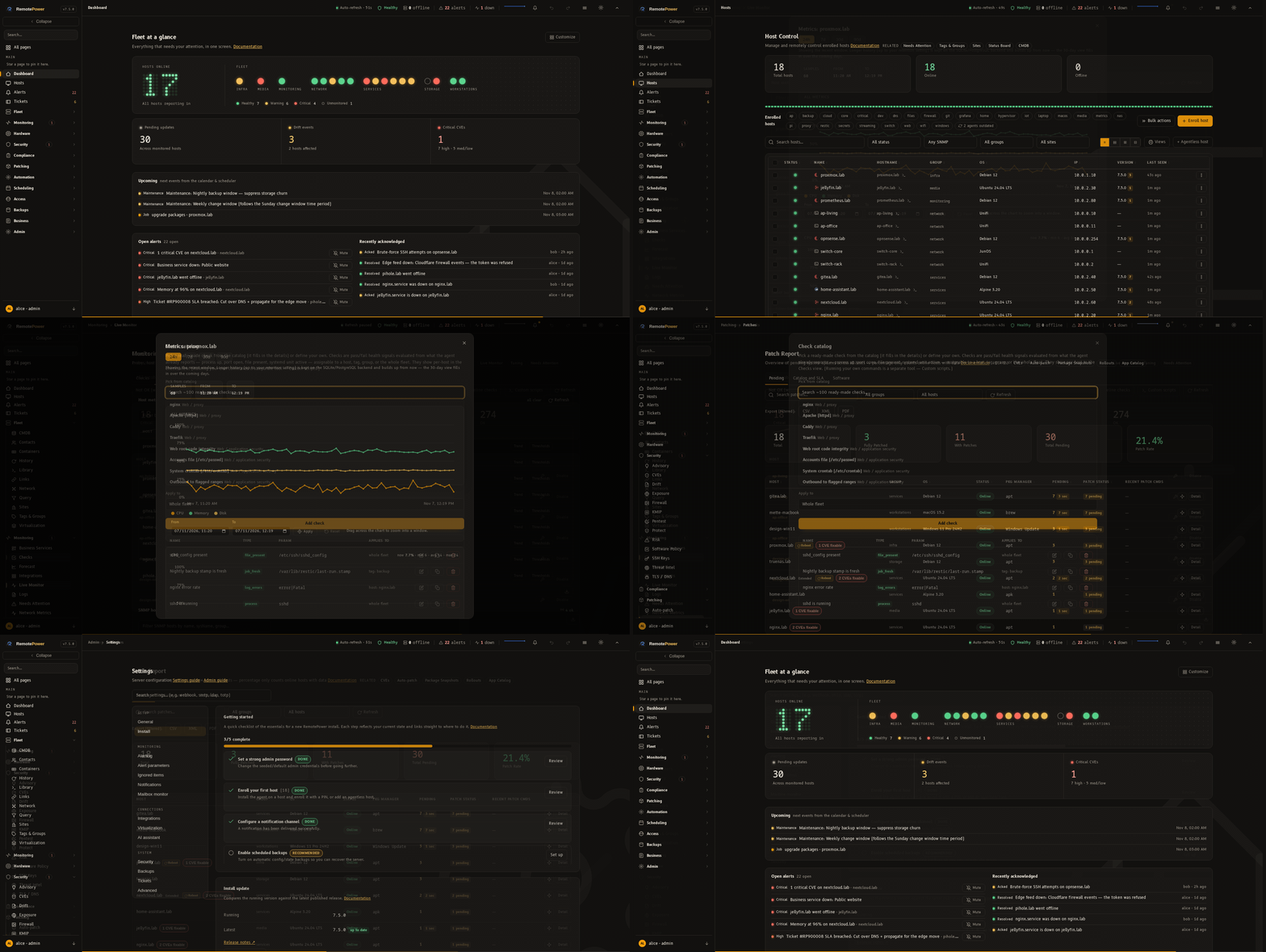
Screenshots
Dashboard |
Fleet overview |
Monitoring |
Host metrics |
CVEs |
Patches |
Compliance |
Pentest |
CMDB |
Settings |
AI assistant |
Tickets (helpdesk) |
Calendar |
WG Access (VPN) |
Browser SSH terminal |
rp — node control (TUI) |
Containers |
KMIP key server |
What is it?
Most teams run a monitor, a CMDB, a wiki, a vulnerability scanner, a patch tool, a ticket system and an SSH jump box as separate services. RemotePower is one self-hosted application that covers all of them: monitoring and alerting, an asset CMDB, documentation with RAG search over your own fleet, CVE scanning, patching, compliance reporting, a helpdesk with SLA clocks and email in and out, and remote management. AI is an optional layer — bring your own local or cloud model, or leave it switched off. With a model configured, it can also triage an alert through a bounded read-only investigation and write a verdict with its evidence.
Each host runs a small Python agent that polls the server over outbound HTTPS. Nothing opens on the client. Enrolment is a 6-digit PIN. The agent runs supervised on every platform: a systemd service on Linux, a launchd agent on macOS, and a Windows service that auto-restarts, installed by one elevated command. See docs/windows-client.md for the Windows specifics.
The stack is small and readable: nginx and Python (gunicorn/Flask) on the
server, plain JavaScript in the browser. No React or Vue, no build step, no
Node.js, no Redis, no Kubernetes. install-server.sh or docker compose up
provisions PostgreSQL, the app server, a maintenance scheduler and a scanner
satellite, with no flags required.
A single small box handles a couple of hundred hosts with no tuning. The same box carries several thousand agents once you adjust the poll interval and the worker count — before load-balanced app nodes, read replicas or relay satellites come into it. See docs/scaling.md for the capacity table and docs/requirements.md for hardware sizing.
Install
Server — one command, HTTPS out of the box:
# Docker (recommended). Self-signed HTTPS on first boot; the one-time admin
# password is printed to `docker logs remotepower`.
docker compose up -d

# Or bare-metal: one wizard installs nginx + the app + TLS + admin.
git clone https://github.com/tyxak/remotepower && cd remotepower
sudo bash install.sh
Open the printed URL and log in. HTTPS is configured for you — self-signed by default, or Let's Encrypt if you give it a public domain. There is no nginx config to edit.
On the box, manage the stack with rp: rp status, the live rp tui
dashboard, and sudo rp doctor for a one-shot health check. See
docs/cli.md.
Add a host — one line. Take the command from Add host → Quick install command in the dashboard, then run it on the target host:
wget -qO- "https://your-server/install?t=<token>" | sudo sh
The host appears in the dashboard within about 60 seconds, which is the default
poll interval. For several hosts at once,
install.sh agent push --server <url> --token <token> user@h1 user@h2 … pushes
the agent over your own SSH. A token enrols one host, so mint one per host.
Upgrading. git pull origin main && sudo bash install.sh update handles
both a plain code update and a conversion from a pre-6.1.0 install. Windows and
macOS agents, the demo vhost, advanced TLS and uninstall are covered in
docs/install.md and
docs/upgrading.md.
Try it first. A read-only demo runs at
demoremote.tvipper.com, seeded with synthetic
hosts, alerts and CVEs. Log in with demo / demo. It resets every few
hours.
What you can do with it
- Monitor and alert — live metrics, a CheckMK-style Checks page, active monitors (HTTP, TCP, DNS, ICMP, traceroute, database liveness and multi-step HTTP flows) with attachable SLA/SLO objects carrying availability targets and error budgets, an Alerts inbox with ack, auto-resolve and mute, and one filterable page to tune every alert threshold, grade and score weight.
- See every signal — SMART and hardware health, CPU and board temperatures, GPU, power and UPS, disk-fill forecasting, a per-host timeline and log search. Agentless syslog, NetFlow/IPFIX/sFlow and SNMP receivers, plus an OID browser for walking a subtree, cover the switches, firewalls and printers that cannot run an agent.
- Manage remotely — shell and Custom Scripts on Linux, Windows and macOS, a file manager, and cron and systemd-timer control, all with no inbound ports. Plus a browser SSH terminal and VNC over your existing SSH, and Proxmox/VMware/OpenShift guest lifecycle through the hypervisor's own API.
- Lock it down — passkeys/WebAuthn, SAML, OIDC, LDAP, TOTP, per-role MFA, a tamper-evident audit log, a strict CSP, and an instance-wide view of who is signed in. A built-in KMIP key server keeps NAS and hypervisor encryption keys off the appliance they unlock. RemotePower also grades its own host's disk encryption, since that is where every host token and the credential vault live.
- Scan for CVEs — backed by OSV.dev, prioritised with CISA KEV and EPSS, with SBOM export in CycloneDX and SPDX.
- Pentest what you own — authorized nuclei, nikto, nmap, wpscan, ZAP and wapiti scans from a hardened scanner satellite, plus on-host lynis audits.
- CMDB and RAG search — assets, an encrypted credentials vault, a Knowledge Base, and an AI assistant that cites your own fleet's data.
- Stay compliant — OpenSCAP CIS/STIG/PCI scans, with control mapping for PCI DSS v4.0, the HIPAA Security Rule, SOC 2, the ACSC Essential Eight and SMB1001.
- Integrate — 50 connectors (homelab apps, hypervisors, and EDR — Wazuh, CrowdStrike, SentinelOne — cross-referenced to find hosts with no EDR at all), a custom HTTP probe that needs no code, Prometheus and Grafana endpoints, webhooks, syslog, and an MCP server.
- Deploy and automate — a one-click app catalog, auto-patch policies, drift detection, ACME certificates, backups, and a Terraform/Ansible provisioning catalog. Optional autonomous remediation sits on top: off for every tenant until you switch it on, with a shadow mode that writes a receipt for what it would have done so you can grade it first.
Full feature inventory → docs/features.md. Step-by-step recipes → docs/cookbook.md.
Recent releases
- v7.5.0 "Wh0leMatters" — finishing what was started, with everything from 7.4.1 to 7.4.9 on top of 7.4.0. A second read of the whole product found fifteen Medium issues, twenty-one Low or hardening items and three informational ones, and fixed every one; one of the Medium issues is High on a Mac that asks for signed commands. Four-eyes approval now holds a command in every place that puts one on a host: library scripts, package actions, file writes, the compose action, a smart plug's power-off, a schedule when it comes due and the start of a rollout. Restoring a backup or a configuration revision asks you to sign in again, and so does narrowing which commands need approval. Monitors assigned to a satellite are probed by it, Provisioning works on a fresh install, and the playbook list no longer hands a viewer the YAML. What the agents already send now reaches compliance, the risk score, the advisory, alerts, the AI, Fleet Query, the Data Explorer and the fleet report. Update the agents.
- v7.4.9 "Ch0iceMatters" — choices on a host, and a review of the whole project. A host runs its upgrades in a Standard or an Extended mode, and Extended also installs the new packages an update needs, such as a new kernel image that apt keeps back. A hard disk and a SATA SSD behind the same controllers keep their own temperature lines, and an update Ubuntu is still phasing in is no longer counted as pending. The review covered everything, not only the new code. It found five High, seventeen Medium and twelve Low or hardening issues and fixed every one of them: a viewer could rewrite a host's watched services, Sign out did not end the session on the server, a tenant's users could read the operator's tickets and invoices, and the Docker image ran its app as root. After the review it also gained a Business services page (hosts, monitors, units, containers and scripts grouped under a name with a rule), an alert for a container that fails its own health check, Nagios-plugin results for custom scripts, assigning an alert to a person, Mattermost, Rocket.Chat, Google Chat and Gotify destinations, and enrolment tokens limited to a network. Later it gained a preview of what an upgrade would change, an inventory of each host's package repositories, ZFS cache and dataset tables, a hardening audit of how containers were started, checks run from a host's own agent, a backup copy to an S3-compatible bucket that a server can be restored from, the CPU time split into I/O wait, steal and the rest, drawn over two days, and named time periods that quiet hours, after-hours detection, the ticket SLA clock and maintenance windows share. Update the agents.
- v7.4.8 "Hon3stMatters" — three screens that said something untrue. A Problems row that read "never" under Updated shows when its host last reported. A sensor limit that is not a temperature (an NVMe drive with no threshold reported 65,261.8 °C) is no limit. A Debian or Ubuntu host with a package apt keeps back, a new kernel image for one, reads as having updates pending and not as fully patched.
- v7.4.7 "0nceMatters" — each problem once: Monitoring → Problems joins an alert, a Needs attention item and a failing check for the same trouble on a host into one row, with its state (an alert you resolved while the host still reports the problem reads "resolved, still failing"), its history and the actions that apply, and Alerts, Needs attention and Checks show the same state. A switch counts only the CVE findings an update can fix, the Thermal page charts any sensor, a btrfs volume is one disk and not seven, and the page no longer sits under the sidebar while alerts are open.
- v7.4.6 "F1xableMatters" — more requests from the same Docker install: a host behind a NAT firewall can be marked internal, so a service that listens on every address is graded as reachable from the local network, not from the world, a server no longer shows up as the client of its own clients in the suggested dependencies, a CVE finding says whether a fix exists for the host's own release, and an alert resolved by hand makes its host report at once, and the Thermal page and the risk score hold a drive to its own temperature lines.
Security
Every release gets a security review and a penetration test. The bar is that nothing Critical, High or Medium ships, and nothing exploitable. Each release runs static analysis (CodeQL — the same setup GitHub runs — Bandit, gitleaks and Semgrep), adversarial code review of the whole project, and dynamic scans (nmap, Nikto, Nuclei and Wapiti) against nginx running the shipped configuration. Release tarballs are GPG-signed, and container images are signed with cosign in keyless mode, verifiable against the release workflow's identity.
The product side: bcrypt-hashed passwords behind a rate-limited login,
TOTP/passkeys/SAML/OIDC/LDAP, a strict CSP with no unsafe-inline alongside
HSTS, frame-ancestors 'none' and a locked permissions-policy, an AES-GCM CMDB
vault, a tamper-evident audit log, signed agent commands, and mandatory TLS
verification with anti-DNS-rebinding on every outbound call. Each release's
write-up is public. Full posture, threat model and review history →
docs/security.md.
Documentation
The Wiki is the browsable home for everything — install guides, the full feature reference, architecture and the changelog. The same content is in docs/.
| Topic | Where |
|---|---|
| Install (Linux, Docker, Windows, macOS) | docs/install.md |
| Full feature inventory | docs/features.md |
| Architecture + on-disk layout | docs/architecture.md |
| API reference (OpenAPI) | docs/api.md — interactive: /swagger.html |
| Security notes | docs/security.md |
| Scaling & deployment | docs/scaling.md |
| Minimum/recommended hardware | docs/requirements.md |
| Troubleshooting / Upgrading | docs/troubleshooting.md · docs/upgrading.md |
Contributing & community
- Request a feature — open a Feature request.
- Report a bug — open a Bug report.
- Ask a question or float an idea — head to Discussions.
- Found a security issue? — report it privately per SECURITY.md; don't open a public issue.
- Contributing code or docs? — see CONTRIBUTING.md.
Full history, newest first → CHANGELOG.md.
License
MIT — see LICENSE.