
tuxxin/iNetPanel
tuxxin/iNetPanel has 50 GitHub stars and 8 forks. GitHot measured 0 stars in 24 hours. Last checked 2026-11-15 22:37 UTC. Last push 2026-10-25.
Measured star growth
- in 24h
- 0
- in 7 days
- Collecting history
- in 15 days
- Collecting history
- in 1 month
- Collecting history
Net star changes over overlapping periods, not daily totals. Missing measurements are left blank. Stars measure attention, not software quality.
About
Self-hosted hosting control panel using Cloudflare Zero Trust Tunnels to securely route multiple domains from a single machine, even on a residential ISP without opening firewall ports. Includes SSL, Multi-PHP, DB, DNS, Backups, WireGuard management and more.
Self-hostedREADME.md
OriginaliNetPanel
Host websites from home — securely, with no open ports.
iNetPanel is a free, open-source hosting control panel designed for home servers. It uses Cloudflare Zero Trust Tunnels to bypass ISP limitations — no port forwarding, no exposed IP, no static IP required. Your server stays completely hidden while your sites are publicly accessible.
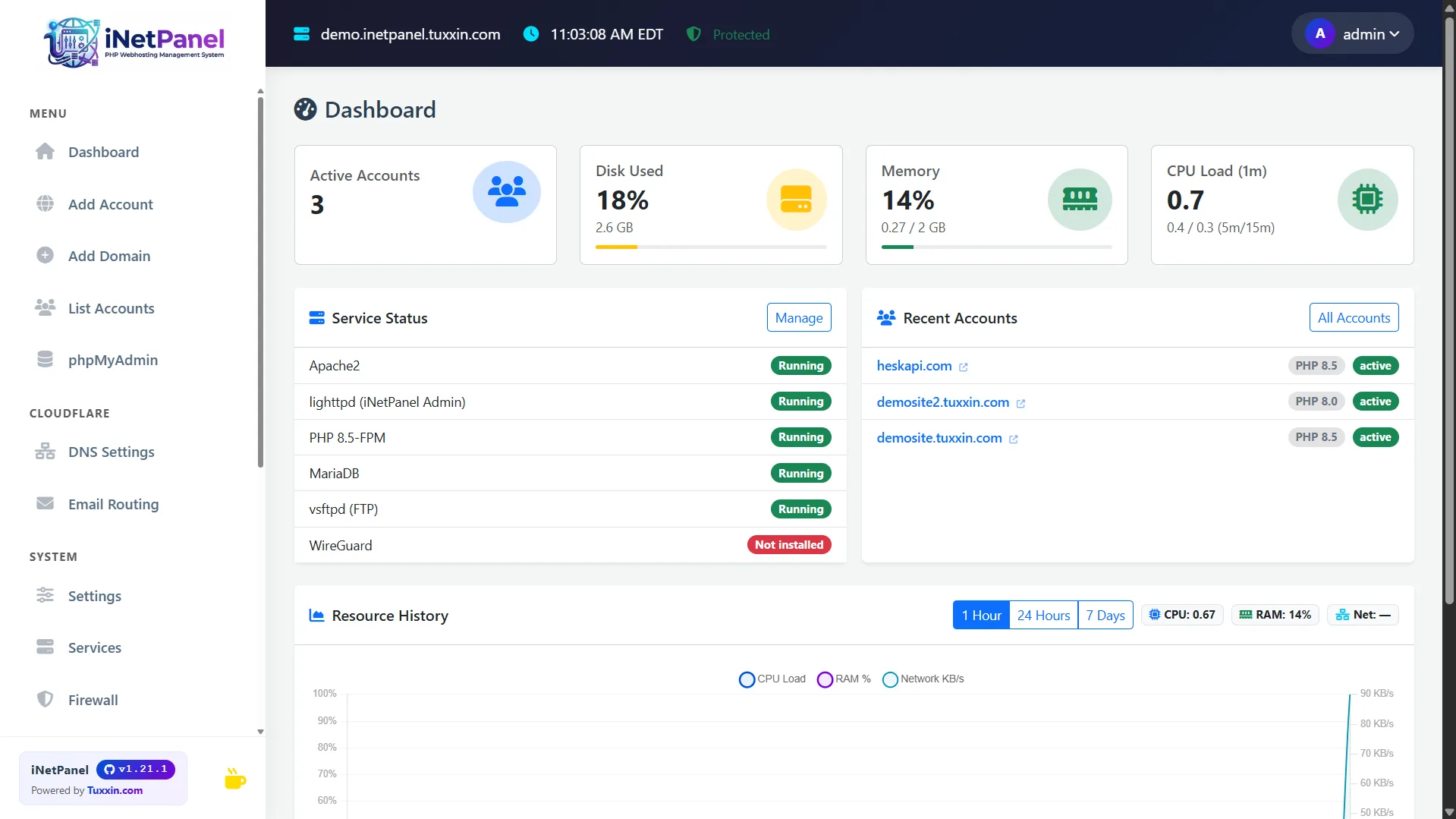
Full automated installation process, up and running in minutes
Full video: inetpanel.info/install
Website · Features · Screenshots · Documentation · Compare
Debian 13 (Trixie) is supported as of v1.26.0
Both Debian 12 (Bookworm) and Debian 13 (Trixie) are supported. Debian 12 left regular support on 2026-07-11 but remains on LTS until June 2028, so existing servers do not need to migrate.
New in the same release: the setup wizard is served over HTTPS from the first request. It collects the admin password and your Cloudflare API key, and previously those went over plain HTTP. The installer generates a self-signed certificate so setup is encrypted immediately — your browser will warn once, which is expected. Replace it with a trusted certificate at any time with
inetp panel_ssl <hostname>.
⚠️ Already running iNetPanel? (installed before v1.24.4)
v1.24.4 fixes a critical bug where creating accounts/domains/SSL silently breaks on previously-working servers: a routine PHP package update enabled php-fpm's
ProtectSystem=full, which mounts/etcread-only for the panel's root helpers (symptom:useradd: cannot lock /etc/passwdorRead-only file system).Most servers need no action — the nightly auto-update applies the fix automatically (it runs as root, outside the sandbox). Just make sure auto-update is on under Settings → Updates.
To apply it right away, or if auto-update is off, run once from a root shell:
inetp panel_update
# or:  php /var/www/inetpanel/scripts/panel_update.php
The web "Update Now" button can't apply this particular fix — it runs inside the sandbox it needs to change. After the fix applies, php-fpm is relaxed to
ProtectSystem=trueand the panel (including "Update Now") works normally again. Full details + backup recommendation: v1.24.4 release notes.
Quick Install
apt-get install -y curl && bash <(curl -s https://inetpanel.info/latest)
Requires a clean Debian 12 or 13 server with root access. The guided installer handles everything. (curl is not bundled with the Debian server ISO, so we install it first — the apt-get step is a no-op if curl is already present.)
Release Channels
| Channel | Installer | Updates | Use case |
|---|---|---|---|
| Stable | inetpanel.info/latest |
Tagged GitHub releases | Production servers (default) |
| Beta | inetpanel.info/latest-beta |
Latest code from main branch |
Testing new features before release |
The stable installer downloads the latest tagged release. Updates are pulled from GitHub Releases only when a new version is published.
The beta installer clones the main branch directly. Updates pull the latest commit from main, which may include untested changes.
You can switch between channels at any time in Settings → Updates → Release Channel without reinstalling.
Why iNetPanel?
Most hosting panels assume you have a VPS with a public IP and open ports. iNetPanel is built for the opposite scenario — a machine behind a NAT, a dynamic IP, an ISP that blocks port 80/443. With Cloudflare Tunnels, your domains route through Cloudflare's network directly to your server. No firewall rules, no DDNS hacks, no exposed attack surface.
Add a domain, and iNetPanel creates the Linux user, Apache vhost, PHP-FPM pool, MariaDB user, SSL certificate, DNS record, and Cloudflare tunnel route — all in one click.
Key Features
Hosting Management
- One-click account creation with Apache, PHP-FPM, FTP, SSL, and tunnel routing
- Multi-domain users — each domain gets its own vhost, document root and SSL certificate
- Client portal for hosting users with database management, SSH keys, file manager, and backups
- Multi-PHP version switching (5.6–8.5) per domain, via the sury.org repository
- Hook scripts for custom post-deploy automation
Security & Networking
- Cloudflare Zero Trust Tunnel — no ports exposed to the public internet
- Automatic Let's Encrypt SSL via DNS-01 challenge
- WireGuard VPN with auto-provisioned peers and full server lockdown option
- Firewall management (firewalld + fail2ban) from the panel
- External exposure scanning via qsa.sh — scan your public IP from outside your own network, straight from the Firewall page or the CLI. Reports open TCP ports, service versions, CVE matches and high-signal exposure checks, so you see what an attacker reaches rather than what the server believes about itself. The last 30 runs are kept on the server.
- Exposure change monitoring — scheduled re-scans that report only genuine changes (a new open port, a changed service version, a new finding). Alerts surface in the panel header and can be delivered to a Discord, Slack or ntfy webhook — no mail server required.
- Security details →
Tuxxin Services (optional)
Integrations with services from Tuxxin, the company behind iNetPanel. Each one works on its free tier with no account; a key adds coverage or raises its limits. Turn them on or off individually in Settings → Tuxxin Services — a module that is off never runs and sends nothing anywhere. New installs start with them on (except the whack.sh scan, which needs a key first); an upgrade leaves the new ones off until you turn them on.
| Module | Service | What it adds | What it sends |
|---|---|---|---|
| External Security Audit | qsa.sh | The exposure scan and monitoring above | Only the request itself |
| IP Intelligence | worldip.io | Country, network and reverse DNS for banned IPs, log entries and this server | The IP you click to look up |
| Domain & Certificate Watch | issued.live | Domain-registration and certificate expiry per hosted site | Hosted domain names, about daily |
| Site Screenshots | webshot.site | A weekly thumbnail of each hosted site | Hosted site URLs, about weekly |
| Malware & Phishing Scan | whack.sh | On-demand scan of a hosted site (needs a free whack.sh key) | The site URL, when a scan is asked for |
Keys, the qsa.sh token and the webhook URL are kept in /root/.inetpanel_tsvc/ (root-only),
never in the panel database. CLI: inetp tsvc status, inetp tsvc qsa run, inetp tsvc worldip <ip>.
Cloudflare Integration
- Full DNS record management (A, AAAA, CNAME, MX, TXT, SRV)
- DDoS mode and Development mode toggles
- Email routing management
- Dynamic DNS for changing IPs
Server Tools
- Real-time dashboard with CPU, RAM, disk, and network monitoring
- Automated backups with system config archiving
- Off-site backup copies to any S3-compatible bucket (AWS S3, Cloudflare R2, Backblaze B2, Wasabi, MinIO), with optional retention
- Image optimizer with AVIF generation
- phpMyAdmin auto-login from admin and client portals
- 35+ CLI commands for server management, security audits, and diagnostics
- Full feature list →
Requirements
- Debian 12 (Bookworm) or Debian 13 (Trixie) — clean install
- Root access
- Cloudflare account (recommended) — or manual port-based mode without Cloudflare
Links
| Website | inetpanel.info |
| Product Tour | Screenshots & walkthrough |
| Features | Full feature list |
| Compare | vs cPanel, Plesk, CloudPanel |
| Documentation | Install guide & docs |
| Install | Install guide |
| Issues | Report a bug |
Technical Stack
| Layer | Technology | Port |
|---|---|---|
| Admin panel | lighttpd + PHP-FPM | 443 (80 redirects) |
| Client portal | lighttpd (same) | 443 (80 redirects) |
| phpMyAdmin | Apache2 vhost | 8888 / 8443 (SSL) |
| Hosting sites | Apache2 SSL vhosts | 1080+ |
| Panel database | SQLite | — |
| Site databases | MariaDB (localhost) | 3306 |
| VPN | WireGuard | 1443/UDP |
| External scanning | qsa.sh (outbound HTTPS) | — |
| Tuxxin Services (optional) | worldip.io, issued.live, webshot.site, whack.sh (outbound HTTPS) | — |
Directory Layout
/var/www/inetpanel/          Panel installation
  ├── public/                Web root (only dir served by lighttpd)
  ├── TiCore/                Core PHP classes
  ├── api/                   JSON API endpoints
  ├── src/                   Admin page views
  ├── themes/                Layout templates (admin + client portal)
  └── db/                    SQLite database

/home/<username>/            Hosting user home
  ├── <domain>/              Domain directory
  ├── <domain>/www/          Public document root
  └── <domain>/logs/         Apache and PHP error logs

/root/scripts/               System scripts (deployed from repo)
/backup/                     Automated backups
Security: Only
public/is web-accessible. All other directories are loaded internally by PHP and unreachable via HTTP.
License
GPL-3.0 — see LICENSE
Created by Tuxxin · inetpanel.info