
tscircuit/simple-3d-svg
tscircuit/simple-3d-svg has 79 GitHub stars and 21 forks. GitHot measured +1 in 7 days. Last checked 2026-11-09 13:24 UTC. Last push 2025-09-28.
An extremely simple 3D SVG renderer (20KB minified)
Measured star growth
- in 24h
- Update delayed
- in 7 days
- +1
- in 15 days
- Update delayed
- in 1 month
- Update delayed
Net star changes over overlapping periods, not daily totals. Missing measurements are left blank. Stars measure attention, not software quality.
README.md
Original@tscircuit/simple-3d-svg
An extremely simple 3D SVG renderer.
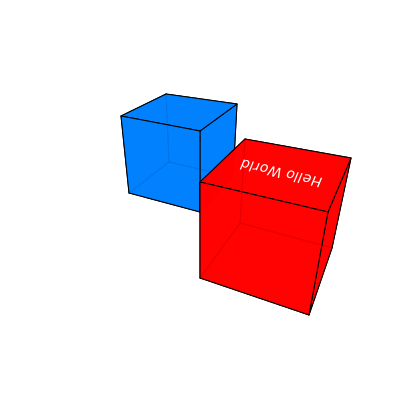
Usage
import { renderScene } from "@tscircuit/simple-3d-svg"

renderScene({
  boxes: [
    {
      center: { x: -1.5, y: 0, z: 6 },
      topLabel: "Hello World",
      topLabelColor: "white",
      faceImages: { top: "data:image/gif;base64,R0lGODlhAQABAIAAAAAAAP///ywAAAAAAQABAAACAUwAOw==" },
      size: { x: 2, y: 2, z: 2 },
      color: "rgba(255, 0, 0, 0.9)",
    },
    {
      center: { x: 1.5, y: 0, z: 8 },
      size: { x: 2, y: 2, z: 2 },
      color: [0, 128, 255, 0.9],
    },
  ],
  camera: { position: { x: -3, y: 4, z: 0 }, lookAt: { x: 0, y: 0, z: 6 } },
})
// "<svg>...</svg>"
Motivation
tscircuit projects often need to check the position of 3D objects relative to each other or see "3D Previews" of printed circuit boards for visual snapshot testing. However, 3D viewers are often reliant on heavy dependencies or browser features making them less portable and consistent.
@tscircuit/simple-3d-svg is a fully-typescript, zero-dependency SVG 3d
renderer that allows checking the positions and sizes of 3D objects in a scene
for visual snapshot testing.
Notes
- To correctly transform text for 3D, you need a perspective transform. However, the SVG spec only provides affine transforms. As a result, the text on the top of boxes will always look slighly "off".
- You can project an image onto the top face of a box by providing
faceImages.topwith a data URI. The renderer uses two clipped images to achieve a perspective-correct mapping.
Advanced Configuration
You can customize the rendering behavior by providing an options object as the second argument to renderScene.
focalLength
The focalLength option (default: 2) controls the perspective effect. Smaller values create a more pronounced perspective (wide-angle lens), while larger values create a flatter perspective (telephoto lens).
renderScene(
  {
    /* ... scene definition ... */
    camera: {
      position: { x: -3, y: 4, z: 0 },
      lookAt: { x: 0, y: 0, z: 6 },
      focalLength: 1.5, // Closer to a wide-angle lens
    },
  },
  {
    /* ... other options ... */
  },
)
backgroundColor
The backgroundColor option allows you to set the background color of the SVG. It accepts a color string (e.g., "white", "#FF0000") or an RGBA tuple (e.g., [255, 255, 255, 1]).
renderScene(
  {
    /* ... scene definition ... */
  },
  {
    backgroundColor: "lightblue",
    // or
    // backgroundColor: [173, 216, 230, 1]
  },
)
showAxes
Set showAxes to true to draw a small XYZ axis guide (about 8% of the SVG size)
in the lower left corner. Each arrow is labeled and points toward the positive
X, Y, or Z direction.
renderScene(
  {
    /* ... scene definition ... */
  },
  {
    showAxes: true,
  },
)
showOrigin
Enable showOrigin to draw lines extending from the world origin along the X, Y,
and Z axes. Segments going in the negative direction are dotted.
renderScene(
  {
    /* ... scene definition ... */
  },
  {
    showOrigin: true,
  },
)
Explore related projects
ytdl-org/youtube-dl
Command-line program to download videos from YouTube.com and other video sites
141,527 starsexcalidraw/excalidraw
Virtual whiteboard for sketching hand-drawn like diagrams
135,396 starsgodotengine/godot
Godot Engine – Multi-platform 2D and 3D game engine
119,942 starsmrdoob/three.js
JavaScript 3D Library.
117,983 stars