
tscircuit/jscad-fiber
tscircuit/jscad-fiber has 52 GitHub stars and 32 forks. GitHot measured 0 stars in 24 hours and +1 in 7 days. Last checked 2026-11-24 00:07 UTC. Last push 2026-11-09.
Measured star growth
- in 24h
- 0
- in 7 days
- +1
- in 15 days
- Collecting history
- in 1 month
- Collecting history
Net star changes over overlapping periods, not daily totals. Missing measurements are left blank. Stars measure attention, not software quality.
About
Create 3d CAD models with React using jscad
Creative & MediaREADME.md
Originaljscad-fiber
View examples · jscad · tscircuit · jscad-electronics
This package allows you to create 3D CAD objects with React and JSCAD.
Table of Contents
Installation
npm install jscad-fiber @jscad/modeling three @react-three/fiber
Usage
Create JSCAD components with React:
import { JsCadView } from "jscad-fiber"
import { Cube, Sphere, Subtract } from "jscad-fiber"

export default () => (
  <JsCadView>
    <Subtract>
      <Cube size={10} />
      <Sphere radius={6.8} />
    </Subtract>
  </JsCadView>
)
Common Props
All components support these common props:
| Prop | Type | Description |
|---|---|---|
color |
string | [number,number,number] |
CSS color string or RGB array |
center |
[number,number,number] | {x,y,z} |
Position in 3D space |
offset |
[number,number,number] | {x,y,z} |
Alternative to center |
Components
Basic Shapes
Cube
| Prop | Type | Description |
|---|---|---|
size |
number | [number,number,number] |
Single number for all dimensions or [width, height, depth] |
<Cube size={10} /> // Single number for all dimensions
<Cube size={[width, height, depth]} /> // Array for different dimensions
Sphere
| Prop | Type | Description |
|---|---|---|
radius |
number |
Sphere radius |
segments |
number |
Optional detail level (default: 32) |
<Sphere radius={10} segments={32} />
Cylinder
| Prop | Type | Description |
|---|---|---|
radius |
number |
Cylinder radius |
height |
number |
Cylinder height |
<Cylinder radius={5} height={10} />
Torus
| Prop | Type | Description |
|---|---|---|
innerRadius |
number |
Inner ring radius |
outerRadius |
number |
Outer ring radius |
innerSegments |
number |
Optional inner detail level (default: 32) |
outerSegments |
number |
Optional outer detail level (default: 32) |
<Torus
  innerRadius={10}
  outerRadius={15}
  innerSegments={32}
  outerSegments={32}
/>
Boolean Operations
Subtract
| Prop | Type | Description |
|---|---|---|
children |
React.ReactNode[] |
First child is base shape, others are subtracted |
<Subtract>
  <Cube size={10} /> {/* Base shape */}
  <Sphere radius={6} /> {/* Subtracted from base */}
</Subtract>
Union
| Prop | Type | Description |
|---|---|---|
children |
React.ReactNode[] |
Shapes to combine |
<Union>
  <Cube size={10} />
  <Sphere radius={6} center={[0,0,10]} />
</Union>
Hull
| Prop | Type | Description |
|---|---|---|
children |
React.ReactNode[] |
Shapes to create hull from |
<Hull>
  <Cube size={10} />
  <Sphere radius={6} center={[0,0,10]} />
</Hull>
Transformations
Translate
| Prop | Type | Description |
|---|---|---|
offset |
[number,number,number] |
Translation in [x,y,z] |
<Translate offset={[x,y,z]}>
  <Cube size={10} />
</Translate>
Rotate
| Prop | Type | Description |
|---|---|---|
angles |
[number,number,number] |
Rotation angles in radians [x,y,z] |
<Rotate angles={[x,y,z]}>
  <Cube size={10} />
</Rotate>
Extrusions
ExtrudeLinear
| Prop | Type | Description |
|---|---|---|
height |
number |
Extrusion height |
twistAngle |
number |
Optional twist during extrusion |
<ExtrudeLinear height={10}>
  <Polygon points={[[0,0], [10,0], [5,10]]} />
</ExtrudeLinear>
ExtrudeRotate
| Prop | Type | Description |
|---|---|---|
angle |
number |
Rotation angle in radians |
segments |
number |
Optional number of segments |
<ExtrudeRotate angle={Math.PI * 2}>
  <Polygon points={[[0,0], [10,0], [5,10]]} />
</ExtrudeRotate>
Component Props Reference
| Component | Props | Description |
|---|---|---|
| Cube | size: number | [number,number,number] |
Size in each dimension |
| Sphere | radius: number, segments?: number |
Radius and detail level |
| Cylinder | radius: number, height: number |
Basic cylinder dimensions |
| Torus | innerRadius: number, outerRadius: number, segments?: number |
Ring dimensions |
| ExtrudeLinear | height: number, twistAngle?: number |
Linear extrusion with optional twist |
| ExtrudeRotate | angle: number, segments?: number |
Rotational sweep |
| Polygon | points: [number,number][] |
2D points array |
| Translate | offset: [number,number,number] |
3D translation |
| Rotate | angles: [number,number,number] |
Rotation angles in radians |
| Hull | children: React.ReactNode |
Convex hull of children |
| Union | children: React.ReactNode |
Boolean union of children |
| Subtract | children: React.ReactNode |
Boolean subtraction |
Why?
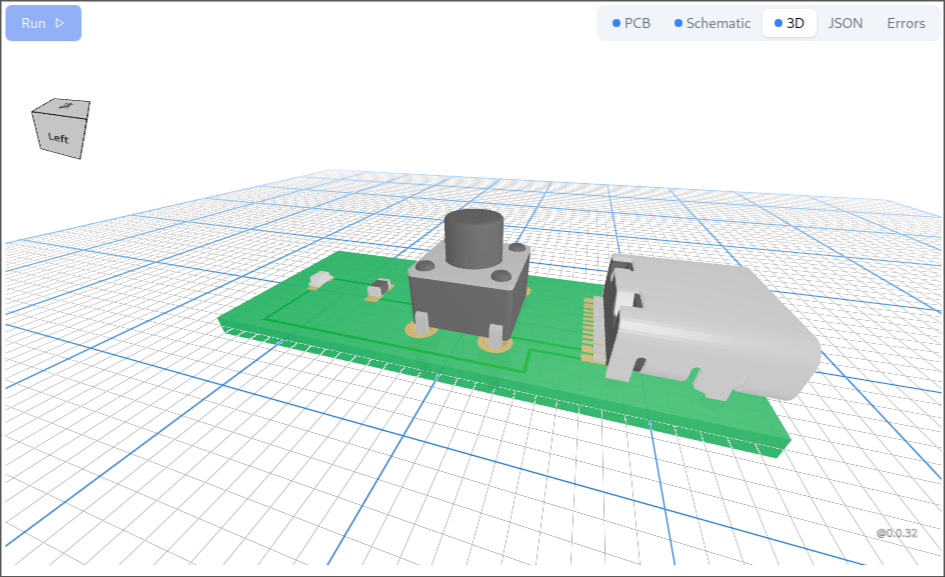
JSCAD allows you to create detailed 3D objects using boolean operations. This is how modern CAD tools create precise 3D models. jscad-fiber is used to create the 3D electronics library for tscircuit called jscad-electronics
Example Wrapper
The library includes an ExampleWrapper component that provides a convenient way to display both the rendered 3D object and its source code:
import { ExampleWrapper } from "jscad-fiber"

export default () => (
  <ExampleWrapper fileName={import.meta.url}>
    <JsCadView>
      <Sphere radius={10} color="orange" />
    </JsCadView>
  </ExampleWrapper>
)
This wrapper:
- Shows the rendered 3D object
- Provides a "Show Code" button that reveals the source code
- Automatically syntax highlights the code
- Makes examples more interactive and educational
Contributing
See the examples directory for more usage examples.
Pull requests welcome! Please check existing issues or create a new one to discuss major changes.
Headless plans and named reference rectangles
jscad-fiber/headless compiles pure JSX components to serializable JSCAD operation
JSON without importing the viewer, Three.js, or the modeling kernel. It supports
synchronous function components, fragments, arrays, and null children. Hooks,
async components, and raw Custom geometry are not supported by this compiler.
The lowercase jscad namespace exposes the planner-supported component subset;
the existing capitalized components remain available.
import { jscad, renderToJscadPlan } from "jscad-fiber/headless"

function Spacer() {
  return <>
    <jscad.extrudeLinear height={4}>
      <jscad.rectangle size={[42, 42]} />
    </jscad.extrudeLinear>
    <jscad.rotate angles={[0, Math.PI, 0]}>
      <jscad.rectangle name="motor" size={[42, 42]} reference />
    </jscad.rotate>
    <jscad.translate offset={[0, 0, 4]}>
      <jscad.rectangle name="board" size={[42, 42]} reference />
    </jscad.translate>
  </>
}

const plan = renderToJscadPlan(<Spacer />)
const json = JSON.stringify(plan)
A reference rectangle describes an attachment plane. It starts in local XY with
normal +Z and in-plane X direction +X; its center is the attachment point.
Ordinary transforms position and orient it alongside the solid. name must be
nonblank and unique within the part. reference excludes the rectangle from
native geometry rendering, so it cannot add material to a print.
The compiler preserves reference rectangles as standard polygon operations with
name and reference metadata. Consumers must extract references before sending
a plan to a geometry interpreter or exporter. Use resolveReferencePlanes from
a version of jscad-planner that provides named-reference extraction; older
interpreters do not understand the metadata. The returned geometry plan can be
executed by existing interpreters, while referencePlanes provides each name,
origin, normal, and in-plane X axis. Metadata lives in the planner/fiber layer;
no changes to @jscad/modeling are needed.
See the motor spacer example for a 4 mm plate,
four hollow posts on 31 mm centers, 3.2 mm M3 clearance holes, a 30 mm center
opening, and named motor and board reference planes. Dimensions in that
example are millimeters.
Native models with named extrusion outlines
import modeling from "@jscad/modeling"
import { ExtrudeLinear, Rectangle, Subtract, Translate, renderToJscadModel } from "jscad-fiber/model"

const model = renderToJscadModel(
  <Translate offset={[10, 20, 30]}>
    <ExtrudeLinear height={80} topOutlineName="top" bottomOutlineName="bottom">
      <Subtract>
        <Rectangle size={[40, 20]} />
        <Rectangle size={[34, 14]} />
      </Subtract>
    </ExtrudeLinear>
  </Translate>,
  modeling,
)
const top = model.referenceFeatures.top
// Native Geom2 containing both boundaries, plus its model-space matrix.
renderToJscadModel wraps the supplied native kernel using @tscircuit/jscad and
evaluates the existing host once. The kernel owns naming, cap construction and
reference propagation through transforms and CSG. Fiber collects names from the
resulting geometry; it has no separate ancestor-matrix traversal or cap collector.
topOutlineName refers to the full native profile at signed height, after the
final twistAngle in radians. bottomOutlineName refers to local Z=0. Read native
planar points first, then apply the returned full model-space matrix to [x,y,0].
Names preserve the profile's native Geom2/closed Path2 representation, including
holes. Names are unique within the model and nonblank. Named caps require exactly
one profile. The compatibility package also provides references.nameOutlines
for naming individual output boundaries in native JSCAD authoring.
References describe authored construction geometry. A subsequent cut retains those references without guessing which surviving B-rep edge inherits a name. They remain valid after JSCAD readers bake the solid's transforms.
Named Rectangle nodes use the same kernel mechanism. A reference rectangle
becomes an empty native geometry carrier, so it contributes no polygons while
following transforms and CSG. A model containing only datums returns an empty
geometries array with its referenceFeatures. Ordinary Custom geometry remains
supported; no special Custom naming API is introduced.
The /model entry is synchronous and viewer-free. It supports pure function
components, fragments, null/conditional children, and the normal native host
operations. Hooks and async components are unsupported. Return values remain
{ geometries, referenceFeatures }, with native planar geometry and full
column-major matrix on each reference.
renderToJscadPlan stores cap names in the standard extrusion options, ready
for the paired planner support. Execute named-cap plans with @tscircuit/jscad;
a legacy kernel throws explicitly instead of discarding the requested names.
Existing attachment-plane extraction via resolveReferencePlanes is unchanged.
Explore related projects
Loading…