
trzsz/trzsz.js
trzsz/trzsz.js has 201 GitHub stars and 17 forks. GitHot measured 0 stars in 24 hours and 0 in 7 days. Last checked 2026-11-25 08:39 UTC. Last push 2026-11-21.
Measured star growth
- in 24h
- 0
- in 7 days
- 0
- in 15 days
- Collecting history
- in 1 month
- Collecting history
Net star changes over overlapping periods, not daily totals. Missing measurements are left blank. Stars measure attention, not software quality.
About
trzsz.js is the js version of trzsz, makes terminal built with electron and webshell to support trzsz ( trz / tsz ).
Developer ToolsREADME.md
Originaltrzsz.js – Add trzsz (trz / tsz) Support to Web SSH and Terminal Apps




trzsz.js enables Web SSH terminals, webshells, and Electron-based terminal applications to natively support trzsz (trz / tsz), a tmux-compatible file transfer protocol similar to lrzsz (rz / sz).
Please check https://trzsz.github.io/py for more information about trzsz ( trz / tsz ).
Getting Started
Install the module
npm install trzszor
yarn add trzszUse in Node.js
import { TrzszFilter } from "trzsz";or
const { TrzszFilter } = require("trzsz");Use in browser
<script src="node_modules/trzsz/lib/trzsz.js"></script>Create
TrzszFilterobject for each connection.const trzszFilter = new TrzszFilter({ // The trzsz options, see below });Generally, the output of the server is forwarded to the terminal. Pass the output through
TrzszFilter.const trzszFilter = new TrzszFilter({ // The output will be forwarded back by TrzszFilter, unless the user runs ( trz / tsz ) on the server. writeToTerminal: (data) => terminal.write(typeof data === "string" ? data : new Uint8Array(data)), }); // forward the output to TrzszFilter webSocket.addEventListener("message", (ev) => trzszFilter.processServerOutput(ev.data));Generally, the user input is forwarded to the server. Pass the user input through
TrzszFilter.const trzszFilter = new TrzszFilter({ // The user input will be forwarded back by TrzszFilter, unless there are files being transferred. sendToServer: (data) => webSocket.send(data), }); // forward the user input to TrzszFilter terminal.onData((data) => trzszFilter.processTerminalInput(data)); // forward binary input to TrzszFilter terminal.onBinary((data) => trzszFilter.processBinaryInput(data));Let
TrzszFilterknow the terminal columns for rendering progress bar.const trzszFilter = new TrzszFilter({ // initialize the terminal columns terminalColumns: terminal.cols, }); // reset the terminal columns terminal.onResize((size) => trzszFilter.setTerminalColumns(size.cols));If the remote server is a Windows shell, such as
cmdandPowerShell.const trzszFilter = new TrzszFilter({ // There is a windows shell isWindowsShell: true, });If running in
Node.jsandTrzszFiltercanrequire('fs'),chooseSendFilesandchooseSaveDirectoryare required. If running in web browser, they will be ignored. Note that they areasyncfunctions.const trzszFilter = new TrzszFilter({ // call on the user runs trz ( upload files ) on the server and no error on require('fs'). chooseSendFiles: async (directory) => { // if `directory` is `true`, allow to choose multiple directories and files. // otherwise, only allow to choose multiple files. // return `undefined` if the user cancels. // return an array of file paths choosed by the user. return ["/path/to/file1", "/path/to/file2", "/path/to/directory3"]; }, // call on the user runs tsz ( download files ) on the server and no error on require('fs'). chooseSaveDirectory: async () => { // return `undefined` if the user cancels. // return a directory path choosed by the user. return "/path/to/directory"; }, });Support dragging files or directories to upload.
terminalHtmlElement.addEventListener("dragover", (event) => event.preventDefault()); terminalHtmlElement.addEventListener("drop", (event) => { event.preventDefault(); trzszFilter .uploadFiles(event.dataTransfer.items) .then(() => console.log("upload success")) .catch((err) => console.log(err)); });TrzszAddonis a wrapper forTrzszFilter. If you are using xterm-addon-attach, just replaceAttachAddonwithTrzszAddon.import { Terminal } from "xterm"; import { TrzszAddon } from "trzsz"; const terminal = new Terminal(); const trzszAddon = new TrzszAddon(webSocket); terminal.loadAddon(trzszAddon);
Examples
Browser web shell example.
Electron terminal app example.
TrzszAddon xterm addon example.
Screenshot
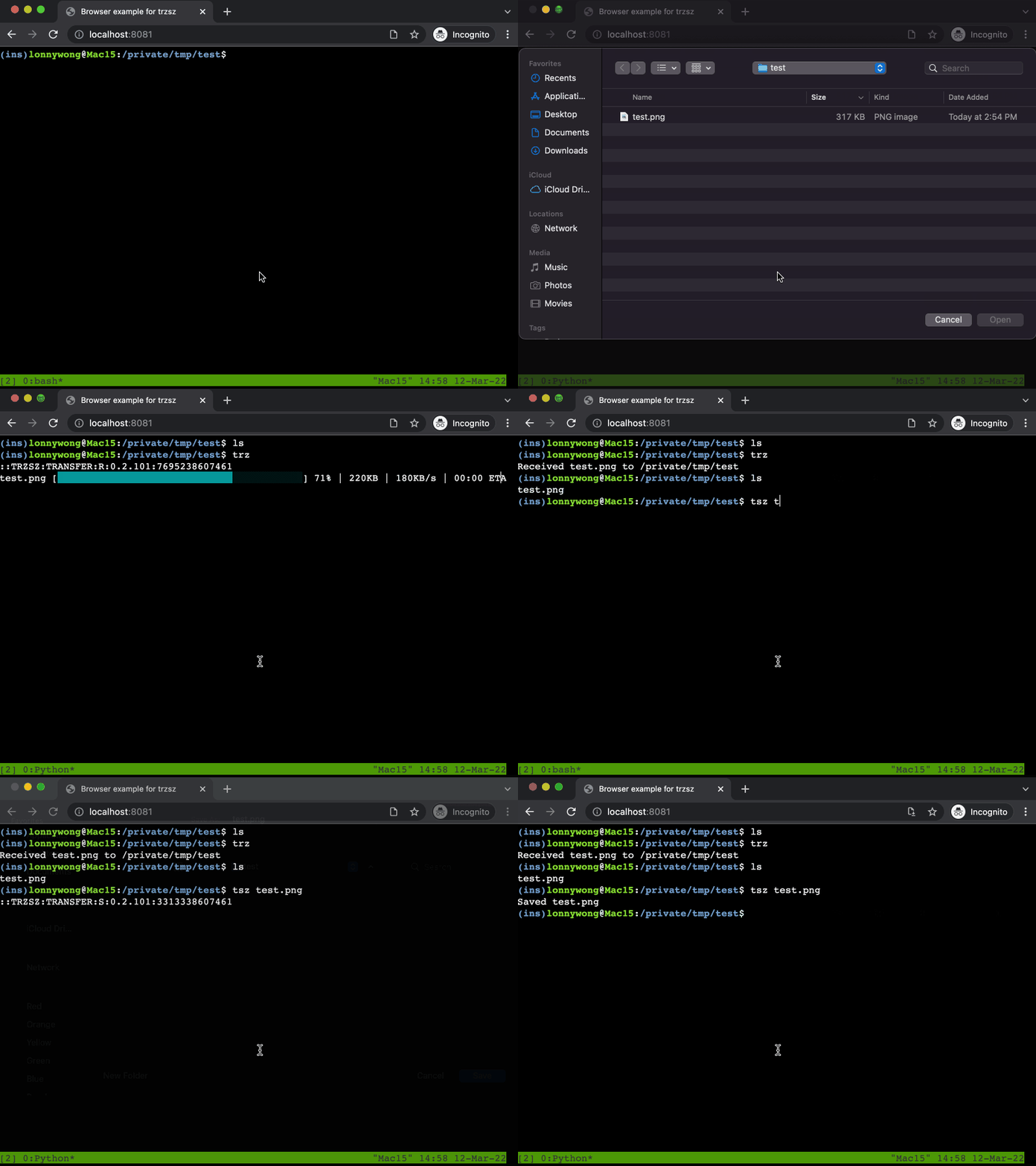
upload and download files in web browser
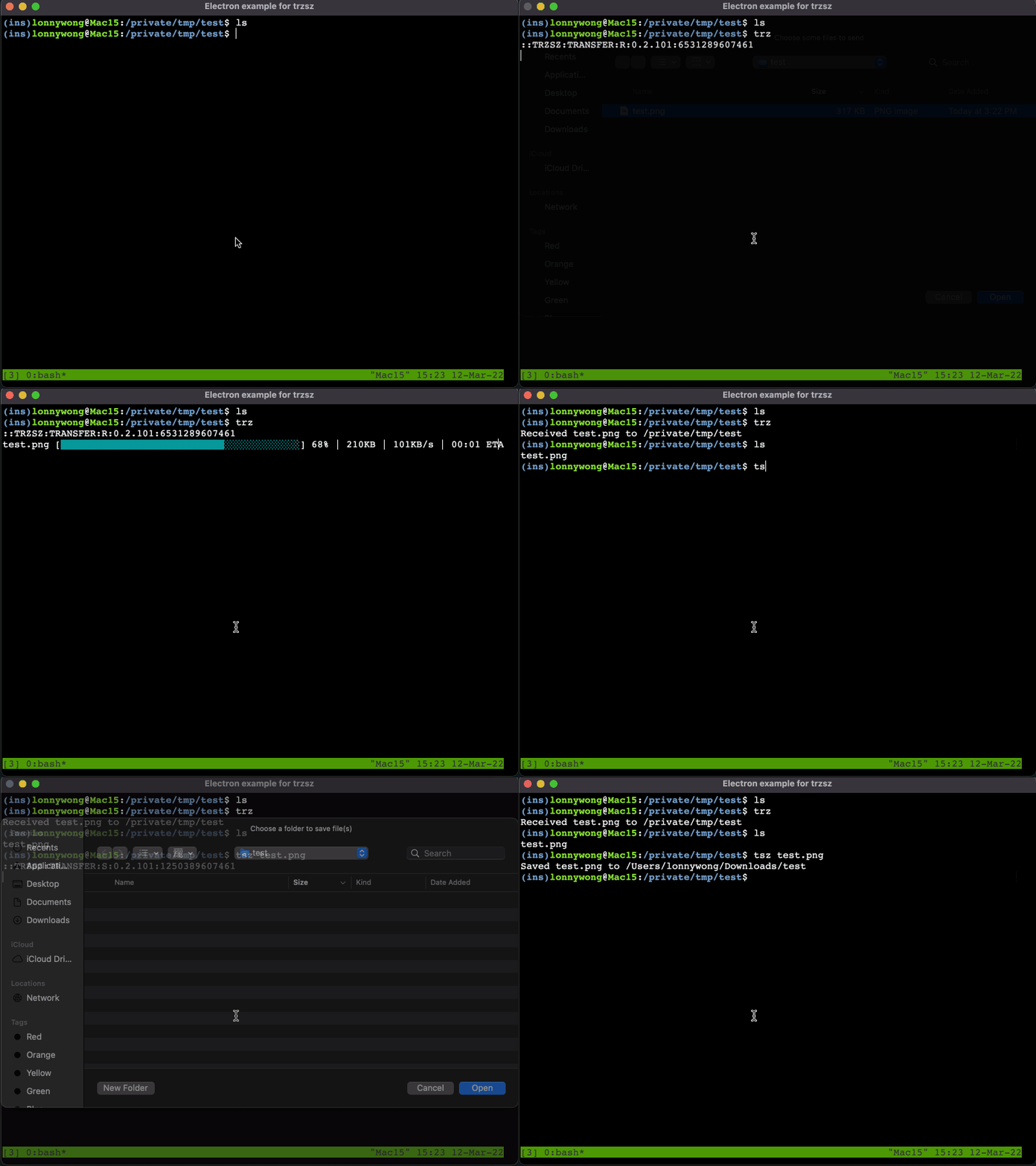
upload and download files in electron app
Contact
Feel free to email the author [email protected], or create an issue. Welcome to join the QQ group: 318578930.
Sponsor
❤️ Sponsor trzsz ❤️, buy the author a drink 🍺 ? Thank you for your support!
Explore related projects
Loading…