
trasta298/keifu
trasta298/keifu has 813 GitHub stars and 27 forks. GitHot measured 0 stars in 24 hours, 0 in 7 days, and +2 in 15 days. Last checked 2026-11-09 09:10 UTC. Last push 2026-10-12.
Git genealogy, untangled. A TUI for navigating commit graphs with color and clarity.
Measured star growth
- in 24h
- 0
- in 7 days
- 0
- in 15 days
- +2
- in 1 month
- Update delayed
Net star changes over overlapping periods, not daily totals. Missing measurements are left blank. Stars measure attention, not software quality.
README.md
Original🧬 keifu


See your branches. Follow your changes. Stay in the terminal.
keifu (系譜, /keːɸɯ/, “genealogy”) is a Git TUI for working across branches. Explore a color-coded commit graph, inspect diffs, and stage, commit, and push changes with the keyboard or mouse.
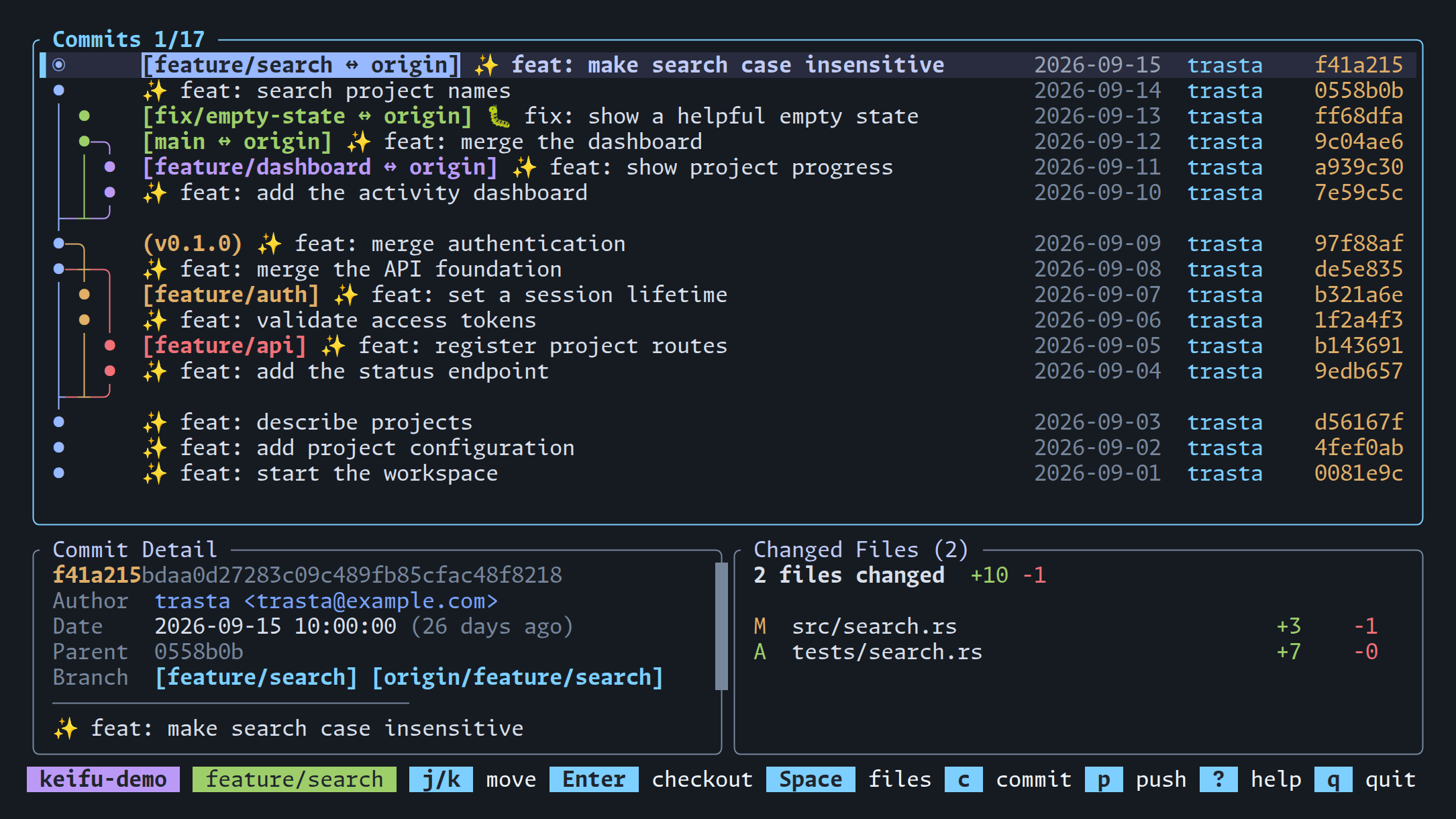
- Follow the graph — See where branches diverge and merge, with local branches, remotes, and tags in one view.
- Inspect the change — Open a file diff with syntax highlighting and word-level change emphasis.
- Keep work moving — Search and switch branches, stage files, write a commit, and push to origin.
- Fit your workspace — Use keyboard shortcuts, click and scroll each pane, or run in a narrow terminal split. No image protocol required.
The pane-preserving diff layout and drag-to-copy shown or described below are available in v0.7.0 and later.
Installation
From crates.io
cargo install keifu
With mise
mise use -g github:trasta298/keifu@latest
With Homebrew
brew install trasta298/tap/keifu
From source
git clone https://github.com/trasta298/keifu
cd keifu
cargo install --path .
Get started
Run inside a Git repository (or one of its subdirectories):
keifu
- Move through commits with
↑/↓orj/k, or click a row. - Press
Spaceto select a changed file, thenEnterto open its diff. - Press
Escto go back. Use/to find a branch, and?for help.
You need a terminal with Unicode and color support, and git in your PATH
for fetch/push. Cargo installation and source builds also need the Rust toolchain.
A quick tour
Read the diff with its context
See added and removed lines, syntax highlighting, and changes within a line.
Use n / N to move between files and ] / [ to jump between hunks.
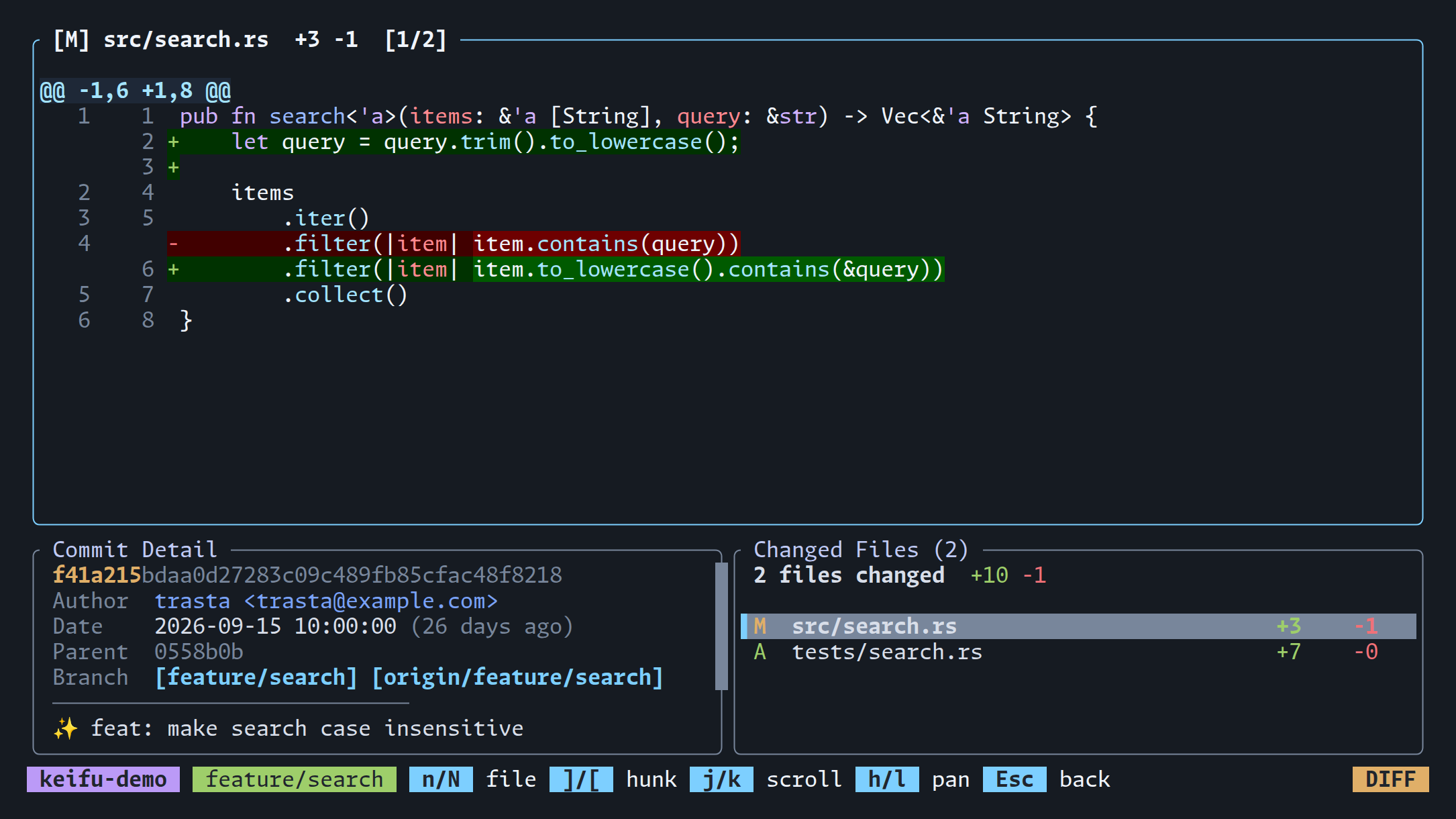
File diffs open fullscreen by default. The layout above keeps commit details and the file list visible:
keifu --file-view replace
Stage files and commit
Select uncommitted changes, press Space, then use s to stage or unstage
a file. a stages everything; u unstages everything. Press c to write a
commit message, then p from the graph to push the current branch to origin.
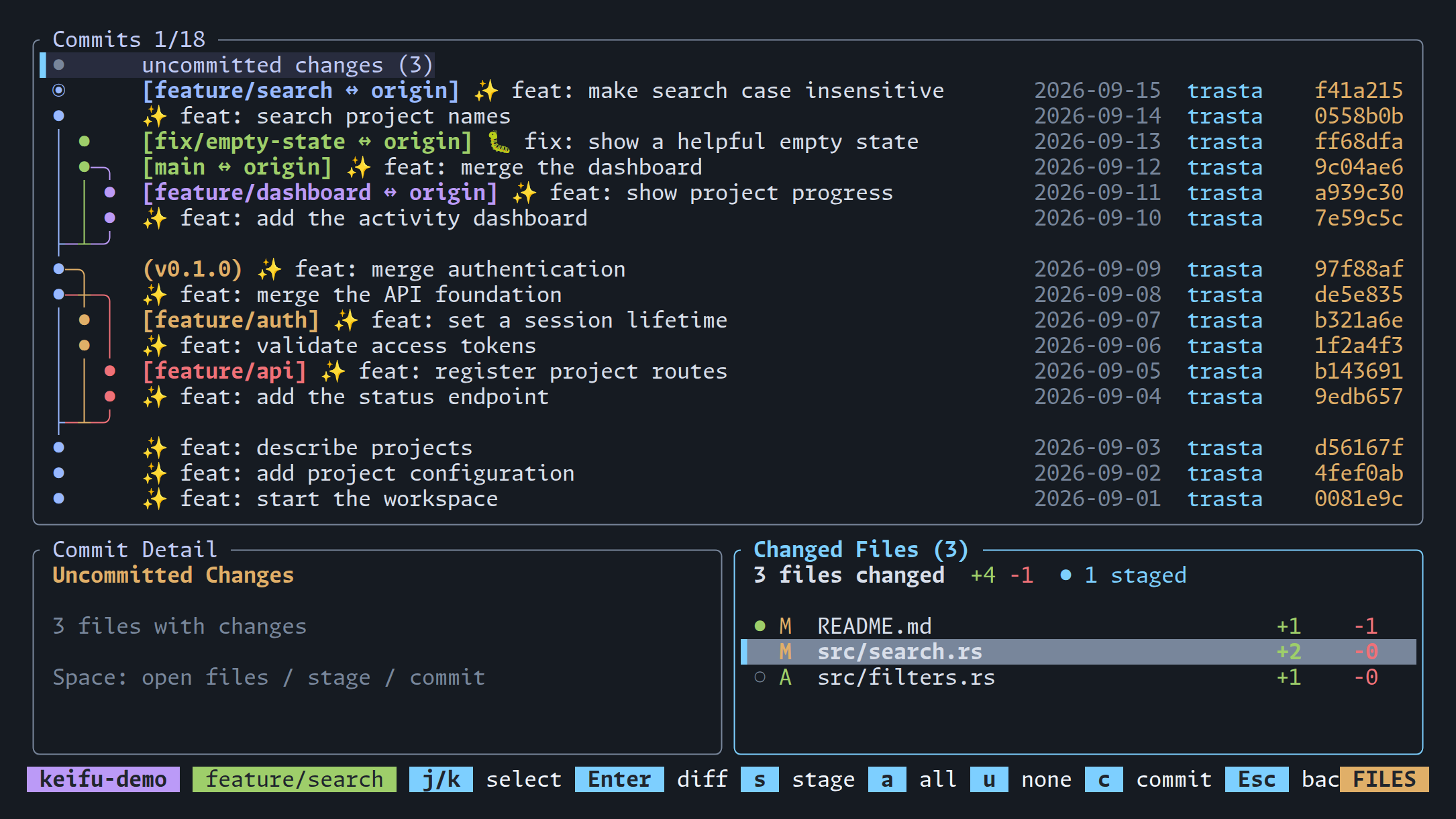
Staging is per file. A commit includes only staged changes.
Find the branch you need
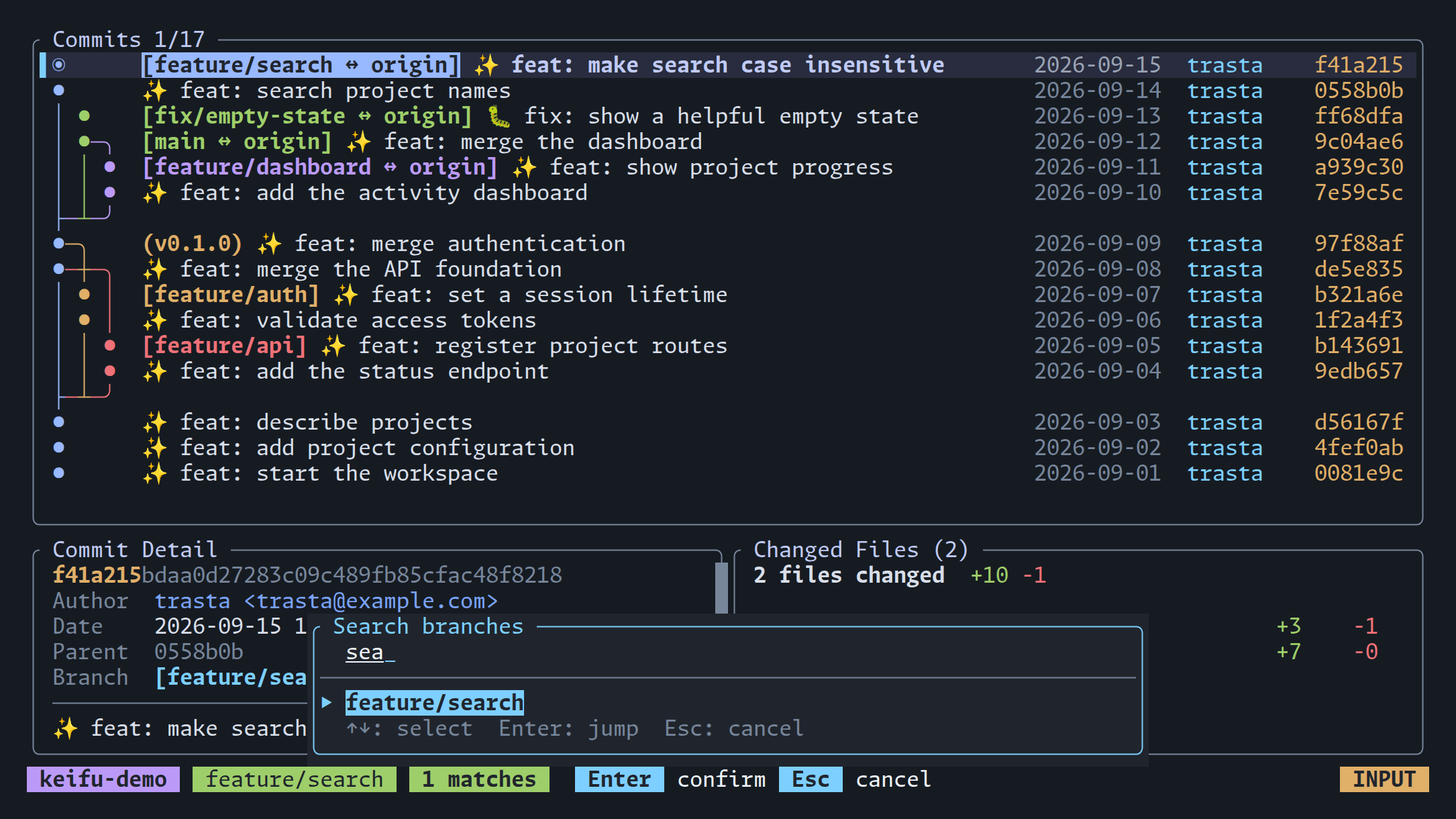
Press / and type part of a branch name. Fuzzy search filters the dropdown as
you type; Enter jumps to the selected result in the graph. Press Enter
again from the graph to check it out.
Keep it beside your editor
On narrow terminals, the detail panes stack vertically and less essential commit metadata is hidden to leave room for the graph and messages.
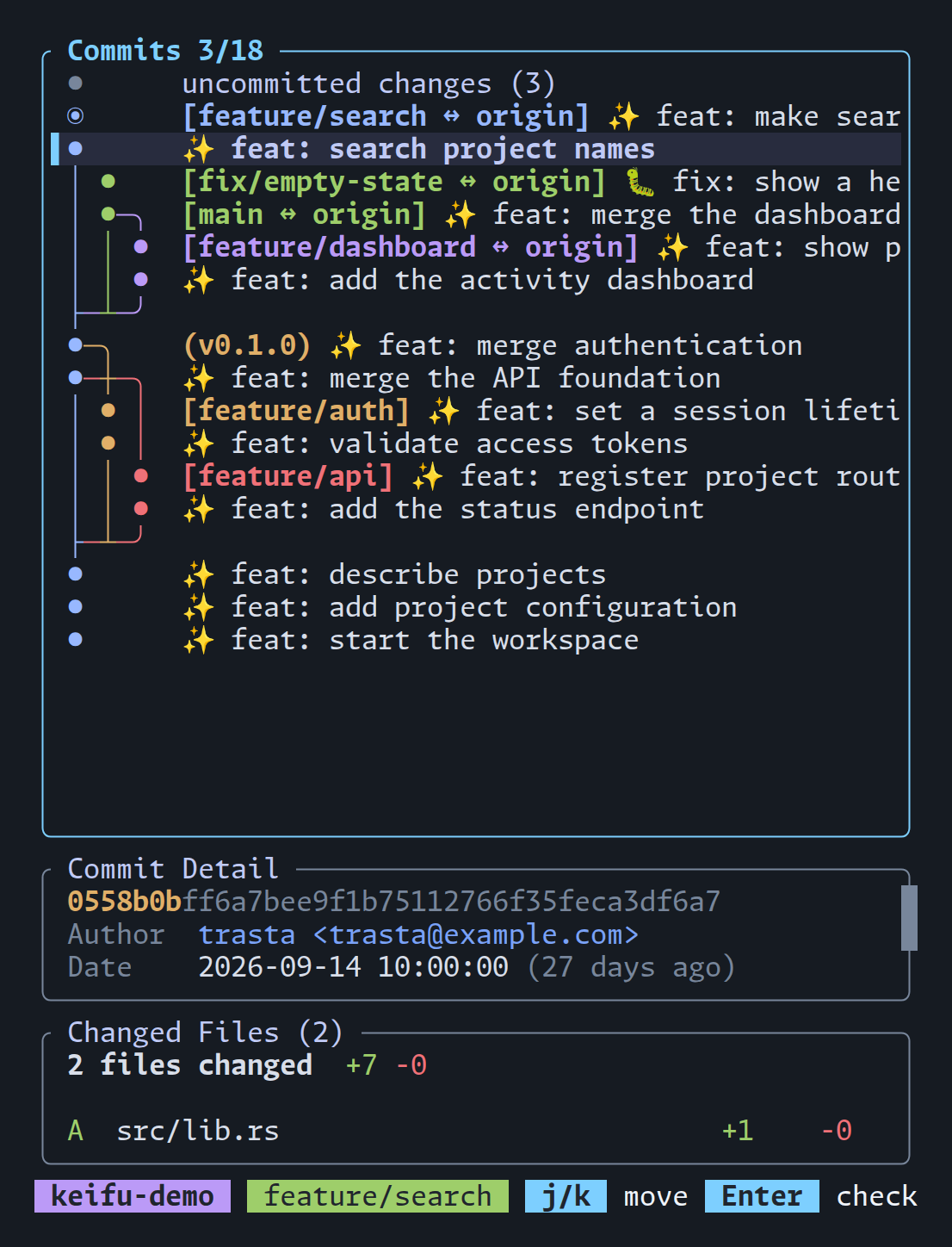
Use the mouse, too
Click a commit or file to select it; double-click to open its files or diff. Scroll the pane under the pointer, or click the action hints in the status bar. Drag across visible text within a pane and release to copy it via OSC 52 (requires terminal clipboard support).
Configuration
Set defaults in ~/.config/keifu/config.toml:
[ui]
file_view = "replace"
By default, keifu refreshes local state every 10 seconds and fetches from origin every 60 seconds. See the configuration guide to adjust or disable automatic updates, or change remote and tag visibility.
Keybindings
Press ? in the app for help.
Full keyboard and mouse reference
Navigation
| Key | Action |
|---|---|
j / ↓ |
Move down (scrolls the detail pane when focused) |
k / ↑ |
Move up (scrolls the detail pane when focused) |
Tab |
Switch pane focus (graph / commit detail) |
] |
Jump to next commit that has branch labels |
[ |
Jump to previous commit that has branch labels |
h / ← |
Select left branch (same commit) |
l / → |
Select right branch (same commit) |
Ctrl+d |
Page down |
Ctrl+u |
Page up |
g / Home |
Go to top |
G / End |
Go to bottom |
@ |
Jump to HEAD (current branch) |
Space |
Open changed file list |
Git operations
| Key | Action |
|---|---|
Enter |
Checkout selected branch/commit |
b |
Create branch at selected commit |
d |
Delete branch (local, non-HEAD) |
f |
Fetch from origin |
c |
Commit staged changes (opens message dialog) |
p |
Push current branch to origin |
File list (Space) / staging
Staging keys work when the "uncommitted changes" row is selected.
| Key | Action |
|---|---|
j / k |
Select file |
Enter |
Open file diff |
s |
Stage / unstage selected file |
a |
Stage all changes |
u |
Unstage all changes |
c |
Commit staged changes |
Esc / q |
Back |
Mouse
| Input | Action |
|---|---|
| Click on a commit row | Select commit (double-click opens the file list) |
| Click on a file row | Select file (double-click opens the diff) |
| Click on a pane | Focus the pane |
| Click on a status bar hint | Run that action |
| Wheel scroll | Scrolls the pane under the cursor |
| Left drag | Select visible text within a pane; release to copy (OSC 52) |
Clicks and double-clicks run on release, so dragging does not activate them.
Selection covers visible text only; scrolling or changing the view clears it.
Your terminal's native selection remains available with its modifier
(usually Shift + drag; Fn + drag on iTerm2).
Note: Ghostty currently fans one wheel notch out into multiple scroll events
for mouse-mode apps (ghostty#3955),
which can scroll a few extra lines per notch. Lowering mouse-scroll-multiplier
in the Ghostty config works around it.
Search
| Key | Action |
|---|---|
/ |
Search branches (incremental fuzzy search) |
↑ / Ctrl+k |
Select previous result |
↓ / Ctrl+j |
Select next result |
Enter |
Jump to selected branch |
Esc / Backspace on empty |
Cancel search |
File diff view
| Key | Action |
|---|---|
j / k / ↑ / ↓ |
Scroll up/down |
h / l / ← / → |
Scroll left/right |
Ctrl+d / Ctrl+u |
Half-page down/up |
Ctrl+f / Ctrl+b |
Full page down/up |
g / G |
Go to top/bottom |
0 |
Scroll to line start |
] / [ |
Jump to next/previous hunk |
n / N |
Jump to next/previous file |
Esc / q |
Back to file select / close |
Other
| Key | Action |
|---|---|
y |
Copy commit hash to clipboard (OSC 52) |
Y |
Copy branch name to clipboard (OSC 52) |
R |
Refresh repository data |
o |
Toggle remote branches |
t |
Toggle tags |
? |
Toggle help |
q / Esc |
Quit (returns focus to the graph first when the detail pane is focused) |
Notes and limitations
- The TUI loads up to 500 commits across the visible branches.
- Merge commits are diffed against the first parent; the initial commit is diffed against an empty tree.
- Changed files are capped at 50. Binary files are shown without line stats.
- If there are staged, unstaged, or untracked changes, an "uncommitted changes" row appears at the top.
- When multiple branches point to the same commit, the label is collapsed with a
+Ncount of other branch labels (e.g.,[main ↔ origin, origin_2, origin_3 +1]). A local branch and all same-named remote branches at that commit count as one label. Matching remote names are listed alphabetically after↔in both the collapsed label and the branch popup, including unselected branches. Remote branches at different commits or without a matching local branch remain separate. Useh/lor←/→to switch between labels. - Long branch names and remote lists are abbreviated to fit; commit details retain the full ref names.
- Checking out
origin/xxxcreates or updates a local branch. Upstream is set only when creating a new branch. If the local branch exists but points to a different commit, it is force-updated to match the remote. - Remote branches are displayed by default. Press
oto hide them; when hidden, commits reachable only from remote branches are excluded from the graph. - Tags are displayed by default. Press
tto hide them. - Delete operations only work with local branches.
- Fetch and push require the
originremote to be configured. Staging works per file (no hunk-level staging); commits include only staged changes, like plaingit commit.
Development
See debugging.md for file logging and the remote-control debug server, and screenshots/README.md to recreate the demo repository and screenshots.
License
MIT
Explore related projects
codecrafters-io/build-your-own-x
Master programming by recreating your favorite technologies from scratch.
561,398 starspublic-apis/public-apis
A collective list of free APIs
497,679 starsmorluto/rea
Reverse engineer anything with agents, from app behavior down to native binaries.
447,495 starsopenclaw/openclaw
The AI that really does things. Any OS. Any Platform. The lobster way. 🦞
394,261 stars