
traccia-ai/traccia-py
About
OpenTelemetry-native SDK for AI agent observability, tracing, evaluation, debugging, governance, and runtime policy enforcement. Framework-agnostic and built for OpenAI Agents, LangGraph, CrewAI, and LLM applications in production.
AIMeasured star growth
- in 24h
- 0
- in 7 days
- 0
- in 15 days
- Collecting history
- in 1 month
- Collecting history
Net star changes over overlapping periods, not daily totals. Missing measurements are left blank. Stars measure attention, not software quality.
README.md
Original
The AI agent control plane. Observe, evaluate, govern and prove what your agents do.
An open-source Python SDK for tracing, evaluations, prompt management, and runtime governance, built on OpenTelemetry.





Docs · Quickstart · TypeScript SDK · Free account · Changelog
- Observe.
init()traces every OpenAI, Anthropic, Gemini and Groq call, with tokens and cost on each span. Send traces to Traccia or to any OTLP backend. - Evaluate. Score your agent on a dataset with
evaluate(), locally or as a saved experiment, and fail a pull request when quality falls or cost or latency goes over your limit. Version prompts and load them at runtime. - Govern. Check each LLM and tool call before it runs: stop an agent that overspends, loops or calls the wrong tool.
- Prove. Keep evidence for the EU AI Act and HIPAA in the Compliance Hub.
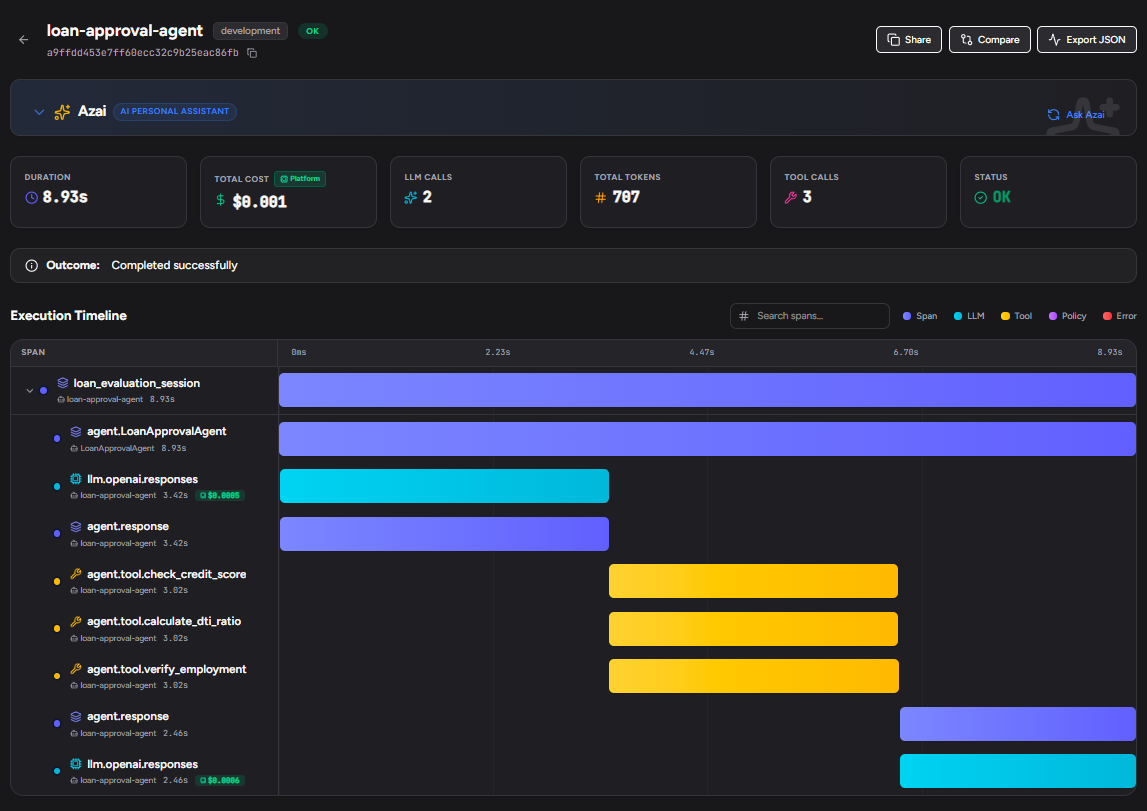
One agent run in Traccia: cost, tokens, every LLM and tool call, and how long each took.
Quickstart
No Traccia account needed. You need an OpenAI API key for this example.
1. Install
pip install traccia openai
export OPENAI_API_KEY="sk-..."
2. Trace your first call
from openai import OpenAI
from traccia import init, observe

init(use_otlp=False, enable_metrics=False, enable_console_exporter=True)  # print spans in your terminal
# init(endpoint="http://localhost:4318/v1/traces")  # or send them to Jaeger, Tempo, SigNoz...
# init()  # or to Traccia: set TRACCIA_API_KEY from app.traccia.ai

client = OpenAI()  # patched by init()

@observe()
def answer(question: str) -> str:
    resp = client.chat.completions.create(
        model="gpt-4o-mini",
        messages=[{"role": "user", "content": question}],
    )
    return resp.choices[0].message.content

answer("What is OpenTelemetry?")
3. See the trace
Each LLM span records the model, tokens, cost, prompt, completion and latency. It prints in your terminal, shows up in your OTLP backend (Jaeger, Grafana), or appears under Traces in Traccia like the run above.
Evaluate your agent
Run your agent over a small dataset and score every answer. This runs locally, with no Traccia account:
from traccia import evaluate

result = evaluate(
    "trivia-check",
    data=[
        {"input": {"question": "What is the capital of France?"}, "expected": "Paris"},
        {"input": {"question": "What is 12 * 12?"}, "expected": "144"},
        {"input": {"question": "Who wrote Hamlet?"}, "expected": "Shakespeare"},
    ],
    task=lambda input: answer(input["question"]),  # answer() from the quickstart
    scorers=["contains"],  # also exact_match, json_valid, or your own function
    persist=False,         # keep it local
)
print(result.summary())
If one of the three answers misses, it prints:
Experiment: trivia-check
Items: 3
Pass rate: 0.6666666666666666
Scored: 3
Errors: 0
Persisted: no (local-only)
Drop persist=False and the run is saved as an experiment in Traccia, where you can compare it with the last run side by side and score with an LLM judge. In CI, traccia eval fails the job when quality, cost or latency misses the bar you set (CI evals, GitHub Action). More: Evaluate.
Version your prompts
Keep prompts in the Traccia prompt registry, where each version is fixed once saved and the production label marks the one to serve. Your code loads whatever version holds the label:
from traccia import load_prompt

prompt = load_prompt(
    "support-reply",
    label="production",
    fallback={"type": "chat", "messages": [  # used if Traccia can't be reached
        {"role": "system", "content": "You answer billing questions for {{company}}."},
        {"role": "user", "content": "{{question}}"},
    ]},
)
messages = prompt.compile(company="Acme", question="Why was I charged twice?")
compile() fills in the {{variables}} and records the prompt name and version on the current span, so each trace shows which prompt produced it. Prompts are cached, and the fallback keeps your agent running if the registry is out of reach. More: Prompts.
Stop a runaway agent
@observe records what happened. @govern also decides whether the next call is allowed to happen. Policies live in the Traccia app, so you can change a limit without a deploy.
flowchart LR
    A["Your agent<br/>(@govern)"] --> B{"Policy check<br/>before the call"}
    B -->|Allow| C["LLM or tool runs"]
    B -->|Reshape| D["Runs on a cheaper model<br/>or with fewer tokens"]
    B -->|Deny| E["AgentBlockedError<br/>provider never called"]
    B -->|Hold| F["ApprovalPending raised<br/>approval queued"]
    C --> G["Spans over OTLP"]
    D --> G
    G --> H["Traccia"]
    G --> I["Or any OTLP backend:<br/>Tempo, Jaeger, Zipkin, SigNoz"]
In the Traccia app, create a Loop Cap policy with a maximum of 3 tool calls per run, set it to Block, and copy your API key.
from traccia import init, observe, govern, AgentBlockedError

init(api_key="...", agent_id="research-agent")  # API key from app.traccia.ai

@observe(name="web_search", as_type="tool")
def web_search(query: str) -> str:
    return f"results for {query}"

@govern(name="run_agent")
def run_agent(topic: str) -> None:
    while True:  # a bug: the agent never decides it has enough
        web_search(topic)

try:
    run_agent("agent observability")
except AgentBlockedError as exc:
    # The 4th search is denied before it runs.
    print(exc.reasons, exc.decision_id)
The same wrapper runs the other policies, for example:
- Spend Cap stops a model call that would go over your USD budget, or moves it to a cheaper model.
- Refund Guard stops a refund over your limit. For a middle amount,
@governraisesApprovalPendingand queues the request for a person to approve. - High-Risk Tool stops a tool you name, such as
delete_account.
See all policies. Each one runs in Observe (log a match), Warn (alert) or Block (stop the call) mode, so you can watch what a policy would stop before you turn it on.
If Traccia can't be reached, the check blocks the call by default. You can let calls through instead under Settings → Policy Enforcement, or locally with init(policy_fail_mode="open"). See Governance in the SDK.
Can't add the SDK? Use the Gateway
For an agent you can't change, such as a closed-source tool or an n8n workflow, point its OpenAI, Anthropic or Gemini client at the Traccia Gateway: change the base URL and add two Traccia headers. You keep your own provider key. The Gateway checks each model call, but it can't see tools or the rest of the run:
SDK (@govern) |
Gateway | |
|---|---|---|
| Spend Cap, Model Boundary | Yes | Yes |
| Loop Cap, tool guards (Refund Guard, High-Risk Tool, ...), Prompt Pin and the other SDK-only policies | Yes | No |
| What the trace shows | The whole run: tools, nested steps, every call | One span per model call |
Use one or the other for a given call, not both. Guides for LiteLLM, the Vercel AI SDK, n8n and more are in the Gateway docs.
Works with
- Model SDKs, patched automatically: OpenAI, Anthropic, Gemini (
google-genai), Groq - Agent frameworks: LangChain, CrewAI, OpenAI Agents SDK
- Coding agents, traced without the SDK: Claude Code, Cursor, GitHub Copilot
- Any OTLP backend: Grafana Tempo, Jaeger, Zipkin, SigNoz (exporters)
What needs an account
| Without an account | With a Traccia account | |
|---|---|---|
| Tracing, to the console or any OTLP backend | Yes | Yes, plus the Traccia app |
Local evals with evaluate(persist=False) |
Yes | Yes |
| Saved experiments, comparisons, LLM-judge scorers | No | Yes |
Prompt registry (load_prompt) |
Fallback only | Yes |
Runtime policies (@govern) |
No | Yes |
| The Gateway, human approval, the Compliance Hub | No | On paid plans |
There is a free plan. See pricing.
Docs
| Topic | Where |
|---|---|
| Install and first trace | Quickstart |
@observe, spans, async, errors |
The observe decorator |
evaluate(), scorers and experiments |
Evaluate |
load_prompt and the prompt registry |
Prompts |
@govern, policy checks, fail mode |
Governance in the SDK |
| Guardrail detection | Guardrails |
| Cost estimation and pricing overrides | Pricing |
| OpenTelemetry metrics | Metrics |
| Multi-agent services and parallel runs | Multi-agent · Parallel runs |
traccia.toml and environment variables |
Configuration |
traccia doctor, check, pricing, eval |
CLI |
| Full API | Python SDK reference |
| Something not working | Troubleshooting |
| Docs for your coding agent | traccia.ai/llms.txt |
Contributing
Bug fixes, integrations and examples are welcome. See CONTRIBUTING.md, and open an issue or a discussion first for anything large.
git clone https://github.com/traccia-ai/traccia-py.git
cd traccia-py
python -m venv venv && source venv/bin/activate
pip install -e ".[dev]"
pytest tests/ -v
If Traccia caught a bad call for you, a star helps other people find it.
Read this far? Come build Traccia with us.
If you want to work on Traccia full time, skip the cover letter. Email [email protected] with one specific thing: a trace the SDK got wrong, a policy you needed and couldn't build, or a part of this code you would rewrite and how.
"I'm passionate about AI" gets archived. A link to your pull request gets a reply.
License
Apache 2.0. Built on OpenTelemetry.
Explore related projects
Loading…