
tomakita/Colorful.Console
tomakita/Colorful.Console has 1,331 GitHub stars and 131 forks. GitHot measured 0 stars in 24 hours. Last checked 2026-11-08 06:42 UTC. Last push 2024-06-06.
Style your .NET console output!
Measured star growth
- in 24h
- 0
- in 7 days
- Collecting history
- in 15 days
- Collecting history
- in 1 month
- Collecting history
Net star changes over overlapping periods, not daily totals. Missing measurements are left blank. Stars measure attention, not software quality.
README.md
OriginalColorful.Console
Colorful.Console is a C# library that wraps around the System.Console class, exposing enhanced styling functionality.
How to Get It
- Download
Colorful.Consolefrom NuGet. - Perform a Git clone
Basic Usage
using System;
using System.Drawing;
using Console = Colorful.Console;
...
...
Console.WriteLine("console in pink", Color.Pink);
Console.WriteLine("console in default");

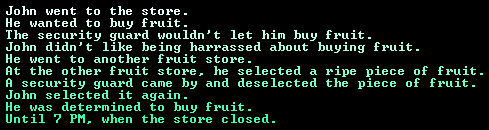
Write With Full System.Drawing.Color Support
int r = 225;
int g = 255;
int b = 250;
for (int i = 0; i < 10; i++)
{
    Console.WriteLine(storyFragments[i], Color.FromArgb(r, g, b));

    r -= 18;
    b -= 9;
}
Format Text Using Two Colors
string dream = "a dream of {0} and {1} and {2} and {3} and {4} and {5} and {6} and {7} and {8} and {9}...";
string[] fruits = new string[]
{
    "bananas",
    "strawberries",
    "mangoes",
    "pineapples",
    "cherries",
    "oranges",
    "apples",
    "peaches",
    "plums",
    "melons"
};

Console.WriteLineFormatted(dream, Color.LightGoldenrodYellow, Color.Gray, fruits);

Format Text Using Several Colors
string dream = "a dream of {0} and {1} and {2} and {3} and {4} and {5} and {6} and {7} and {8} and {9}...";
Formatter[] fruits = new Formatter[]
{
    new Formatter("bananas", Color.LightGoldenrodYellow),
    new Formatter("strawberries", Color.Pink),
    new Formatter("mangoes", Color.PeachPuff),
    new Formatter("pineapples", Color.Yellow),
    new Formatter("cherries", Color.Red),
    new Formatter("oranges", Color.Orange),
    new Formatter("apples", Color.LawnGreen),
    new Formatter("peaches", Color.MistyRose),
    new Formatter("plums", Color.Indigo),
    new Formatter("melons", Color.LightGreen),
};

Console.WriteLineFormatted(dream, Color.Gray, fruits);

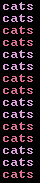
Alternate Between 2 or More Colors Based on Number of Console Writes
ColorAlternatorFactory alternatorFactory = new ColorAlternatorFactory();
ColorAlternator alternator = alternatorFactory.GetAlternator(2, Color.Plum, Color.PaleVioletRed);

for (int i = 0; i < 15; i++)
{
    Console.WriteLineAlternating("cats", alternator);
}
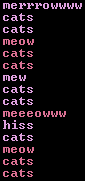
Alternate Between 2 or More Colors Based on 1 or More Regular Expressions
ColorAlternatorFactory alternatorFactory = new ColorAlternatorFactory();
ColorAlternator alternator = alternatorFactory.GetAlternator(new[] { "hiss", "m[a-z]+w" }, Color.Plum, Color.PaleVioletRed);

for (int i = 0; i < 15; i++)
{
    string catMessage = "cats";

    if (i % 3 == 0)
    {
        catMessage = meowVariant[meowCounter++];
    }
    else if (i % 10 == 0)
    {
        catMessage = "hiss";
    }

    Console.WriteLineAlternating(catMessage, alternator);
}
Style Specific Regions of Text
StyleSheet styleSheet = new StyleSheet(Color.White);
styleSheet.AddStyle("rain[a-z]*", Color.MediumSlateBlue);

Console.WriteLineStyled(storyAboutRain, styleSheet);

Style Specific Regions of Text, Performing a Simple Transformation
StyleSheet styleSheet = new StyleSheet(Color.White);
styleSheet.AddStyle("rain[a-z]*", Color.MediumSlateBlue, match => match.ToUpper());

Console.WriteLineStyled(storyAboutRain, styleSheet);

Style Specific Regions of Text, Performing a Transformation Based on Surrounding Text
StyleSheet styleSheet = new StyleSheet(Color.White);
styleSheet.AddStyle("rain[a-z]*", Color.MediumSlateBlue,
    (unstyledInput, matchLocation, match) =>
    {
        if (unstyledInput[matchLocation.End] == '.')
        {
            return "marshmallows";
        }
        else
        {
            return "s'mores";
        }
    });

Console.WriteLineStyled(storyAboutRain, styleSheet);

Convert Text to ASCII Art Using a Default Font
int DA = 244;
int V = 212;
int ID = 255;
for (int i = 0; i < 3; i++)
{
    Console.WriteAscii("HASSELHOFF", Color.FromArgb(DA, V, ID));

    DA -= 18;
    V -= 36;
}
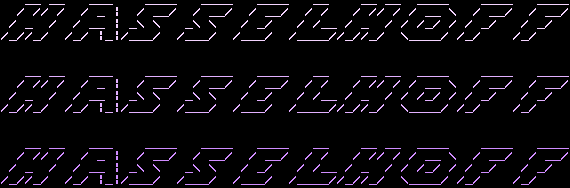
Convert Text to ASCII Art Using FIGlet Fonts
FigletFont font = FigletFont.Load("chunky.flf");
Figlet figlet = new Figlet(font);

Console.WriteLine(figlet.ToAscii("Belvedere"), ColorTranslator.FromHtml("#8AFFEF"));
Console.WriteLine(figlet.ToAscii("ice"), ColorTranslator.FromHtml("#FAD6FF"));
Console.WriteLine(figlet.ToAscii("cream."), ColorTranslator.FromHtml("#B8DBFF"));

Style Collections With a Gradient
List<char> chars = new List<char>()
{
	'r', 'e', 'x', 's', 'z', 'q', 'j', 'w', 't', 'a', 'b', 'c', 'l', 'm',
	'r', 'e', 'x', 's', 'z', 'q', 'j', 'w', 't', 'a', 'b', 'c', 'l', 'm',
	'r', 'e', 'x', 's', 'z', 'q', 'j', 'w', 't', 'a', 'b', 'c', 'l', 'm',
	'r', 'e', 'x', 's', 'z', 'q', 'j', 'w', 't', 'a', 'b', 'c', 'l', 'm'
};
Console.WriteWithGradient(chars, Color.Yellow, Color.Fuchsia, 14);

Usage Notes
Console colors can be set back to their defaults using the Colorful.Console.ReplaceAllColorsWithDefaults function.
Individual colors in the console's color palette can be replaced using the Colorful.Console.ReplaceColor function.
Colorful.Console can only write to the console in 16 different colors (including the black that's used as the console's background, by default!) in a single console session. This is a limitation of the Windows console itself (ref: MSDN), and it's one that we weren't able to work our way around. If you know of a workaround, let us know!
Explore related projects
codecrafters-io/build-your-own-x
Master programming by recreating your favorite technologies from scratch.
560,905 starspublic-apis/public-apis
A collective list of free APIs
497,149 starsmorluto/rea
Reverse engineer anything with agents, from app behavior down to native binaries.
442,207 starsopenclaw/openclaw
The AI that really does things. Any OS. Any Platform. The lobster way. 🦞
394,173 stars