
tjblackheart/andcli
tjblackheart/andcli has 162 GitHub stars and 3 forks. GitHot measured 0 stars in 24 hours. Last checked 2026-11-13 15:54 UTC. Last push 2026-11-11.
Measured star growth
- in 24h
- 0
- in 7 days
- Collecting history
- in 15 days
- Collecting history
- in 1 month
- Collecting history
Net star changes over overlapping periods, not daily totals. Missing measurements are left blank. Stars measure attention, not software quality.
About
A 2FA TUI for your shell
Developer ToolsREADME.md
Originalandcli
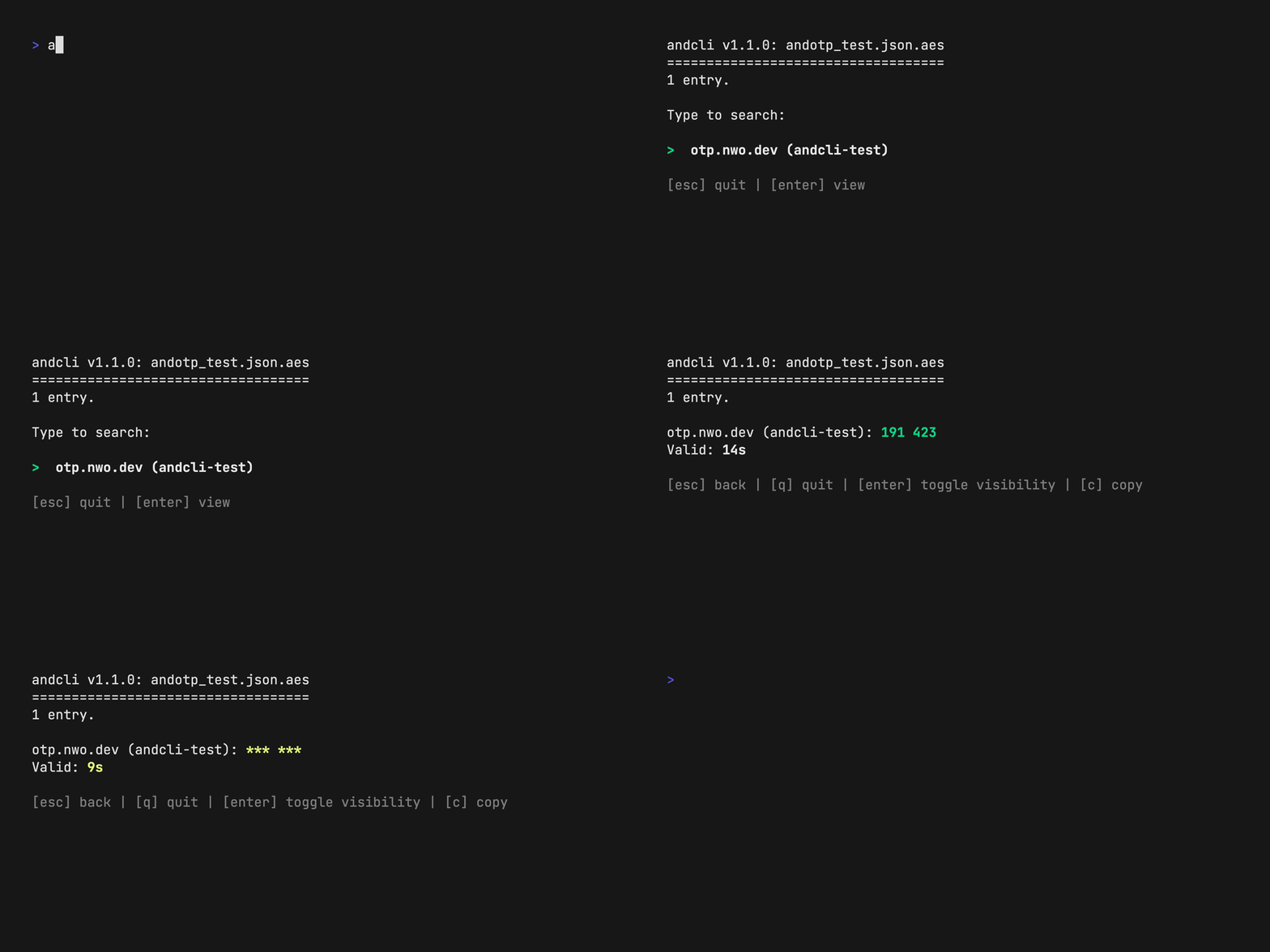
andcli lets you work with 2FA tokens directly in your shell, using encrypted backups exported out of your favourite 2FA apps. All the data is held in memory only and will never leave your machine.
andcli can handle input from the following providers (if they provide more than 2FA support, only the OTP related entries will be consumed):
- andotp
- Aegis
- 2fas
- Stratum / Authenticator Pro
- Keepass or anything else that exports *.kdbx v2
- ProtonPass in *.pgp and *.zip format
- Proton Authenticator
- Ente Authenticator
At the moment only TOTP entries are supported.
Installation
Download a prebuild release and place it somewhere in your $PATH. If you have Go installed you can install directly: go install github.com/tjblackheart/andcli/v2/cmd/andcli@latest.
Usage
- Export an encrypted, password protected backup from your app and save it into your preferred cloud provider (i.e. Dropbox, Nextcloud...).
- Start
andcliand point it to this file withandcli <path/to/file>. Specify the vault type via-t <type>. The path and type will be persisted, so you have to do this only once. - Enter the password.
- To search for an entry, type
/. - Navigate via keyboard, press
Enterto view a token and presscto copy it into the clipboard. Pressuto hide usernames for this entry, which are visible by default.
Since v2.1.3 it is possible to pipe the password from stdin and skip the input question: echo $PASSWORD | andcli --passwd-stdin
Keys
↑/k   up
↓/j   down
/     filter
enter toggle token visibility
u     toggle usernames visibility
c/y   yank token to system clipboard
q     quit
Clipboard config
By default andcli chooses the first available system clipboard tool. On Linux, it reads available environment variables and chooses in this order: termux-clipboard-set when running in Termux, wl-copy on Wayland, xclip -selection clipboard and xsel -b on X11. If no environment variables are found, it probes directly for wl-copy, xclip, and xsel binaries. macOS always uses pbcopy, Windows always uses clip.exe, and Android uses termux-clipboard-set.
If no system clipboard tool is found, andcli falls back to the OSC52 protocol and tries to copy via terminal escape sequences. This is useful for remote and SSH sessions, but requires terminal support and the success message might not be accurate.
If you need more control over this, you can either set your preferred command including all flags in the clipboard_cmd entry in the config file, or you could pass the full command via the -c flag, which then gets persisted. If you set your own command it will always be used instead.
Config file
The configuration is persisted in the default user home config directory. For Linux, this is $XDG_CONFIG_HOME/andcli. For MacOS, it's $HOME/Library/Application Support/andcli. For Windows it's C:\Users\$USER\AppData\Roaming\andcli.
If $XDG_CONFIG_HOME is set it will be used as the preferred config home dir on all OSes.
Theming
It's possible to adapt the application colors to your preferred color scheme. To do that, update the values in the config file found under theme. Each color has to be a valid hexadecimal string (i.e. #cc0000). If there are errors parsing your custom colors on application startup, default values will be used instead.
Querying
It's possible to use andcli without the TUI and query a vault directly: andcli --query 'something'. The result will be either a string separated by " " as in <Issuer> <Token> <ValidSecs> or, in the case of multiple/no matches, an error.
Session timeout
andcli will auto-quit after an adjustable time to not leave juicy info exposed in the open. The default session timeout is set to 300s (5 minutes) and can be adjusted via the --session-timeout flag or set directly as session_timeout in the config file. It can be disabled by setting this value to 0.
Options
Usage: andcli [options] <path/to/file>

Options:
  -c, --clipboard-cmd string   A custom clipboard command, including args (xclip, wl-copy, pbcopy etc.)
  -f, --file string            Path to the encrypted vault (deprecated: Pass the filename directly)
  -h, --help                   Show this help
      --passwd-stdin           Read the vault password from stdin. If set, skips the password input.
  -q, --query string           Query the vault directly and skip TUI functionality
      --session-timeout int    Auto-close after N seconds of inactivity (0=disabled) (default 300)
      --timeout int            Timeout for decrypting the vault file, in seconds (default 5)
  -t, --type string            Vault type (aegis, andotp, ente, keepass, proton, protonauth, stratum, twofas)
  -v, --version                Prints version info and exits
Implementing new vaults
A usable vault implementation for andcli has to implement an interface providing only one function called Entries(). Have a look at the current implementations to see how this works.
You can use the demo registration server implementation at tools/srv to quickly create some demo tokens for your vault.
Thanks
License
Explore related projects
codecrafters-io/build-your-own-x
Master programming by recreating your favorite technologies from scratch.
562,290 starspublic-apis/public-apis
A collective list of free APIs
498,719 starsmorluto/rea
Reverse engineer anything with agents, from app behavior down to native binaries.
457,064 starsopenclaw/openclaw
The AI that really does things. Any OS. Any Platform. The lobster way. 🦞
394,438 stars