
thomasthanos/nexusmods-bypass
thomasthanos/nexusmods-bypass has 165 GitHub stars and 5 forks. GitHot measured 0 stars in 24 hours. Last checked 2026-11-09 22:58 UTC. Last push 2026-11-06.
Queue Nexus Mods collections, skip repetitive steps, and resume your queue in Chrome, Firefox & Edge.
Measured star growth
- in 24h
- 0
- in 7 days
- Collecting history
- in 15 days
- Collecting history
- in 1 month
- Collecting history
Net star changes over overlapping periods, not daily totals. Missing measurements are left blank. Stars measure attention, not software quality.
README.md
Original










Manual install — Install from a ZIP
Chrome, Edge, Brave, Opera
- Download the latest
nexus.mods.bypass-<version>.zipfrom the Releases page.- Extract the
.zipfile into a new folder.- Open
chrome://extensions(oredge://extensions).- Enable Developer mode in the top right.
- Click Load unpacked and select the folder you just extracted.
Firefox 140 or newer
- Download the latest
nexus.mods.bypass-<version>-firefox.zipfrom the Releases page.- Open
about:debugging#/runtime/this-firefox.- Click Load Temporary Add-on and select the
.zipfile directly (no need to extract it).Temporary installation: A temporary add-on is unloaded when Firefox closes. Installing it permanently requires downloading from the official AMO store.
In Vortex mode, keep Vortex running: the browser can confirm a link was sent, not that Vortex finished the download.
Usage
On first install, the welcome page asks three setup questions and has a Test Vortex button. Sign in to Nexus Mods. On a mod's Files tab, download as usual. On a collection, pick Vortex or browser download in the collection panel and start the queue (keep the tab open). The toolbar popup has quick switches, Page settings and Help & Bugs. A collection run ends with a summary (sent / skipped / failed, retry failed, copy list); the collection menu's Download history shows what was sent to Vortex and resends what is missing.
Reference
Settings — Preferences and presets
- Quick setup: presets Vortex user, Browser downloads and Minimal (a mix shows as Custom).
- Download flow: auto-start, close the extra tab after sending to Vortex, check that Vortex opens (turn off for another mod manager that handles
nxm://links), skip requirements, error popups, hide ads and Premium panels, archived file buttons, Wabbajack import, smallest files first. - Files: browser download folder. Optional
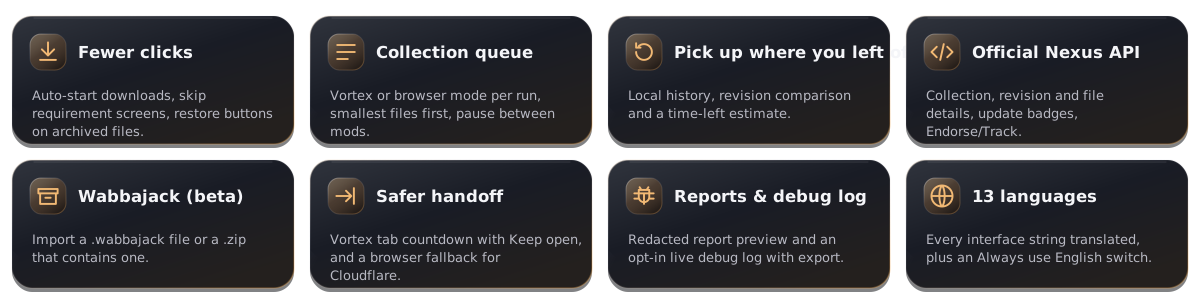
.metafiles for Mod Organizer 2 beside each file saved in the browser, from a mod page or a collection, so MO2 shows the mod's description and opens its Nexus page (off by default). - Official Nexus API: use the documented API for collection, mod and file details (on), follow curator update policy (off), endorse and track buttons (on). See docs/nexus-site-map.md.
- Advanced: request timeout (at least 15 seconds), close-tab delay, Vortex download speed and pause between files, official API, open a page when Nexus asks for a browser check (on by default, also for collections; turning it off asks first).
- Language: Always use English.
Privacy & permissions — Local data and access
Settings, history and logs stay in local extension storage; no analytics or accounts. Reports are opt-in and show the exact redacted JSON first. Details: PRIVACY.md.
| Permission | Used for |
|---|---|
storage |
Settings and local download history. |
downloads |
Starting and tracking browser downloads. |
downloads.ui |
Chrome/Edge only: hides the download bubble while a collection run is active (setting, on by default), restored when the run ends. |
scripting |
Injecting the extension's packaged UI on Nexus pages as needed. |
alarms |
Pacing the background queue. |
https://www.nexusmods.com/* |
The only site the extension operates on. |
Bug reports & debug log — Reports and diagnostics
- Send bug report (popup → Help & Bugs, or Add details on an error): describe it, review the redacted JSON, then send through the relay, save/copy it, or open a prefilled GitHub issue.
- Ideas and questions (Help & Bugs → Report on GitHub → Idea or suggestion or Question, or Suggest an idea in the settings): open a new GitHub discussion in Ideas or Q&A, where others can upvote and answer. Bug reports stay issues.
- Debug log (Help & Bugs → Debug log): opt-in live log with filters, search and export.
- Automatic error reports: off by default. A one-time, keyboard-accessible invitation on Nexus Mods after an update lets you opt in with one click, without another browser permission. New extension faults send minimal technical diagnostics; repeated faults are grouped, failed sends retry, and you can switch reporting off at any time.
Quick fixes — Common download problems
Downloads do not start
Sign in to Nexus Mods and enable Start downloads automatically in Page settings.
Vortex does not receive the file
Start Vortex first, and sign it in to the same Nexus account as this browser: Vortex refuses links made for another account. In Vortex, Settings → Download → Handle Mod Manager Download buttons on nexusmods.com must be on (on Linux, whichever mod manager registered for
nxm://last receives the links). If Vortex stays in the background, look in its Downloads tab: the file may already be there.The collection queue pauses or runs slowly
Rate limits pause the queue temporarily; it resumes automatically. Keep the collection tab open and Hide ads and Premium panels enabled, so its ad-timer cookie stays current for the background queue.
Already downloaded files start again
Choose Skip Downloaded when the history dialog appears. Cleared history cannot identify files already on disk.
Files are saved in the wrong folder
Browser download folder in Page settings is a folder inside the browser's download location, such as
NexusMods; a browser lets an extension save nowhere else, so a full path likeD:\modscannot go there. To save toD:\mods, choose it as the download location in the browser's own settings and leave Browser download folder empty (the default since 3.3.2). Vortex keeps its own download folder.Opera: a file in a folder set here goes inside the system
Downloadsfolder, not the location chosen in Opera's settings. Leave Browser download folder empty and Opera saves each file where it saves its own downloads.
For developers — Build and test
npm ci && npm run lint
npm run build          # regression checks, then Chrome and Firefox zips
npm run test:visual    # Playwright tests
See CONTRIBUTING.md, docs/nexus-site-map.md and SECURITY.md.
The independent private diagnostics service and mobile dashboard live in workers/diagnostics/, with their own dependencies and tests. Deployment and extension-client integration are separate setup steps; the shipped extension continues to use the existing reporting relay and consent settings.
Licence
Source-available under the repository licence; the name, src/icons/ and docs/store/ are excluded. src/content/nnw.js is GPL-3.0-or-later, based on Nexus No Wait ++ — see third-party notices.

Explore related projects
n8n-io/n8n
Fair-code workflow automation platform with native AI capabilities. Combine visual building with custom code, self-host or cloud, 400+ integrations.
209,959 starslanggenius/dify
Build Agentic workflows, RAG pipelines, with rich AI model and tool support on one collaborative workspace. Deploy on cloud, VPC, or self-hosted, so teams move from prototype to production without rebuilding the stack.
160,773 starsmicrosoft/PowerToys
Microsoft PowerToys is a collection of utilities that supercharge productivity and customization on Windows
140,755 starsstablyai/orca
Orca is the place for working with a fleet of agents (e.g. Grok Bot, Claude Code). Run any coding agent with your own subscription. Available on desktop, mobile and remote runtime.
120,604 stars