
theopenbee/openbee
theopenbee/openbee has 48 GitHub stars and 3 forks. GitHot measured 0 stars in 24 hours. Last checked 2026-11-15 15:27 UTC. Last push 2026-11-14.
Measured star growth
- in 24h
- 0
- in 7 days
- Update delayed
- in 15 days
- Update delayed
- in 1 month
- Update delayed
Net star changes over overlapping periods, not daily totals. Missing measurements are left blank. Stars measure attention, not software quality.
About
OpenBee turns the agent CLIs you already use — Claude Code, Codex or pi — into a team of always-on workers.
Self-hostedREADME.md
Original
OpenBee — Build reliable AI teams.
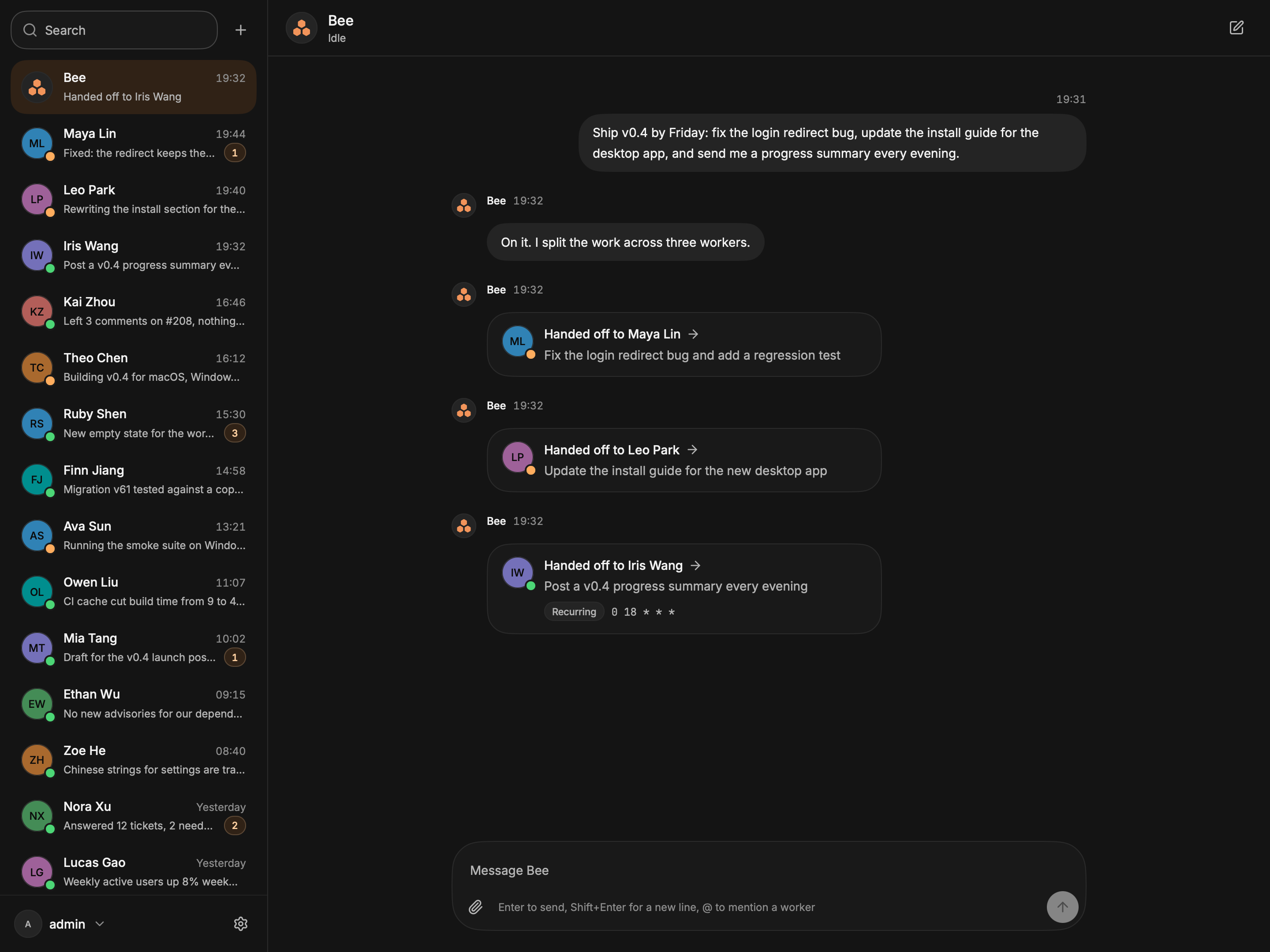
OpenBee turns the agent CLIs you already use — Claude Code, Codex or pi — into a team of always-on workers. Message Bee, the coordinator, from the desktop app, the browser or your chat app, and Bee hands the job to the right worker. In a chat app, the result comes back to the same chat. In the desktop app and the browser, each task gets its own worker chat, opened from Bee's handoff card.






Is it for you?
OpenBee fits if you want to:
- Delegate by chatting. Say what you need; a worker does it on your machine. In a chat app it replies in the same chat; in the desktop app and the browser it reports in its own chat.
- Run several agents at once. Each worker has its own engine, working folder and rules.
- Schedule work. Run tasks now, after a delay, or on a cron schedule.
- Reach it from anywhere. Use the desktop app, the web console, or Lark, DingTalk, WeCom, WeChat, Telegram, Discord and Linear.
- Self-host. It runs on your computer or server, and your data stays in
~/.openbee.
You need one agent CLI — Claude Code, Codex or pi — installed and signed in. OpenBee drives it and ships no model of its own.
Quick start
🖥️ Desktop app — for your own computer
The server is built in, so this is all you install.
brew install --cask theopenbee/tap/openbee-desktop             # macOS

scoop bucket add theopenbee https://github.com/theopenbee/scoop-bucket
scoop install theopenbee/openbee-desktop                       # Windows
On Linux, or to skip the package manager, download it from Releases. Open the app, create the admin account, then install the engine for your CLI under Settings → Plugins → Marketplace.
Builds are not code signed yet. If the first launch is blocked, see First launch.
🌐 Server — for an always-on machine
npm install -g @theopenbee/cli
openbee server -d
openbee plugin install claude   # or codex, pi
Open http://localhost:19876 and create the admin account. Other install methods are in Server and CLI.
💬 Then talk to Bee
Create a worker named Maya for backend fixes, working in ~/code/api.
Bee creates the worker. Hand it a task the same way. To chat from Lark, Telegram or another app, add a channel plugin.
Documentation
- Desktop app: downloads, first launch, the built-in server, the client-only build, building from source
- Server and CLI: install methods, config and data files, everyday commands
- Plugins: engines and chat channels, from the app or the command line
- theopenbee.com/docs: guides for workers, tasks, constraints and chat apps
- Write a plugin: channel protocol, engine protocol
🤝 Community
- 🐛 Bug reports / Feature requests → GitHub Issues
- 🤝 Contributing → Please read the Contributing Guide. You must agree to the Contributor License Agreement (CLA) before submitting.
📄 License
OpenBee is licensed under the GNU Affero General Public License v3.0.
Copyright (c) 2026 TENGYONGZHI