
theappfoundryco/personal-homelab-server
theappfoundryco/personal-homelab-server has 9 GitHub stars and 0 forks. GitHot measured 0 stars in 24 hours. Last checked 2026-11-12 11:58 UTC. Last push 2026-11-07.
A private, self-hosted assistant for your day: a dashboard, a Telegram bot and optional apps for monitoring and local AI. Runs in Docker on your own machine.
Measured star growth
- in 24h
- 0
- in 7 days
- Update delayed
- in 15 days
- Update delayed
- in 1 month
- Update delayed
Net star changes over overlapping periods, not daily totals. Missing measurements are left blank. Stars measure attention, not software quality.
README.md
Original
Personal homelab server
Your day, your data, your machine. A private assistant that runs at home: a dashboard, a Telegram bot and optional apps for monitoring and local AI.



macOS and Linux · MIT licence · made by The App Foundry
curl -fsSL https://raw.githubusercontent.com/theappfoundryco/personal-homelab-server/main/get.sh | bash
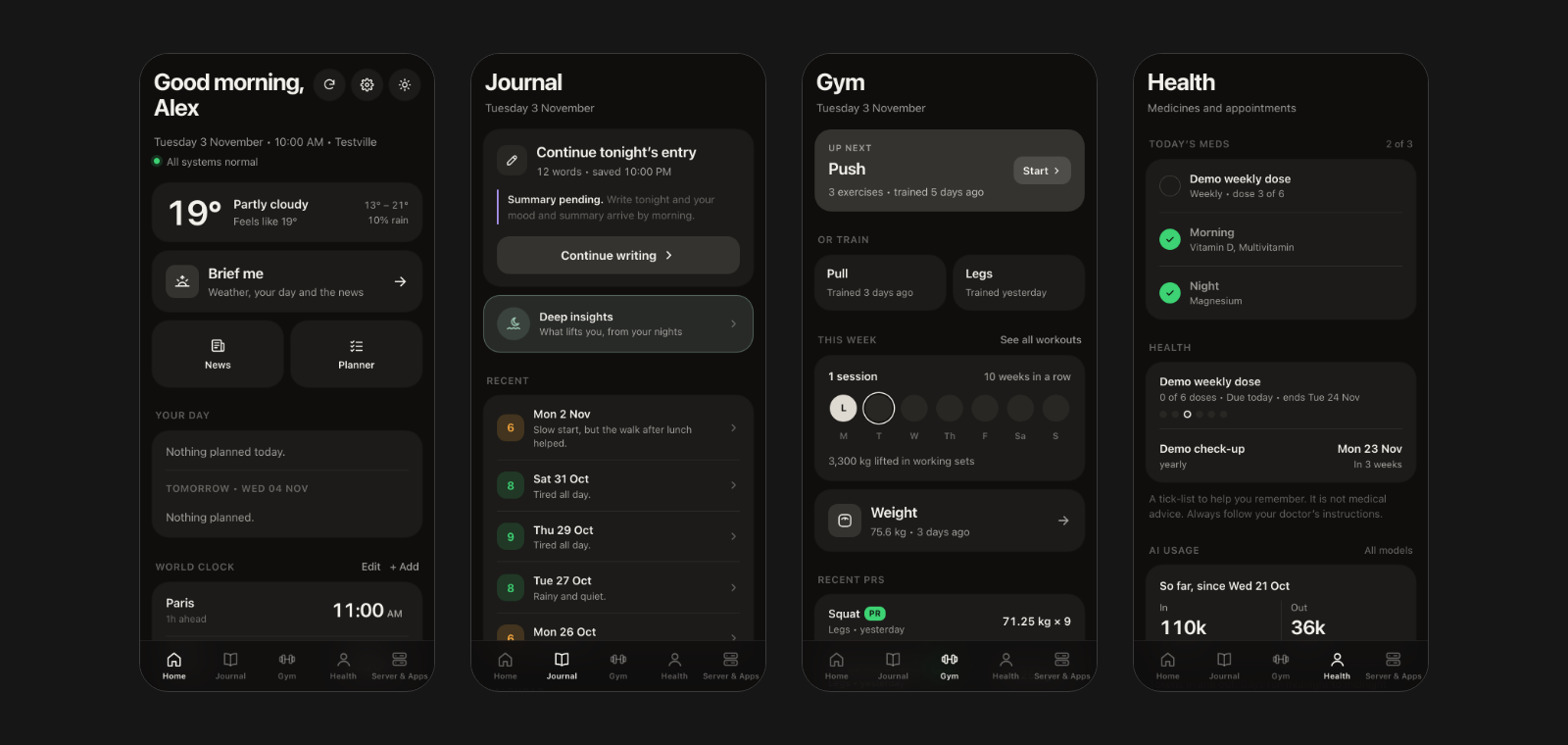
Demo data only.
What it is
One install gives you a dashboard that works like an app on your phone, a Telegram bot that understands plain words, and a command line to look after it all. Everything runs in Docker on a computer you own. Your data lives in ~/.homelab, outside the project folder, and updates never touch it.
It adapts to the machine it runs on. A setup wizard looks at your hardware and suggests sensible AI models, and every optional feature shows a clear message and a fix when its dependency is missing, instead of breaking.
What you get
| Area | What it does |
|---|---|
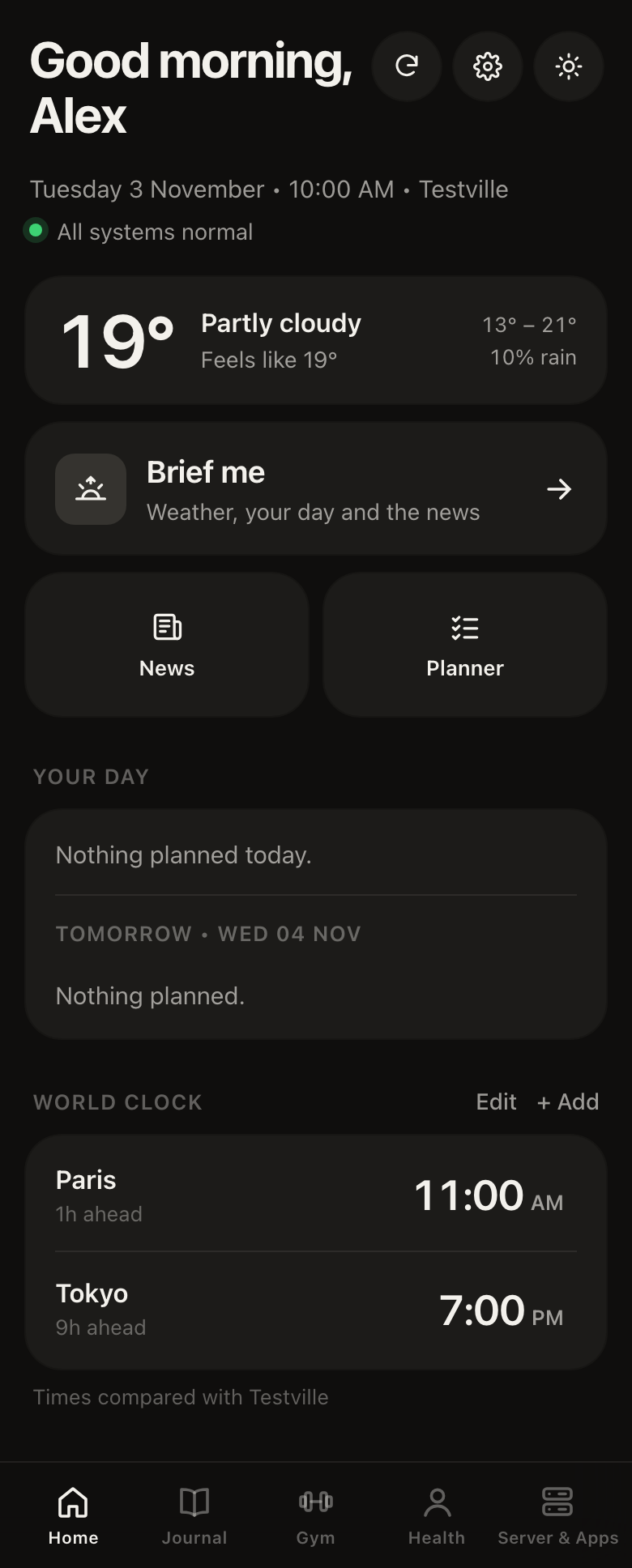
| Home | A greeting, the weather, your day and tomorrow, a world clock, and Brief me: a short morning briefing with weather, your calendar, the news and a server recap. |
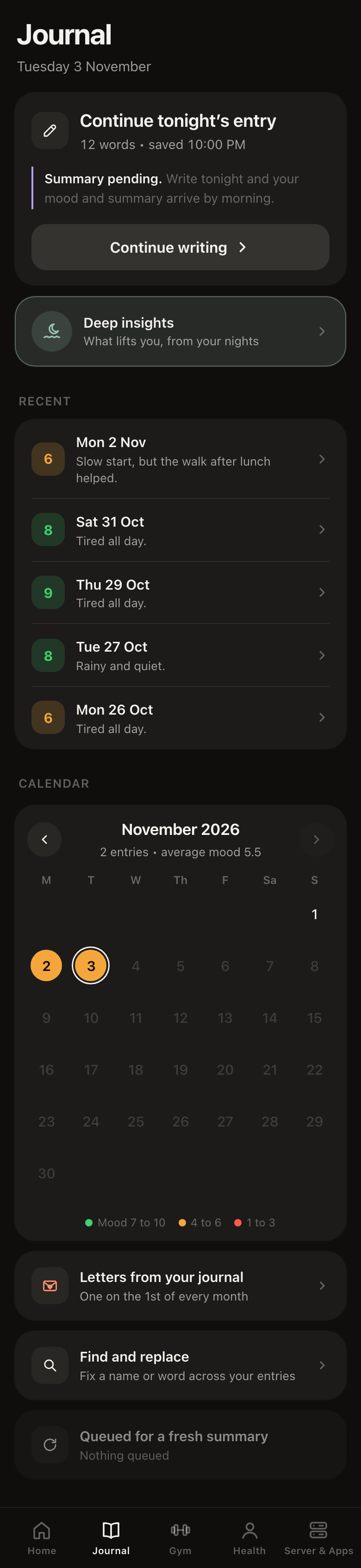
| Journal | Write your day. Optionally get a private nightly summary, a mood score, a weekly recap and deeper insights, written by a model on your own machine. |
| Gym | Log workouts, see your weekly streak, personal records, body weight and progress charts. |
| Health | Add your medicines on your own schedule (every day at set times, every week, every 2 weeks or every month) and your appointments, then tick them off. Optional Telegram reminders with Done, 5 min and 15 min. The tab shows your first name. A tick-list for remembering, never medical advice. |
| Planner and notes | Notes, one-off or repeating reminders, and long-term goals, in plain words. |
| News and weather | Headlines by topic with short AI digests, and forecasts for home or any city. |
| Flights and email | Flights found in your calendar with a "time to leave" nudge, and a short list of important email (off until you add a Gmail app password). |
| Telegram bot | "Remind me to water the plants tomorrow", "any important emails". It answers from your own data. |
| Server and apps | Is anything down, how hot is the machine, restart an app, read its logs, add your own Docker apps. |
More screens
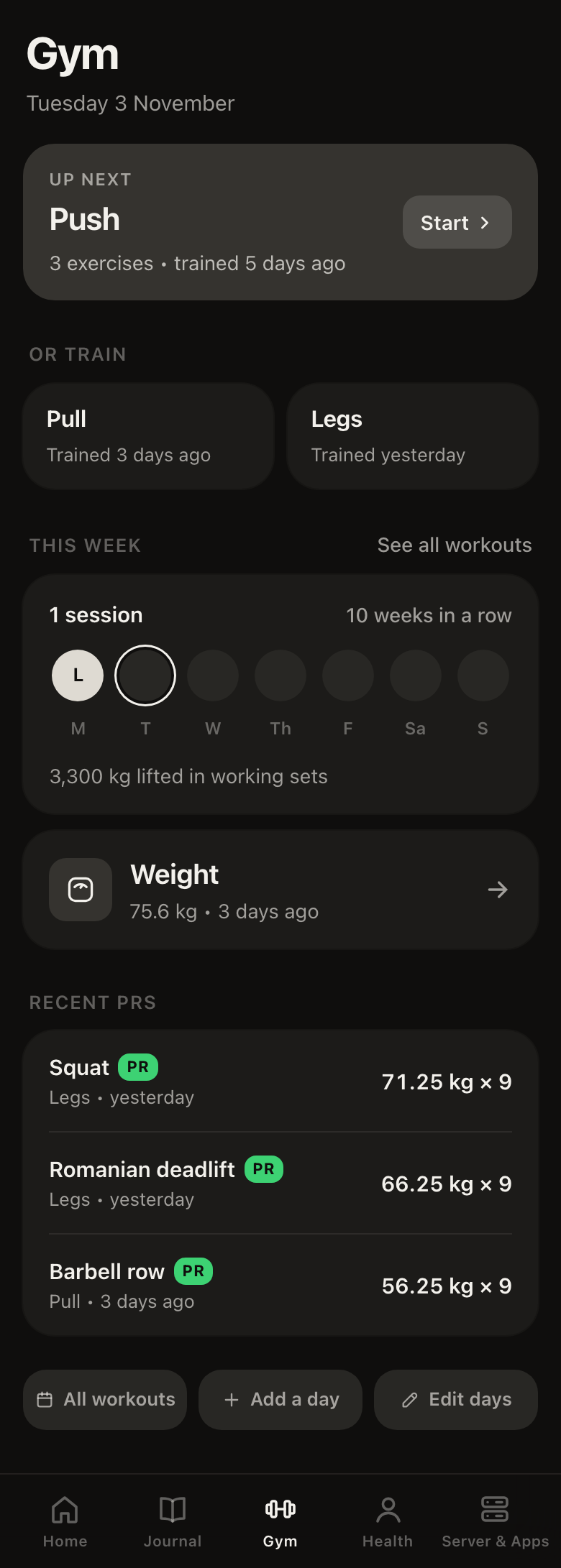
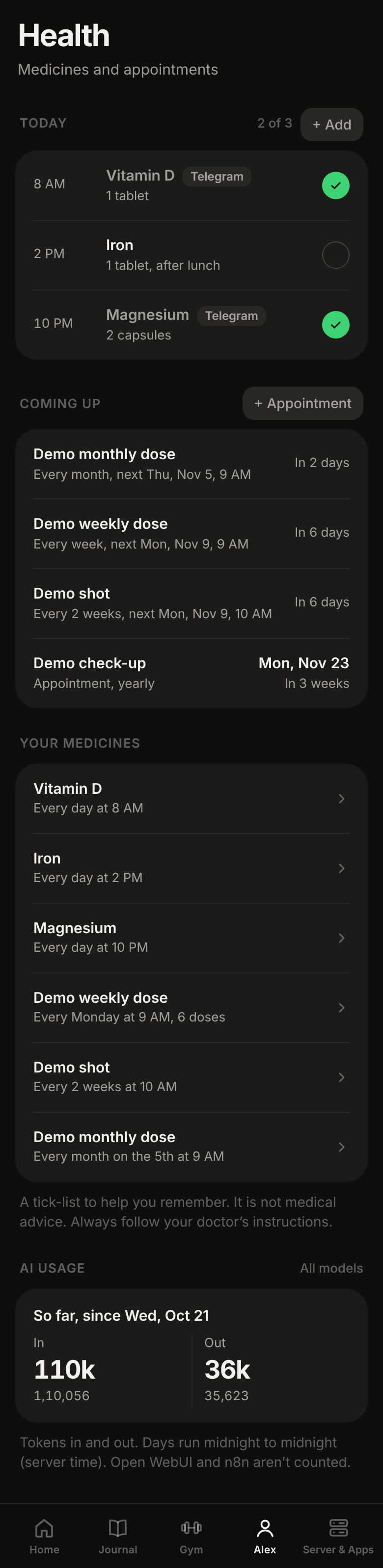
How it fits together
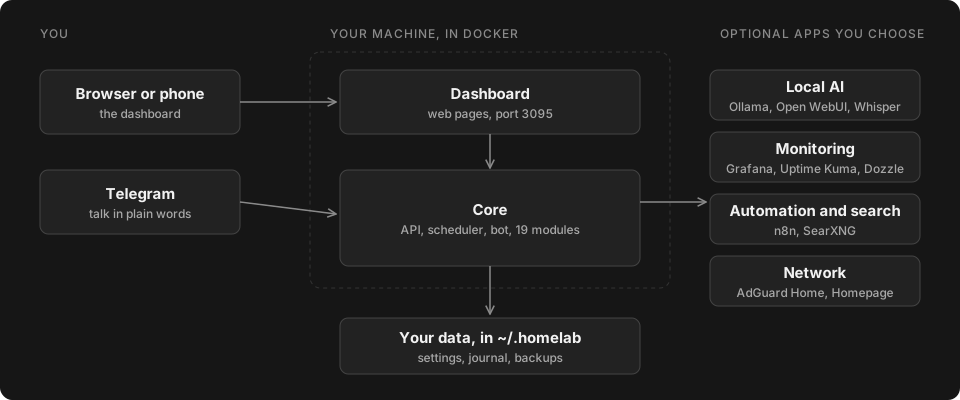
- Modules. Each feature is a folder in
modules/with amodule.yamland aregister(app)function. Modules never import each other, so you can switch one off or write your own. See docs/modules.md. - Capabilities. Ollama, Whisper, Telegram, the calendar and the internet are checked once, and each feature says what it needs.
homelab doctorgives the full picture. - Host helper. A small user-level service lets the dashboard restart apps or start an update. It has an allowlist and only touches this project's containers.
Optional apps
You pick them during setup or later with homelab apps. Nothing is installed that you did not choose.
| App | What it is for |
|---|---|
| Local AI engine (Ollama) | Runs AI models on this machine for chat, journal summaries and news. |
| AI chat (Open WebUI) | A ChatGPT-style page for your local models. |
| Voice to text (Whisper) | Turns Telegram voice notes into text. |
| Monitoring (Prometheus and Grafana) | Server health, app status and charts. |
| Website monitor (Uptime Kuma) | Checks that your websites are up and alerts you. |
| Live logs (Dozzle) | Read every app's log in the browser. |
| Private search (SearXNG) | Web search for the assistant without tracking. |
| Automations (n8n) | Connect apps and build your own workflows. |
| Full dashboard (Homepage) | One page with links to every app. |
| Ad blocker (AdGuard Home) | Blocks ads for every device on your network. Needs port 53, so use a machine that is always on. |
Built to be trusted
- Pinned. Every Docker image is pinned to an exact version, and CI fails if one is not.
- Tested. Over 340 automated tests, including recorded API replies, and a scan of every change for secrets, emails and public IP addresses.
- Safe updates. When a new version is out, the dashboard shows what it brings (Security, New and Fixed) and updates with one tap, or run
homelab update. Either way it takes a snapshot first and goes back by itself if anything fails. - Backups in one command.
homelab backupsaves your data and settings to one file,homelab restorebrings it back. Backups are plain files, so keep them somewhere safe. - Private by default. The dashboard listens on this machine only until you open it to your network with a PIN. The only outside calls are for features you use, such as weather and news feeds.
- Open. MIT licence, built in the open, and written so that one missing piece never takes the rest down.
Install
Requirements: macOS or Linux, about 5 GB of free disk space (more for local AI models), and git and Python 3. Docker is installed for you if it is missing (Colima on a Mac, Docker Engine on Linux).
curl -fsSL https://raw.githubusercontent.com/theappfoundryco/personal-homelab-server/main/get.sh | bash
It downloads the project to ~/personal-homelab-server, asks its few questions up front (your name, optional extras), does the long part quietly, and opens the dashboard at http://localhost:3095. Run it again any time: it keeps your settings and passwords. It starts on the newest tagged release (the stable channel). Add HL_CHANNEL=edge before bash to follow the newest work instead.
Prefer to read it first? Clone it and run the installer yourself:
git clone https://github.com/theappfoundryco/personal-homelab-server.git
cd personal-homelab-server
./install.sh --help
./install.sh
Update and uninstall
homelab update                    # snapshot first, and back by itself if anything fails (the dashboard offers the same)
homelab update --check            # only say whether a newer version exists
homelab update --channel edge     # follow the newest work instead of tagged releases

homelab backup                    # do this before you uninstall
homelab uninstall                 # stops and removes the containers, keeps your data
homelab uninstall --purge         # also deletes your data
If homelab is not found, run ~/personal-homelab-server/bin/homelab path add once.
The homelab command
| Command | What it does |
|---|---|
homelab status |
what is running and how healthy it is |
homelab doctor |
the full health check, with a fix for each problem |
homelab modules |
list modules, or turn one on or off |
homelab apps |
list the optional apps, or add or remove them |
homelab backup, homelab restore |
save your data and settings to one file, bring it back |
homelab access |
who can open the dashboard: this machine only, or your home network with a PIN |
homelab logs, start, stop, restart |
the usual |
Run homelab help for the rest.
Documentation and community
| Project page | theappfoundry.co/homelab |
| Install guide | theappfoundry.co/homelab/install |
| Questions and ideas | Discussions and Discord #homelab |
| Bugs and feature requests | Issues (remove personal information first) |
| Security problems | Report privately, see SECURITY.md |
| Build your own module | docs/modules.md |
Contribute
Fork it, make a branch, open a pull request into main. Your own data and settings stay in ~/.homelab and are never part of a pull request. Start with CONTRIBUTING.md, and please follow the Code of Conduct.
Important notice
This is a personal-organisation tool, not a medical device, and it gives no medical, psychological, legal or financial advice. Read docs/DISCLAIMER.md.
Licence
MIT. Made by The App Foundry · Terms · Privacy policy
Explore related projects
awesome-selfhosted/awesome-selfhosted
A list of Free Software network services and web applications which can be hosted on your own servers
336,467 starsimmich-app/immich
High performance self-hosted photo and video management solution.
119,024 starsStirling-Tools/Stirling-PDF
#1 PDF Application on GitHub that lets you edit PDFs on any device anywhere
96,434 starslouislam/uptime-kuma
A fancy self-hosted monitoring tool
93,575 stars