
the0807/git-graph-plus
the0807/git-graph-plus has 113 GitHub stars and 30 forks. GitHot measured 0 stars in 24 hours, +1 in 7 days, and +2 in 15 days. Last checked 2026-11-17 02:34 UTC. Last push 2026-07-01.
What you can do
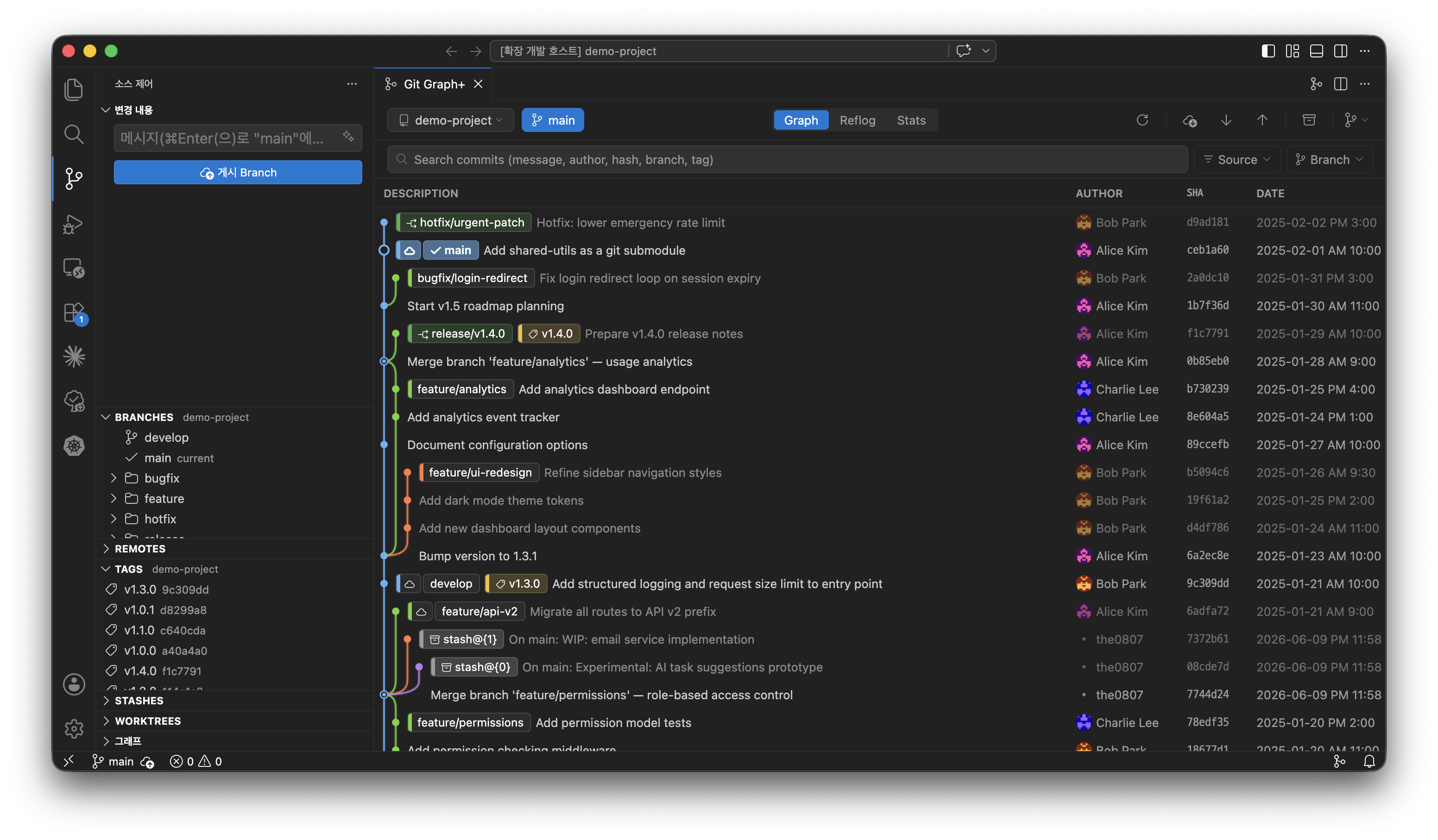
- Interactive Commit Graph - Color-coded branch rails and merge lines for clear history at a glance
- Full Git Workflow - Branch, merge, rebase, cherry-pick, reset, stash, worktree, tags, and remote operations
- Drag to Rebase & Merge - Drag one branch onto another to rebase or merge it - no commands needed
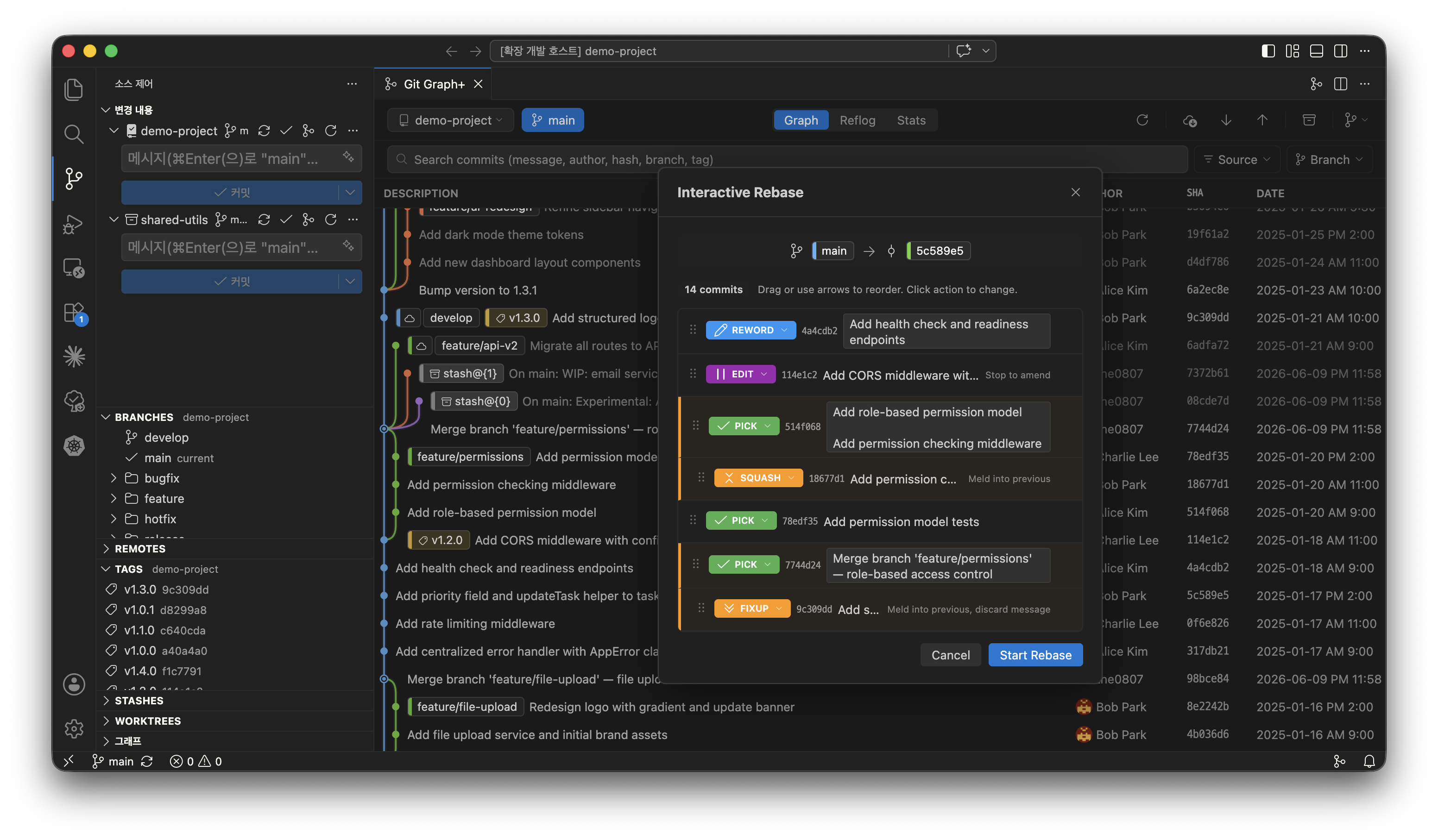
- Interactive Rebase - Drag-to-reorder commits with per-commit action control (pick, squash, fixup, drop, etc.)
Measured star growth
- in 24h
- 0
- in 7 days
- +1
- in 15 days
- +2
- in 1 month
- Collecting history
Net star changes over overlapping periods, not daily totals. Missing measurements are left blank. Stars measure attention, not software quality.
About
💻 A modern Git visualization tool for VS Code. Understand your commit history, manage branches, and work with Git more intuitively.
Developer ToolsREADME.md
OriginalGit Graph+


A modern, full-featured Git GUI for VS Code. Visualize your commit history, manage branches, and perform advanced git operations - all without leaving your editor.
Staging, committing, and inline blame use VS Code's built-in Source Control. Git Graph+ focuses on everything else.
Highlights
- Interactive Commit Graph - Color-coded branch rails and merge lines for clear history at a glance
- Full Git Workflow - Branch, merge, rebase, cherry-pick, reset, stash, worktree, tags, and remote operations
- Drag to Rebase & Merge - Drag one branch onto another to rebase or merge it - no commands needed
- Interactive Rebase - Drag-to-reorder commits with per-commit action control (pick, squash, fixup, drop, etc.)
- Fixup & Squash Workflow - Create
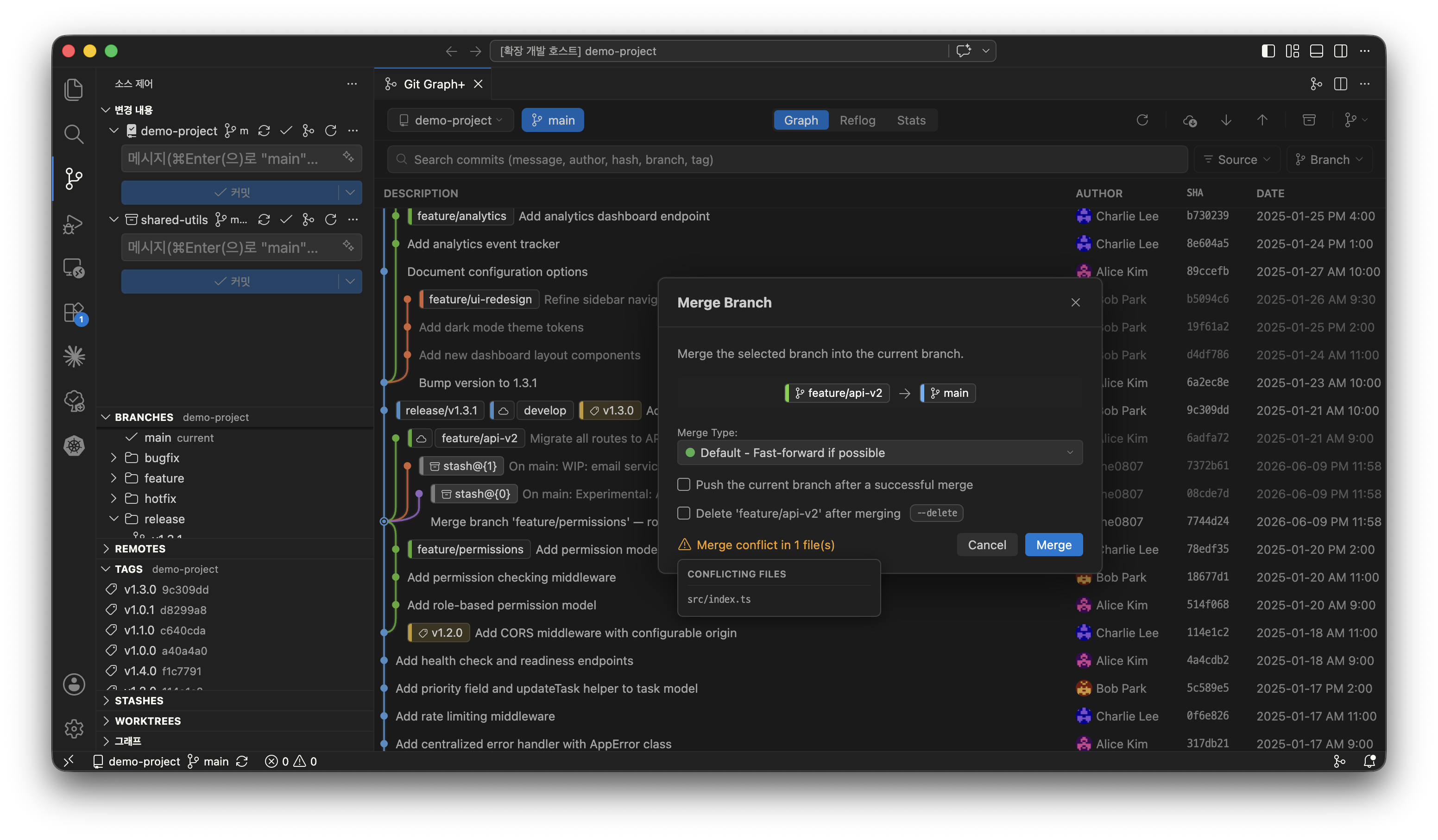
fixup!/squash!commits from the graph, then fold them in with the interactive-rebase autosquash toggle - Conflict Prediction & Resolution - Preview conflicting files before you run a merge/rebase, then resolve in the VS Code 3-way merge editor
- Built-in Diff Viewer - Shiki-powered syntax highlighting with image diff (side-by-side, swipe, onion-skin)
- Markdown Commit Messages - Commit descriptions render as formatted Markdown in the details panel, with a Markdown/Plain toggle
- Advanced Git Tooling - Git Flow, Bisect, LFS with file locks, Submodules, Statistics, and Reflog with dangling-commit recovery
Features
Commit Graph & History
| Feature | Description |
|---|---|
| Graph Visualization | Interactive commit graph with color-coded branch rails and merge lines |
| Commit Ordering | Topological ordering like Fork for clear branch history |
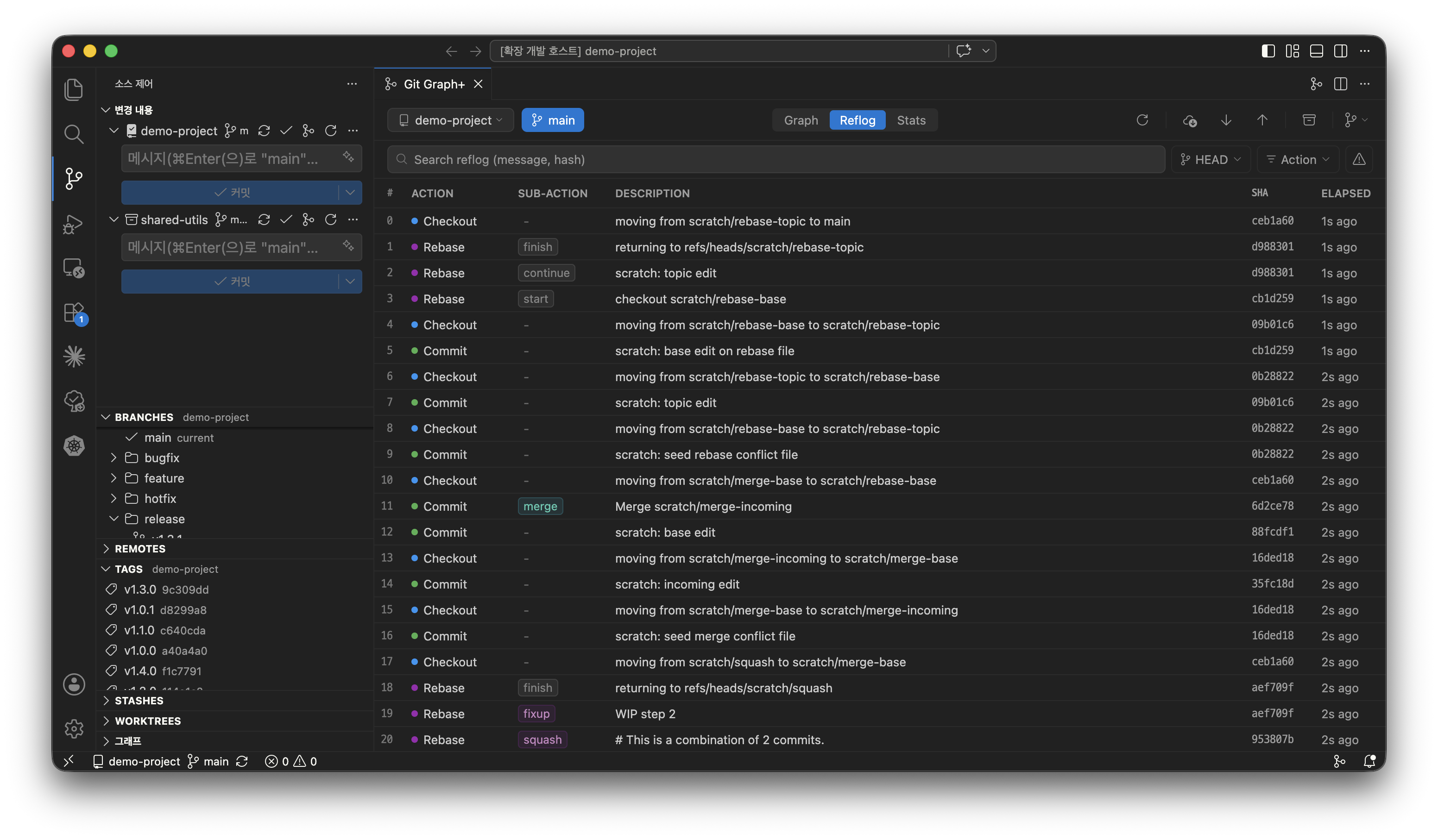
| Three Views | Graph for visual history, Reflog for git reference log history, Statistics for analytics |
| Commit Details | Click any commit to view metadata, changed files, and full diffs in a resizable bottom panel |
| Markdown Messages | Commit messages containing Markdown render formatted in the details panel, with a Markdown/Plain toggle |
| Commit Links | Issue, PR, and merge-request references in commit messages become clickable links - GitHub/GitLab auto-detected from origin, plus custom regex rules |
| Commit Comparison | Select a base commit, then click another to compare - select multiple commits to toggle a combined changes panel, or compare any commit to your working tree |
| Search | Find commits by message, author, date range, hash, or changed file - with result highlighting and keyboard navigation |
| Jump to HEAD | A button beside the search box scrolls to the current HEAD commit (emphasized when off-screen); search also matches the HEAD keyword |
| Keyboard Navigation | Move the graph selection with arrow keys; Ctrl/Cmd jumps to the first parent or newest child, remembering the path back |
| Branch Filter | Filter the commit graph to show only commits reachable from a selected branch |
| Uncommitted Changes | Shows pending uncommitted changes as a virtual node. Clicking it opens the VS Code SCM view for staging/committing. |
| Push Status | Blue dot for local-only commits (not pushed), gray dot for remote-only commits (remote ahead) |
| Avatars | Gravatar avatars displayed next to author names |
| Themes | Full support for light, dark, and high-contrast VS Code themes |
Branch & Tag Management
| Feature | Description |
|---|---|
| Branch Operations | Create, rename, delete, and checkout branches |
| Branch Toolbar | Fork-style split button: create a branch (or worktree) seeded from the current branch, with Lean Sync (rebase the current branch onto the default branch), Lean Finish (merge it into the default branch), and a nested Git Flow menu |
| Amend | Amend the last commit directly from the graph with a single click |
| Merge | Default, --no-ff, --ff-only, and squash merge strategies |
| Rebase | Standard rebase and interactive rebase with drag-to-reorder UI |
| Interactive Rebase | Keyboard-driven visual UI with action dropdown (pick, reword, edit, squash, fixup, drop), drop warnings, and an autosquash toggle that folds fixup!/squash! commits into their targets - start it from a branch or a multi-commit selection. An optional classic mode runs git rebase -i in an integrated terminal (gitGraphPlus.interactiveRebase.mode) |
| Drag to Rebase/Merge | Drag one branch onto another in the graph to rebase it onto, or merge it into, the target |
| Squash Commits | Select multiple consecutive commits in the graph and squash them into one |
| Fixup / Squash Commit | Commit staged changes as a fixup! or squash! of any commit straight from its context menu, ready for autosquash |
| Cherry-pick & Revert | Apply or undo specific commits (one or several selected at once), with --no-commit option |
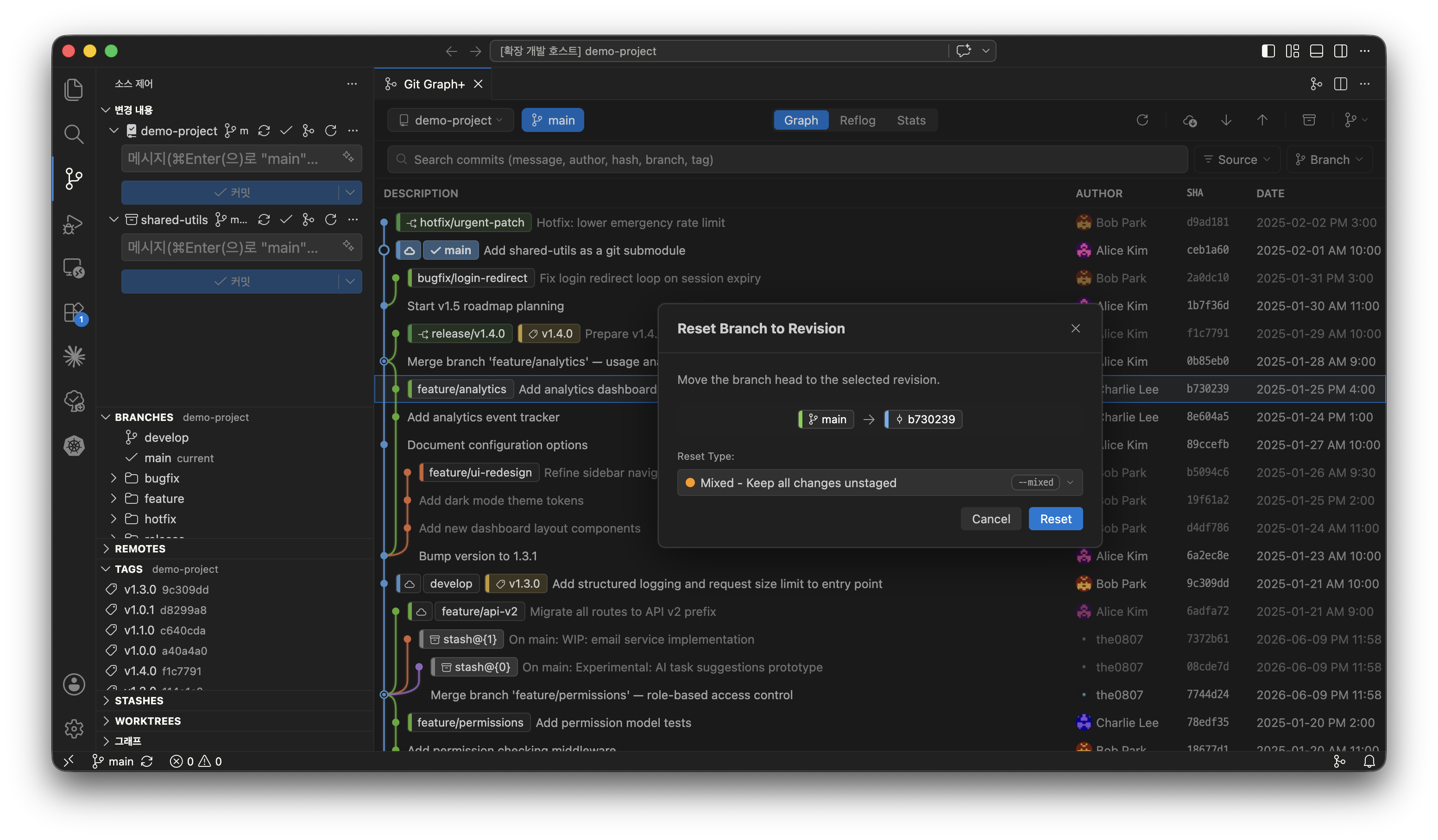
| Reset | Reset to any commit with soft, mixed, or hard mode |
| Tags | Create lightweight or annotated tags; view tag details, push to remote, delete locally or from remote |
| Upstream Tracking | Automatic local/remote branch matching based on upstream configuration |
Remote Operations
| Feature | Description |
|---|---|
| Fetch / Pull / Push | With remote selection dialog and progress notification - fetch skips the dialog when only one remote exists |
| Remote Management | Add and remove remotes |
| Force Push | --force-with-lease (safe) or --force (override) modes, with visual warning |
| Auto Fetch | Configurable periodic fetch interval (1–60 minutes) |
| Remote Checkout | Checkout remote branches with local tracking branch creation dialog |
| Pull Prompt | Automatic pull suggestion when checking out a branch that is behind its remote |
Conflict Resolution
| Feature | Description |
|---|---|
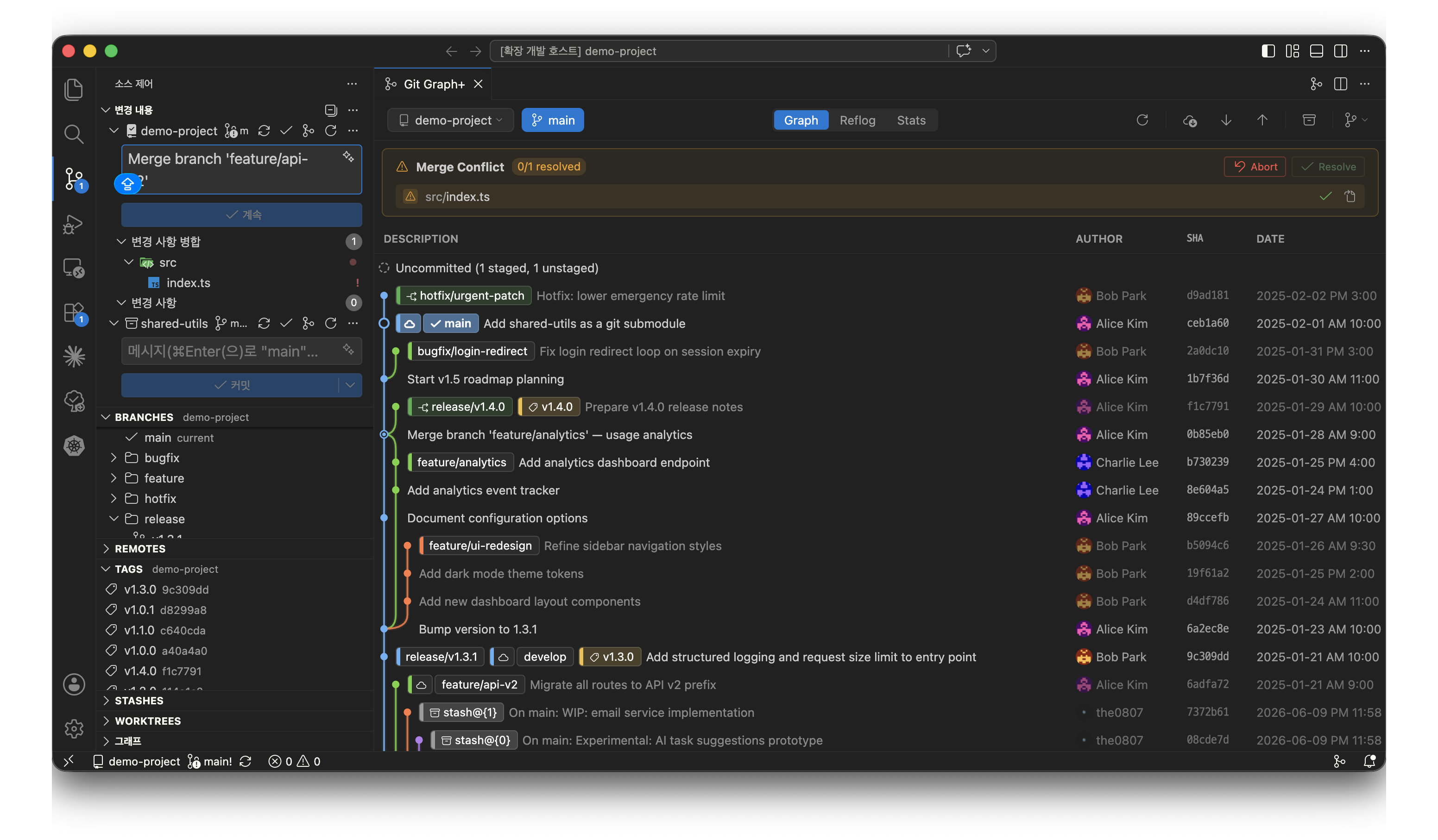
| Conflict Prediction | Merge and rebase modals preview which files would conflict, listed on hover before you run the operation |
| Auto Detection | Detects conflicts during merge, rebase, cherry-pick, and revert |
| Conflict Banner | Shows conflicting files with per-file status indicators |
| Editor Integration | Click conflict files to open in VS Code's 3-way merge editor |
| Resolve & Stage | Per-file "Mark as Resolved" with automatic staging |
| Continue / Abort | One-click buttons to continue or abort the operation |
Diff Viewer
| Feature | Description |
|---|---|
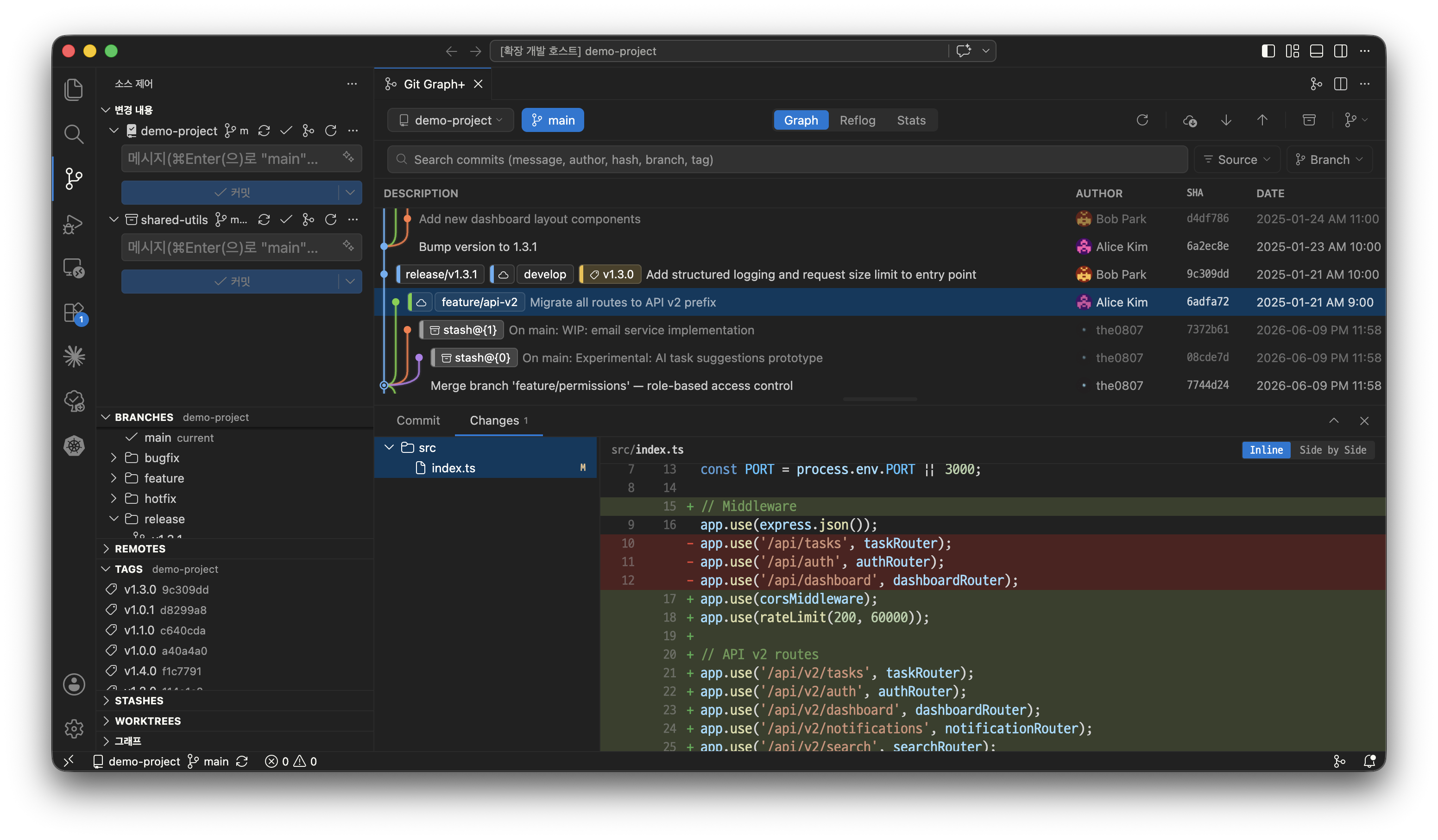
| File Tree | Hierarchical file browser with status badges (Added, Modified, Deleted, Renamed, Copied) |
| Syntax Highlighting | Powered by Shiki - accurate, editor-quality syntax colors |
| Image Diff | Side-by-side visual preview with swipe comparison for image changes |
| Patch Export | Save any commit as a .patch file |
| Open in Editor | Right-click any file in the diff viewer to open it or view its changes in VS Code |
| File Path Actions | Right-click a file to reveal it in the OS file explorer, copy its absolute path, or copy its repo-relative path |
| Reverse Changes | Undo a whole file, a single hunk, or gutter-selected lines of a commit against your working tree — and copy selected lines — right from the diff |
Stash & Worktree
| Feature | Description |
|---|---|
| Stash | Save, apply, pop, drop, and rename - with untracked files and keep-index options |
| Stash in Graph | Stash entries appear as badges in the commit graph with dedicated context menu |
| Worktree | List, add, remove, and prune worktrees, create one straight from the commit graph context menu, open them in a new window or reveal in the file explorer, with linked branch cleanup |
Advanced Tools
| Feature | Description |
|---|---|
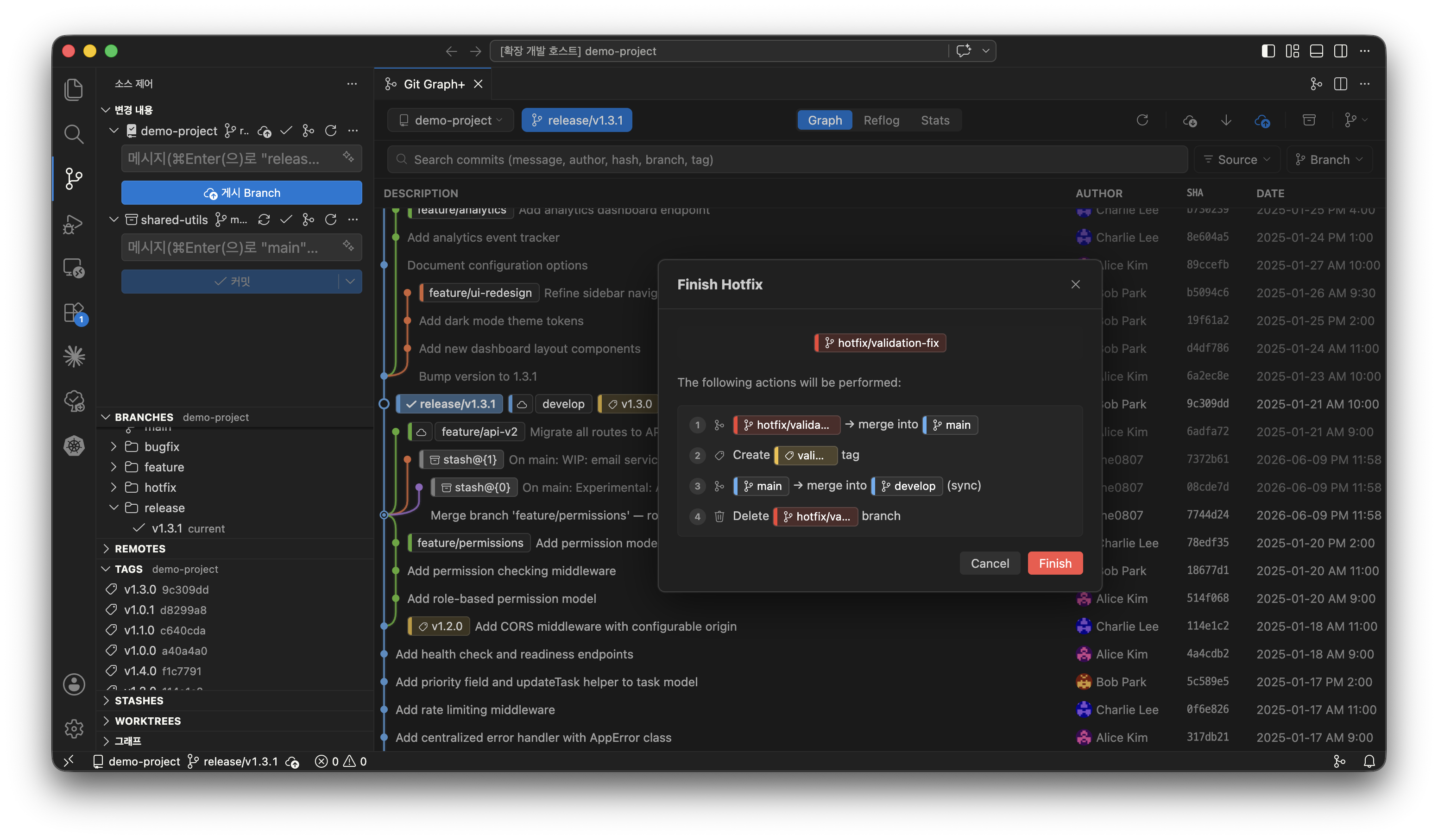
| Git Flow | Initialize and manage feature, release, and hotfix branches |
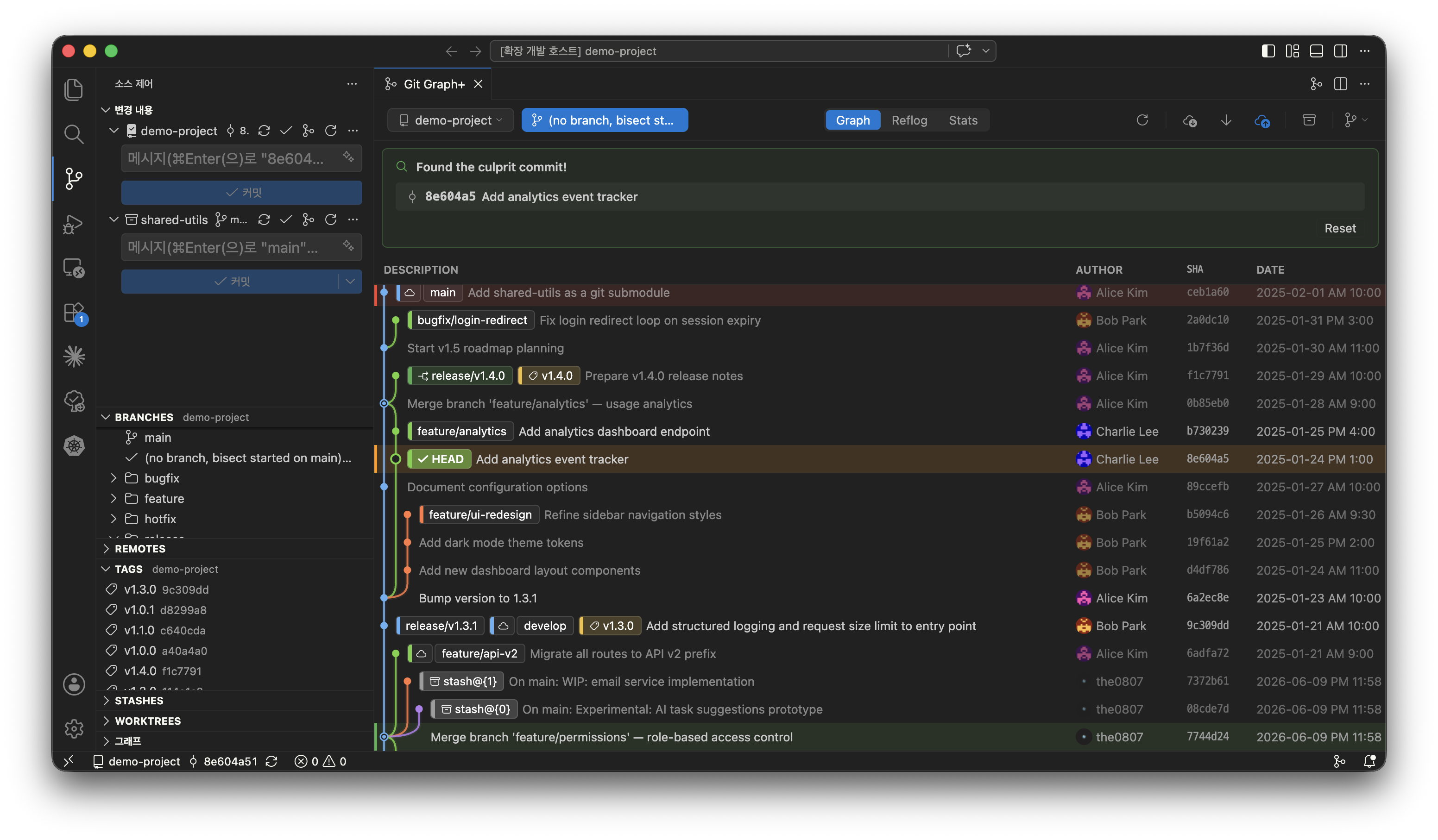
| Git Bisect | Visual bisect UI - start, mark good/bad, and reset |
| Git LFS | View LFS-tracked files and manage file locks |
| Submodules | View status, update submodules, and switch graph to submodule repos |
| Statistics | Commits by author (with Gravatar), activity heatmap |
| Reflog | Browse the full git reference log with semantic color-coded sub-actions (amend, squash, etc.), search, action filters, and per-branch view. Includes dangling commit detection and recovery. |
Multi-Repository & Submodules
- Auto-discovers submodules within the workspace
- Switch between repositories via the toolbar dropdown
Activity Bar Sidebar
- Tree views for Branches, Remotes, Tags, Stashes, and Worktrees
- Click to open quick action menu, right-click for full context menu
- Branches sorted:
main/masterfirst, then alphabetical
Internationalization
- English (default), Korean, and Chinese Simplified
- Configurable via
gitGraphPlus.localesetting - Git terms (commit, merge, rebase, push, pull, fetch, etc.) remain untranslated
Getting Started
- Install from the VS Code Marketplace
- Open a folder containing a Git repository
- Open Git Graph+ using any of:
- Command Palette -
Git Graph+: Open - Activity Bar - Click the Git Graph+ icon
- SCM title bar, Status bar, or Editor title bar - Click the git-merge icon
- Command Palette -
[!Tip] For the best experience, enable these VS Code settings:
git.autofetch: true- keeps the graph up to date by periodically fetching from all remotesgit.fetchPrune: true- removes stale remote-tracking branches on each fetch
Settings
| Setting | Default | Description |
|---|---|---|
gitGraphPlus.autoRefresh |
true |
Auto-refresh on repository changes |
gitGraphPlus.timeout |
60 |
Max time (seconds) to wait for a Git command before abort |
gitGraphPlus.initialCommitCount |
200 |
Commits loaded on first render / refresh (lower = faster in huge repos) |
gitGraphPlus.loadMoreCommitCount |
50 |
Extra commits fetched per Load more commits click |
gitGraphPlus.locale |
auto |
UI language (auto, en, ko, zh-cn) |
gitGraphPlus.graphSortOrder |
topological |
Commit sort order (topological, date, author-date) |
gitGraphPlus.interactiveRebase.mode |
ui |
Interactive rebase mode (ui visual editor, classic git rebase -i in a terminal) |
gitGraphPlus.showSignatureStatus |
true |
Show GPG/SSH signature status in the graph |
gitGraphPlus.commitMessageLinks |
[] |
Custom { pattern, url } regex rules that turn commit-message text into clickable links |
gitGraphPlus.autoDetectRepoLinks |
true |
Auto-link #123 issues (github.com/gitlab.com) and !123 GitLab MRs from the origin remote |
gitGraphPlus.branchBadgeBarThickness |
thin |
Branch badge bar thickness (thin, medium, thick) |
gitGraphPlus.branchColors |
[] |
Fixed branch colors by name pattern (regex → hex) |
gitGraphPlus.graphColors |
12 colors | Color palette auto-assigned to graph rails (hex strings) |
Operation Defaults
Preset the default options for each operation dialog under gitGraphPlus.defaults.* (configure in VS Code Settings):
| Operation | Options (under gitGraphPlus.defaults.) |
|---|---|
| Push | push.force, push.setUpstream, push.allTags |
| Pull | pull.rebase, pull.stash |
| Fetch | fetch.allRemotes |
| Merge | merge.mode, merge.pushAfter, merge.deleteSource |
| Rebase | rebase.autostash, rebase.pushAfter |
| Amend | amend.keepMessage, amend.resetDate, amend.resetAuthor, amend.only, amend.pushAfter |
| Checkout | checkout.dirty, checkoutRemote.dirty |
| Create Branch | createBranch.checkout, createBranch.publish |
| Create Tag | createTag.push |
| Cherry-pick | cherryPick.noCommit, cherryPick.pushAfter |
| Revert | revert.noCommit, revert.pushAfter |
| Reset | reset.mode |
| Stash | stashSave.includeUntracked, stashSave.keepIndex |
| Delete Branch | deleteBranch.force, deleteBranch.deleteRemote |
| Delete Tag | deleteTag.deleteRemote |
| Remove Worktree | removeWorktree.deleteBranch |
Requirements
- VS Code 1.85.0 or later
- Git installed and available in PATH (or configured via the
git.pathsetting)
Acknowledgements
- UI/UX ideas from Git Graph, Fork, and SourceGit
- This project does not use any code from Git Graph. All code has been written from scratch.
- Extension icon from VS Code Codicons, licensed under CC BY 4.0
Changelog
See CHANGELOG.md for release history.