
tgotwig/vidmerger
tgotwig/vidmerger has 154 GitHub stars and 14 forks. GitHot measured 0 stars in 24 hours. Last checked 2026-11-15 12:00 UTC. Last push 2026-11-02.
Measured star growth
- in 24h
- 0
- in 7 days
- Collecting history
- in 15 days
- Collecting history
- in 1 month
- Collecting history
Net star changes over overlapping periods, not daily totals. Missing measurements are left blank. Stars measure attention, not software quality.
About
📼 Merge video & audio files via CLI
Creative & MediaREADME.md
Original
Vidmerger
A wrapper around FFmpeg which simplifies merging of multiple videos.
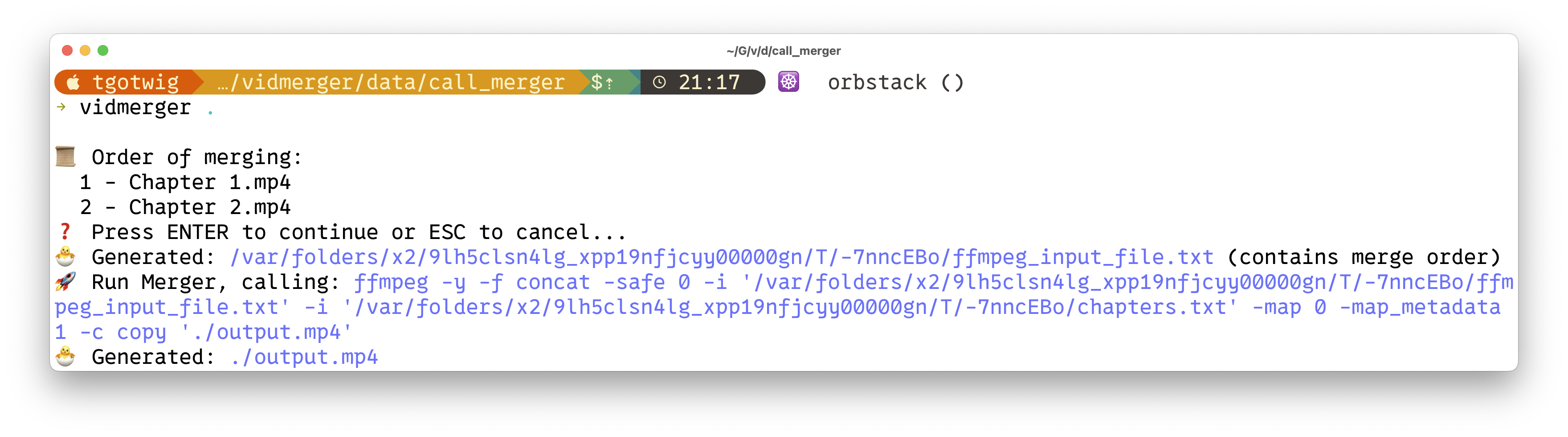
🙉 What is this exactly?
Vidmerger is a command-line-tool which uses ffmpeg to merge multiple video-files with the same file-extension into one file, for example running vidmerger . on mp4 files would create a merged video called output.mp4 🐣
Here is the usage help of vidmerger 🤗
A wrapper around ffmpeg which simplifies merging multiple videos 🎞  Everything in between the first `-` till the fill extension of the input files will be used as chapter titles 📖.

Usage: vidmerger [OPTIONS] <TARGET_DIR>

Arguments:
  <TARGET_DIR>  Sets the input file to use

Options:
  -f, --format <format>   Specifies which formats should be merged individually, the default is 👉 3g2,3gp,aac,ac3,alac,amr,ape,au,avi,awb,dts,f4a,f4b,f4p,f4v,flac,flv,m4a,m4b,m4p,m4r,m4v,mkv,mov,mp2,mp3,mp4,mpeg,mpg,oga,ogg,ogm,ogv,ogx,opus,pcm,spx,wav,webm,wma,wmv
      --fps <fps>         Generates videos inside a temporary folder with this fps value and merges them
      --shutdown          For doing a shutdown at the end (needs sudo)
      --skip-fps-changer  Skips the fps changer
      --skip-cropper      Skips the cropper that removes black bars
  -y, --yes               Skips confirmation of merge order
      --verbose           Prints detailed logs
  -h, --help              Print help
  -V, --version           Print version

<DIAGRAM_FROM_BELOW>
%%{init: {'themeVariables': { 'mainBkg': 'white', 'nodeBorder': 'black' }}}%%
graph LR;
VideoA((Video_A))-->Vidmerger;
VideoB((Video_B))-->Vidmerger;
Vidmerger-->|no fps mismatch detected| A_B_SAME_FPS((("A+B_SAME_FPS")));
Vidmerger-->FPS_Changer-->A_B_SAME_FPS;
A_B_SAME_FPS-->|black bars detected| Cropper;
A_B_SAME_FPS-->|no black bars detected| Merger;
Cropper-->Merger;
Merger-->Output((A+B+Chapters));
| Feature | Description |
|---|---|
| Selector | Iterates through this list of file endings, selects all files which matches with the current file ending except ones which start with a dot. The list can be overwritten by --format or -f, example: --format mp4,mkv. |
| FPS_Changer | After detecting not matching fps values, it scales all the higher fps videos down to the lowest detecting fps value. Can be skipped by --skip-fps-changer. The desired fps value can be set by --fps, example: --fps 23.976. |
| Cropper | Detects black bars on each video and crops them away before the merge. Videos without bars are not cropped, but if at least one video is cropped, all inputs are converted so the merge uses one codec. Can be skipped by --skip-cropper. |
| Merger | Finally, it merges the videos and adds chapters. Chapter titles are automatically extracted from the input file names — specifically, the text between the first dash and the file extension. Example: Video_A - Chapter 1.mp4. |
✨ Installing / Getting started
You can install it on all the three major operating systems 🤗
X64
| Platform | Packager | Command |
|---|---|---|
| 🍎 MacOS | 🍺 Homwbrew | brew tap tgotwig/vidmerger brew install vidmerger |
| 🐧 Linux | 🍺 Homwbrew | brew tap tgotwig/linux-vidmerger brew install vidmerger |
| 🐧 Linux | 🍺 CURL | sudo curl -L https://github.com/TGotwig/vidmerger/releases/latest/download/vidmerger-linux.tar.gz -o /tmp/vidmerger-linux.tar.gz && sudo tar -xzvf /tmp/vidmerger-linux.tar.gz -C /usr/local/bin |
| 🏳️🌈 Windows | 🍫 Chocolatey | choco install ffmpeg # prerequisite choco install vidmerger |
ARM64
| Platform | Packager | Command |
|---|---|---|
| 🍎 MacOS | 🍺 Homwbrew | brew tap tgotwig/vidmerger brew install vidmerger |
| 🐧 Linux | 🍺 CURL | sudo curl -L https://github.com/tgotwig/vidmerger/releases/download/0.4.2/vidmerger-linux-arm64.tar.gz -o /tmp/vidmerger-linux-arm64.tar.gz && sudo tar -xzvf /tmp/vidmerger-linux-arm64.tar.gz -C /usr/local/bin |
Docker (X64 & ARM64)
You can also use Docker to run vidmerger without installing anything except Docker, hosted on Dockerhub 🐳
docker container run -it -v <PATH-TO-YOUR-VIDEOS>:/data tgotwig/vidmerger
Examples with Bash:
docker container run tgotwig/vidmerger --help
docker container run tgotwig/vidmerger --version
docker container run -it -v ./data/call_merger:/data tgotwig/vidmerger
⚙️ Developing
The primary requirements are rust, ffmpeg, and go-task. The devcontainer provides all necessary components 🔧
If you see anything to improve, just create an issue or directly open a pull request 🤗✨
🧪 Tests
- For major tests:
task test - For linting tests:
task lint