
textlint-rule/sentence-splitter
textlint-rule/sentence-splitter has 138 GitHub stars and 20 forks. GitHot measured 0 stars in 24 hours. Last checked 2026-11-16 18:50 UTC. Last push 2026-11-14.
Measured star growth
- in 24h
- 0
- in 7 days
- Collecting history
- in 15 days
- Collecting history
- in 1 month
- Collecting history
Net star changes over overlapping periods, not daily totals. Missing measurements are left blank. Stars measure attention, not software quality.
About
Split {Japanese, English} text into sentences.
Developer ToolsREADME.md
Originalsentence-splitter
Split {Japanese, English} text into sentences.
What is sentence?
This library split next text into 3 sentences.
We are talking about pens.
He said "This is a pen. I like it".
I could relate to that statement.
Result is:
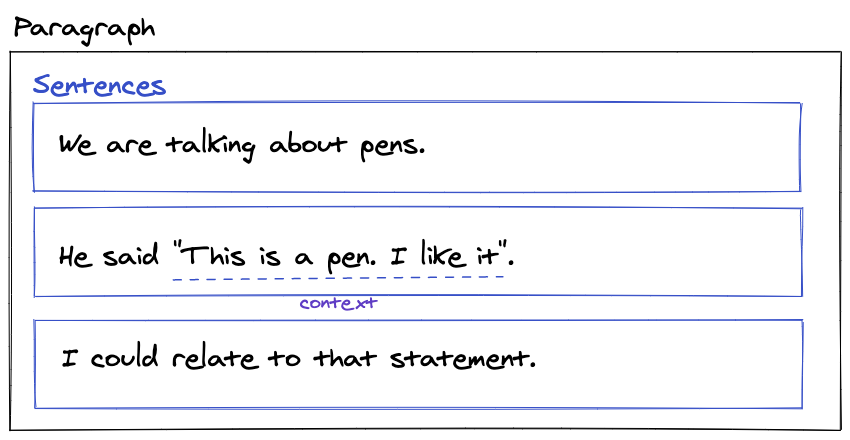
You can check actual AST in online playground.
Second sentence includes "This is a pen. I like it", but this library can not split it into new sentence.
The reason is "..." and 「...」 text is ambiguous as a sentence or a proper noun.
Also, HTML does not have suitable semantics for conversation.
As a result, The second line will be one sentence, but sentence-splitter add a contexts info to the sentence node.
{
    "type": "Sentence",
    "children": [
      {
        "type": "Str",
        "value": "He said \"This is a pen. I like it\""
      },
      ...
    ],
    "contexts": [
        {
            "type": "PairMark",
            "pairMark": {
                "key": "double quote",
                "start": "\"",
                "end": "\""
            },
            "range": [
                8,
                33
            ],
            ...
        ]
    ]
}
- Example: https://sentence-splitter.netlify.app/#He%20said%20%22This%20is%20a%20pen.%20I%20like%20it%22.
Probably, textlint rule should handle the "..." and 「...」 text after parsing sentences by sentence-splitter.
- Issue: Nesting Sentences Support · Issue #27 · textlint-rule/sentence-splitter
- Related PR
Installation
npm install sentence-splitter
Usage
export interface SeparatorParserOptions {
    /**
     * Recognize each characters as separator
     * Example [".", "!", "?"]
     */
    separatorCharacters?: string[]
}

export interface AbbrMarkerOptions {
    language?: Language;
}

export interface splitOptions {
    /**
     * Separator & AbbrMarker options
     */
    SeparatorParser?: SeparatorParserOptions;
    AbbrMarker?: AbbrMarkerOptions;
}

/**
 * split `text` into Sentence nodes.
 * This function return array of Sentence nodes.
 */
export declare function split(text: string, options?: splitOptions): TxtParentNodeWithSentenceNode["children"];

/**
 * Convert Paragraph Node to Paragraph Node that includes Sentence Node.
 * Paragraph Node is defined in textlint's TxtAST.
 * See https://github.com/textlint/textlint/blob/master/docs/txtnode.md
 */
export declare function splitAST(paragraphNode: TxtParentNode, options?: splitOptions): TxtParentNodeWithSentenceNode;
See also TxtAST.
Example
- Online playground: https://sentence-splitter.netlify.app/
Node
This node is based on TxtAST.
Node's type
Str: Str node hasvalue. It is same as TxtAST'sStrnode.Sentence: Sentence Node hasStr,WhiteSpace, orPunctuationnodes as childrenWhiteSpace: WhiteSpace Node has\n.Punctuation: Punctuation Node has.,。
Get these SentenceSplitterSyntax constants value from the module:
import { SentenceSplitterSyntax } from "sentence-splitter";

console.log(SentenceSplitterSyntax.Sentence);// "Sentence"
Node's interface
export type SentencePairMarkContext = {
  type: "PairMark";
  range: readonly [startIndex: number, endIndex: number];
  loc: {
    start: {
      line: number;
      column: number;
    };
    end: {
      line: number;
      column: number;
    };
  };
};
export type TxtSentenceNode = Omit<TxtParentNode, "type"> & {
    readonly type: "Sentence";
    readonly contexts?: TxtPairMarkNode[];
};
export type TxtWhiteSpaceNode = Omit<TxtTextNode, "type"> & {
    readonly type: "WhiteSpace";
};
export type TxtPunctuationNode = Omit<TxtTextNode, "type"> & {
    readonly type: "Punctuation";
};
Fore more details, Please see TxtAST.
Node layout
Node layout image.
- Example: https://sentence-splitter.netlify.app/#This%20is%201st%20sentence.%20This%20is%202nd%20sentence.
This is 1st sentence. This is 2nd sentence.
<Sentence>
    <Str />                      |This is 1st sentence|
    <Punctuation />              |.|
</Sentence>
<WhiteSpace />                   | |
<Sentence>
    <Str />                      |This is 2nd sentence|
    <Punctuation />              |.|
</Sentence>
Note: This library will not split Str into Str and WhiteSpace(tokenize)
Because, Tokenize need to implement language specific context.
For textlint rule
You can use splitAST for textlint rule.
splitAST function can preserve original AST's position unlike split function.
import { splitAST, SentenceSplitterSyntax } from "sentence-splitter";

export default function(context, options = {}) {
    const { Syntax, RuleError, report, getSource } = context;
    return {
        [Syntax.Paragraph](node) {
            const parsedNode = splitAST(node);
            const sentenceNodes = parsedNode.children.filter(childNode => childNode.type === SentenceSplitterSyntax.Sentence);
            console.log(sentenceNodes); // => Sentence nodes
        }
    }
}
Examples
Difference from Intl.Segmenter
Intl.Segmenter with granularity: "sentence" also splits text into sentences.
It is built into JavaScript runtimes and is a good choice when you only need sentence strings.
sentence-splitter is designed for linting tools like textlint, and it provides the following features that Intl.Segmenter does not have.
- Return AST nodes(
Sentence,Str,Punctuation,WhiteSpace) withrangeandloc(line and column) - Split a TxtAST
Paragraphnode withsplitAST, so it works with Markdown and other formats supported by textlint - Handle abbreviations like
Mr.andU.S. - Do not split a sentence inside pair marks like
"..."and「...」, and addcontextsinfo to the sentence node - Return the same result in every runtime. The result of
Intl.Segmenterdepends on the ICU data of the runtime
For example, Node.js 22 (ICU 78.3) returns the following results.
| Input | Intl.Segmenter |
sentence-splitter |
|---|---|---|
Mr. Smith went to Washington. He left. |
Mr. / Smith went to Washington. / He left. |
Mr. Smith went to Washington. / He left. |
He said "This is a pen. I like it". I agree. |
He said "This is a pen. / I like it". / I agree. |
He said "This is a pen. I like it". / I agree. |
Reference
This library use "Golden Rule" test of pragmatic_segmenter for testing.
Related Libraries
- textlint-util-to-string
- and https://github.com/textlint/textlint/wiki/Collection-of-textlint-rule#rule-libraries
Tests
Run tests:
npm test
Create input.json from _input.md
npm run createInputJson
Update snapshots(output.json):
npm run updateSnapshot
Adding snapshot testcase
- Create
test/fixtures/<test-case-name>/directory - Put
test/fixtures/<test-case-name>/_input.mdwith testing content - Run
npm run updateSnapshot - Check the
test/fixtures/<test-case-name>/output.json - If it is ok, commit it
Contributing
- Fork it!
- Create your feature branch:
git checkout -b my-new-feature - Commit your changes:
git commit -am 'Add some feature' - Push to the branch:
git push origin my-new-feature - Submit a pull request :D
License
MIT