
textfuel/lazyjira
textfuel/lazyjira has 379 GitHub stars and 28 forks. GitHot measured 0 stars in 24 hours. Last checked 2026-11-09 13:59 UTC. Last push 2026-08-21.
Lazygit but for Jira
What you can do
- JQL search with autocomplete, syntax highlighting, and persistent history
- 4-panel layout - issues, projects, detail, status - with vim-style navigation
- Inline editing - transitions, priority, assignee, labels, comments, description ($EDITOR)
- Configurable - custom keybindings (including navigation keys), JQL tabs, issue columns, custom fields
Measured star growth
- in 24h
- 0
- in 7 days
- Update delayed
- in 15 days
- Update delayed
- in 1 month
- Update delayed
Net star changes over overlapping periods, not daily totals. Missing measurements are left blank. Stars measure attention, not software quality.
README.md
Original




lazyjira
Terminal UI for Jira. Like lazygit but for Jira.
Jira's web UI is painfully slow. Changing a ticket status takes multiple clicks, pages take seconds to load, and you spend more time fighting the interface than actually working. lazyjira gives you a fast, keyboard-driven terminal UI so you can browse issues, update statuses, read descriptions and more with minimum latency.

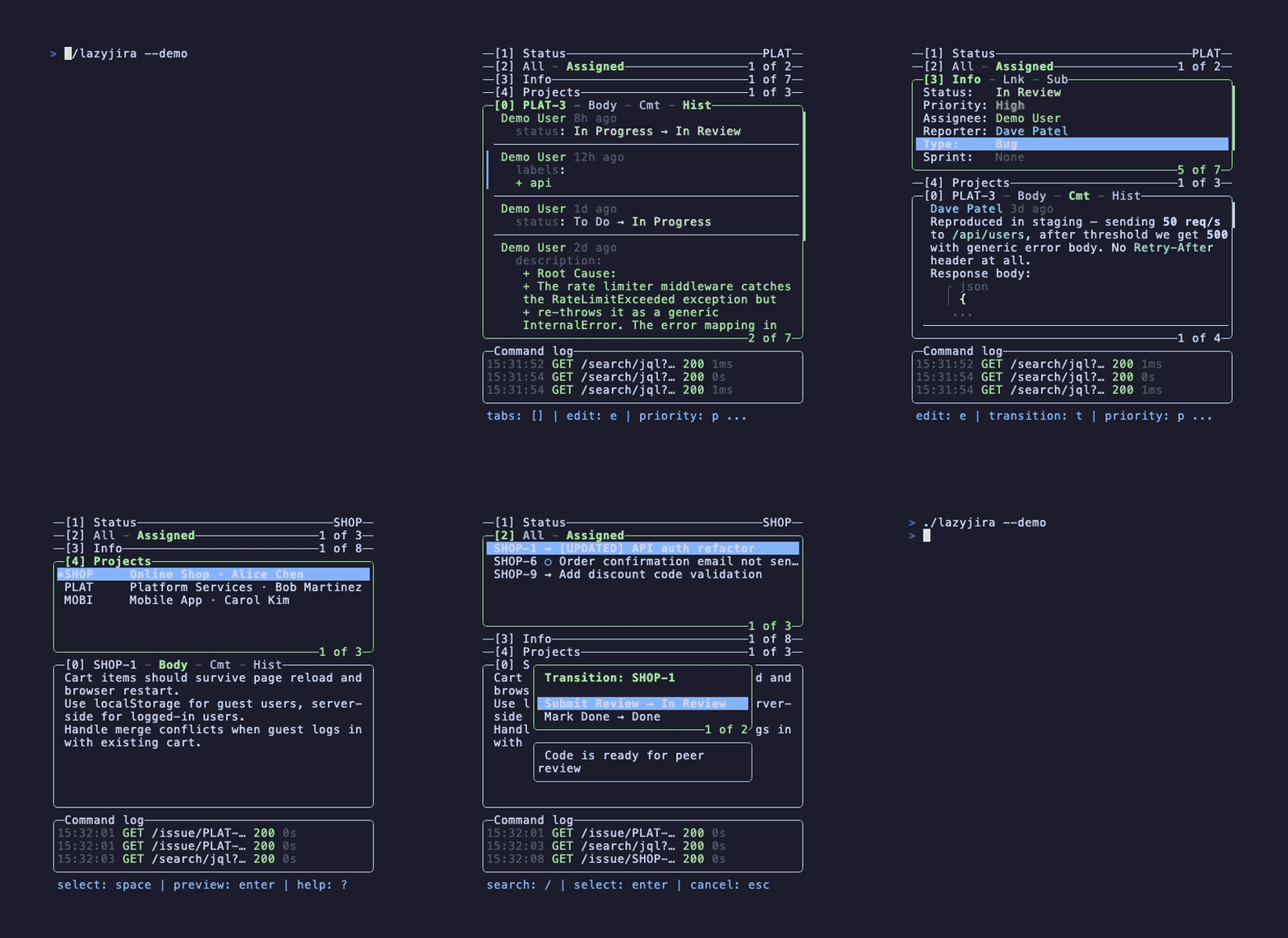
Demo mode
Try without a Jira account (build from source required):
make build-demo
./lazyjira --demo
Features
- JQL search with autocomplete, syntax highlighting, and persistent history
- 4-panel layout - issues, projects, detail, status - with vim-style navigation
- Inline editing - transitions, priority, assignee, labels, comments, description (
$EDITOR) - Configurable - custom keybindings (including navigation keys), JQL tabs, issue columns, custom fields
- Themes - default ANSI palette plus all four Catppuccin flavors (Latte, Frappé, Macchiato, Mocha)
- Adaptive - side-by-side or stacked layout, mouse support
Installation
macOS
Homebrew
brew install textfuel/tap/lazyjira
Linux
Arch Linux (AUR)
yay -S lazyjira-bin     # prebuilt binary
yay -S lazyjira-git     # build from source
Nix / NixOS
nix run github:textfuel/lazyjira
Or add to your flake inputs:
inputs.lazyjira.url = "github:textfuel/lazyjira";
Or import the package
let
  version = "...";
  src =
    fetchFromGitHub {
      owner = "textfuel";
      repo = "lazyjira";
      tag = "v${version}";
      hash = "...";
    };

  buildGoApplication = import "${src}/nix/build-go-application.nix" system;
in
callPackage "${src}/nix/package.nix" { inherit buildGoApplication version; }
deb (Debian, Ubuntu)
Download .deb from Releases:
sudo dpkg -i lazyjira_*.deb
rpm (Fedora, RHEL)
Download .rpm from Releases:
sudo rpm -i lazyjira_*.rpm
apk (Alpine)
Download .apk from Releases:
sudo apk add --allow-untrusted lazyjira_*.apk
Windows
Download .zip from Releases, extract lazyjira.exe, and add it to your PATH.
Use Windows Terminal for best rendering.
Go / From source
go install github.com/textfuel/lazyjira/v2/cmd/lazyjira@latest
Or build manually:
git clone https://github.com/textfuel/lazyjira.git
cd lazyjira
make build
Setup
Run lazyjira. On first launch the setup wizard asks for your Jira type (Cloud or Server/Data Center), host, and credentials.
Jira Cloud
Provide your email and an API token (also called Personal Access Token / PAT).
Create one at https://id.atlassian.com/manage-profile/security/api-tokens
Jira Server / Data Center
Provide your Personal Access Token (PAT). No email needed.
Generate a PAT in Jira: Profile > Personal Access Tokens > Create token.
For environments that require client certificates (mTLS), see Configuration.
Credentials saved to ~/.config/lazyjira/auth.json.
Themes
lazyjira supports the default ANSI 16 palette, Catppuccin presets, auto light/dark selection, and custom palette overrides. Set gui.theme in ~/.config/lazyjira/config.yml:
gui:
  theme: catppuccin-mocha
See the Themes docs for supported values, palette overrides, and examples.
Usage
lazyjira                 # start
lazyjira auth            # re-authenticate
lazyjira logout          # clear credentials
lazyjira --dry-run       # read-only mode (no writes to Jira)
lazyjira --log app.log   # log API requests to file
lazyjira --version       # show version
Press ? inside the app for all keybindings.
Documentation
- Configuration - config file, keybindings, issue tabs, custom fields, git integration
- Keybindings - full list of default keys
- Custom Fields - displaying Jira custom fields
Roadmap
- Robust JQL search
- Git integration, create branches from issues, open issue from current branch
- Jira Server and Data Center support
- Client certificate authentication (mTLS)
- Create issues
- Configurable navigation keys
- Searchable keybindings help popup
- Scroll detail panel without switching focus
- Create subtasks from TUI
- Link issues (add/remove issue links)
- CLI mode (non-interactive commands for scripting and automation)
- Robust issue type changer (handle subtask/parent unlinking, field validation)
- Clickable hyperlinks in terminal (OSC 8) for URLs in descriptions and comments
- Catppuccin Theming
- Custom colors theming, date format, languages
- Mouse support toggle
- Show icons toggle
- Cache with configurable TTL
- Auto-refresh with configurable interval
- Custom field type handling (select, multiselect, user)
- Board ID per project
- Rich text editing, colors, panels, media in ADF descriptions
- Bulk operations, transition and assign multiple issues at once
- Notifications, watch for issue updates
- Offline mode, cached view when network is unavailable
Star History
License
MIT
Explore related projects
codecrafters-io/build-your-own-x
Master programming by recreating your favorite technologies from scratch.
561,398 starspublic-apis/public-apis
A collective list of free APIs
497,679 starsmorluto/rea
Reverse engineer anything with agents, from app behavior down to native binaries.
447,495 starsopenclaw/openclaw
The AI that really does things. Any OS. Any Platform. The lobster way. 🦞
394,261 stars