
templetongroup/radiant
templetongroup/radiant has 118 GitHub stars and 22 forks. Star changes are not measured yet. Last checked 2026-11-13 19:43 UTC. Last push 2026-11-13.
What you can do
- Agent chat with streaming replies and visible model thinking, on any model: Anthropic, OpenAI, OpenRouter, xAI, Nous, Groq, Mistral and more, or Ollama and LM Studio on your own Mac. Sessions store messages in a neutral format, so you can switch models mid-conversation and keep your context.
- Real tools — read, write and edit files and run shell commands in the chat's project folder. Ask before every command, auto-run the low-risk ones (with a second opinion on each from a small decision model), or allow all.
- Undo — every reply that edits files leaves a checkpoint; roll the files back and keep the conversation.
- Changes panel — a right-hand tab listing what the agent changed in the chat's folder: M/A/D/R/U letters, +/- line counts, an inline diff, a commit box for the files you tick, and Undo with a one-hour Restore. Nothing is ever pushed. Sidebar rows show each chat's branch and lines changed.
Measured star growth
- in 24h
- Collecting history
- in 7 days
- Collecting history
- in 15 days
- Collecting history
- in 1 month
- Collecting history
Net star changes over overlapping periods, not daily totals. Missing measurements are left blank. Stars measure attention, not software quality.
About
A local coding harness for Mac. Chat with coding agents across cloud and local models, watch every tool call in a live activity feed, and drive a real terminal — in one window. Free and MIT licensed.
Developer ToolsREADME.md
Original


100% free and open source. MIT licensed — use it, modify it, redistribute it, sell it.
A local coding harness for your Mac: chat with coding agents across cloud and local models, watch them work in a live activity feed, and drive a real terminal — all in one window.
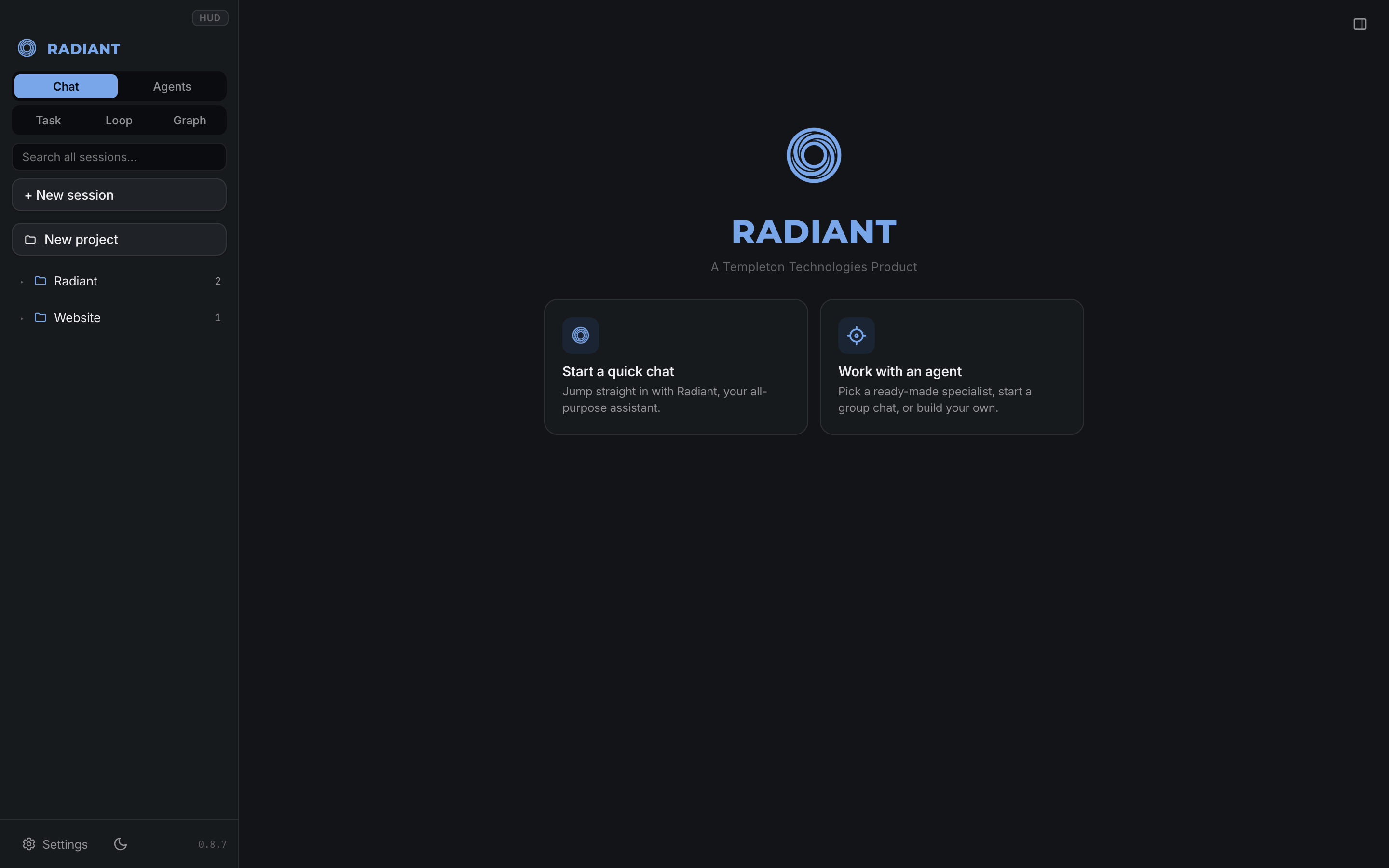
An agent working in a real folder — every file it touched is listed, and the composer shows which model is answering and what it is allowed to do.
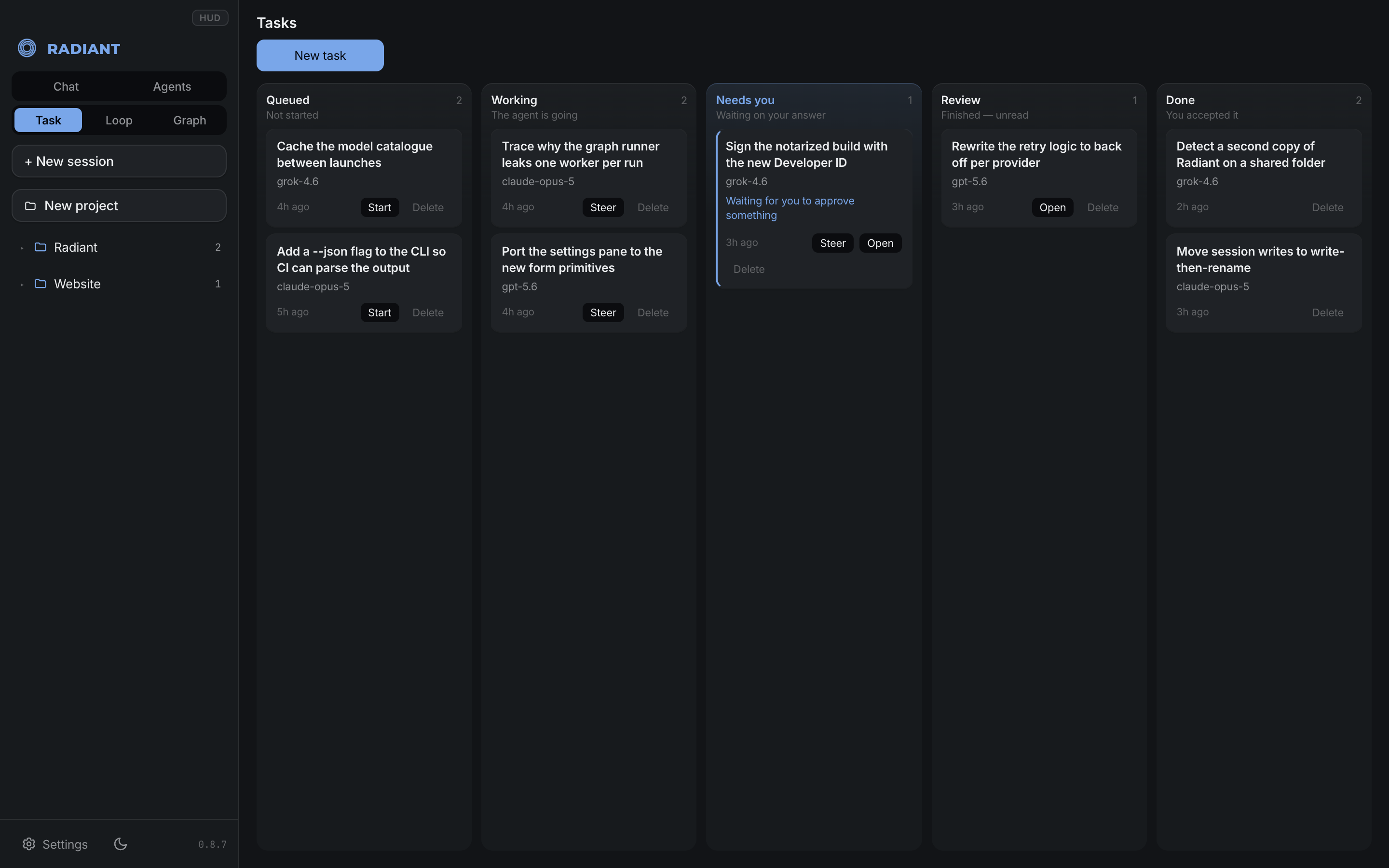
Longer jobs run as tasks. "Needs you" is the column that matters: an agent that hits a decision stops there instead of guessing.
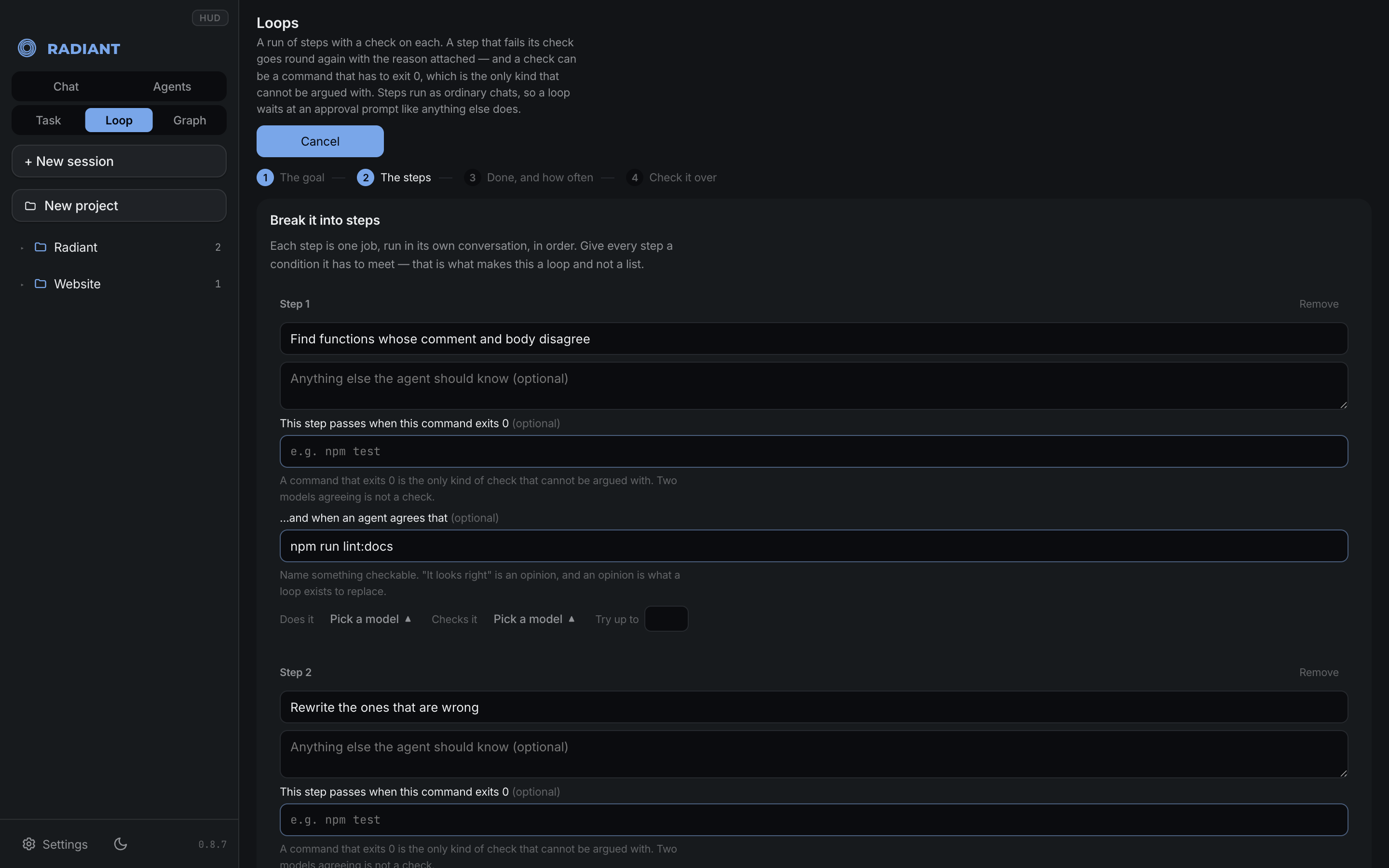
A loop is a run of steps that checks its own work. Each step carries a condition — a shell command that has to exit 0, or a sentence another agent judges — and a step that fails goes round again carrying the reason.
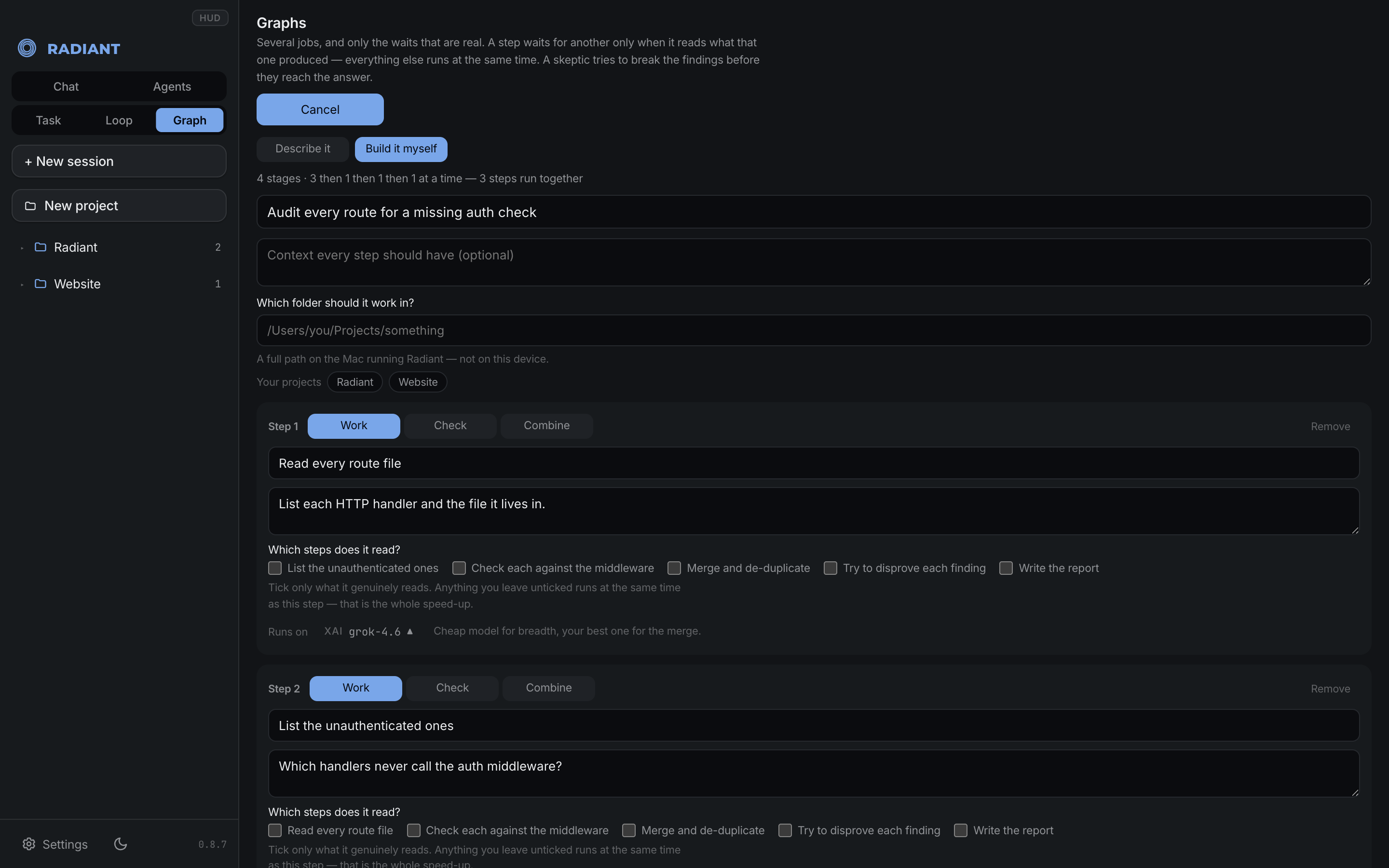
A graph is several jobs and only the waits that are real. You tick what a step actually reads; everything left unticked runs at the same time. Here that is four stages, three of them running together.
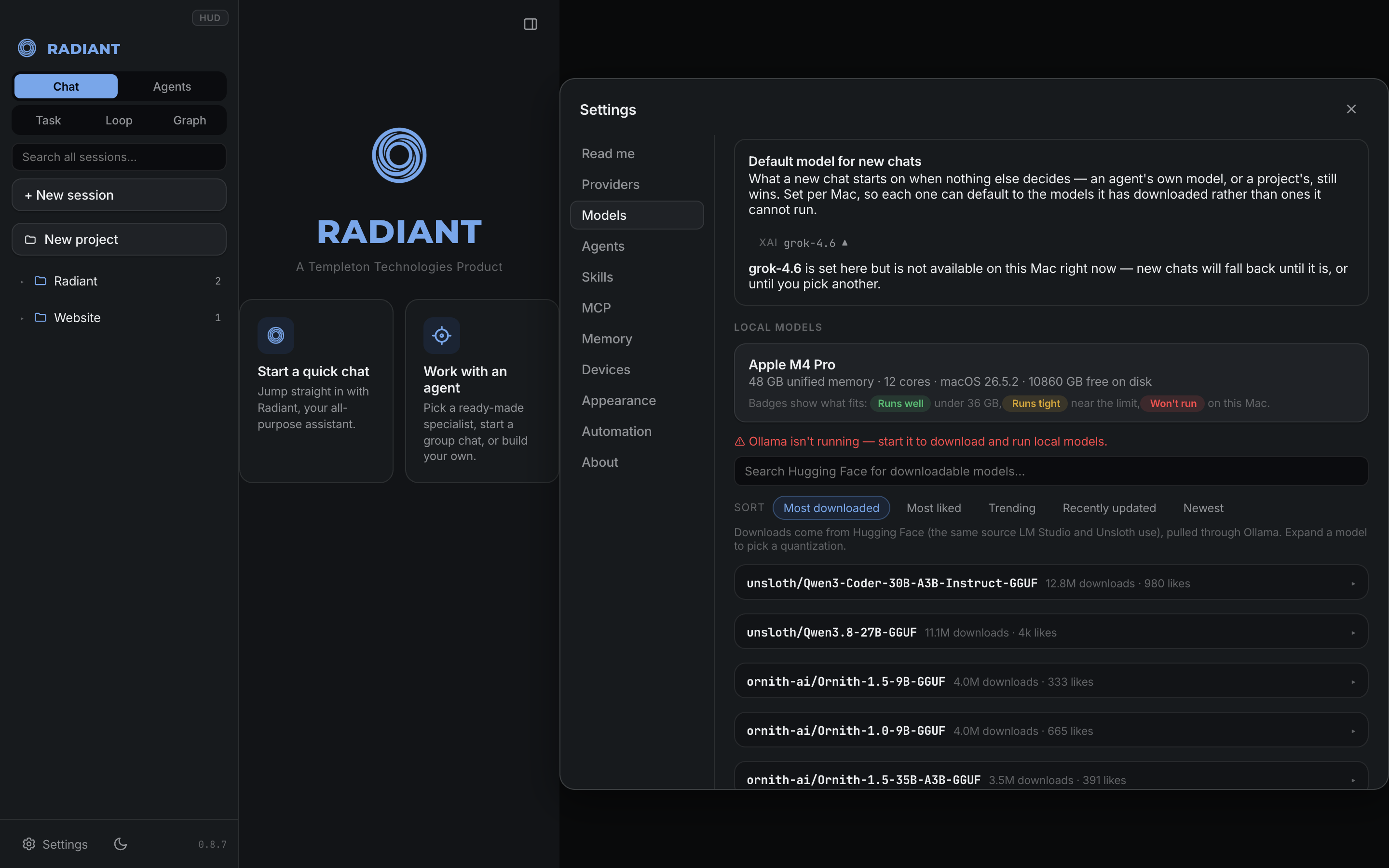
Local models are measured against the machine you are on, not a spec sheet — every one is labelled Runs well, Runs tight or Won't run before you spend the download.
Features
Agents that do real work
- Agent chat with streaming replies and visible model thinking, on any model: Anthropic, OpenAI, OpenRouter, xAI, Nous, Groq, Mistral and more, or Ollama and LM Studio on your own Mac. Sessions store messages in a neutral format, so you can switch models mid-conversation and keep your context.
- Real tools — read, write and edit files and run shell commands in the chat's project folder. Ask before every command, auto-run the low-risk ones (with a second opinion on each from a small decision model), or allow all.
- Undo — every reply that edits files leaves a checkpoint; roll the files back and keep the conversation.
- Computer control, app by app (opt-in, Mac) — a vision model can drive the browser and the desktop, and Radiant asks about each app by name before it clicks or types in it: this chat, always, or no. Terminals and Radiant itself are never allowed, even on "Allow all"; password managers and System Settings are asked every chat. Always-allowed apps are listed in Settings, each with a Revoke button.
- Changes panel — a right-hand tab listing what the agent changed in the chat's folder: M/A/D/R/U letters, +/- line counts, an inline diff, a commit box for the files you tick, and Undo with a one-hour Restore. Nothing is ever pushed. Sidebar rows show each chat's branch and lines changed.
- Your Claude Code and Codex subscriptions (opt-in) — list the sessions you started in the Claude Code and Codex apps, continue them in Radiant, or pick either as a chat's model. They run on their own sign-in, so no API key. Off until you turn it on, private to the Mac unless you allow other devices.
- Open chats as tabs, a composer bar that states its model, thinking level and permission mode in words, and long turns that fold to "Worked for 2m 39s".
- Your project's rules — Radiant reads a project's
AGENTS.md,CLAUDE.md,.clinerulesor.cursorrulesinto every chat, and shows the branch's pull request and CI status above the composer. - Reasoning carries between steps — a model that thinks (Claude with a thinking level, ChatGPT models on a ChatGPT sign-in) gets its own earlier reasoning back at each tool step instead of starting over.
- Sandbox commands (optional) — macOS enforces a fence around every command the agent runs: writes only inside the project folder, and, if you choose, no internet. A blocked command tells the agent to ask you.
- One message, one reply — a message that arrives twice (a retried connection, a repeated voice request) runs once. A turn that stops for any reason says why in the chat, with a Continue button — never an empty reply.
- Steer while it works — messages typed mid-turn queue up; Steer stops the agent and sends them now. Stop keeps whatever was already written.
Work that runs longer
- Task board — a kanban board where the run moves the card: Queued, Working, Needs you (the moment the agent asks something), Review, Done. Click a task for a two-column view: its description and one feed of your comments, its history and every run with the tools it used on the left; status, priority, labels, due date and dependencies on the right. Tasks can wait on other tasks, and an agent can read the board, add subtasks and leave comments itself.
- Loops — a run of steps where each step has a check it must pass (a command that exits 0, or a sentence another agent judges); a step that fails goes round again carrying the reason. A check can also answer blocked — no attempt could pass — which ends the loop at once instead of spending the attempts left.
- Graphs — several jobs with only the waits that are real: steps that do not depend on each other run at the same time. A run shows what every step and round spent (tokens, and dollars at list price), and a repeating graph can stop at a token budget.
- Long builds — no cap on rounds. The only ceiling is a spend budget you set, measured in real cost, and a turn that keeps failing the same kind of command is stopped instead of burning tokens.
- Long chats keep what matters — past half the model's window, Jev sets aside older tool results the task no longer needs (and any result a later, identical call replaced), so what the task depends on keeps its place. When a chat outgrows its model, earlier exchanges about something else are set aside before anything is summarized — kept in the chat, just not sent.
Models, chosen well
- Sign in with a subscription you already pay for — Claude, ChatGPT, Grok, GitHub Copilot, Qwen or Nous Portal — or paste an API key.
- The right model for each message — easy messages can go to a fast model from the same provider, decided by Jev (a small decision model) in about 300 ms. Or choose Jev Router at the top of OpenRouter's list and let it pick any model for each message; every reply is labeled with the model that actually answered.
- Local models, measured against your Mac — each one is labelled Runs well, Runs tight or Won't run before you download it.
The workspace
- Activity panel — a live feed of every tool call and its output, plus a Preview tab that shows what the agent makes.
- Terminal panel — a real login shell (node-pty + xterm.js).
- Browser control from your own Chrome — the Radiant Browser Bridge extension lets the agent read pages, click, and see the network calls a site makes, in the browser you are already signed into.
- Voice — hold a spoken conversation over any chat on OpenAI GPT-Live or Google Gemini Live; your own model, tools and approvals do the work.
- Skills and MCP — reusable skills globally or per agent, MCP tool servers attached only when a message needs them, and 142 ready-made agents.
- Theming — light, medium and dark, fourteen presets (Tokyo Night, Catppuccin, Everforest, Gruvbox, Nord, Dracula, Rosé Pine, Solarized and more), or your own background and text colors with the rest of the palette derived in OKLCH and a contrast check.
- Private by design — API keys live in
~/.radiant/config.json(mode- and never reach the browser; the agent's shell runs without your secrets in its environment; the server binds to 127.0.0.1 unless you turn on sharing with your other Macs and phone, which is gated by an access token.
Radiant for iPhone and iPad
On the App Store. It runs open models
directly on the device with Apple's MLX — search Hugging Face, see whether a
model fits your device before you download it, and chat with nothing leaving
the phone. It also talks to Apple Intelligence and to cloud models with your
own key, which stays in the Keychain. The app is native SwiftUI; the source is in apps/ios.
Install the Mac app
Download the latest Radiant for Mac (Apple Silicon), open it, and drag Radiant into Applications. It is signed and notarized by Apple, so it opens like any other app, and it keeps itself up to date.
Or build it yourself:
npm install
npm run dist        # produces release/Radiant-<version>-arm64.dmg
Run from source (dev mode)
npm install
npm run dev         # server on :5834, UI with hot reload on http://localhost:5833
npm run app builds the UI and launches the Electron app without packaging.
Using it
- Start a session. If Ollama or LM Studio is running locally, a local model is picked automatically — no account, no key, nothing leaves your machine.
- To use cloud models, open ⚙ Settings and paste an API key next to a provider. The model picker (top right) lists every model you have access to.
- Point the session's workspace folder (path chip in the top bar) at a project and ask the agent to build, fix, or explain something. It asks before running each shell command; file edits show up in the Activity panel.
- The ▤ button toggles the side panel: Activity feed and Terminal.
Architecture
server/— Express + WebSocket backend: streaming provider clients (providers.js, Anthropic + OpenAI-compatible), agent tools (tools.js), config and session storage (config.js)src/— React UI (Vite): chat, model picker, settings, activity feed, xterm terminalelectron/— thin Electron shell that boots the server in-process and opens a window on it
Subscription sign-in is implemented in server/oauth.js — device-code and PKCE
flows for Claude, ChatGPT, Nous Portal, xAI (Grok), Qwen and GitHub Copilot, so
you can use a plan you already pay for instead of an API key. The provider
registry's auth field is what each provider's flow is selected by.
License
Radiant is a Templeton Technologies product, released under the MIT License.
In plain terms: use it, modify it, redistribute it, build on it, sell it —
commercially or otherwise. The only condition is that the copyright notice
travels with it. See LICENSE for the exact terms.
Radiant was previously under the Functional Source License (FSL-1.1-MIT),
which prohibited competing use. It is now MIT: fully open source by the Open
Source Definition, with no carve-out.
Copyright © 2026 Templeton Technologies.
Explore related projects
codecrafters-io/build-your-own-x
Master programming by recreating your favorite technologies from scratch.
562,324 starspublic-apis/public-apis
A collective list of free APIs
498,756 starsmorluto/rea
Reverse engineer anything with agents, from app behavior down to native binaries.
457,350 starsopenclaw/openclaw
The AI that really does things. Any OS. Any Platform. The lobster way. 🦞
394,391 stars