
taojy123/KeymouseGo
taojy123/KeymouseGo has 10,651 GitHub stars and 1,353 forks. Star changes are not measured yet. Last checked 2026-11-05 23:05 UTC. Last push 2026-06-07.
类似按键精灵的鼠标键盘录制和自动化操作 模拟点击和键入 | automate mouse clicks and keyboard input
Measured star growth
- in 24h
- Update delayed
- in 7 days
- Collecting history
- in 15 days
- Collecting history
- in 1 month
- Collecting history
Net star changes over overlapping periods, not daily totals. Missing measurements are left blank. Stars measure attention, not software quality.
README_en-US.md
Original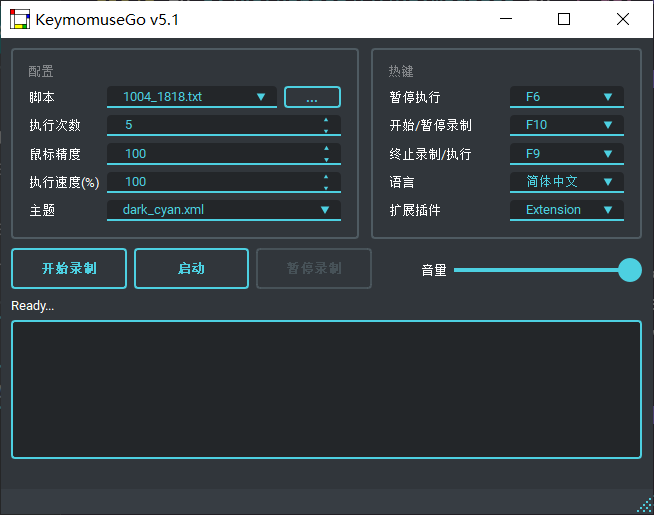




Features:
- Record mouse/keyboard operations
- Reproduce operations recorded before
- Can be regarded as simplified Quick Macro
Usage:
- Free users away from works that are simple and repetitive
- You can record the necessary operations once and left the rest of works to computer
Table of content
Installation
This program is written in Python and packed as executable file. You can download release version directly without installation of Python.
Bundle with source code
1. Install Python 3
2. Install requirement with pip3
- (Windows) pip install -r requirements-windows.txt
- (Linux/MacOS) pip3 install -r requirements-universal.txt
3. Install pyinstaller
-  pip install pyinstaller
4. Bundle with pyinstaller
- (Windows) pyinstaller -F -w --add-data "./assets;assets" KeymouseGo.py
- (Linux X11) pyinstaller -F -w --add-data "./assets:assets" --hidden-import "pynput.keyboard._xorg" --hidden-import "pynput.mouse._xorg" KeymouseGo.py
- (Linux Wayland) pyinstaller -F -w --add-data "./assets:assets"  --hidden-import "pynput.keyboard._uinput" --hidden-import "pynput.mouse._uinput" KeymouseGo.py
- (MacOS) pyinstaller -F -w --add-data "./assets:assets" --hidden-import "pynput.keyboard._darwin" --hidden-import "pynput.mouse._darwin" KeymouseGo.py
The executable program would appear at folder your_poject_location/dist.
Usage
Basic operation
Desktop mode
Click
Recordbutton to start recordingDo anything like clicking mouse or tapping keyboard, which will be recorded
Click
Finishbutton to stop recordingClick
Launchbutton to reproduce the operation recorded in step 2
Command line mode
Run specific script
> ./KeymouseGo scripts/0314_1452.txt
Run specific script for 3 times
> ./KeymouseGo scripts/0314_1452.txt -rt 3
> ./KeymouseGo scripts/0314_1452.txt --runtimes 3
Tips
The program will endlessly run the script if run times is set to
0The default launch hotkey is
F6, which functions the same as the launch button. The default stop hotkey isF9, which will terminate the running scriptOnly mouse click operation and keyboard operation will be recorded. Mouse trail won't be recorded.
A new script file will be generated in directory
scriptsat the end of recording.You can choose the script to run in choice list.
The content of script can be edited with reference of
Grammar of script.In hotkey setting,
Middlerefers mouse middle button andXButtonrefers mouse side button.Due to the limitation of execution speed, the running speed cannot be set too high.
In some system environment, there may be circumstances that the mouse events cannot be fully recorded. To settle this, you can run this program as administrator/root.
For mac users, make sure that application must be white listed under Enable access for assistive devices. You may also need to whitelist terminal application if running from terminal. If the app crashes, you may try to give write permission for directory
~/.qt_material.
chmod -R 770 ~/.qt_material
- For Linux/Mac users, if you have problems recording or executing event after running this program as root, you may refer to documentation of pynput
Grammar of scripts
Assume that the resolution of screen is
1920 * 1080
The script is saved in json5 format, in which each line represents an event
{
  scripts: [
    // Press mouse right button at the relative coordinates `(0.05208, 0.1852)`(i.e. absolute coordinates `(100,200)`) after 3000ms
    {type: "event", event_type: "EM", delay: 3000, action_type: "mouse right down", action: ["0.05208%", "0.1852%"]},
    // Release mouse right button at the coordinates after 50ms
    // The mouse event will execute on the position that the cursor is currently in when the coordinate is set to [-1, -1]
    {type: "event", event_type: "EM", delay: 50, action_type: "mouse right up", action: [-1, -1]},
    // Press key 'f' after 1000ms
    {type: "event", event_type: "EK", delay: 1000, action_type: "key down", action: [70, 'F', 0]},
    // Release key 'f' after 50ms
    {type: "event", event_type: "EK", delay: 50, action_type: "key up", action: [70, 'F', 0]},
    // Press mouse left button at the relative coordinates `(0.2604, 0.4630)`(i.e. absolute coordinates `(500,500)`) after 100ms
    {type: "event", event_type: "EM", delay: 100, action_type: "mouse left down", action: ["0.2604%", "0.4630%"]},
    // Move mouse to the relative coordinates `(0.2604, 0.4630)`(i.e. absolute coordinates `(500,500)`) after 100ms
    {type: "event", event_type: "EM", delay: 100, action_type: "mouse move", action: ["0.2604%", "0.5556%"]},
    // Release mouse left button at the relative coordinates `(0.3125, 0.5556)`(i.e. absolute coordinates `(600,600)`) after 100ms
    {type: "event", event_type: "EM", delay: 100, action_type: "mouse left up", action: ["0.3125%", "0.5556%"]},
    // Input 'Hello world' at current coordinate after 100ms
    {type: "event", event_type: "EX", delay: 100, action_type: "input", action: "你好 world"}
  ]
}
- It is recommended to back up script before editing. And make sure to follow the format while editing, otherwise it may result in failure of execution.
Advanced Operations
Please check wiki
About me
I'm Tao Jiayuan, with commonly used id taojy123, tao.py on Internet
My personal site tslow.cn organizes and lists a collection of 'personal projects' and 'gadgets'.
You can refer my newly published articles on jianshu and watch my technology sharing and life documentary on bilibili
My Email: [email protected]
Contributors
If you are a developer and interested in this project, you can check the progress in branch dev. and you are welcomed to participating by opening pull request to branch dev.
Thanks to free develop tool provided by JetBrains

Explore related projects
codecrafters-io/build-your-own-x
Master programming by recreating your favorite technologies from scratch.
560,173 starspublic-apis/public-apis
A collective list of free APIs
496,450 starsmorluto/rea
Reverse engineer anything with agents, from app behavior down to native binaries.
434,857 starsopenclaw/openclaw
The AI that really does things. Any OS. Any Platform. The lobster way. 🦞
393,998 stars