
tanaer/WindowsClear
tanaer/WindowsClear has 1,226 GitHub stars and 65 forks. GitHot measured +3 stars in 24 hours. Last checked 2026-11-09 08:28 UTC. Last push 2026-05-12.
Windows C盘清理工具/C盘瘦身工具,还你Appdata的大量硬盘空间 | Windows System disk cleanup, returning a large amount of hard drive space from your Appdata
Measured star growth
- in 24h
- +3
- in 7 days
- Update delayed
- in 15 days
- Update delayed
- in 1 month
- Update delayed
Net star changes over overlapping periods, not daily totals. Missing measurements are left blank. Stars measure attention, not software quality.
README_EN.md
OriginalWindowsClear (AppData Mover)
Introduction
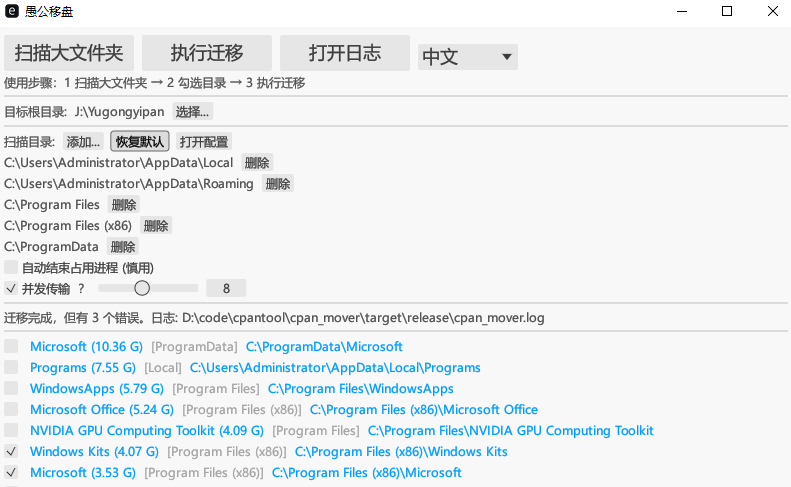
A powerful Windows system disk cleanup tool focused on freeing up massive space occupied by the AppData directory. It automatically identifies large software data folders and allows you to move them to another drive (e.g., Drive D) with one click. It automatically creates Directory Junctions (Junction Points) so that software runs seamlessly as if the files were never moved.
Key Features
- Smart Scan: Automatically analyzes
%LOCALAPPDATA%and%APPDATA%to quickly locate folders taking up more than 10% of space. - Seamless Migration: Moves files across drives and creates Junction links in place; no software reconfiguration needed.
- Safe & Reliable:
- Process Guard: Detects file locks and supports auto-killing locking processes (using Windows Restart Manager).
- Rollback: Automatically attempts to restore files if an error occurs during migration.
- User Experience:
- High Performance: Built with Rust, utilizing multi-threaded scanning for blazing speed.
- Smart Cache: Instant results for repeated scans if no changes are detected.
- Visual Progress: Byte-level precision progress bar with real-time speed and ETA.
- Bilingual: One-click switch between English and Chinese interface.
- Pause/Resume: Pause anytime during large file transfers.
Usage
- Run
WindowsClear.exe(orcpan_mover.exe) as Administrator. - Click "Scan Large Folders".
- Check the folders you want to move (start with non-critical apps recommended).
- Select Target Root (e.g.,
D:\AppData). - Click "Move Folders" and wait for completion.
FAQ
- Why Administrator privileges?
- Creating Directory Junctions (
mklink /J) and managing other processes typically require admin rights.
- Creating Directory Junctions (
- Will software work after moving?
- Yes. Directory Junctions are transparent to applications; they still "see" files on C drive.
- How to restore?
- Simply delete the shortcut (folder with arrow icon) on C drive, then cut and paste the folder from D drive back to its original location on C.
Build Guide
Built with Rust.
# Clone repository
git clone https://github.com/tanaer/WindowsClear.git
cd WindowsClear

# Build Release
cargo build --release
License
MIT License
Explore related projects
codecrafters-io/build-your-own-x
Master programming by recreating your favorite technologies from scratch.
561,375 starspublic-apis/public-apis
A collective list of free APIs
497,650 starsmorluto/rea
Reverse engineer anything with agents, from app behavior down to native binaries.
447,211 starsopenclaw/openclaw
The AI that really does things. Any OS. Any Platform. The lobster way. 🦞
394,260 stars