
tamnguyenvan/screenarc
tamnguyenvan/screenarc has 730 GitHub stars and 59 forks. GitHot measured +3 in 7 days. Last checked 2026-11-09 06:26 UTC. Last push 2026-07-22.
ScreenArc – Cross-platform screen recorder & editor with automatic cinematic zooms, mouse tracking, and effortless video creation.
What you can do
- 🎥 Flexible Capture: Record your full screen, a specific window, or a custom area with seamless multi-monitor support.
- 👤 Webcam Overlay: Add a personal touch by including your webcam feed in the recording.
- 🎬 Cinematic Mouse Tracking: Automatically generates smooth pan-and-zoom effects that follow your mouse clicks, keeping the action front and center.
- 🎨 Powerful Editor: A visual timeline to easily trim clips, customize frames, backgrounds (colors, gradients, wallpapers), shadows, and more.
Measured star growth
- in 24h
- Update delayed
- in 7 days
- +3
- in 15 days
- Update delayed
- in 1 month
- Update delayed
Net star changes over overlapping periods, not daily totals. Missing measurements are left blank. Stars measure attention, not software quality.
README.md
OriginalScreenArc 🎬



✨ Create cinematic screen recordings with automatic pan-and-zoom effects ✨
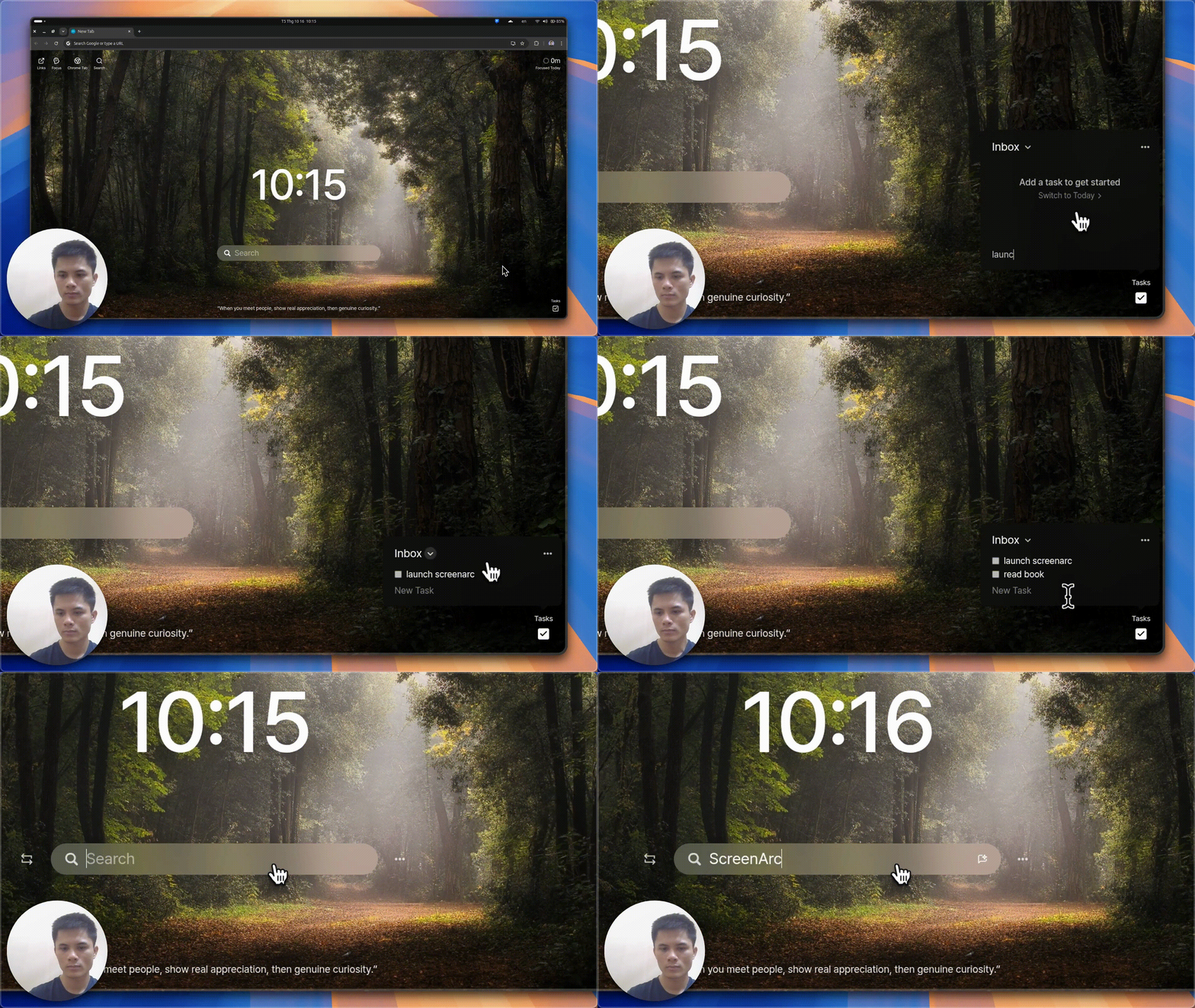
ScreenArc is a smart screen recording and editing tool that makes professional video creation effortless. It automatically tracks your mouse movements and clicks, creating smooth cinematic animations that keep viewers focused on what matters. No manual keyframing needed!
Perfect for developers, educators, and content creators who want to produce stunning tutorials, demos, and presentations.
🎥 Demo
⭐ Features
- 🎥 Flexible Capture: Record your full screen, a specific window, or a custom area with seamless multi-monitor support.
- 👤 Webcam Overlay: Add a personal touch by including your webcam feed in the recording.
- 🎬 Cinematic Mouse Tracking: Automatically generates smooth pan-and-zoom effects that follow your mouse clicks, keeping the action front and center.
- 🎨 Powerful Editor: A visual timeline to easily trim clips, customize frames, backgrounds (colors, gradients, wallpapers), shadows, and more.
- 📏 Instant Aspect Ratios: Switch between 16:9 (YouTube), 9:16 (Shorts/TikTok), and 1:1 (Instagram) with a single click.
- 💾 Preset System: Save your favorite styles and apply them instantly to future projects for a consistent look.
- 📤 High-Quality Export: Export your masterpiece as an MP4 or GIF with resolutions up to 2K.
🚀 Installation
Grab the latest version for your OS from the Releases Page.
🐧 Linux Instructions
Prerequisites
- X11 Display Server Required - ScreenArc currently doesn't support Wayland.
- Check your session type:
echo $XDG_SESSION_TYPE - If it shows
wayland, switch to X11 from your login screen.
- Check your session type:
Installation Steps
Download the latest AppImage:
wget https://github.com/tamnguyenvan/screenarc/releases/latest/download/ScreenArc-*-linux-x64.AppImageMake it executable:
chmod +x ScreenArc-*-linux-x64.AppImageRun ScreenArc:
- Double-click the file in your file manager, or
- Run from terminal:
./ScreenArc-*-linux-x64.AppImage
Troubleshooting
- If you get permission errors, ensure the file is executable
- For AppImage issues, try running with
--no-sandboxflag
🪟 Windows Instructions
Security Notice
🔒 Important: As a new open-source project, we don't have a code signing certificate yet. You may see security warnings during installation.
To proceed safely:
- In your browser, click "Keep" or "Keep anyway" when downloading
- On the SmartScreen prompt, click "More info" → "Run anyway"
Our code is fully open source for your review.
Installation Steps
Download the latest Windows installer:
- Visit our Releases Page
- Download the
ScreenArc-*-Setup.exefile
Run the installer:
- Locate the downloaded file (usually in your
Downloadsfolder) - Double-click to start the installation
- Follow the on-screen instructions
- Locate the downloaded file (usually in your
🍏 macOS Instructions
Security Notice
🔒 Important: As a new open-source project, we don't have a code signing certificate yet. You'll need to authorize the app to run on your Mac.
To proceed safely:
- After downloading and attempting to open the app, you'll see a security warning
- Close the warning dialog
- Open System Settings > Privacy & Security
- Scroll down to the "Security" section
- Click "Open Anyway" next to the warning about ScreenArc
- Click "Open" in the confirmation dialog
Our code is fully open source for your review
Installation Steps
Download the appropriate macOS package for your system:
- Visit our Releases Page
- For Apple Silicon (M1/M2/M3) Macs: Download
ScreenArc-*-arm64.dmg - For Intel Macs: Download
ScreenArc-*-x64.dmg
Install ScreenArc:
- Open the downloaded
.dmgfile - Drag the ScreenArc app to your Applications folder
- Open from Launchpad or Applications folder
- Open the downloaded
🛠️ Tech Stack
- ⚡ Core Framework: Electron, Vite, TypeScript
- 💅 Frontend: React, TailwindCSS
- 📦 State Management: Zustand with Immer & Zundo (for undo/redo)
- 🎥 Backend & Video Processing: Node.js, FFmpeg
🔧 Development Setup Guide
Prerequisites
- Linux: Ensure you are on an X11 session, not Wayland.
- Windows:
- Install Build Tools for Visual Studio 2022 with the "Desktop development with C++" workload.
- Install Python 3.8 and add it to your PATH.
- macOS:
- Install Xcode Command Line Tools
- Install Python 3.8 and add it to your PATH.
Setup Steps
Clone the repo:
git clone https://github.com/tamnguyenvan/screenarc.git
cd screenarc
Install dependencies:
rm package-lock.json
npm install
Set up FFmpeg:
- Download the appropriate FFmpeg executable from screenarc-assets and place it in the
binaries/[os]directory.
# Linux wget https://github.com/tamnguyenvan/screenarc-assets/releases/download/v0.0.1/ffmpeg-linux-x64 -O binaries/linux/ffmpeg chmod +x binaries/linux/ffmpeg # macOS (Apple Silicon) wget https://github.com/tamnguyenvan/screenarc-assets/releases/download/v0.0.1/ffmpeg-darwin-arm64 -O binaries/darwin/ffmpeg-arm64 chmod +x binaries/darwin/ffmpeg-arm64 # macOS (Intel) wget https://github.com/tamnguyenvan/screenarc-assets/releases/download/v0.0.1/ffmpeg-darwin-x64 -O binaries/darwin/ffmpeg-x64 chmod +x binaries/darwin/ffmpeg-x64 # Windows wget https://github.com/tamnguyenvan/screenarc-assets/releases/download/v0.0.1/ffmpeg.exe -O binaries/windows/ffmpeg.exe- Download the appropriate FFmpeg executable from screenarc-assets and place it in the
Run in development mode:
npm run dev
🤝 Contributing
A huge thank you to everyone who has contributed to making ScreenArc better!
🙏 Acknowledgements
ScreenArc stands on the shoulders of giants. This project would not be possible without the incredible work of the open-source community. A special thank you to the authors and maintainers of these key libraries & tools that handle low-level system interactions:
- global-mouse-events: Mouse event listener on Windows
- node-x11: X11 Node.js binding
- Cursorful: I borrowed the Timeline design idea from them.
📜 License
This project is licensed under the GPL-3.0 License.
Explore related projects
n8n-io/n8n
Fair-code workflow automation platform with native AI capabilities. Combine visual building with custom code, self-host or cloud, 400+ integrations.
209,959 starslanggenius/dify
Build Agentic workflows, RAG pipelines, with rich AI model and tool support on one collaborative workspace. Deploy on cloud, VPC, or self-hosted, so teams move from prototype to production without rebuilding the stack.
160,773 starsmicrosoft/PowerToys
Microsoft PowerToys is a collection of utilities that supercharge productivity and customization on Windows
140,755 starsstablyai/orca
Orca is the place for working with a fleet of agents (e.g. Grok Bot, Claude Code). Run any coding agent with your own subscription. Available on desktop, mobile and remote runtime.
120,604 stars