
tamia6/AppDuo
tamia6/AppDuo has 128 GitHub stars and 21 forks. GitHot measured +3 stars in 24 hours, +8 in 7 days, and +12 in 15 days. Last checked 2026-11-17 02:19 UTC. Last push 2026-10-28.
Measured star growth
- in 24h
- +3
- in 7 days
- +8
- in 15 days
- +12
- in 1 month
- Collecting history
Net star changes over overlapping periods, not daily totals. Missing measurements are left blank. Stars measure attention, not software quality.
About
Free, open-source macOS app cloner with custom icons, names and separate data. Hard-clone process names support routing with compatible proxy clients.
ProductivityREADME.en.md
OriginalAppDuo
简体中文 · English
AppDuo is a free, open-source native macOS app cloning tool. Give each clone its own name, icon, and data directory. Hard clones also use distinct process names, so proxy clients with process-based rules can route each clone through a different network exit.
Built with Swift and SwiftUI. Licensed under GPL-3.0.
Different icons. Different names. Different routes.
For example, create three hard clones of WeChat for personal use, Hong Kong work, and US work. Choose a different .icns icon for each, use a readable display name, and use a short process name for routing rules.
| Display name | Icon example | Clone / process name | Example route |
|---|---|---|---|
| Personal WeChat | Original green | WeChatCN |
DIRECT: your local connection |
| Hong Kong Work | Blue-violet | WeChatHK |
HK Work group → Hong Kong node |
| US Work | Orange | WeChatUS |
US Work group → US node |
Icons are selected by the user, not generated automatically by region. DIRECT uses your local network; it is a mainland China exit only when that network exits in mainland China. Otherwise, select an appropriate existing proxy policy if needed.
Clash / Mihomo routing example
- Select Hard clone in AppDuo. Set the clone/process names above, choose display names, and select icons.
- In a Clash client using a compatible Mihomo core, create
HK WorkandUS Workpolicy groups with suitable nodes, or replace those names with your existing groups. - Merge these rules into your existing configuration, before domain, GEOIP, rule-set, or
MATCHrules that might match first. This is a fragment, not a complete proxy configuration.
mode: rule
find-process-mode: always
rules:
  - PROCESS-NAME-REGEX,^WeChatCN(-|$),DIRECT
  - PROCESS-NAME-REGEX,^WeChatHK(-|$),HK Work
  - PROCESS-NAME-REGEX,^WeChatUS(-|$),US Work
^WeChatHK(-|$) matches WeChatHK and helpers named WeChatHK-OriginalName, but not WeChatHK2. Names are case-sensitive in this example. Simple alphabetic names avoid regex escaping issues.
The proxy client must actually capture the connections and identify their local processes. Apps such as WeChat may ignore the system HTTP proxy; use a capture mode such as TUN according to your client's documentation. Check the process name, matched rule, and outbound policy in the connection list for each clone. A different icon or name alone does not prove routing works.
Other proxy clients
AppDuo provides distinguishable process identities; it does not bundle Clash or supply proxy nodes. Clients supporting process-name, process-path, or process-regex rules can be configured using their own syntax. The example above requires Mihomo's PROCESS-NAME-REGEX support; it is not universal syntax for all Clash versions or other clients.
Changing only the display name does not change the process name. Soft clones use the original application's process and cannot use this distinct-process-name approach. AppDuo's HTTP/HTTPS/SOCKS5 environment-variable proxy settings are a separate mechanism and depend on support in the target app.
Reference: Mihomo routing rules and matching order.
Separate notifications for separate clones
Different clones can receive their own notifications, keeping work and personal messages distinct without switching between windows. The target app must support notifications, and notifications must be enabled both in the app and in macOS. Focus mode, running state, and third-party app versions can affect delivery.
For example, each of the three WeChat clones can receive messages for its own account. The notification source name and icon depend on the app and its macOS registration. AppDuo does not provide a push service or guarantee notifications after a clone has quit.
Dock and Notification Center screenshots
These real screenshots show two WeChat instances: the original app in green and a WeWork clone in purple. They illustrate distinct icons and separate notifications; they are not screenshots of the three-identity configuration example.
Dock: distinct icons and unread badges

Notification Center: separate message notifications
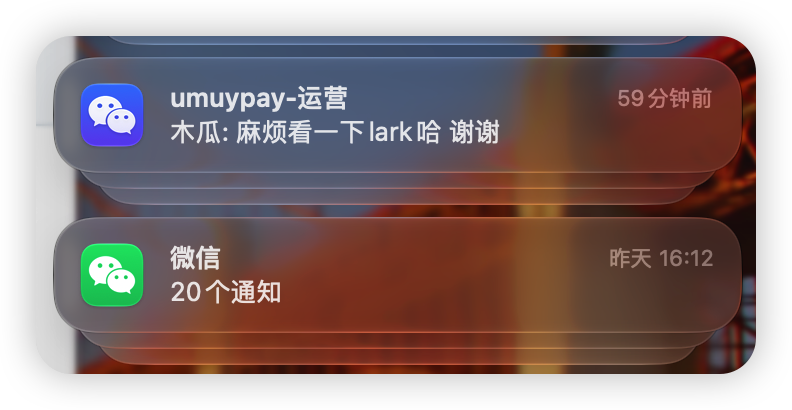
Notifications require app compatibility and permission in both the app and macOS.
Downloads and automated builds
Install with Homebrew, which automatically selects the Apple Silicon or Intel build:
brew install --cask tamia6/tap/appduo
Download from Releases: choose AppDuo-arm64.dmg for Apple Silicon or AppDuo-x86_64.dmg for Intel.
GitHub Actions tests and builds both architectures on pushes to main, pull requests, and manual runs. DMGs are available as workflow artifacts. Pushing a vMAJOR.MINOR.PATCH tag publishes a release with DMGs and SHA-256 checksums, with the version embedded in the application metadata.
What if macOS blocks the first launch?
Current builds are ad-hoc signed and have not been notarized by Apple. macOS may warn that the developer cannot be verified or that Apple cannot check the app for malicious software. Installing through Homebrew may show the same warning.
After confirming that the app came from this project's GitHub Releases or the Homebrew installation above, and that you trust this source:
- Try opening AppDuo in Applications. Dismiss the warning if it is blocked.
- Open System Settings → Privacy & Security, scroll to the AppDuo warning, and click Open Anyway.
- Authenticate if prompted, then click Open. macOS saves an exception for this app, so subsequent launches normally work.
This allows this app to open; it does not notarize it. You do not need to disable Gatekeeper globally or run Terminal commands to remove quarantine attributes. If the warning says the app “will damage your computer” or “is damaged”, stop and download it again from the official release. Report an issue if the problem persists. On a managed Mac, contact your administrator if approval is unavailable.
Reference: Apple: Safely open apps on your Mac.
In-app updates
Updater-enabled versions check for stable AppDuo releases in the background on launch. When prompted, choose Install Update to download and verify the archive, then Install and Relaunch when ready. The AppDuo menu also includes 检查更新… (Check for Updates). Installation waits for active clone operations; clone data and settings are preserved. Version 0.1.6 needs one manual upgrade to an updater-enabled version. This does not replace macOS first-launch approval.
See automatic update setup and limitations.
Build and run
Requires macOS 14+, Xcode or Command Line Tools, and a Swift 6 toolchain. Creating clones uses Apple's clang and codesign.
swift test
./script/build_and_run.sh             # Build and launch the .app
./script/build_and_run.sh --verify    # Build and verify process startup
./script/build_and_run.sh --dmg       # Package a DMG for the current architecture
bash script/check_packaged_app.sh dist/AppDuo.app # Check signing, icons, and packaged resources
You can open Package.swift in Xcode. The Codex Run action is configured. Build output is in dist/. Packages use local ad-hoc signing and are not notarized by Apple.
Features
- Checks the locally installed source app's version and build number when AppDuo opens. Hard clones show an update badge and a quick upgrade action, preserving data, icons, and settings. Soft clones run the source app directly.
- Compact cards and a five-step creation wizard, editing, launching, upgrading, moving clones to Trash, and settings. Closing the last window exits the app; there is no persistent menu-bar icon.
- 34 built-in recipes, local YAML overrides, and framework-based detection for unknown apps.
- Hard clones copy the app; soft clones use a native launcher. Supports automatic, dylib, and launcher injection modes.
- Separate data paths, HOME/TMPDIR and recipe environment variables, allowlisted shared paths, app language, HTTP/HTTPS/SOCKS5 proxies, and Keychain password storage.
- Original icon preview and
.icnsreplacement. Updates read the installed clone's icon, so the original icon file is no longer needed. - Hard-clone main processes use the custom name; helpers use
Name-OriginalName, and launchers useName-Launcher. Internal compatibility symlinks are retained, and filename collisions are rejected before renaming. - Mach-O header-space checks and dylib injection, Cocoa/POSIX isolation hooks, CEF/single-instance compatibility patches, helper bundle-ID changes, obsolete framework cleanup, nested signing, and strict signature verification.
- Updates build a temporary sibling copy and verify its signature before replacing the old app. Failed builds preserve the existing clone; data directories are not deleted during upgrades.
- Native CLI for environment checks, app inspection, and clone management.
Yams is the only package dependency, used for YAML parsing; Package.resolved pins its version. Generated launchers and injected libraries are small C/Objective-C components compiled with Apple clang. No Python engine is bundled.
Data and recipes
The default root in the published source is ~/AppDuo/: apps in Apps/, independent data in Data/, recipes in recipes/, and records in clones.json. Custom paths and the CLI’s --root option are also available.
Default directories do not need administrator privileges. Automatic elevation for system directories is not provided; use a user-writable location. Data deletion is off by default. The app only removes data inside its default Data directory; manage custom data paths in Finder.
CLI
The built-in YAML option preserve_main_executable_name: true keeps the main executable's original name. WeCom enables it to avoid the startup crash reproduced after renaming version 5.0.9. App names, icons and bundle IDs remain independent, but main process names cannot distinguish the instances. WeChat keeps its existing executable-renaming behavior. Quit and update an older WeCom clone to apply this compatibility policy without moving or deleting its data. Successful creation or update does not verify login, notifications or full data isolation for every version.
The CLI is available from source and is not included in the downloaded GUI app.
swift run AppDuoCLI clone /Applications/WeChat.app --name WeWork --icon /path/icon.icns
swift run AppDuoCLI list
swift run AppDuoCLI update WeWork
swift run AppDuoCLI remove WeWork              # Confirm, trash the app, keep its data
swift run AppDuoCLI probe /Applications/WeChat.app
swift run AppDuoCLI recipes
swift run AppDuoCLI doctor
Run swift run AppDuoCLI help for proxy, language, directory, and injection options. Use --root DIR to isolate test data. Supply CLI proxy passwords through ATBCLONE_PROXY_PASSWORD; records do not store plaintext passwords.
Example for a hard clone, using an existing Singapore policy group:
- PROCESS-NAME-REGEX,^WeWork(-|$),Singapore
Verify process detection and rule matching in your client. Proxy environment variables are not honored by every app; soft clones still run the original process.
Validation and limitations
swift test compiles real Mach-O test apps with clang. Tests cover hard/soft clones, dylib/launcher paths, process-path matching, special characters in environment variables, preserving the original app, repeated icon-preserving updates after the source icon file is deleted, valid signatures, helper-name collisions, and keeping the existing clone after a failed update.
Third-party applications change frequently, particularly those relying on CEF, Feishu, or ChatGPT binary compatibility patches. Included recipes do not mean every third-party version has been tested for login, notifications, or multiple instances. The app UI is currently Chinese; cloned applications support language selection. The English landing page and README do not add an English app UI. Full GUI localization, online self-updates, old-state migration, and administrator elevation are not provided.
Project layout
Sources/CloneCore/: core engine, YAML recipes, runtime templates, and resources.Sources/AppDuo/: SwiftUI interface and AppKit file-selection/launch integration.Sources/AppDuoCLI/: native command-line interface.Tests/CloneCoreTests/: real-binary integration and regression tests.script/build_and_run.sh: build, run, debug, and package entry point.
Native Cocoa notifications and language
With automatic injection, native Cocoa apps receive language preferences through settings and environment variables. Choosing English does not switch them to a launcher. Launching the registered main executable directly avoids notification failures caused by a mismatched process identity. Previously created clones may need to be quit and updated once, preserving data, icons, names, and bundle IDs. Explicit launcher mode and apps that require launch arguments may still have notification or menu-bar compatibility limitations.