
talebook/talebook
talebook/talebook has 5,892 GitHub stars and 634 forks. GitHot measured +1 stars in 24 hours. Last checked 2026-11-06 14:23 UTC. Last push 2026-11-01.
一个简单好用的个人书库
Measured star growth
- in 24h
- +1
- in 7 days
- Collecting history
- in 15 days
- Collecting history
- in 1 month
- Collecting history
Net star changes over overlapping periods, not daily totals. Missing measurements are left blank. Stars measure attention, not software quality.
README_EN.md
Original


Tale Book: My Calibre WebServer
中文 | English
A better online books library management website built on Calibre + Vue
A Simple and User-Friendly Personal Book Management System
This is a simple personal book management system based on Calibre, supporting online reading. Main features:
- Beautiful interface: A modern interface rebuilt with Nuxt 4 + Vue 3 + Vuetify, supporting both PC and mobile browsing, with multi-language (Chinese/English) support and light/dark theme switching;
- Multi-user support: Multi-user functionality with login via social platforms like Douban (deprecated), QQ, Weibo, Github, etc.; full user management and guest permission control, bcrypt password storage, image captcha and GeeTest verification;
- Online reading support: Built-in candle-reader for reading e-books in the browser, with automatic conversion for non-EPUB formats;
- Online library with book sources: Import Legado-style book sources to search and read web novels online, and save them to the library as txt/epub with one click; book source management UI with batch import, enable/disable and validity checks;
- Batch scan and import of books, with automatic metadata filling, recycle bin and batch deletion;
- Email push support: Manage multiple Kindle and other receiving devices, one-click push with automatic batch format conversion;
- OPDS support: Use apps like KyBooks for convenient reading; also browse and import books from other OPDS libraries;
- One-click installation, web-based initial configuration, easy website setup, with online update checking;
- Optimized file storage path for large libraries, can be categorized by alphabet or keep Chinese filenames;
- Quick update of book information: Search and import metadata in parallel from multiple sources (Douban, Baidu Encyclopedia, Xinhua Bookstore, Tomato Novel), with optional AI-powered book information recognition;
- Private mode support: Requires access code to enter the website, convenient for small group sharing; individual books can also be marked as private, visible only to yourself;
This project was previously named: calibre-webserver
Highlights of the Past Year
- Online library & book sources: New Legado-style book source parsing engine — search and read web novels online and save them to the library as txt/epub; book source management UI (batch enable/disable/delete, validity checks, paginated search).
- Frontend rewrite: Upgraded from Nuxt 2 to Nuxt 4 + Vue 3 + Vuetify 3, full i18n (Chinese/English), light/dark theme switching, redesigned login/signup and book editing pages.
- AI & multi-source metadata: New AI-powered book information API; metadata sources extended to Douban, Baidu Encyclopedia, Xinhua Bookstore, Tomato Novel and Calibre, queried in parallel.
- Online reading: Default EPUB reader switched to candle-reader; non-EPUB books are converted automatically before online reading.
- Push & conversion: New user device management with multi-device push; background batch conversion of Kindle-proprietary formats to EPUB.
- OPDS import: Add external OPDS sources, browse and batch import books, with failure retry and progress tracking.
- Security hardening: Automatic password migration from SHA256 to bcrypt; image captcha and GeeTest verification for login/signup/password reset; multiple security fixes (ReDoS, code injection, etc.).
- Admin enhancements: User management UI, guest upload permission control, recycle bin, batch book deletion, update checking, and a user feedback entry.
- Infrastructure: Upgraded to Tornado 6.5, switched to uv for Python dependency management, added database migration tooling; Docker base image consolidated into
talebook/talebook-basefor faster builds.
Docker
Docker is the recommended deployment method. Images are published to both Docker Hub and GitHub Container Registry; pull them as talebook/talebook or ghcr.io/talebook/talebook, respectively.
It is recommended to use docker-compose, download the configuration file docker-compose.yml from the repository, and then execute the command to start.
If you want to modify the mounted directories or ports, please modify the docker-compose.yml file.
By default, the Compose file keeps Talebook settings, the user database, and the library together in data/ next to docker-compose.yml. Rebuilding or replacing the container does not remove those files. Back up this directory regularly, and do not keep long-lived data under /tmp, which the host may clean. To use another location, set an absolute path in a colocated .env file:
TALEBOOK_DATA_DIR=/path/to/talebook-data
If an existing deployment still uses /tmp/demo, back it up before updating the Compose file and set TALEBOOK_DATA_DIR=/tmp/demo to keep mounting the existing data. Alternatively, migrate it while the container is stopped. Do not complete setup again without first mounting the original data.
wget https://raw.githubusercontent.com/talebook/talebook/master/docker-compose.yml
docker-compose -f docker-compose.yml  up -d
If using native docker, then execute the command:
docker run -d --name talebook -p <local-port>:80 -v <local-data-directory>:/data talebook/talebook
For example
mkdir -p "$PWD/data" && docker run -d --name talebook -p 8080:80 -v "$PWD/data:/data" talebook/talebook
FAQ
For frequently asked questions, please refer to the User Guide. If you can't solve it, please submit an ISSUE.
For manual installation, please refer to the Developer Guide
If you think this project is great, welcome to support the author!
Disclaimer! This project does not maintain any public book library sites. Sites like joyeuse, wenyuange, etc. are built by users. Please do not consult me about related issues, I can't help!
Contributors
Demo
Demo site (password admin/demodemo)
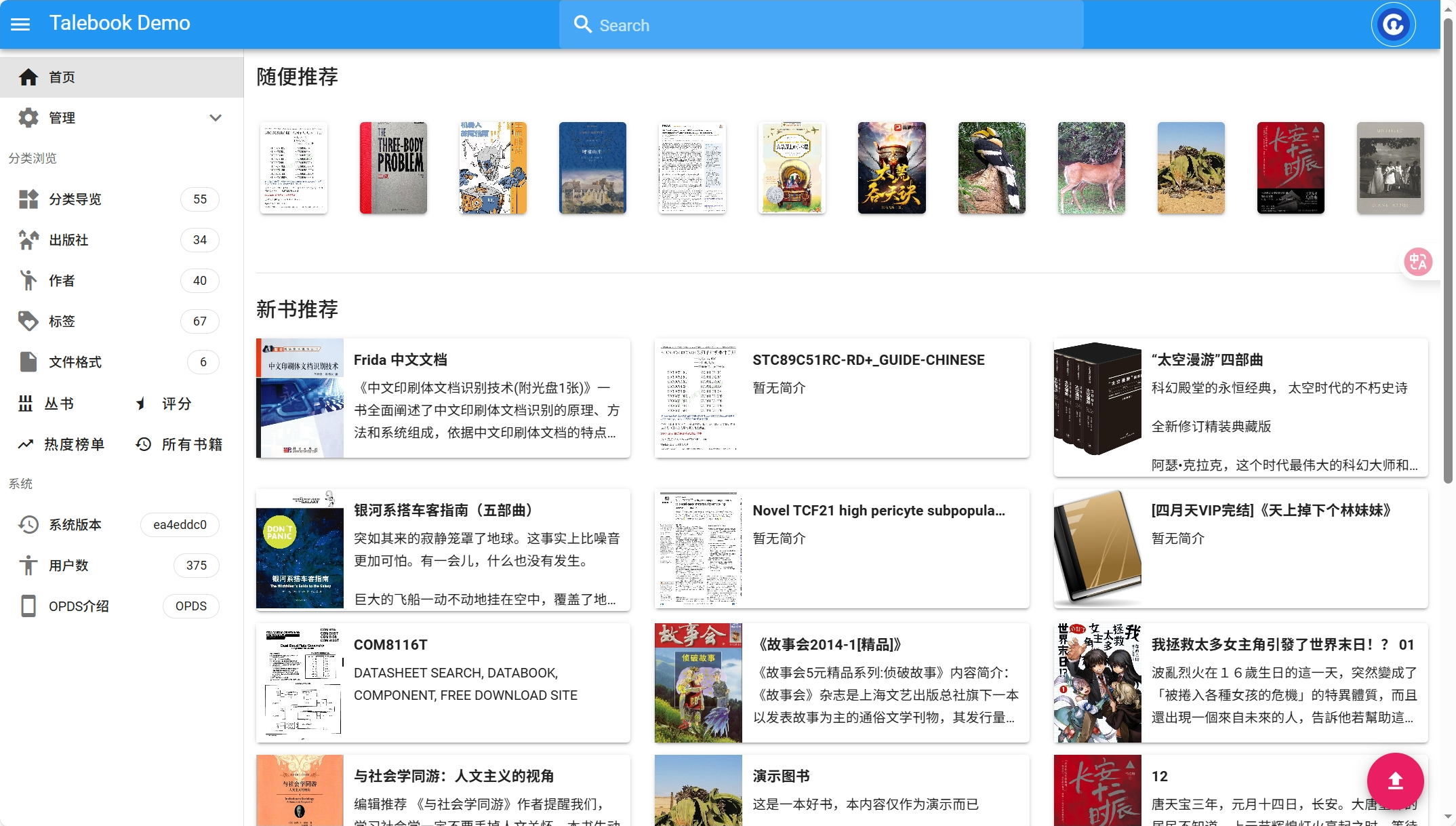
Project demo screenshot below:
Explore related projects
codecrafters-io/build-your-own-x
Master programming by recreating your favorite technologies from scratch.
560,448 starspublic-apis/public-apis
A collective list of free APIs
496,763 starsmorluto/rea
Reverse engineer anything with agents, from app behavior down to native binaries.
438,118 starsopenclaw/openclaw
The AI that really does things. Any OS. Any Platform. The lobster way. 🦞
394,075 stars