t28hub/auto-palette
t28hub/auto-palette has 30 GitHub stars and 4 forks. GitHot measured 0 stars in 24 hours. Last checked 2026-11-16 19:48 UTC. Last push 2026-11-15.
What you can do
- Automatically extracts prominent color palettes from images.
- Provides detailed color swatch information (color, position, population)
- Supports multiple extraction algorithms: DBSCAN, DBSCAN++, KMeans, SLIC, and SNIC.
- Supports numerous color spaces: RGB, HSL, LAB, LCHuv, ANSI256 and more.
Measured star growth
- in 24h
- 0
- in 7 days
- Collecting history
- in 15 days
- Collecting history
- in 1 month
- Collecting history
Net star changes over overlapping periods, not daily totals. Missing measurements are left blank. Stars measure attention, not software quality.
About
🎨 Automatically extract prominent color palettes from images, available as a Rust library, WebAssembly module, and CLI tool.
Developer ToolsREADME.md
Originalauto-palette
🎨
auto-paletteis a library that automatically extracts prominent color palettes from images, available as Rust library, WebAssembly and CLI tool.





Overview
auto-palette is a Rust project that offers color palette extraction from images. It consists of the following components:
auto-palette: Core library for programmatic usage.auto-palette-cli: Command-line interface for easy usage.auto-palette-wasm: WebAssembly build for browser usage.
Perfect for developers, designers and anyone who needs to extract color palettes from images.
[!NOTE] This project is in early development (0.y.z). The API may change at any time and breaking changes may occur without notice.
Features
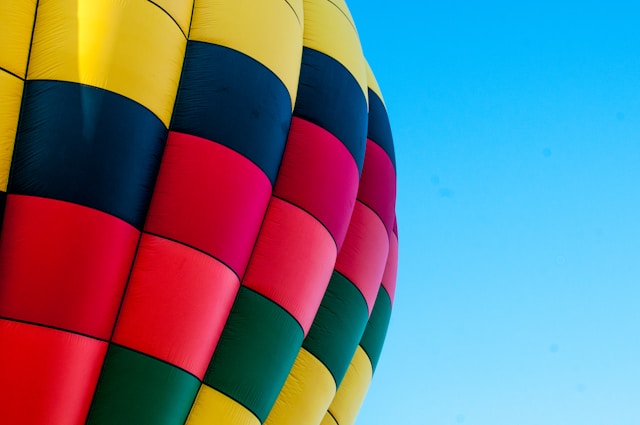
| Theme | Color Palette |
|---|---|
(Default) |
 |
Colorful |
 |
Vivid |
 |
Muted |
 |
Light |
 |
Dark |
 |
[!NOTE] Photo by Laura Clugston on Unsplash
- Automatically extracts prominent color palettes from images.
- Provides detailed color swatch information (color, position, population)
- Supports multiple extraction algorithms:
DBSCAN,DBSCAN++,KMeans,SLIC, andSNIC. - Supports numerous color spaces:
RGB,HSL,LAB,LCHuv,ANSI256and more. - Theme-based swatch selection:
Colorful,Vivid,Muted,Light, andDark. - Available as a Rust library, Wasm, and a CLI tool.
Installation
Rust Library
To use auto-palette in your Rust project, add it to your Cargo.toml.
[dependencies]
auto-palette = "0.9.2"
CLI Tool
To use the command-line interface, install the auto-palette-cli crate.
cargo install auto-palette-cli
Usage
Rust Example
Here is a basic example that demonstrates how to extract the color palette and find the top 5 prominent colors. See the examples directory for more advanced usage.
use auto_palette::{ImageData, Palette};

fn main() {
  // Load the image data from the file
  let image_data = ImageData::load("./gfx/holly-booth-hLZWGXy5akM-unsplash.jpg").unwrap();

  // Extract the color palette from the image data
  let palette: Palette<f64> = Palette::extract(&image_data).unwrap();
  println!("Extracted {} swatches", palette.len());

  // Find the 5 prominent colors in the palette and print their information
  let swatches = palette.find_swatches(5).unwrap();
  for swatch in swatches {
    println!("Color: {}", swatch.color().to_hex_string());
    println!("Position: {:?}", swatch.position());
    println!("Population: {}", swatch.population());
    println!("Ratio: {}", swatch.ratio());
  }
}
CLI Example
Here is an example of extracting the color palette from an image using the CLI tool:
$ auto-palette path/to/your_image.jpg --count 6 --color-space rgb --output-format table
+---+-------------------+------------+------------+
| # | Color             | Position   | Population |
+---+-------------------+------------+------------+
| 1 | RGB(94, 203, 254) | (549, 13)  |     109005 |
| 2 | RGB(220, 17, 36)  | (59, 374)  |       4250 |
| 3 | RGB(4, 14, 29)    | (87, 195)  |       2533 |
| 4 | RGB(252, 220, 35) | (94, 32)   |       2149 |
| 5 | RGB(2, 104, 106)  | (366, 329) |       2133 |
| 6 | RGB(209, 86, 145) | (378, 263) |       1126 |
+---+-------------------+------------+------------+
Extracted 182 swatch(es) in 0.344 seconds
Development
See the CONTRIBUTING guidelines.
Contributing
Contributions are welcome! For detailed information on how to contribute, please refer to CONTRIBUTING guidelines.
Please note that this project is released with a CODE_OF_CONDUCT. By participating in this project you agree to abide by its terms.
Security
If you discover any security vulnerabilities, please do not create a public issue or pull request.
Instead, please follow the Security Policy to report them privately.
License
This project is distributed under the MIT License. See the LICENSE file for details.