
syntstar/lightspeak
syntstar/lightspeak has 7 GitHub stars and 0 forks. GitHot measured 0 stars in 24 hours. Last checked 2026-11-14 19:56 UTC. Last push 2026-11-12.
What you can do
- 🎙️ Voice channels that just work – Opus audio, noise suppression, echo cancellation, per-user volume, and global push-to-talk (keyboard or mouse buttons) that also works in full-screen games.
- 🖥️ Screen sharing up to 1440p / 60 fps – hardware-encoded H.264, with the sound of just the shared app or the whole system (without your friends' voices echoing back).
- 🔒 End-to-end encrypted calls – voice, screen and stream audio are encrypted on your devices. The server only forwards data it cannot decrypt.
- 💬 Text chat – spaces, channels and categories, direct messages and group chats, replies, reactions, pins, mentions, Markdown with syntax highlighting, full-text search and files up to 200 MB.
Measured star growth
- in 24h
- 0
- in 7 days
- Collecting history
- in 15 days
- Collecting history
- in 1 month
- Collecting history
Net star changes over overlapping periods, not daily totals. Missing measurements are left blank. Stars measure attention, not software quality.
About
Self-hosted voice chat, text chat and screen sharing (up to 1440p) with end-to-end encrypted calls. Lightweight Windows app, plus web client.
Self-hostedREADME.md
Original
Lightspeak
Self-hosted voice chat, text chat and screen sharing for you and your friends –
with a Windows app that uses about a tenth of the memory.


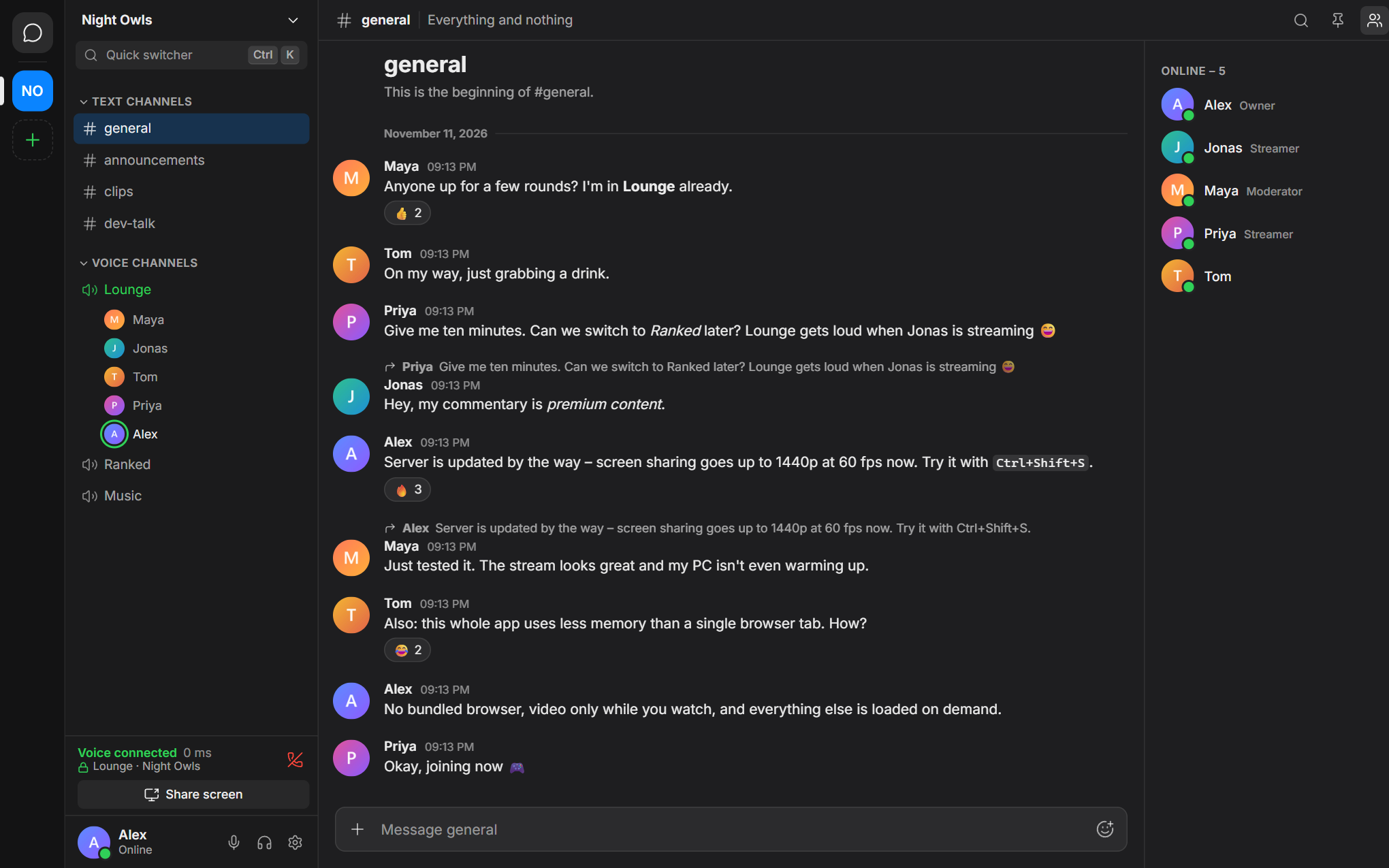
Lightspeak is a small, private alternative to Discord and TeamSpeak. You run the server yourself – on a cheap VPS, a Raspberry Pi or an old PC – and invite your friends with a link. There is no central service, no account with a company, no tracking and no ads.
It was built around one idea: a chat app should not need a gigabyte of RAM. The Windows app is a few megabytes, starts in under a second and stays out of the way while you play.
Highlights
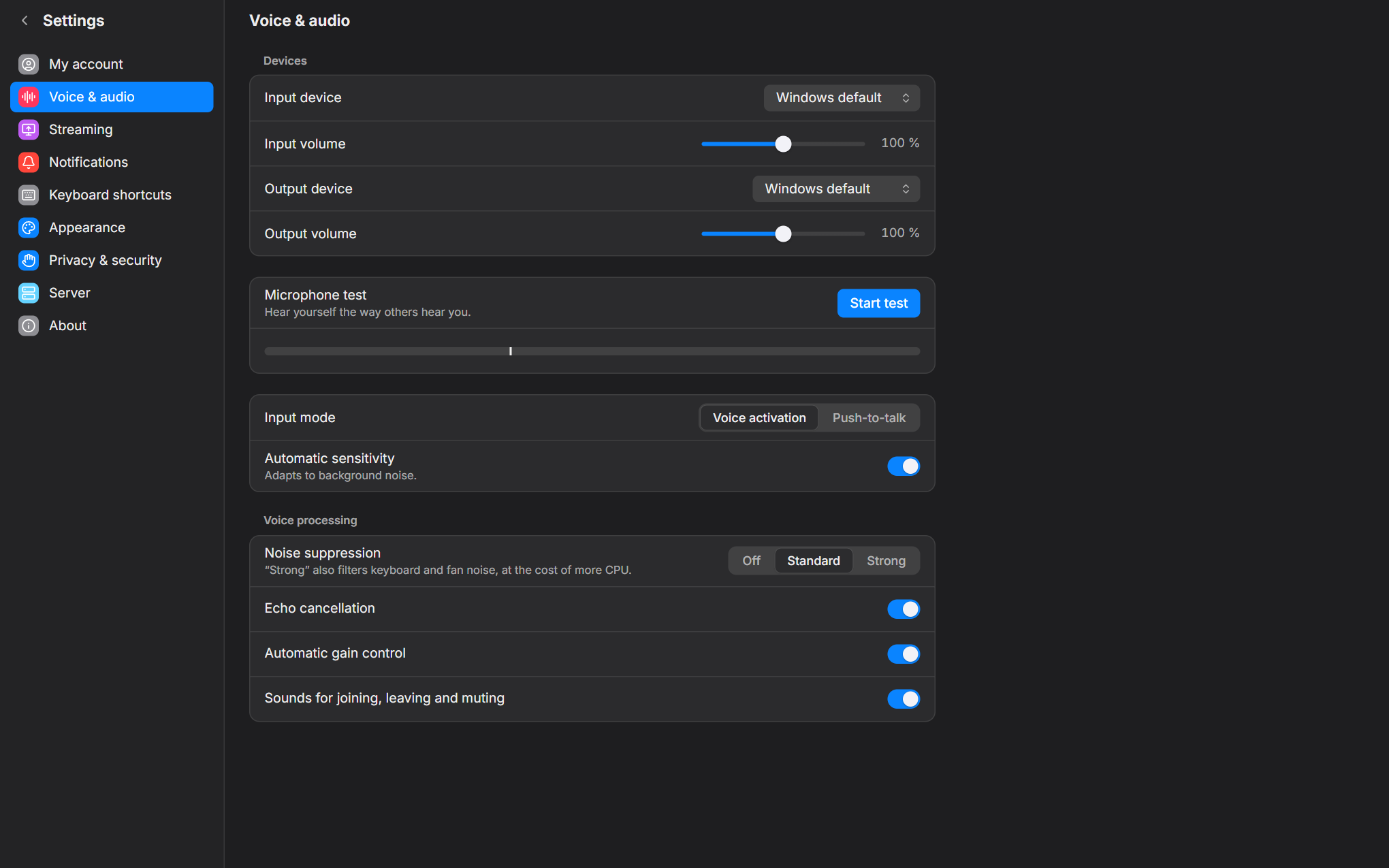
- 🎙️ Voice channels that just work – Opus audio, noise suppression, echo cancellation, per-user volume, and global push-to-talk (keyboard or mouse buttons) that also works in full-screen games.
- 🖥️ Screen sharing up to 1440p / 60 fps – hardware-encoded H.264, with the sound of just the shared app or the whole system (without your friends' voices echoing back).
- 🔒 End-to-end encrypted calls – voice, screen and stream audio are encrypted on your devices. The server only forwards data it cannot decrypt.
- 💬 Text chat – spaces, channels and categories, direct messages and group chats, replies, reactions, pins, mentions, Markdown with syntax highlighting, full-text search and files up to 200 MB.
- 🛡️ Roles and permissions – per-space roles, per-channel overrides, private channels, announcement channels, stage-style voice channels, an away channel and slow mode.
- 🪶 Lightweight – see the numbers below. What you don't use costs nothing: video is only received while you watch, and the app trims its memory when it sits in the tray.
- 🌍 No install needed for guests – the same client runs in Chrome, Edge, Firefox and Safari (also on macOS and Linux), served by your own server.
- 🧰 One-command server – a single installer sets up the server, LiveKit and HTTPS certificates as systemd services. No Docker, about 250 MB of RAM in total.
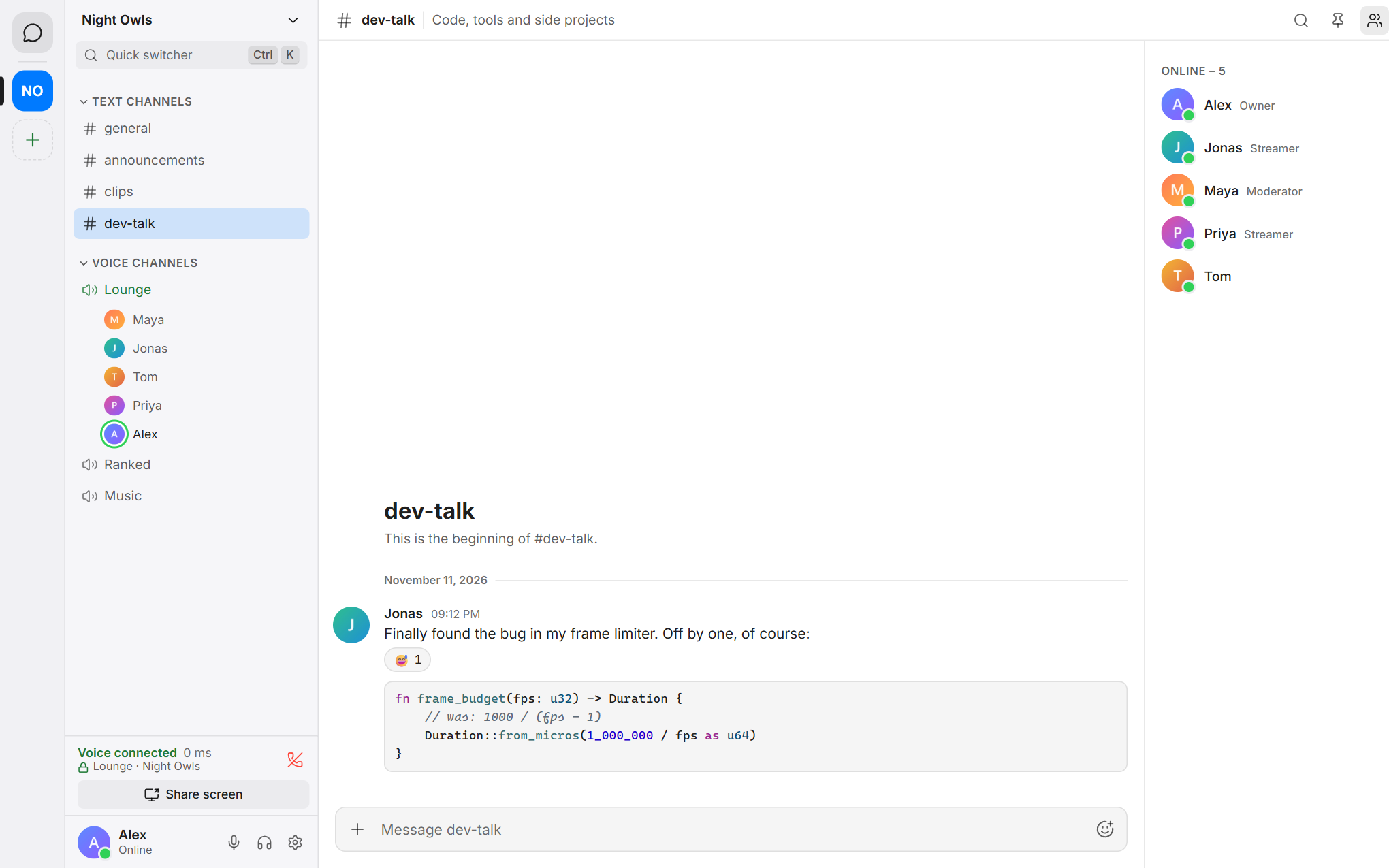
- 🇬🇧 🇩🇪 English and German, light and dark theme, accent colours.
| Light theme | Voice settings |
|---|---|
 |
 |
How light is it?
Measured on Windows 11 with the release build (whole process tree, including WebView2):
| Lightspeak | Discord (for comparison) | |
|---|---|---|
| Window open, idle | 80–150 MB | ~1,080 MB |
| Minimised to the tray | ~70 MB | – |
| In a voice channel | ~150 MB | – |
| Idle CPU | ~0.1 % | ~0.6 % |
| Installer | ~2 MB | – |
| Cold start until usable | ~0.4 s | – |
The server side (Lightspeak server + LiveKit + Caddy) idles at roughly 250 MB of RAM on a small VPS.
How is that possible?
- The app is built with Tauri: it uses the WebView2 runtime that Windows already ships instead of bundling its own browser.
- The interface is plain Svelte with hand-written CSS – no UI framework, about 125 KB of JavaScript (gzip) at start. Everything else is loaded on demand.
- Message lists are virtualised, images are loaded as server-side thumbnails, and video tracks are only subscribed while a stream is actually on screen.
- Native parts (push-to-talk hook, per-app audio capture, encryption keys) are written in Rust and only run while they are needed.
Quick start
I just want to join my friends' server
- Open the invite link you received.
- Click Download Lightspeak for Windows and run
Lightspeak-setup.exe(no admin rights needed) – or pick Open in browser to skip the install. - Choose a username and a password. Done.
Windows may show "Windows protected your PC" because the installer is not commercially code-signed. Click More info → Run anyway. You can verify the download against
SHA256SUMSon the releases page.
More in the user guide.
I want to host a server
You need a Linux machine (Debian 12+ or Ubuntu 22.04+, x86_64 or arm64, 1 vCPU / 1 GB RAM is enough) with a public IPv4 address and two host names pointing at it – your own domain or free sslip.io names.
curl -fsSLO https://github.com/syntstar/lightspeak/releases/latest/download/install.sh
sudo bash install.sh --version latest
The installer asks a few questions, shows what it is going to do and only then changes anything. At the end it prints an owner invite link: open it, create your account, and you are the admin of your new server. Invite your friends from the app.
| Where | Good for | Notes |
|---|---|---|
| VPS (recommended) | Always on, fast upload | Any small plan works, from about €4 per month |
| Home server (Raspberry Pi, NAS, old PC) | No monthly cost | Needs a public IPv4 address and port forwarding |
| Local | Trying it out, development | One PC only, no HTTPS |
The full walkthrough – ports, firewalls, settings, backups and updates – is in docs/SELF_HOSTING.md.
Updating later is one command, with a database backup and an automatic rollback if anything fails:
sudo lightspeak-admin update
The Windows app updates itself from the GitHub releases of this repository. Every update is signed, and the app only installs builds that carry a valid signature.
Documentation
| User guide | Installing, talking, push-to-talk, sharing your screen |
| Self-hosting | Setting up a server on a VPS, at home or locally; settings, backups, updates |
| Admin guide | Roles, invites, moderation, accounts, storage, troubleshooting |
| Security | Threat model, encryption, what the server can and cannot see |
| Architecture | How the pieces fit together |
| Contributing | Building from source, tests, conventions |
Security and privacy
- Calls and screen shares are end-to-end encrypted. Keys are created on your devices and never reach the server unencrypted. If encryption cannot be established, the call does not start – there is no unencrypted fallback.
- Text messages and files are not end-to-end encrypted. They travel over TLS and are stored on your server, so whoever runs the server can read them – the same trust model as Discord, except that the server is yours.
- Passwords are hashed with Argon2id. The Windows app keeps its session and keys in the Windows Credential Manager.
- Server and app releases are signed; the installer and the updater reject anything without a valid signature.
Details and the full threat model: docs/SECURITY.md. Found a vulnerability? Please report it privately – see the security policy.
What Lightspeak deliberately does not do
- Webcam video – the focus is on voice and screen sharing.
- Native macOS, Linux or mobile apps – the desktop app is Windows-only; everything else uses the browser client.
- A Docker image – the installer sets everything up natively, which keeps memory use low.
- End-to-end encryption for text and files – only calls and screen shares are end-to-end encrypted.
- Password reset by e-mail – Lightspeak never asks for an e-mail address. A server admin sets a temporary password instead.
- Federation or public server discovery – a server is for a group of people who know each other.
Building from source
# Server (Go)
cd server
go run ./cmd/lightspeak-server serve --dev

# Windows app (Node.js + Rust)
cd client
npm install
npm run tauri dev
Prerequisites, tests and the release process are described in CONTRIBUTING.md.
Built with
Tauri · Svelte · LiveKit · Go · SQLite · Caddy – the complete list with licences is in docs/THIRD_PARTY.md.
License
Lightspeak is free software, released under the GNU Affero General Public License v3.0.
In short: you may use, study, change and share it. If you run a modified server for other people, you have to make your changes available to them under the same licence.