
surya-koritala/condor
surya-koritala/condor has 34 GitHub stars and 3 forks. GitHot measured 0 stars in 24 hours. Last checked 2026-11-11 14:47 UTC. Last push 2026-10-21.
Qwen3.8-Flash-Next (180B MoE) on one 12-16 GB NVIDIA GPU, Linux or Windows. Own engine, own compression.
Measured star growth
- in 24h
- 0
- in 7 days
- Update delayed
- in 15 days
- Update delayed
- in 1 month
- Update delayed
Net star changes over overlapping periods, not daily totals. Missing measurements are left blank. Stars measure attention, not software quality.
README.md
OriginalCondor
Qwen3.8-Flash-Next (180B, MoE) on one 12-16 GB NVIDIA GPU with 32-64 GB of RAM, on Linux or Windows. Our own engine and our own compressed weights. OpenAI- and Anthropic-compatible APIs, a chat page, MCP. Free for personal use. More Flash-class models will come here.
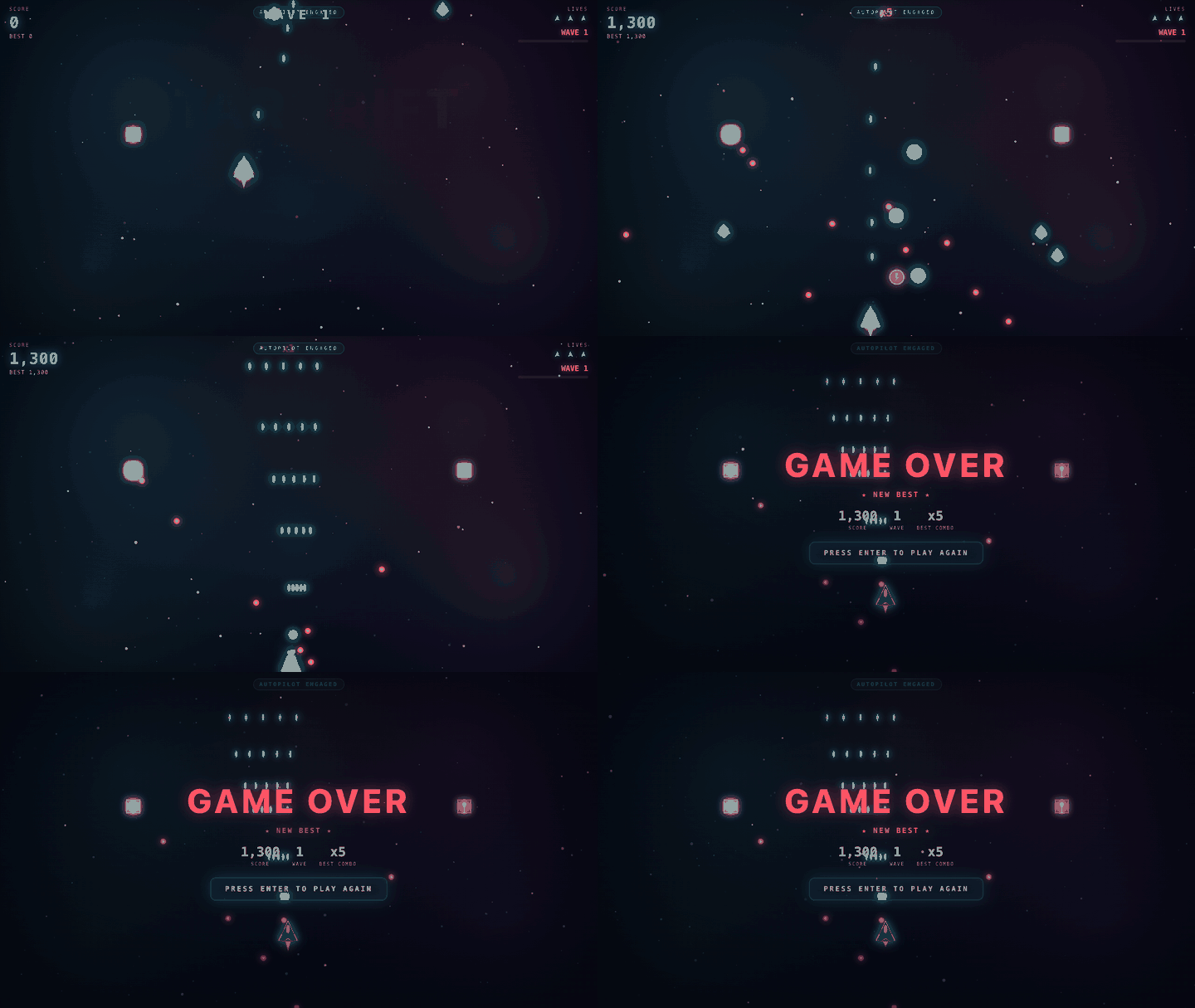
The model wrote that game in one prompt on my 4080 SUPER, unedited. 3 of 6 tries were playable in precise mode; all 6 are in examples/star-drift, broken ones included.
v0.2.4 (2026-10-21): precise and best are closer to the original (KL vs bf16 0.22 -> 0.15 and 0.165 -> 0.12; new downloads
precise-v2/ and best-v2/, ./setup.sh fetches them), long prompts are read faster (fast: a 4K prompt's first token 1.7 -> 1.3 s),
and a named tool_choice gets one call. Details in the CHANGELOG.
How it works, in short
- The engine knows which experts the model routes to. The busy ones sit on the GPU, the rest in RAM; the CPU computes the misses while the GPU works on the layer.
- Experts are compressed by use: busy ones keep more bits.
- The model's own draft head guesses the next token and the big model checks it in the same pass.
- Long prompts go through the model a layer at a time, so a 32K prompt doesn't blow up memory.
Details: docs/HOW_IT_WORKS.md.
Numbers
RTX 4080 SUPER 16 GB, Ryzen 9 7950X3D, 64 GB RAM, Ubuntu 26.04. Greedy, thinking off, bench/compare.py.
                                     precise             best                fast
experts, avg bits/weight             ~2.9                ~3.4                ~2.0
attention + rest                     6 bit               6 bit               4-5 bit
download                             82 GB               90 GB               66 GB
KL divergence vs bf16 (wikitext-2)   0.15                0.12                0.39

first token, short / 4K / 30K        0.26 / 1.9 / 7.3 s  0.33 / 2.1 / 7.4 s  0.16 / 1.3 / 7.5 s
writing, short / 4K / 30K prompt     91 / 86 / 91        79 / 71 / 76        113 / 115 / 131 tok/s

GSM8K   (150 q, Inspect AI)          148/150             147/150             149/150
MMLU-Pro (150 q, Inspect AI)         127/150             131/150             121/150
Speed: v0.2.4's build, 2026-10-21, the median of three runs each, nothing else on the computer. GSM8K and MMLU-Pro: precise and best on that build the same night, fast on 2026-10-19 (its experts are unchanged). Run to run, writing speed moves about 5-10% here (fast measured 124 tok/s on a short prompt on 2026-10-19). GSM8K is a sanity check that compression didn't break reasoning; MMLU-Pro says more. Logs in results/, scripts in bench/. Also tested on a cloud A10 (24 GB) and, on Windows, an L4 (24 GB).
Your own machine: tools/bench.sh (about 5 min) prints a block to paste into a "Bench result" issue. To compare with what you run now,
bench/compare.py runs the same prompts and questions against any OpenAI-compatible server (bench/README.md); I
don't publish comparisons myself.
What you need
- NVIDIA RTX 30/40/50 (or an Ampere+ workstation card), 12 GB+ VRAM (16 GB recommended), driver 580+.
- 32 GB+ RAM. Precise and best want 64 GB; fast is the mode for 32 GB.
- A decent CPU. Experts that miss the GPU cache run on it, so it matters about as much as the GPU: a 16-core 7950X3D does a pass in ~16 ms, an 8-core Zen 2 with DDR4 in ~70 ms.
- ~90 GB of free disk (73 GB for fast, 97 GB for best), on an SSD.
- Linux x86-64 (tested on Ubuntu 22.04, 24.04 and 26.04) or Windows 10/11 x64 (tested on Windows Server 2022). WSL untested.
12 GB cards and 32 GB of RAM: measured on my 4080 held back to those sizes, fast mode does about 145 tok/s on a short prompt. A 3060 has half the 4080's bandwidth, so expect roughly half that. Not yet run on a real 12 GB card.
Two NVIDIA cards: GLYD_GPUS=0,1 tools/serve.sh splits the layers over them and the second card's VRAM holds more experts. Checked
on 2x4090: the same output as one card, byte for byte, 189 vs 186 tok/s there (one 4090 already holds most experts). Two 12-16 GB
cards should gain more; not yet run on real ones.
Other cards, fast mode, measured on rented machines right after install (first token / writing speed, short prompt):
RTX 5090   0.13 s / 175 tok/s
RTX 4090   0.39 s / 116 tok/s
RTX 3090   0.51 s / 72 tok/s
Those machines' RAM read 27-65 GB/s (this 4080 desktop: 70), which shows on long prompts; full table in #3. Your card's numbers are welcome there.
Install
git clone https://github.com/surya-koritala/condor && cd condor
./setup.sh
It checks GPU, RAM and disk, installs the engine (no sudo), downloads the model (resumable: rerun if it stops), asks the mode and the
context, and opens http://127.0.0.1:8080. Enter takes the defaults. Run it again to start next time; nothing downloads twice.
Windows (PowerShell, NVIDIA driver 580+):
git clone https://github.com/surya-koritala/condor; cd condor
powershell -ExecutionPolicy Bypass -File setup.ps1
tools\download.ps1 and tools\serve.ps1 (-Fast, -Best) are the twins of the .sh scripts. Tested on AWS L4 machines (Windows
Server 2022, 64 GB RAM, only NVIDIA's driver installed): clean install and tests/ passing in fast and precise mode; about 40 tok/s
chat in fast mode on that 8-core machine (the L4 has 40% of a 4080's bandwidth). Not yet tested on a GeForce card under Windows or in WSL2.
With an AI coding assistant: Set up https://github.com/surya-koritala/condor on this PC - follow docs/AI_SETUP.md.
Modes
- precise (default): the one for code; long programs come out right far more often. v0.2.4: most experts at 3 bits, KL 0.22 -> 0.15.
- best: closest to the original (KL 0.12), a little slower than precise, 8 GB more; 64 GB of RAM.
- fast: quicker than precise, 66 GB, runs with 32 GB of RAM. KL 0.39, top-1 agreement with the original 83%. One of the 19
tool-call tests in
tests/can fail with it (the 12-round tool loop overruns now and then).
Switch: tools/download.sh --best (or --fast), then tools/serve.sh --best. No flag means precise.
Using it
- Chat:
http://127.0.0.1:8080. Renders tables, code and diagrams, runs the HTML the model writes, shows GPU/CPU/RAM live. - OpenAI-compatible API at
http://127.0.0.1:8080/v1(any key, any model name); Anthropic-compatible at/v1/messages, e.g.ANTHROPIC_BASE_URL=http://127.0.0.1:8080 claude. - Agent frameworks and tool calls, what's tested: docs/CLIENTS.md.
- MCP:
claude mcp add glyd -- ~/.glyd-qwen-3.8-flash/bin/glyd-engine qwenmcp --repo /path/to/condor - Images: PNG or JPEG in OpenAI
image_urlparts (base64, or a URL on a public host) or Anthropic image blocks, up to 1,024 tokens an image by default. An image adds 0.3-2 s to the prompt on a 4080 SUPER; text speed is unchanged. - Several users: 4 requests at once by default, each streaming from the start (
GLYD_USERS=N tools/serve.sh, 1 to 8). - Thinking is off by default; turn it on in chat settings or with
reasoning_effort. - Context up to 262,144 tokens; follow-ups reuse the conversation and start in under a second.
Known limits
- NVIDIA only, RTX 30 series or newer, 12 GB minimum (#8); no macOS. An AMD build exists but hasn't run on a card yet.
- Images: PNG and JPEG, no video, no uploads on the chat page yet. A new long prompt pauses the other streams while it's read.
- Up to 4 requests at once; past that they wait in order. Total speed stays about one user's.
- Fast mode is weaker on long code.
- Short on free RAM, it gets slow and the disk gets busy: close what's eating RAM.
Troubleshooting
- Download stopped: rerun
./setup.sh. - "No NVIDIA driver found" or "580 or newer is needed": update the driver (Ubuntu:
sudo apt install nvidia-driver-595), reboot. - Port 8080 in use: it's probably already running; or
tools/serve.sh 8090. - Download stuck at 0 MB/s then "Connection reset by peer": IPv6 to the Hub's CDN is broken on some networks. The engine falls back to
IPv4 by itself;
GLYD_IPV4=1 ./setup.shforces it from the start. - Slower than the numbers above: check the CPU (above) and the context: on a 16 GB card a bigger
GLYD_CTXtakes VRAM from the expert cache (one user saw 11-15% slower at 131,072 than at the default 32,768).
Anything else: open an issue with what it printed. Security: SECURITY.md.
License
- Model: Qwen3.8-Flash-Next by the Qwen team, under its license; the compressed weights on Hugging Face carry the same license.
- This repo (scripts, chat app, benchmarks, docs): Apache 2.0.
- The engine ships compiled in releases under BUSL 1.1: free for personal, research and non-commercial use; commercial use needs a license ([email protected]). Each version turns Apache 2.0 four years after release.
PRs welcome: CONTRIBUTING.md. Thanks to the Qwen team for open-weighting this model.
Explore related projects
affaan-m/ECC
The agent harness performance optimization system. Skills, instincts, memory, security, and research-first development for Claude Code, Codex, Opencode, Cursor and beyond.
301,468 starsNousResearch/hermes-agent
The agent that grows with you
262,771 starsmultica-ai/andrej-karpathy-skills
A single CLAUDE.md file to improve Claude Code behavior, derived from Andrej Karpathy's observations on LLM coding pitfalls.
232,266 starsfirecrawl/firecrawl
Supercharge your AI agents with data from the web and beyond. Building the library for superintelligence. 🔥
200,932 stars