
suhaibbinyounis/github-copilot-api-vscode
suhaibbinyounis/github-copilot-api-vscode has 132 GitHub stars and 29 forks. GitHot measured 0 stars in 24 hours and 0 in 7 days. Last checked 2026-11-17 02:04 UTC. Last push 2026-11-10.
What you can do
- Use Cursor with Copilot, Gemini, or Ollama as the backend
- Run LangChain agents without paying for OpenAI
- Power AutoGPT and CrewAI agents locally
- Query data with PandasAI and LlamaIndex
Measured star growth
- in 24h
- 0
- in 7 days
- 0
- in 15 days
- Collecting history
- in 1 month
- Collecting history
Net star changes over overlapping periods, not daily totals. Missing measurements are left blank. Stars measure attention, not software quality.
About
Unlock GitHub Copilot as a local API Gateway. Use Copilot with Cursor, LangChain, and any OpenAI-compatible tool.
Developer ToolsREADME.md
Original

GitHub Copilot API Gateway
Use GitHub Copilot, Gemini, Ollama & any VS Code AI — like any other API.
One extension. Zero API keys. Auto-discovers every model. Works with LangChain, Cursor, Aider, and 50+ tools.


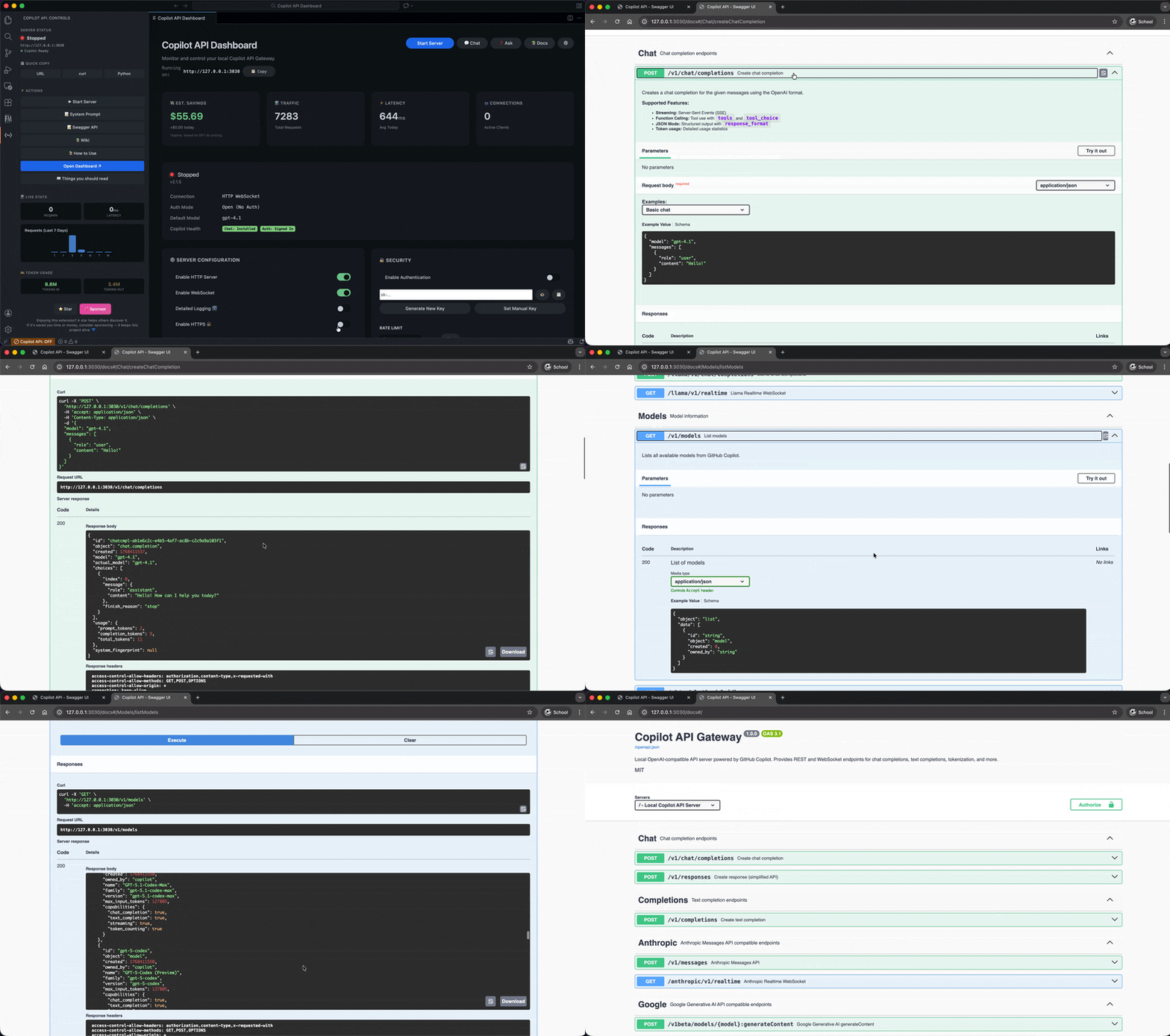
⚡ Quick Start
# 1. Install from VS Code Marketplace (search "GitHub Copilot API Gateway")
# 2. Click "Start Server" in the sidebar
# 3. Done. Your local API is ready.
Use it like OpenAI:
from openai import OpenAI

client = OpenAI(
    base_url="http://127.0.0.1:3030/v1",
    api_key="anything"  # No real API key needed
)

response = client.chat.completions.create(
    model="gpt-4o",
    messages=[{"role": "user", "content": "Hello!"}]
)
🔒 Your prompts stay private. All AI requests are processed entirely on your machine through VS Code's Copilot extension — your prompts and API keys never leave your machine. The extension collects anonymous, aggregate usage metrics (server start/stop events, command usage, error types) to help improve reliability. This telemetry is fully optional and respects your VS Code
telemetry.telemetryLevelsetting — set it tooffto disable all data collection. The full source code is available on GitHub for you to audit.
✅ What You Can Do
- Use Cursor with Copilot, Gemini, or Ollama as the backend
- Run LangChain agents without paying for OpenAI
- Power AutoGPT and CrewAI agents locally
- Query data with PandasAI and LlamaIndex
- Build chatbots with Botpress, Chainlit, or Rasa
- Pair program with Aider or Open Interpreter
- Generate code with GPT Engineer or Sweep
- Connect Clawdbot to power AI on WhatsApp, Telegram, Discord & Slack
- Mix and match models — route one request to GPT-4o, the next to Gemini, all on
localhost:3030
If it speaks OpenAI, it works with this gateway.
🎯 Cursor tip: If Cursor bypasses your custom base URL for model names like
gpt-4o, pick acopilot-*model alias fromGET /v1/models(for examplecopilot-gpt-4o). These aliases are provided specifically to prevent Cursor model-name interception.
🔀 Multi-Provider: One Endpoint, Every Model
This gateway auto-discovers all AI models registered in VS Code — not just Copilot.
| Provider | How to enable | Example models |
|---|---|---|
| GitHub Copilot | Install GitHub Copilot extension | gpt-4o, claude-3.5-sonnet, o3-mini |
| Google Gemini | Install Gemini Code Assist extension | gemini-2.0-flash |
| Ollama | Install an Ollama VS Code extension | Local models (llama3, mistral, etc.) |
| Any other | Any extension using vscode.lm API |
Automatically discovered |
All models are exposed at GET /v1/models and routable via the model field in any request. No config changes needed — just install the VS Code extension and the models appear.
🤖 Using with Clawdbot (Moltbot)
Clawdbot is an open-source AI assistant that brings LLMs to messaging platforms like WhatsApp, Telegram, Discord, and Slack. Since it supports any OpenAI-compatible API endpoint, you can use this gateway to power Clawdbot with GitHub Copilot:
- Start the Copilot API Gateway in VS Code
- Expose the API (set host to
0.0.0.0if Clawdbot runs on another machine) - Configure Clawdbot to use your gateway:
# In your Clawdbot config
llm:
  provider: openai
  base_url: http://YOUR-IP:3030/v1
  api_key: your-optional-api-key  # or "anything" if auth is disabled
  model: gpt-4o
Now your WhatsApp/Telegram/Discord/Slack bots are powered by Copilot! 🚀
🌐 Internet Access via Cloudflare Tunnels
Access your Copilot API from anywhere — your phone, tablet, or share with friends:
- Enable authentication (set an API key in Security settings)
- Start the server
- Click "Go Live" in the Internet Access section
- Get a public
*.trycloudflare.comURL instantly
Free, no Cloudflare account needed! Perfect for:
- Accessing from your phone outside your home network
- Sharing with friends or teammates temporarily
- Remote development without VPN setup
🖥️ Run as a Background Service
The gateway runs inside VS Code's extension host, so VS Code must be running — but it doesn't need to be visible. Here's how to run it like a background service:
Prerequisites: Enable autoStart so the server launches automatically:
{ "githubCopilotApi.server.autoStart": true }
macOS:
# Launch VS Code minimized (gateway starts automatically)
open -a "Visual Studio Code" --args --disable-workspace-trust

# Or run completely headless via CLI
nohup code --disable-workspace-trust &>/dev/null &
Windows (PowerShell):
# Launch minimized
Start-Process code -ArgumentList "--disable-workspace-trust" -WindowStyle Minimized

# Or add to Task Scheduler for start-on-boot:
# Program: code
# Arguments: --disable-workspace-trust
Linux:
# Run in background
nohup code --disable-workspace-trust &>/dev/null &

# Or create a systemd user service (~/.config/systemd/user/copilot-api.service):
# [Service]
# ExecStart=/usr/bin/code --disable-workspace-trust
# Restart=on-failure
# Then: systemctl --user enable --now copilot-api
Note: VS Code must remain running in the background. If you close VS Code, the gateway stops. The
autoStartsetting ensures the API server starts the moment VS Code opens — no manual clicks needed.
🔌 API Endpoints
| Endpoint | Method | Description |
|---|---|---|
/v1/chat/completions |
POST | Chat completions (streaming supported) |
/v1/completions |
POST | Legacy completions API (streaming supported) |
/v1/responses |
POST | OpenAI Responses API (2026 spec, streaming supported) |
/v1/models |
GET | List all available models |
/v1/tools |
GET | List available tools (VS Code + MCP) |
/v1/tools/call |
POST | Execute a tool directly |
/v1/mcp/servers |
GET | List connected MCP servers |
/v1/messages |
POST | Anthropic Claude-compatible endpoint |
/v1beta/models/:model:generateContent |
POST | Google Gemini-compatible endpoint |
/health |
GET | Server health check |
/docs |
GET | Interactive Swagger UI |
⚙️ Configuration
Customize in VS Code Settings (githubCopilotApi.*):
{
  "githubCopilotApi.server.port": 3030,
  "githubCopilotApi.server.host": "127.0.0.1",
  "githubCopilotApi.server.apiKey": "",
  "githubCopilotApi.server.autoStart": false
}
| Setting | Default | Description |
|---|---|---|
server.port |
3030 | Local server port |
server.host |
127.0.0.1 | Bind address (use 0.0.0.0 for LAN access) |
server.apiKey |
(empty) | Optional Bearer token for authentication |
server.allowedHosts |
[] |
Additional exact Host names accepted by HTTP and WebSocket APIs through a reverse proxy |
server.allowedOrigins |
[] |
Exact browser origins allowed to call the APIs cross-origin |
server.autoStart |
false | Start server when VS Code opens |
For advanced options (TLS, IP allowlisting, audit logging), see CONTRIBUTING.md.
HTTP and WebSocket requests validate Host and Origin. Browser requests are same-origin by default; add an exact origin such as https://app.example.com to server.allowedOrigins only when a browser app needs cross-origin access. For a reverse proxy, add its exact gateway hostname to server.allowedHosts. JSON POST requests must use Content-Type: application/json. The former server.webSocketAllowedHosts and server.webSocketAllowedOrigins settings remain supported as deprecated aliases. Native WebSocket clients can send Authorization: Bearer <key> or x-api-key; browser clients can pass api-key.<key> as a WebSocket subprotocol. The credential subprotocol is not returned in the handshake response.
📦 Requirements
- VS Code 1.95+
- GitHub Copilot Chat extension (must be signed in)
📖 Documentation
🛡️ Trust & Transparency
This project is 100% free and open-source under the MIT License.
- 🔍 Full source code available on GitHub
- 📊 Anonymous telemetry — collects aggregate extension health metrics only (no prompts, no file paths, no PII). Respects your VS Code
telemetry.telemetryLevelsetting — disable via"telemetry.telemetryLevel": "off"in VS Code settings. - 🔒 Prompts stay local — your AI requests and API keys never leave your machine
- ✅ Community-driven — contributions welcome via CONTRIBUTING.md
- 🛡️ Security — report vulnerabilities via SECURITY.md
Disclaimer: This extension is an independent, community-built project and is not affiliated with GitHub, Microsoft, or OpenAI. It leverages your existing GitHub Copilot subscription. Use responsibly.
Built with ❤️ by Suhaib Bin Younis