
subidhkhanal/spare-gpu
subidhkhanal/spare-gpu has 28 GitHub stars and 0 forks. Star changes are not measured yet. Last checked 2026-11-09 09:08 UTC. Last push 2026-11-08.
Queues repo chores and runs them through BharatCode only when it has genuinely spare capacity, not on a fixed schedule.
What you can do
- 1 - Coding jobs - /auto write tests for src - Tests, docs, reviews, fixes, "make the tests pass", "implement a plan", on a private copy
- 2 - Apply and undo - /apply, /undo - A job's files copied into your project, and taken back
- 3 - Code review - /code-review, /code-review 42 - Bugs with evidence in your changes, a commit, a branch or a pull request
- 4 - Security review - /security-review - High-confidence security findings, false alarms dropped
Measured star growth
- in 24h
- Collecting history
- in 7 days
- Collecting history
- in 15 days
- Collecting history
- in 1 month
- Collecting history
Net star changes over overlapping periods, not daily totals. Missing measurements are left blank. Stars measure attention, not software quality.
README.md
Original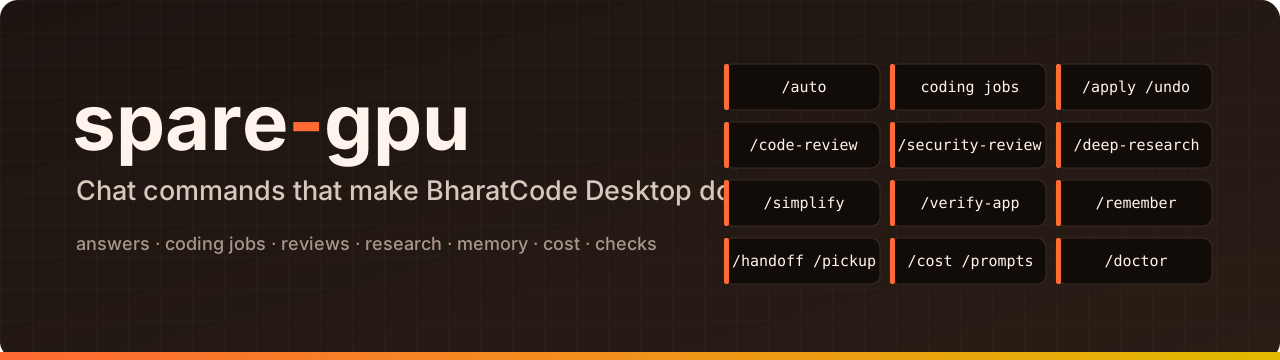





What this is
A set of chat commands for BharatCode Desktop. You install it once, then do everything by typing a /command in any Desktop chat:
- Get work done: coding jobs (tests, docs, fixes, "make the tests pass", "carry out this plan") on a private copy of your project, kept only if they pass their checks.
- Check your code: code review (also of GitHub pull requests), security review, safe simplifications, and app checks in a real browser.
- Research: reports with sources that are checked to be real.
- Keep track: project memory every chat knows, hand-offs between chats, exact token costs, fewer permission prompts, and a health check of the install.
- Wait less: questions and some jobs go to whichever model starts sooner.
The work is split between Desktop's two models: DeepSeek plans and checks, and Qwen does the many quick steps, several at once.
Windows only. It works inside BharatCode Desktop with no API key and no extra account. Everything below is what the current build does.
[!NOTE] spare-gpu is an independent project for the BharatCode Build League. It is not affiliated with BharatCode.
Contents
- Install
- Features
- Coding jobs
- Apply and undo
- Code review
- Security review
- Deep research
- Simplify
- App check
- Memory across chats
- Cost
- Fewer permission prompts
- Health check
- Faster answers
- Settings
- Safety
- Command reference
- FAQ
- Where to look next
- Remove
Install
You need Windows and BharatCode Desktop, installed and signed in.
- Open PowerShell and paste:
irm https://raw.githubusercontent.com/subidhkhanal/spare-gpu/master/install.ps1 | iex - Fully close BharatCode Desktop (also from the taskbar tray) and open it again.
- In any chat, type
/doctorto check that everything is connected.
That's all. The installer adds Python and git if they're missing, installs spare-gpu in %LOCALAPPDATA%\spare-gpu, and runs gtu integrate --pack, the one terminal command spare-gpu has: it adds every chat command below to Desktop. Run the same line again to update.
Installer options and manual install
- Pin a version:
$env:SPARE_GPU_VERSION = '0.1.0'before the install line. - Install from another copy of the repository:
$env:SPARE_GPU_REPO = 'owner/name'. - Until the first release is published, it installs the latest code from
masterand says so. - By hand, with Python 3.11+ and git:
pipx install git+https://github.com/subidhkhanal/spare-gpu, thengtu integrate --pack. gtu integrate --pack --only review,memoryinstalls only some commands (the parts:split,research,review,security,simplify,verify,memory,manage).--liteis for a Qwen-only plan.
Features
Twelve features, each a chat command. They are listed in the order a project usually meets them; none depends on another.
| # | Feature | Type in a chat | What you get |
|---|---|---|---|
| 1 | Coding jobs | /auto write tests for src |
Tests, docs, reviews, fixes, "make the tests pass", "implement a plan", on a private copy |
| 2 | Apply and undo | /apply, /undo |
A job's files copied into your project, and taken back |
| 3 | Code review | /code-review, /code-review 42 |
Bugs with evidence in your changes, a commit, a branch or a pull request |
| 4 | Security review | /security-review |
High-confidence security findings, false alarms dropped |
| 5 | Deep research | /deep-research <question> |
A report whose every source is checked to exist |
| 6 | Simplify | /simplify src |
Cleanups that keep behaviour, kept only if your tests pass |
| 7 | App check | /verify-app <url> <what> |
Your running app checked in a real browser |
| 8 | Memory | /remember, /handoff, /pickup |
Notes every chat knows; work passed to a new chat |
| 9 | Cost | /cost |
Exact tokens per model, and what each job used |
| 10 | Fewer prompts | /prompts |
Allow rules for commands you keep approving |
| 11 | Health check | /doctor |
Every problem in the install, with its fix |
| 12 | Faster answers | /auto <question> |
The answer from whichever model starts sooner |
The bigger commands (3 to 7) split the work: DeepSeek plans and judges, several Qwen helpers read or search at the same time, and each ends with a cost summary of which model did what and the exact tokens used. Add --plan to any of them (for example /code-review --plan) to see the plan, how many helpers it would start and on which model, without starting anything.
1. Coding jobs
A job is a piece of coding work that runs on its own as a Desktop chat named "spare-gpu: …", which you can open and watch. Every job works on a private copy of your project, so your own files are never touched, and its result is checked before it is kept.
| Job | Ask for it | What it does | Kept only if |
|---|---|---|---|
tests |
/auto write tests for src |
Writes new test files | the new tests pass |
docs |
/auto write docs for src |
Adds docstrings and README text | no code changed |
review |
/auto review src |
Writes a code review | (nothing to check) |
fix |
/code-review --fix |
Applies review findings | your tests still pass |
green |
/auto make the tests pass |
Changes the code until the tests pass, up to 3 tries | the tests pass, existing tests untouched |
implement |
/auto implement docs/plan.md |
Carries out a Markdown plan | your tests still pass |
Plain words work too: "fix the failing tests" runs a green job, "implement docs/plan.md" an implement job, "is my tests job done?" shows what's running and finished, and "cancel the docs job" stops one within a few seconds.
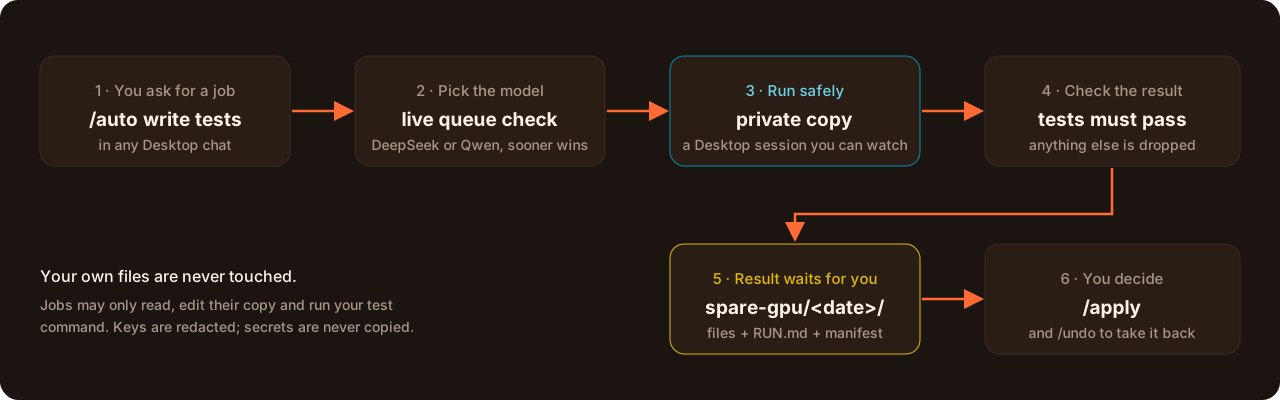
- The job runs right away; the chat reply says Done, Failed or Cancelled, and where the files are.
- spare-gpu finds how your tests run from
pyproject.toml,package.json,go.mod,Cargo.tomlor aMakefile(see Settings to change it). - Each job has a token budget (200,000 by default); a job that reaches it stops instead of failing, and nothing of it is kept.
2. Apply and undo: /apply, /undo
When a job finishes, the files it changed are copied to a dated folder in your project. Nothing else changes until you say so.
your-project/
└── spare-gpu/
    └── 2026-11-05_12-38-50/      ← when the job finished
        ├── RUN.md                ← what the job did, step by step
        ├── manifest.json         ← every file it changed, with checksums
        └── src/
            └── mathx.py          ← the changed files
| Type | What happens |
|---|---|
/apply |
Copies the newest result into your project |
/apply 2026-11-05_12-38-50 |
Copies that older result instead |
/apply --dry-run |
Says what would happen, writes nothing |
/undo |
Takes the last apply back, exactly |
/applyonly replaces a file you haven't changed since the job started. Otherwise it skips it and tells you (/apply --forcereplaces it anyway).- Your old version is saved first, so
/undorestores everything exactly. - The
spare-gpu/folder is ignored by git, so it never shows up as a change. You can also copy files from it by hand.
3. Code review: /code-review
Several Qwen helpers each look for one kind of bug, at the same time; DeepSeek checks every finding against the code and keeps only those with real evidence.
| Type | What it reviews |
|---|---|
/code-review |
Your uncommitted changes |
/code-review HEAD~1 or /code-review my-branch |
A commit, or a branch against the default branch |
/code-review 42 |
GitHub pull request 42 |
/code-review high 42 |
The same, more thoroughly (low, medium, high or deep; default medium) |
--fixhands the kept findings to afixjob: applied on a private copy and kept only if your tests still pass, then/applybrings them in.- Pull requests go through the GitHub CLI (
gh, signed in withgh auth login). Your files and branch stay as they are: nothing is checked out. The review judges the code against what the PR says it does. It never comments unless you add--post; then it posts the findings as one PR comment and never approves or blocks. - Fewer false findings: before DeepSeek reads them, entries that try to give instructions instead of describing code are dropped, and duplicates are merged, noting how many helpers agreed.
4. Security review: /security-review
A read-only security review. Five Qwen helpers each look for one kind of problem: injection, login and access, secrets, code execution, data leaks. Known false alarms are dropped by fixed rules, then DeepSeek verifies what's left.
| Type | What it reviews |
|---|---|
/security-review |
Your uncommitted changes |
/security-review my-branch |
A commit or a branch |
/security-review deep |
The same, with a second verifier trying to refute each finding |
- Only high-confidence findings are reported, each with the code path and a fix.
- It never changes a file.
5. Deep research: /deep-research
Writes a report with sources into research/<topic>/. Qwen scouts search research papers (OpenAlex, Crossref, arXiv) and the web at the same time; writers draft the sections; DeepSeek checks every source and removes fake or wrong ones.
| Type | What you get |
|---|---|
/deep-research how do vector databases index embeddings? |
A standard report |
/deep-research <question> --depth quick |
A short one, fewer sources |
/deep-research <question> --depth deep |
A longer one, more sources |
- Every reference is checked against the registries: its id must resolve and its title, authors and year must match.
- Web search goes through Exa, with no key needed; your searches go to Exa.
6. Simplify: /simplify
Finds cleanups that don't change behaviour (a helper that already exists used instead of a copy, a branch that can't be taken, work done twice), and applies the safe ones as a fix job, kept only if your tests still pass.
| Type | What it looks at |
|---|---|
/simplify |
Your uncommitted changes |
/simplify src/payments |
A file or folder |
- Qwen helpers propose; DeepSeek accepts only changes with no risk to behaviour, and shows you the list first.
- The result lands in
spare-gpu/like any job:/applyit or leave it.
7. App check: /verify-app
Checks a running app in a real browser: Qwen drivers click through each check you describe at the same time, and DeepSeek judges each one pass, fail or unclear, quoting what the page showed.
| Type | What it does |
|---|---|
/verify-app http://localhost:3000 the login form accepts a valid user |
Checks that one flow |
- Needs the Playwright add-on from Desktop's marketplace.
- It only looks and clicks; it never changes your code.
8. Memory across chats: /remember, /handoff, /pickup
Desktop forgets a chat when it ends. These keep what matters.
| Type | What it does |
|---|---|
/remember <note> |
Adds a note to .gtu/memory.md. Every chat in this project reads it automatically. /remember alone shows it. |
/handoff |
Saves where this chat stopped (goal, what's done, next steps, files involved) to .gtu/handoff.md. |
/pickup |
In a new chat: reads the hand-off and the memory, says what changed since, and waits for you. |
- Keep the memory short: every chat reads it on every step, so it costs tokens.
/doctorshows how much, and/rememberwarns past 60 lines or 4,000 characters. - Commit
memory.mdto share it with your team;handoff.mdstays private.
9. Cost: /cost
Shows the exact tokens per model from Desktop's own record of every reply on this machine, then spare-gpu's jobs: how they ended, what they used, which kept nothing, and the most expensive three.
| Type | What it shows |
|---|---|
/cost |
The last 24 hours |
/cost 7 days |
The last week |
/cost with tables |
The full tables instead of one paragraph |
/cost beta |
Another Desktop build's record (stable, beta, dev or local) |
- It reads the record of the Desktop you're typing in, unless you name another build.
- Each of the bigger commands also reports its own run's tokens at the end.
10. Fewer permission prompts: /prompts
Desktop asks before running a shell command, and "always allow" only remembers that exact text, so git status and git status --short each ask again.
| Type | What it does |
|---|---|
/prompts |
Finds the read-only commands you approved in at least 3 chats in the last 30 days, and gives the allow rules to paste |
/prompts 90 |
Looks at the last 90 days |
/prompts --min 2 |
Needs only 2 chats |
- It reads a private copy of Desktop's own history, and names the config file the snippet goes in.
- It never edits your files and never suggests anything that writes, deletes, installs or pushes.
11. Health check: /doctor
Checks everything (spare-gpu, git, Desktop's settings, the connection to spare-gpu, the command pack, project memory, this project's jobs and settings) and tells you how to fix each problem. It changes nothing.
| Type | What it does |
|---|---|
/doctor |
The full check, in a few seconds |
/doctor live |
Also sends one tiny request, to measure what the pack adds to each step |
/doctor beta |
Checks another Desktop build's settings |
- Every finding is PASS, WARN or FAIL, and each problem comes with its fix.
- The pack is built to add nothing to your normal chats;
/doctor livemeasures it.
12. Faster answers: /auto
At busy times one of Desktop's two models has a queue of several minutes while the other is free. /auto checks BharatCode's live queues and, when the other model would start sooner and is good enough for the task, sends your work there. /auto is also how you ask for coding jobs.
| Type | What happens |
|---|---|
/auto what does a race condition mean? |
Answers in the chat, on the model that starts sooner |
/auto write docs for src/utils.py |
Runs a docs job, on the model that starts sooner |
/auto |
Shows how long each model would wait right now |
Example from 5 Nov, when DeepSeek had a 3-minute queue:
/auto what is the name of the latest mac chip
→ Apple M5 (M5 Pro / M5 Max for pro Macs)
  (Answered by Qwen 3.8 27B: saves about 2m 43s of waiting over DeepSeek V4.1 Flash, and its lane has a free slot.)
How it picks the model
It starts from DeepSeek and switches only when that saves at least 20 seconds and the other model has a free slot:
| Right now | Questions and docs run on | Everything else runs on |
|---|---|---|
| DeepSeek free | DeepSeek | DeepSeek |
| DeepSeek queued, Qwen free | Qwen | DeepSeek |
| Qwen queued, DeepSeek free | DeepSeek | DeepSeek |
Moving up to DeepSeek is always allowed. Moving down to Qwen happens for docs jobs, the one job type where Qwen was measured to be just as good, and for questions, which go to the faster model by design rather than by measurement. Tests and reviews stay on DeepSeek. Questions aren't measured: a quick answer is the point, and the reply always names the model that answered. If your plan has only Qwen, everything runs on Qwen. The measurement is a small evaluation, 3 tasks per job type: see research/eval/.
In the bigger commands, some DeepSeek roles also ship as a standard-model variant on Qwen. They are only used once a benchmark shows Qwen is good enough for them; until then they stay on DeepSeek.
Settings
Jobs work without any settings. To change how they run, write .gtu/settings.json in your project; commit it, the rest of .gtu stays out of git. For one run, an environment variable overrides a setting.
{ "test_command": "npm test", "job_token_budget": 300000 }
| Setting | Override for one run | What it sets |
|---|---|---|
test_command |
GTU_TEST_COMMAND |
How your tests run (found from your project's files when not set). Tests and fixes are kept only if this passes. |
allowed_commands |
GTU_ALLOWED_COMMANDS |
Commands a job may run (must include the test command) |
test_timeout |
GTU_TEST_TIMEOUT |
Seconds one test run may take |
agent_timeout |
GTU_AGENT_TIMEOUT |
Seconds one job's Desktop session may take |
job_token_budget |
GTU_JOB_TOKEN_BUDGET |
Tokens one job may use before it stops |
preferred_model |
GTU_PREFERRED_MODEL |
The model jobs start from |
switch_safe |
GTU_SWITCH_SAFE |
Extra job types allowed to move to the faster model |
green_rounds |
GTU_GREEN_ROUNDS |
Tries a "make the tests pass" job gets, 1 to 10 (default 3) |
/doctor shows the settings in force and says what's wrong with a broken file.
Safety
- Your files are never changed. Jobs work on a private copy, and results wait in
spare-gpu/until you/applythem. - It never pushes and never commits to your project.
/code-review --postis the only thing that writes anywhere else, and only when you ask: one comment on that pull request. - Jobs may only read, edit their copy, and run your test command. No web access, no other commands, no permission pop-ups, and your other MCP servers are switched off inside a job.
- Some files are never copied into a job, even if git tracks them: tool and instruction folders that Desktop would run or obey (
.opencode,.claude,.agents,.cursor), Desktop's own config files, and credential files (.env,*.pem,*.key,id_rsa*and similar). To leave out more, list patterns in.gtu/copy-exclude, one per line. - Big folders like
node_modules,venv,distandbuildaren't copied, unless git tracks them. - Before code is sent for review, anything that looks like a key or password is replaced with
[redacted]. - The commands' helpers and tools are hidden from your normal chats, so they add nothing to them (a test holds this to a budget of 1,500 tokens per step), and every helper has a step limit (30 for a helper, 60 for a lead).
Command reference
In any Desktop chat
| Command | Feature |
|---|---|
/auto <task or question> |
Coding jobs, Faster answers |
/apply [result] [--dry-run] [--force], /undo [result] |
Apply and undo |
/code-review [low|medium|high|deep] [commit, branch or PR number] [--fix|--post] [--plan] |
Code review |
/security-review [commit or branch] [deep] [--plan] |
Security review |
/deep-research <question> [--depth quick|standard|deep] [--plan] |
Deep research |
/simplify [file or folder] [--plan] |
Simplify |
/verify-app <url> <what to check> [--plan] |
App check |
/remember [note], /handoff, /pickup |
Memory |
/cost [days] [build] |
Cost |
/prompts [days] [--min N] |
Fewer prompts |
/doctor [live] [build] |
Health check |
In a terminal (only to install or remove)
| Command | What it does |
|---|---|
gtu integrate --pack |
Adds every chat command to Desktop (the installer runs it). Safe to run again. |
gtu integrate --uninstall |
Removes spare-gpu from Desktop |
FAQ
Does it change my files?
No. Every job works on a private copy. The files a job changed wait in spare-gpu/<date>_<time>/ until you copy them yourself or type /apply, and /undo takes that back.
Will a cheaper model make my work worse?
Only two kinds of work move to Qwen to save waiting. Docs jobs: Qwen was measured to be just as good at them. Questions: these go to the faster model by design. Tests, reviews and the other jobs stay on DeepSeek. In the bigger commands, the many small helper steps run on Qwen by design, while DeepSeek plans and checks their work. Every job's result is also checked before it's kept, and each reply names the model that answered.
Do I need an API key or a terminal?
No API key: spare-gpu uses Desktop's own sign-in. The terminal is only for installing (the one PowerShell line) and removing; everything else is a chat command.
Do the commands slow down my normal chats?
No. Their helpers and tools are hidden from normal chats, so they add nothing to each step (a test holds this to a 1,500-token budget). Only the memory file is read by every chat, and /doctor shows its size.
Why Windows only?
It is built and tested for BharatCode Desktop on Windows: paths, line endings, the installer and the shell commands all follow Windows.
Does it work offline?
No. Jobs, reviews and questions run on BharatCode's models. The commands that only read your machine, like /cost, /prompts, /doctor, /apply and /undo, work without a connection, but they still run in a Desktop chat.
Where to look next
| If you want to… | Read |
|---|---|
| Check an install step by step on a clean PC | docs/install-checklist.md |
| Cut a release | docs/releasing.md |
| See the measurements behind the routing and the commands | research/ |
| See which job types may move to Qwen, and why | research/eval/ |
| Check each command by hand | research/<command>/manual-check.md |
| See what code is reused, and under which licence | ATTRIBUTION.md |
Remove
gtu integrate --uninstall
Then delete the %LOCALAPPDATA%\spare-gpu folder.
License
MIT, see LICENSE. Credits for code reused from other projects are in ATTRIBUTION.md.
bharatcode.ai · Tests · Issues · Research
An independent project for the BharatCode Build League, not affiliated with BharatCode.
Explore related projects
codecrafters-io/build-your-own-x
Master programming by recreating your favorite technologies from scratch.
561,250 starspublic-apis/public-apis
A collective list of free APIs
497,507 starsmorluto/rea
Reverse engineer anything with agents, from app behavior down to native binaries.
445,844 starsopenclaw/openclaw
The AI that really does things. Any OS. Any Platform. The lobster way. 🦞
394,231 stars