
storybookjs/vitest-plugin-rsc
storybookjs/vitest-plugin-rsc has 64 GitHub stars and 6 forks. GitHot measured 0 stars in 24 hours. Last checked 2026-11-15 11:29 UTC. Last push 2026-11-04.
Measured star growth
- in 24h
- 0
- in 7 days
- Collecting history
- in 15 days
- Collecting history
- in 1 month
- Collecting history
Net star changes over overlapping periods, not daily totals. Missing measurements are left blank. Stars measure attention, not software quality.
About
Render React Server Components in Vitest Browser Mode.
Web & AppsREADME.md
Originalvitest-plugin-rsc
Test React Server Components and Next.js App Router apps in Vitest Browser Mode.


Write a test, render a page of your Next.js app, click around, check the database. No dev server, no deployment, no mocks of Next.js.
test("archive a note", async () => {
  await signedInAs(testUser);
  await db.insert(notes).values({ ownerId: testUser.id, title: "Inbox triage" });

  await renderServer({ url: "/notes" });
  await expect.element(page.getByText("Inbox triage")).toBeVisible();

  await page.getByRole("button", { name: "Archive Inbox triage" }).click();
  await expect.element(page.getByText("Inbox triage")).not.toBeInTheDocument();
});
That test seeds a database, renders the /notes route on the server, hydrates it in a real browser, runs a Server Action and checks the result. All in one browser tab.
The trick: the plugin runs your server code in the test's browser tab. Next's own request handler renders the route, Next's own client hydrates it, and the db your test seeds is the very same module your Server Components read. In the notes demo, that database is Postgres compiled to WebAssembly.
Why
Server Components have been hard to test. Rendering one in a unit test has been an open problem since 2023, so they've mostly been left to E2E tests. And E2E tests are slow, share a server and a database, and get flaky. That's why validation errors, roles, empty states, feature flags and time-dependent code usually go untested.
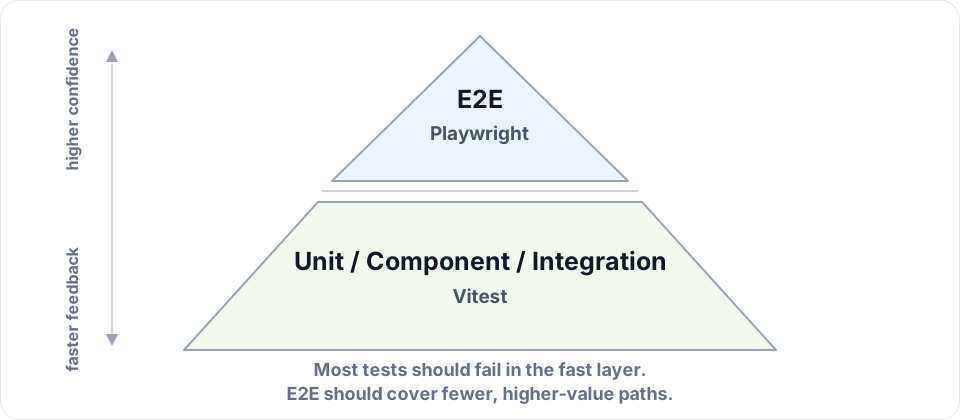
This plugin moves that coverage down to the fast part of the pyramid:
- Everything lives in the tab. The file system is in memory, the database is a real engine in WebAssembly, and outgoing requests go to MSW.
- Test files run in parallel. Every Vitest worker gets its own tab, with its own server, database, disk, cookies and storage.
- Every test starts clean. Cookies, storage, the disk and Next's cache are reset before each test.
That also makes it a nice loop for coding agents: edit, run, fix, repeat.
Is it really Next.js?
Yes. The plugin doesn't reimplement Next. It swaps the bundler for Vite and runs Next's runtime unchanged. To keep that honest, the repo runs Next's own e2e tests against the plugin: 968 of the 1139 that apply pass (85%) on [email protected]. Every failure is listed with a reason in the conformance report. CI also tests against next@latest and next@canary.
Quick start
You need:
- Vite 8+ and Vitest 5.0.4+ in Browser Mode (the examples use Playwright).
- A Next.js App Router app on
[email protected]or later.
1. Install
npm install -D vitest-plugin-rsc@alpha vitest @vitest/browser-playwright playwright @types/node@24
# Next's route resolution, pinned to your `next` version
npm install -D -E @next/routing@$(node -p "require('next/package.json').version")
npx playwright install chromium
A few notes:
- The plugin is in alpha. Releases live on the
alphatag and the API can still change. @next/routingmust match yournextversion exactly. Upgrade them together.- Vitest 5 needs
@types/node22+, and create-next-app installs 20, hence the bump.
2. Configure Vitest
// vitest.config.mts
import { playwright } from "@vitest/browser-playwright";
import { defineConfig } from "vitest/config";
import { vitestPluginRSC } from "vitest-plugin-rsc";
import { vitestPluginNext } from "vitest-plugin-rsc/nextjs/plugin";

export default defineConfig({
  plugins: [vitestPluginRSC(), vitestPluginNext()],
  test: {
    browser: {
      enabled: true,
      headless: true,
      provider: playwright(),
      instances: [{ browser: "chromium" }],
    },
    include: ["**/*.test.{ts,tsx}"],
    isolate: false,
  },
});
- No setup file needed: the plugin cleans up around every test.
isolate: falseloads your app's server once per worker instead of once per file. It does mean the test files in a worker share modules, so put mocks in a setup file..mtsmakes the config load as ESM, which matters if yourpackage.jsonhas no"type": "module".includekeeps Playwright's*.spec.tsfiles out.- Add
.vitest/to.gitignore. That's where screenshots of failed tests go.
3. Write a test
A Server Component that reads a cookie and bumps it from a Server Action:
// app/likes.tsx
import { cookies } from "next/headers";

export async function Likes() {
  const likes = Number((await cookies()).get("likes")?.value ?? 0);

  return (
    <form
      action={async () => {
        "use server";
        (await cookies()).set("likes", String(likes + 1));
      }}
    >
      <button>Likes: {likes}</button>
    </form>
  );
}
And its test:
// app/likes.test.tsx
import { expect, test } from "vitest";
import { page } from "vitest/browser";
import { renderServer } from "vitest-plugin-rsc/nextjs/testing-library";
import { Likes } from "./likes";

test("likes from a Server Action", async () => {
  await renderServer(<Likes />, { headers: { cookie: "likes=41" } });

  await page.getByRole("button", { name: "Likes: 41" }).click();
  await expect.element(page.getByRole("button", { name: "Likes: 42" })).toBeVisible();
});

test("opens the home page", async () => {
  const { response } = await renderServer({ url: "/" });

  expect(response.status).toBe(200);
});
The first test renders a single component, Testing Library style, but on Next's server. The click runs the Server Action, and Next renders again with the new cookie. The second test opens your home page like a browser would.
4. Run it
npx vitest
Vitest starts Chromium and watches your files. Use npx vitest run in CI. The first test in each worker is a bit slower, because it loads Next's runtime.
What you can test
Pretty much everything Next does. Your files go through Next's own compiler, so next/font, next/image, next/dynamic and styled-jsx just work, and a mistake that would break next build breaks your test too. Routes, layouts, loading.tsx, error boundaries, redirects, cookies, Server Actions, route handlers, caching and proxy.ts all behave as they do in Next.
Head to the Next.js guide for an example of each.
Databases
Browsers have no TCP sockets, so the database runs in the tab: a real engine in WebAssembly. Your app keeps its ORM, queries and migrations. Tests mock just one module, db.ts.
| Drizzle | Prisma | Kysely | SQL | |
|---|---|---|---|---|
| Postgres, on PGlite | ✅ | ✅ | ✅ | ✅ |
SQLite, on @libsql/client-wasm |
✅ | ✅ | ✅ | ✅ |
| MySQL, on MariaDB in WebAssembly | ✅ | ✅ | ✅ | ✅ |
There's a Redis recipe for ioredis too. See Databases.
Storybook
@storybook/nextjs-vite-rsc brings the same thing to Storybook. A story can render a whole page of your app, with the same mocks as your tests. Even a static, deployed Storybook carries its database along, so forms really submit.
Without Next.js
vitestPluginRSC() on its own renders Server Components for any React app. See RSC without Next.js.
Good to know
It's Next's real runtime, but in a browser tab. A few things follow from that:
- No
test.concurrent. Tests in one file run one after another. Files still run in parallel. - No native addons or TCP sockets. Use a database recipe, a WebAssembly alternative, or MSW.
- Development React by default. A Server Component's error message reaches the client, where a deployment would send a digest. Use
build: "production"to match a deployment. - Some Next features aren't supported yet, like
opengraph-imageimage rendering, the React Compiler and most customwebpackconfig.
The full list is in Limitations.
Documentation
Guides
- Testing a Next.js app: the main guide.
- Testing Client Components in a
"use client"test file. - Databases: Postgres, SQLite, MySQL and Redis in the tab.
- Node.js in the browser: which Node APIs work, and the in-memory disk.
- Static builds:
vite build, and how to serve the result. - RSC without Next.js.
Reference
Under the hood
- Internals: how it all works, the Next.js conformance suite, benchmarks and releasing. Detailed, and mostly for contributors.
Contributing
See CONTRIBUTING.md.