
storax/kubedoom
storax/kubedoom has 2,172 GitHub stars and 135 forks. GitHot measured 0 stars in 24 hours, 0 in 7 days, and 0 in 15 days. Last checked 2026-11-08 20:52 UTC. Last push 2024-08-20.
Kill Kubernetes pods by playing Id's DOOM!
Measured star growth
- in 24h
- 0
- in 7 days
- 0
- in 15 days
- 0
- in 1 month
- Collecting history
Net star changes over overlapping periods, not daily totals. Missing measurements are left blank. Stars measure attention, not software quality.
README.md
OriginalKube DOOM
Kill Kubernetes pods using Id's Doom!
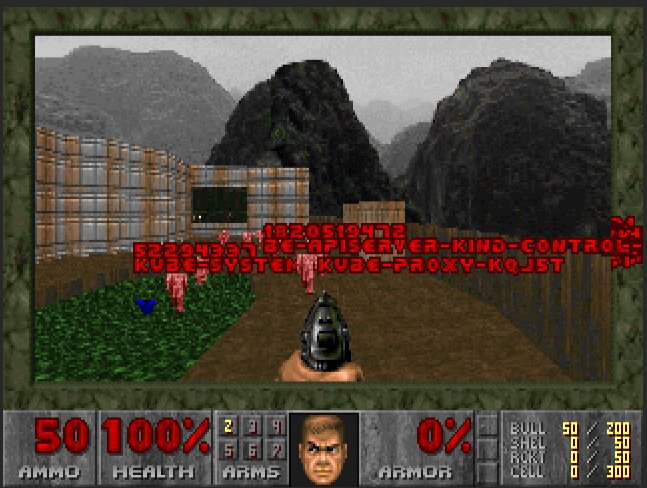
The next level of chaos engineering is here! Kill pods inside your Kubernetes cluster by shooting them in Doom!
This is a fork of the excellent gideonred/dockerdoomd using a slightly modified Doom, forked from https://github.com/gideonred/dockerdoom, which was forked from psdoom.
Running Locally
In order to run locally you will need to
- Run the kubedoom container
- Attach a VNC client to the appropriate port (5901)
With Docker
Run ghcr.io/storax/kubedoom:latest with docker locally:
$ docker run -p5901:5900 \
  --net=host \
  -v ~/.kube:/root/.kube \
  --rm -it --name kubedoom \
  ghcr.io/storax/kubedoom:latest
Optionally, if you set -e NAMESPACE={your namespace} you can limit Kubedoom to deleting pods in a single namespace
With Podman
Run ghcr.io/storax/kubedoom:latest with podman locally:
$ podman run -it -p5901:5900/tcp \
  -v ~/.kube:/tmp/.kube --security-opt label=disable \
  --env "KUBECONFIG=/tmp/.kube/config" --name kubedoom
  ghcr.io/storax/kubedoom:latest
Attaching a VNC Client
Now start a VNC viewer and connect to localhost:5901. The password is idbehold:
$ vncviewer viewer localhost:5901
You should now see DOOM! Now if you want to get the job done quickly enter the
cheat idspispopd and walk through the wall on your right. You should be
greeted by your pods as little pink monsters. Press CTRL to fire. If the
pistol is not your thing, cheat with idkfa and press 5 for a nice surprise.
Pause the game with ESC.
Killing namespaces
Kubedoom now also supports killing namespaces in case you have too many of
them. Simply set the -mode flag
to namespaces:
$ docker run -p5901:5900 \
  --net=host \
  -v ~/.kube:/root/.kube \
  --rm -it --name kubedoom \
  ghcr.io/storax/kubedoom:latest \
  -mode namespaces
Running Kubedoom inside Kubernetes
See the example in the /manifest directory. You can quickly test it using
kind. Create a cluster with the
example config from this repository:
$ kind create cluster --config kind-config.yaml
Creating cluster "kind" ...
 ✓ Ensuring node image (kindest/node:v1.23.0) 🖼
 ✓ Preparing nodes 📦 📦
 ✓ Writing configuration 📜
 ✓ Starting control-plane 🕹️
 ✓ Installing CNI 🔌
 ✓ Installing StorageClass 💾
 ✓ Joining worker nodes 🚜
Set kubectl context to "kind-kind"
You can now use your cluster with:

kubectl cluster-info --context kind-kind

Not sure what to do next? 😅  Check out https://kind.sigs.k8s.io/docs/user/quick-start/
This will spin up a 2 node cluster inside docker, with port 5900 exposed from the worker node. Then run kubedoom inside the cluster by applying the manifest provided in this repository:
$ kubectl apply -k manifest/
namespace/kubedoom created
deployment.apps/kubedoom created
serviceaccount/kubedoom created
clusterrolebinding.rbac.authorization.k8s.io/kubedoom created
To connect run:
$ vncviewer viewer localhost:5900
Kubedoom requires a service account with permissions to list all pods and delete them and uses kubectl 1.23.2.
Building Kubedoom
The repository contains a Dockerfile to build the kubedoom image. You have to
specify your systems architecture as the TARGETARCH build argument. For
example amd64 or arm64.
$ docker build --build-arg=TARGETARCH=amd64 -t kubedoom .
To change the default VNC password, use --build-arg=VNCPASSWORD=differentpw.
Explore related projects
codecrafters-io/build-your-own-x
Master programming by recreating your favorite technologies from scratch.
561,144 starspublic-apis/public-apis
A collective list of free APIs
497,361 starsmorluto/rea
Reverse engineer anything with agents, from app behavior down to native binaries.
444,435 starsopenclaw/openclaw
The AI that really does things. Any OS. Any Platform. The lobster way. 🦞
394,214 stars