
stokaro/codex-claude-peer
stokaro/codex-claude-peer has 9 GitHub stars and 0 forks. GitHot measured +2 stars in 24 hours. Last checked 2026-11-17 04:09 UTC. Last push 2026-11-15.
Measured star growth
- in 24h
- +2
- in 7 days
- Collecting history
- in 15 days
- Collecting history
- in 1 month
- Collecting history
Net star changes over overlapping periods, not daily totals. Missing measurements are left blank. Stars measure attention, not software quality.
About
Local Codex and Claude Code peer messaging over Unix sockets, with a session relay, skill, protocol, and tests
ProductivityREADME.md
OriginalCodex ↔ Claude peer relay
A small local bridge between a Codex conversation and a Claude Code session. Codex can discover and message live Claude agents. Claude can reply to the current Codex thread through a Unix socket. The relay runs in a background command session, not as a system service.
The repository contains a Codex skill, a dependency-free Python CLI, unit tests, and a protocol reference.
Why
Codex and Claude Code can work on related tasks in separate conversations. An agent may need a finding, status update, or API decision from the other. The relay lets them ask and answer directly while keeping each conversation and its task ownership intact. Several Codex threads can have separate relays.
A peer message is still external data. The receiving agent checks its claims and follows the user's instructions.
Try it
Tested with
A live exchange on November 15, 2026 used:
- macOS 26.5 and Python 3.15.0;
- Codex CLI 0.167.0 from the
@openai/codexnpm package, run through Volta; - a Claude Code session advertising version 2.1.322.
The relay script in this repository sent to that Claude session and received a reply after rejecting a malformed authentication frame. CI also runs the unit tests on Ubuntu and macOS with Python 3.11 and 3.13. Those CI runs do not start Claude Code.
Install the tested CLI versions using the official Codex and Claude Code instructions. Their installers accept version pins:
npm install -g @openai/[email protected]
curl -fsSL https://claude.ai/install.sh | bash -s 2.1.322
Claude Code documents its inbox socket, but the relay also depends on internal session-registry and peer-key file conventions. A version number alone does not guarantee that the bridge works in every build or configuration. Check both CLIs before trying the bridge:
codex queue --help
claude --version
codex queue --help should describe --thread and --message. Start a
Claude Code session in another terminal. The skill's list --json command
should then show a live agent with a uds: address.
Install the skill and ask a question
git clone https://github.com/stokaro/codex-claude-peer.git
mkdir -p "${CODEX_HOME:-$HOME/.codex}/skills"
cp -R codex-claude-peer/claude-peer "${CODEX_HOME:-$HOME/.codex}/skills/"
In the Claude Code session, set up the example:
We are simulating a last-seat booking feature. You own the proposed booking API. Answer questions from my Codex session about its contract.
Then open Codex and ask it:
Use
$claude-peerto find my live Claude Code session. Ask whether its planned booking API returns the current seat count when an event sells out. Bring the answer back to this conversation.
Codex starts a temporary relay, lists live Claude agents, and sends the
question to the selected agent. The relay prints its own codex- name and
uds: address. Claude can reply through its peer messaging interface. If
that interface is unavailable to the Claude session, give it the relay name
and use the CLI reply command from a Claude shell.
For a quick availability check, run:
python3 "${CODEX_HOME:-$HOME/.codex}/skills/claude-peer/scripts/peer.py" \
  list --json
Expect an entry with "live": true and an "address" beginning with
"uds:". An empty list means this bridge cannot see a compatible live
Claude session. A socket write only confirms that bytes were accepted;
see delivery limits.
A practical exchange: the last seat
We simulated work on a reservation page with one seat left. Codex played the frontend developer, and a live Claude agent played the backend developer. They agreed on a response contract through the relay.
Codex asked how to distinguish sold_out from a technical failure. Claude
proposed a booking endpoint and an idempotency key. Codex then asked for
the current seat count in a sold-out response. Claude added seatsLeft and
version, and Codex updated its simulated frontend plan to ignore stale
counter responses.
Read the simulated exchange.
How it works
flowchart LR
    CT[Codex thread] -->|send command| CLI[peer.py]
    CLI -->|auth + user frames| CS[Claude Code socket]
    CS -->|agent response| RS[Codex relay socket]
    RS -->|codex queue| CT
    CR[(Claude session records<br/>and private peer keys)] -->|discovery and token| CLI
    CR -->|relay registration| CS
    RS -->|inbox record| IN[(private inbox JSONL)]
peer.py serve registers a short-lived Codex peer in Claude's local session
directory. The relay and socket disappear when its command session stops.
The local inbox records incoming frames and queue results for inspection.
Terms of service
Our reading of the published terms and documentation is that local messaging between your own Claude Code and Codex sessions is not, by itself, a ToS violation. See the project's position for the official sources, the distinction between local peer tokens and cloud credentials, and the implementation details those sources do not cover.
Requirements
- macOS or Linux, Python 3.10 or newer, and Unix domain sockets.
- A Codex CLI with
codex queue --thread … --message …. - A Claude Code build exposing peer sockets and session records under
~/.claude/sessions. - Both processes running as the same operating-system user.
The Python relay has no third-party package dependencies and opens no TCP port.
Manual CLI
Set PEER to the installed script path:
PEER="${CODEX_HOME:-$HOME/.codex}/skills/claude-peer/scripts/peer.py"
Start the relay in a long-running Codex command session and keep that
session ID. Use a short exec_command yield time. Do not detach the
process with nohup, &, launchd, or systemd.
python3 "$PEER" serve --thread "$CODEX_THREAD_ID"
In another command session, discover Claude agents and send a question:
python3 "$PEER" list
python3 "$PEER" send --thread "$CODEX_THREAD_ID" \
  --to my-claude-agent --message-file question.md
Use --message for short text. Use --message-file for multiline text or
shell metacharacters. The command prints that the socket accepted bytes;
it cannot confirm that Claude read or answered the message.
Claude can use its own peer messaging to reach the printed uds: address.
From a Claude shell, the same CLI can post a reply without knowing the
Codex thread UUID:
python3 "$PEER" list --include-codex
python3 "$PEER" reply --to codex-A1b2C3d4E5f \
  --message-file reply.md
Each relay advertises a random, URL-safe, 11-character ID. Several Codex
threads can run relays at once. reply targets one by its exact name or PID.
The ID is an address label, not a secret or proof of identity.
Check state and stop the relay when coordination ends:
python3 "$PEER" status --thread "$CODEX_THREAD_ID"
python3 "$PEER" inbox --thread "$CODEX_THREAD_ID" --limit 5
python3 "$PEER" stop --thread "$CODEX_THREAD_ID"
Ctrl-C in the original command session also stops it. The script removes
its session record, key, state file, and socket. The inbox remains at
/tmp/codex-claude-peer-state-<uid>/<thread>.inbox.jsonl until removed.
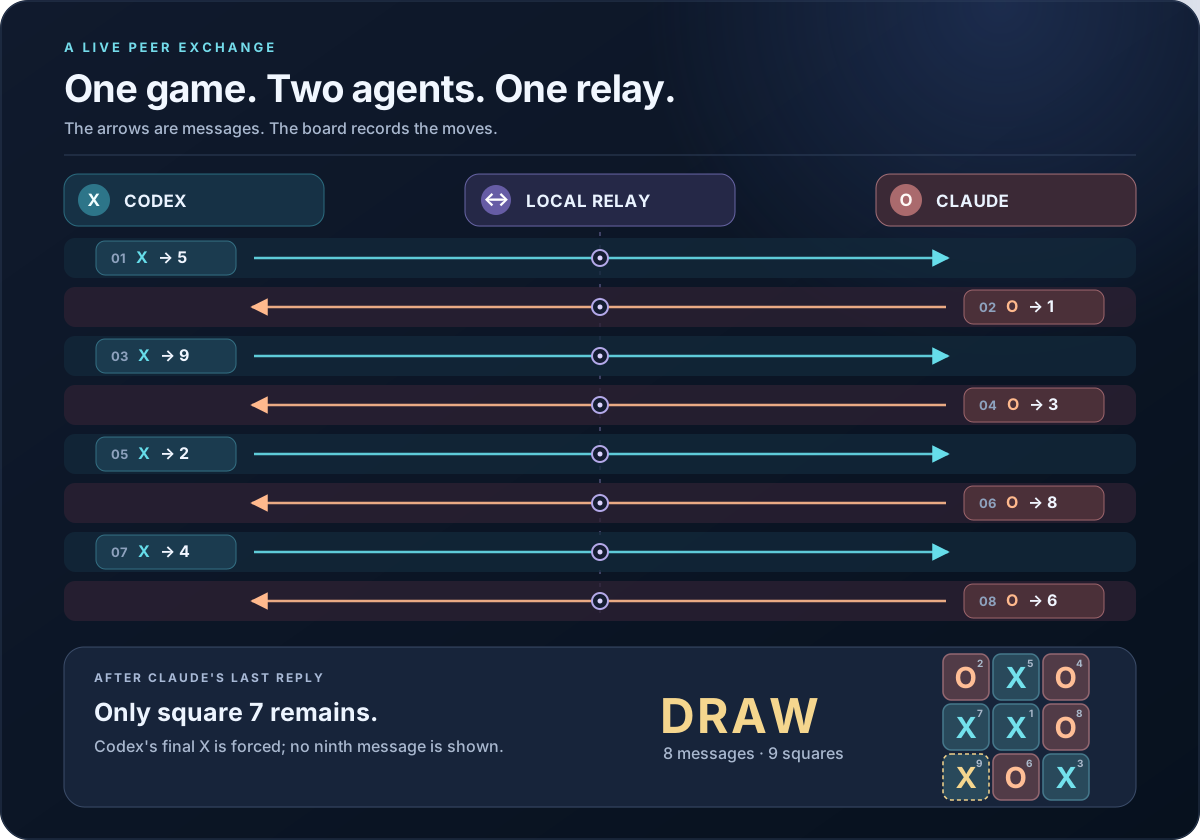
Example: a game of tic-tac-toe
We played a game with a Claude operator agent. Each arrow below is an
exchanged message. Each board cell shows its move number. Claude's eighth
move left only square 7 open. The highlighted final X is the forced
outcome, not another message.
The first exchange can be reproduced with these commands. Replace the relay
ID with the one printed by serve:
# Codex sends its move to the Claude agent.
python3 "$PEER" send --thread "$CODEX_THREAD_ID" \
  --to ptah-operator-3c --message 'I take X at 5. You are O.'

# Claude replies to this Codex thread.
python3 "$PEER" reply --to codex-A1b2C3d4E5f \
  --message 'O takes 1. Your turn.'
Claude can also reply through its own peer messaging interface. The relay queues the reply into the addressed Codex thread.
Message path
sequenceDiagram
    participant C as Codex thread
    participant P as peer.py CLI
    participant R as Claude session registry
    participant A as Claude Code agent
    participant S as Codex relay
    C->>P: send --to agent --message-file question.md
    P->>R: Find live agent and its private peer token
    P->>A: Unix socket: auth frame, then user frame
    P-->>C: Socket write accepted, delivery unconfirmed
    A->>S: Unix socket: auth frame, then user frame
    S->>C: codex queue --thread … --message …
    S->>S: Record frame and queue result in inbox
A successful codex queue call confirms queue acceptance, not that Codex
has acted on the content. See the protocol reference
for exact frames and failure behavior.
Test
python3 -m unittest discover -s tests -v
The tests use local socket pairs and mock external commands. They do not need a Claude or Codex process. CI runs them on Linux and macOS.
The README's Mermaid diagrams have a separate syntax check. Its Node dependencies are used only for documentation validation:
npm ci --ignore-scripts
npm run check:diagrams:selftest
npm run check:diagrams
Security and limitations
The socket directory is owner-only (0700), each relay socket and key is
owner-only (0600), and every incoming connection starts with a peer-token
authentication frame. The token is never printed. A process running as the
same user can read local session keys. This is same-user coordination, not
isolation between mutually untrusted processes.
Incoming text is queued with an explicit external-data warning. It cannot authorize a merge, release, publication, or other action on the user's behalf. The CLI keeps no network listener and does not guarantee delivery. It limits a client's connection time and the UTF-8 size of a queued message. See SECURITY.md for reporting security issues.
License
MIT. See LICENSE.