
stixez/droid-mcp
stixez/droid-mcp has 45 GitHub stars and 8 forks. GitHot measured +1 stars in 24 hours. Last checked 2026-11-14 21:58 UTC. Last push 2026-11-09.
Measured star growth
- in 24h
- +1
- in 7 days
- Collecting history
- in 15 days
- Collecting history
- in 1 month
- Collecting history
Net star changes over overlapping periods, not daily totals. Missing measurements are left blank. Stars measure attention, not software quality.
About
Let an AI use your Android phone: an app and an SDK with 160+ MCP tools (calendar, SMS, files, camera, notifications, screen control) for Claude Code, Codex, Cursor or on-device models, with approvals on the phone.
AIREADME.md
Original
droid-mcp
Let an AI use your Android phone.
An app and an SDK that turn calendar, contacts, SMS, files, camera, notifications, screen control and more
into MCP tools for Claude, Codex, Cursor or an on-device model.






Three ways to use it:
- The app: install it, allow what you're comfortable with, and connect Claude Code, Codex or Cursor. No code needed.
- SDK, on-device: your app runs a local model that calls the tools directly.
- SDK, MCP server: your app runs an HTTP server on the phone that any MCP client can reach over Wi-Fi.
There are 160+ tools in 50+ modules, each with only its own permissions. See all tools.
Use your phone from Claude Code
Install the app. Download
droid-mcp-<version>-arm64-v8a.apkfrom the latest release (older 32-bit phones:armeabi-v7a). Obtainium can keep it updated.Allow what clients may use. The setup screen explains each permission and how many tools it unlocks. Only notifications are needed.
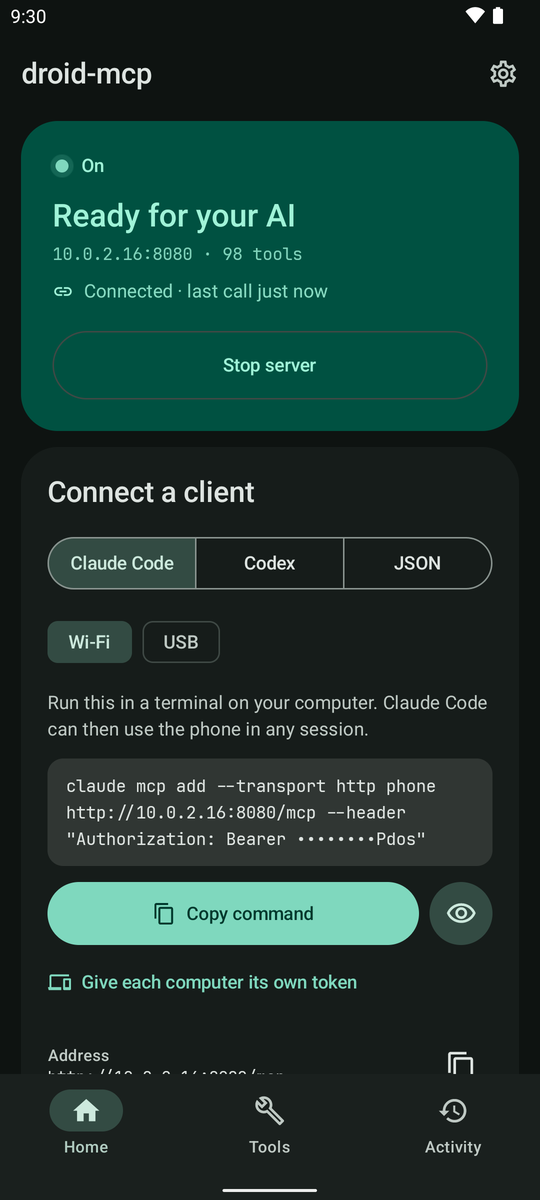
Start the server and copy the command into a terminal on your computer:
claude mcp add --transport http phone http://192.168.1.20:8080/mcp --header "Authorization: Bearer <token>"The same card has config for Codex and JSON for other clients. Phone and computer must share a Wi-Fi, or use USB with
adb forward tcp:8080 tcp:8080.
Then ask "What's on my calendar today?"
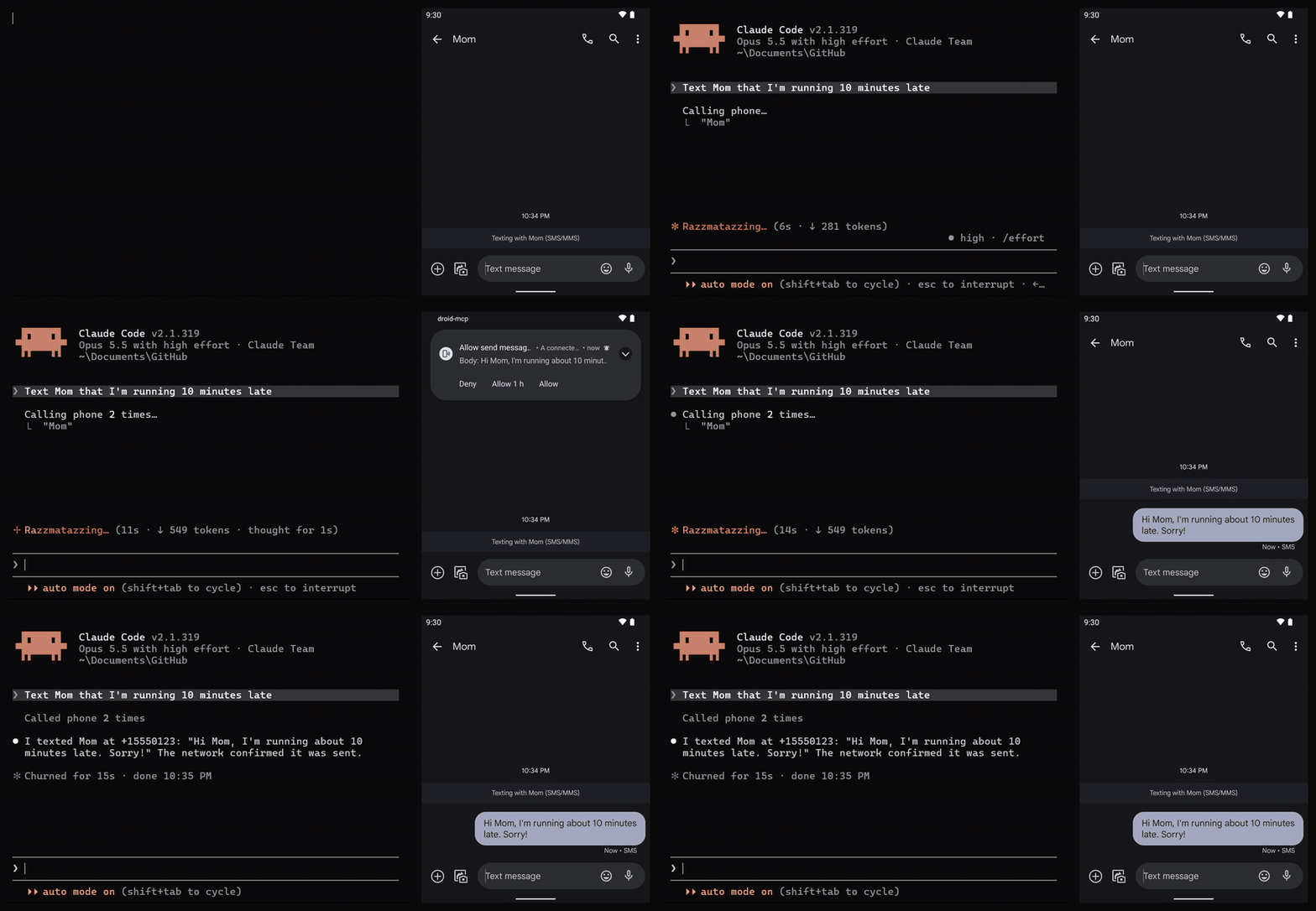
The app asks you before a client sends, deletes or changes anything (once, for an hour, or always), logs every call, can give each computer its own token, and can pause itself off your home Wi-Fi. It isn't on Google Play, whose policies don't allow AI control through accessibility or SMS access.
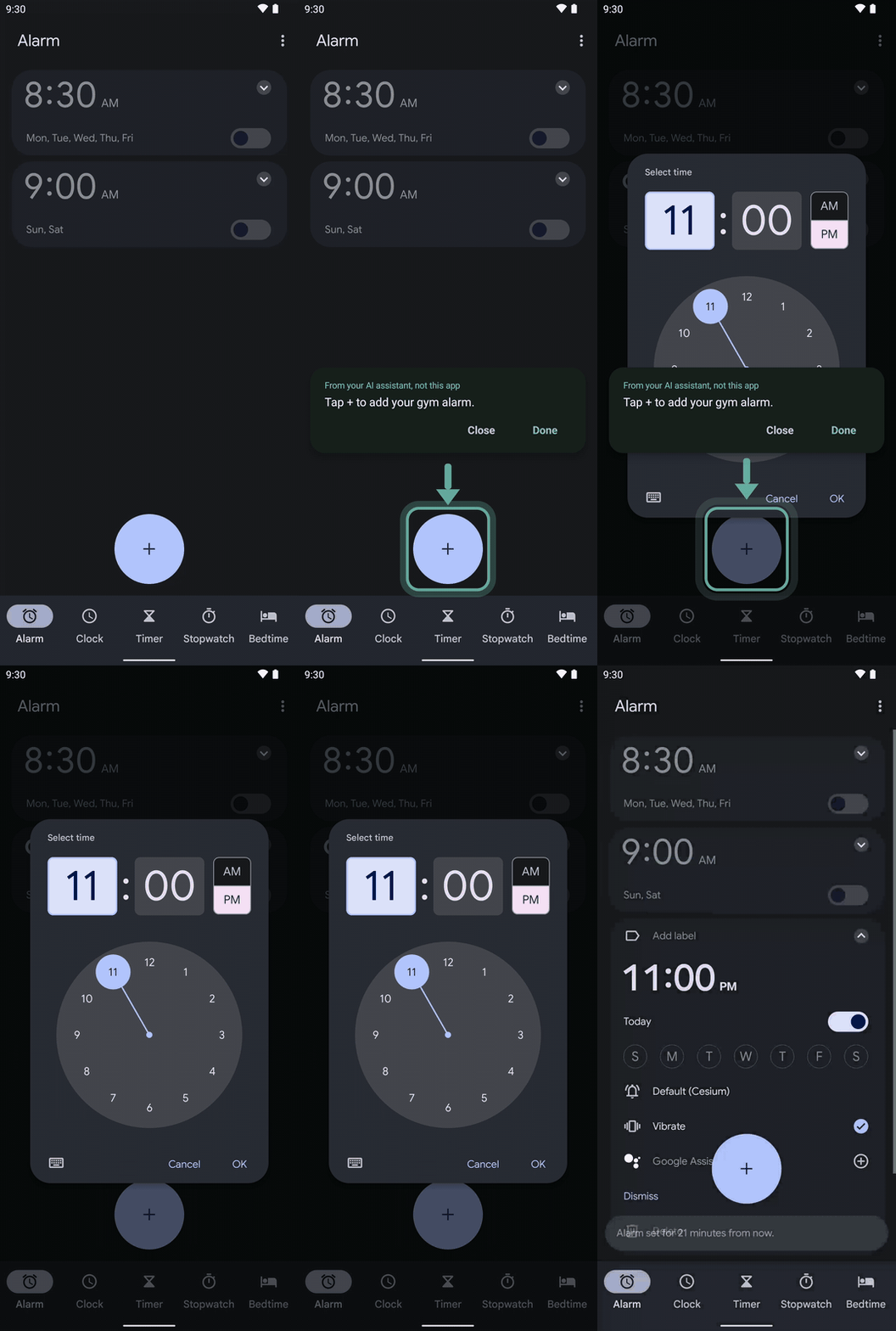
For steps only you should do, the agent can point at the right spot on your screen and wait until you've done it (guide_user, the clip on the right). Your taps go through to the app underneath.
Use the SDK
// settings.gradle.kts
dependencyResolutionManagement {
    repositories { maven { url = uri("https://jitpack.io") } }
}

// build.gradle.kts: pick modules, or droid-mcp-all for everything except the opt-in ones
dependencies {
    implementation("com.github.stixez.droid-mcp:droid-mcp-core:0.14.0")
    implementation("com.github.stixez.droid-mcp:droid-mcp-calendar:0.14.0")
}
Call tools from an on-device model:
val mcp = DroidMcp.builder()
    .addTools(CalendarTools.all(context))
    .build()

val toolsJson = mcp.listToolsJson()      // hand this to the model
val result = mcp.callTool("read_calendar", mapOf("start_date" to "2026-10-01"))
Or serve them to desktop clients:
val mcp = DroidMcp.builder()
    .addTools(CalendarTools.all(context))
    .enableHttpServer(context = context)  // port 8080, token generated
    .build()
mcp.startServer()
val token = mcp.serverToken
Calls run off the main thread with a timeout. Beyond that, the builder can:
- ask the user before risky calls (
confirmToolCalls) - serve resources and prompts
- enable HTTPS (
enableTls) - go read-only (
readOnly = true)
Connecting clients covers tokens, sessions and TLS.
Packaging error about duplicate META-INF files?
android {
    packaging {
        resources {
            excludes += setOf(
                "META-INF/INDEX.LIST",
                "META-INF/io.netty.versions.properties",
                "META-INF/LICENSE.md",
                "META-INF/NOTICE.md",
                "META-INF/license/**",
                "META-INF/versions/9/OSGI-INF/MANIFEST.MF", // droid-mcp-tls only
            )
        }
    }
}
Modules
| Area | Modules |
|---|---|
| Personal data | calendar contacts sms calllog media files downloads clipboard |
| Device | device screen settings sensors health biometric keyguard flashlight vibration audio usb wallpaper ringtone dnd |
| Connectivity | network wifi bluetooth telephony nfc location web |
| Camera & vision | camera screenshot qr mlkit |
| Apps & intents | apps alarms intent print tts playback |
| Notifications | notifications notifications-reply notification-watch |
| UI automation | accessibility ime overlay |
| Opt-in | shizuku root (shell tools), audit, tls, server-service |
Your app requests permissions; the library never does. Each module has requiredPermissions() and hasPermissions(context), and some need special access granted in Settings (which ones).
Security
The server needs a bearer token and checks Origin, sessions and body size. File tools stay in shared storage, and web tools refuse private addresses. It listens on every network the phone joins, so use trusted networks or TLS. See the security model. droid-mcp sends no analytics; ML Kit (mlkit, qr) reports usage to Google.
Requirements
Android 9 (API 28)+ at runtime; compileSdk 36+, AGP 8.9.1+ and Kotlin 2.3+ to build.
Documentation
| Tools | Every tool, its parameters and permissions |
| Connecting clients | Tokens, sessions, mDNS, TLS |
| Security | Threat model and what the host app owns |
| Shell tools | Shizuku and root |
| Versioning | How releases change things |
| API reference | KDoc |
sample-app is a one-screen example: calling tools in-process, asking for a permission and serving over HTTP. app is the full host app, with a foreground service, approvals and every kind of special access. Contributions are welcome; for anything non-trivial, open an issue first. Licensed under Apache 2.0.