
stffnb/edentext
stffnb/edentext has 606 GitHub stars and 44 forks. GitHot measured +3 stars in 24 hours. Last checked 2026-11-09 01:28 UTC. Last push 2026-11-06.
Powerful web-based Word Processor for docx and odt. Free, Open Source, Private by Design
What you can do
- Real page layout — A4/Letter pages, margins, headers & footers, footnotes, columns, page and line numbering, watermarks; mirrored margins and chapters opening on a right-hand page for books
- Opens and saves .odt and .docx, exports PDF; templates (.ott/.dotx) and a letter gallery (DIN 5008); password-protected files in both formats
- Compatible with Word, LibreOffice and WPS Office — documents keep their layout; automated round-trip and layout tests check this against LibreOffice
- Styles — paragraph, character, table and list styles with inheritance, chapter numbering
Measured star growth
- in 24h
- +3
- in 7 days
- Update delayed
- in 15 days
- Update delayed
- in 1 month
- Update delayed
Net star changes over overlapping periods, not daily totals. Missing measurements are left blank. Stars measure attention, not software quality.
README.md
Original


Full-featured word processor, right in the browser
Free · Open Source · Private by Design




English · Deutsch · Español · Français · Italiano · Português · Ελληνικά · Русский · Українська · 日本語 · 简体中文 · 繁體中文
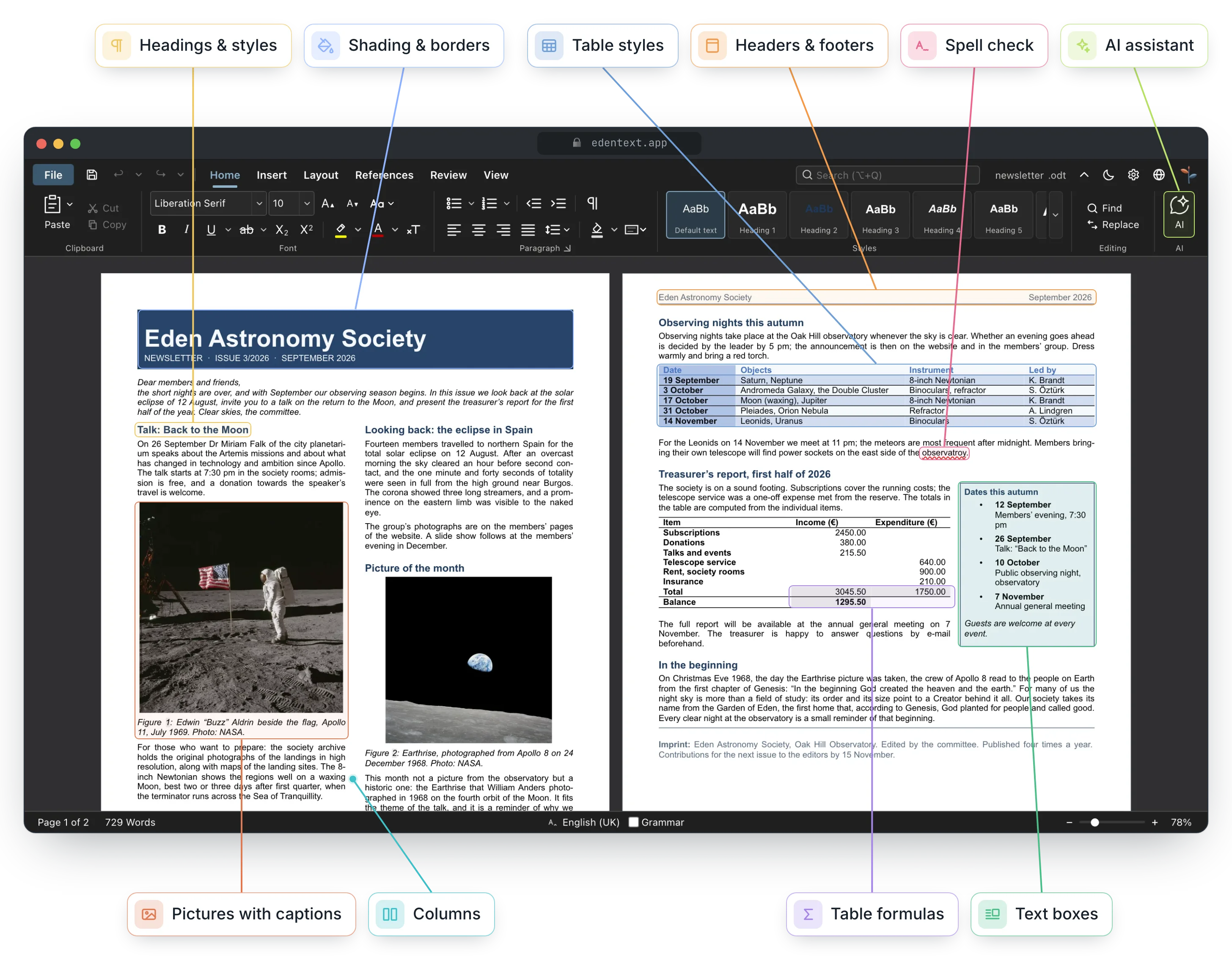
EdenText is a web-based, powerful word processor for everything from quick notes to full-length books. No server, no account — processing runs locally and your documents never leave your computer. Open the link, or install it as an app and work offline. For most languages the first download is about 2 MB; dictionaries and fonts load as needed[^1]. The interface comes in English, German, Spanish, French, Italian, Portuguese, Greek, Russian, Ukrainian, Japanese and Chinese (simplified and traditional).
[!NOTE] EdenText is still in beta and actively developed. Tests and round-trip checks verify that it works; even so, bugs can't be ruled out at this stage, so keep backups of documents you care about. The browser also keeps the last three versions of the open document, in case it ever fails to load.
Found a bug, or a document that doesn't look right? Please open an issue — every report helps. Documents that EdenText displays differently from Word, LibreOffice or WPS Office are especially welcome: attach the file (or a stripped-down copy) and it becomes a test case.
Features
- Real page layout — A4/Letter pages, margins, headers & footers, footnotes, columns, page and line numbering, watermarks; mirrored margins and chapters opening on a right-hand page for books
- Opens and saves
.odtand.docx, exports PDF; templates (.ott/.dotx) and a letter gallery (DIN 5008); password-protected files in both formats - Compatible with Word, LibreOffice and WPS Office — documents keep their layout; automated round-trip and layout tests check this against LibreOffice
- Styles — paragraph, character, table and list styles with inheritance, chapter numbering
- Tables with styles, sorting and spreadsheet-style formulas
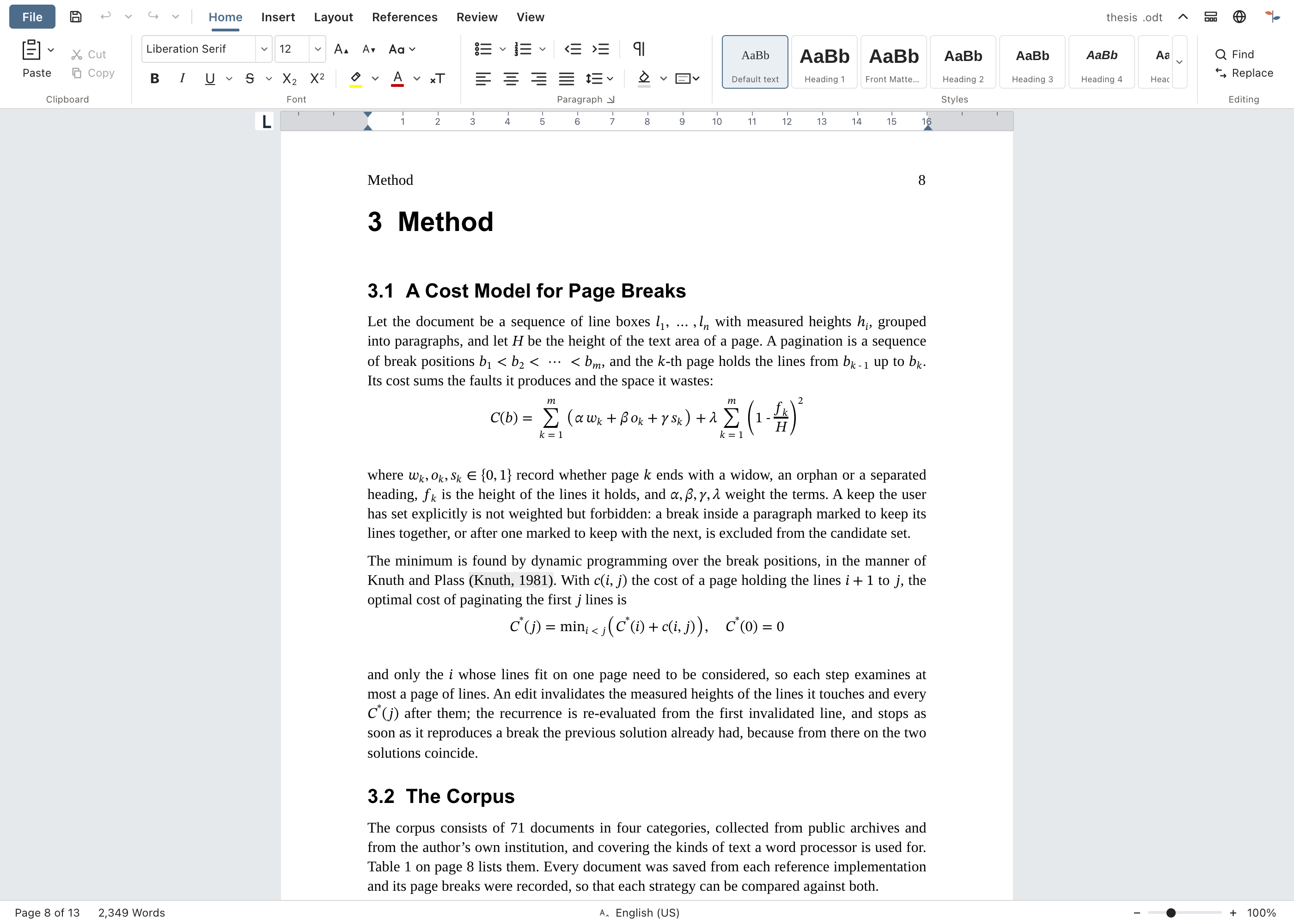
- Everything a thesis needs — table of contents, captions, cross-references, citations & bibliography, alphabetical index, formulas (LaTeX)
- Review tools — track changes and threaded comments with margin balloons, comparing and merging with another file, printable markup, spell check (English, German, Spanish, French, Italian, Portuguese, Greek, Russian and Ukrainian), synonyms (all of these but Greek), grammar check (English)
- Optional AI assistant — with your own provider or a local model; answers questions about the document and edits it as tracked changes. Can be switched off; requests go directly to the provider, without an EdenText server
- Private by design — your documents never leave your computer, all processing runs locally; works offline as an installable app. The editor sends nothing, unless you switch on the AI assistant, which sends to the provider you chose. Documents are autosaved in the browser; Recent documents can be set to delete closed ones at the next start or not keep them at all, and a private window leaves nothing behind once it is closed
- Any current browser — in Chrome and Edge, Save writes back to the opened
file, and so does Brave once
brave://flags/#file-system-access-apiis enabled; otherwise each save is a download, so turn on "Always ask where to save" in the browser settings to pick the location
Where the browser keeps EdenText from matching Word or LibreOffice exactly is described under Known limitations.
Gallery
The documents behind these pictures are in docs/showcase/ as .odt
and .docx, ready to open in EdenText, LibreOffice or Word. They are built by
scripts/showcase/run.mjs; the photographs are NASA's and the book is Lewis Carroll's,
both public domain.
 Review — tracked changes, threaded comments in the margin, a draft watermark |
 Book — A5 with mirrored margins. Each chapter starts on a right-hand page, the header shows the book title on left-hand pages and the chapter title on right-hand pages, and page numbering starts with the first chapter |
 Newsletter — columns, pictures with captions, a sidebar box |
 Tables — table styles and spreadsheet-style formulas |
Desktop app
Each release also carries unsigned desktop installers built with Electron:
- macOS —
EdenText-<version>-arm64.dmg(Apple silicon) orEdenText-<version>.dmg(Intel). Drag the app into Applications. As it is unsigned, open it the first time via right-click → Open, or runxattr -d com.apple.quarantine /Applications/EdenText.app. - Windows —
EdenText-Setup-<version>.exe. SmartScreen warns about an unknown publisher: More info → Run anyway. - Linux —
EdenText-<version>.AppImage(chmod +x, then run it) or the.deb(sudo apt install ./edentext_*.deb).
The desktop app opens documents from the file manager and saves changes straight back to the same file, writes PDFs directly without the print dialog and tells you at start when a newer version is out.
Development
npm install
npm run dev      # dev server with hot-reload
npm test         # test suite
npm run build    # production build → dist/
cd desktop && npm install && npm start   # desktop app on the same build
Built with Svelte 5, TypeScript, Vite and TipTap 3 (ProseMirror).
Self-hosting
EdenText needs no backend and stores nothing on the server; documents stay in the browser. A container image is published for each release (amd64 and arm64):
docker run -p 8080:80 ghcr.io/stffnb/edentext
Alternatively, each release includes edentext-<tag>.zip with the built app, and
npm run build creates the same files in dist/. Any web server can host this folder.
The container image can also be built locally with docker build -t edentext ..
A community-maintained Helm chart for Kubernetes is in charts/edentext.
For an update, copy the new files over the old ones instead of emptying the folder first.
Tabs opened before the update keep loading the files of their own version until they are
reloaded. The server should answer requests for missing files with 404 rather than
index.html, so that these tabs can ask to be reloaded.
We recommend serving EdenText over HTTPS. The editor also works over plain HTTP, but browsers then turn off a few features: offline use, installing it as an app, saving straight back to the opened file (it is downloaded instead) and the copy buttons. On localhost everything works as it does over HTTPS.
A version hosted on GitHub Pages is freely available to everyone at edentext.app (it counts visits anonymously with GoatCounter, EU-hosted, without cookies or stored IP addresses; the desktop app, the container image, the release download and self-built copies contain no counter).
Embedding
Another web application can show EdenText in an iframe and keep the document itself.
With ?embed=1 the editor leaves out its own file management. The embed.js helper,
served by every instance, loads files into it and gets them back as ODT, DOCX or PDF;
see docs/architecture/embed.md.
The host can also set the language, theme and accent colour, and switch the AI assistant off.
In embed mode the editor
shows the EdenText logo and a “Powered by EdenText” notice, which the AGPL terms require
to stay (NOTICE.md) and which only a white-label build under the
commercial license leaves out (VITE_EDENTEXT_ATTRIBUTION=off).
Architecture
flowchart TD
  Browser[Browser: local, offline-capable app] --> App[App shell and Svelte UI]
  App --> Editor[TipTap / ProseMirror editor]
  Editor <--> Document[Structured document and editor extensions]
  Document --> Layout[Styles, page layout, pagination and frames]
  Document <--> Storage[localStorage: documents, settings and recovery copies]
  Document <--> Interchange[ODT and DOCX import/export]
  Interchange --> Files[Browser file APIs, downloads and templates]
  Editor --> Tools[Spell check, grammar, formulas and review tools]
  Layout --> Render[Editable browser pages]
EdenText runs entirely in the browser: App.svelte composes the interface around
the TipTap document model and its editor extensions. Styles and layout turn that
model into editable pages; storage keeps local state and recovery copies. Import
and export translate the same model to ODT and DOCX, while browser file APIs save
or download the resulting files. See the architecture guides
for format and layout invariants.
Contributing
Contributions are welcome — see CONTRIBUTING.md. Merging requires a signed CLA, checked automatically on every pull request.
Contributors
Thanks to everyone who helped — with ideas, bug reports, testing and feedback. Besides the contributors listed by GitHub, I also want to thank:
Patrick R., @Deleh, @lukasmwerner, @JinJieBeWater, @farragoo, @sbvelinga


License
Copyright © 2026 Steffen Becker · Made in Germany
AGPL-3.0, with an additional term under its section 7(b) for embed mode (NOTICE.md). A commercial license is available for use cases the AGPL does not fit. Bundled fonts and language data keep their own licenses — see THIRD-PARTY-NOTICES.md.
EdenText is an independent project, not affiliated with Microsoft or The
Document Foundation. .docx and .odt are supported for interoperability.
[^1]: Over the wire, compressed: ~1.0 MB of app code, the rest the spell checker with the dictionary for the browser's language and the fonts a page shows; the Greek and Ukrainian dictionaries add ~2.5 and ~1.5 MB. Everything else is fetched and kept for offline use once it is needed; all fonts, dictionaries and thesauri together are ~20 MB, or ~28 MB with the English grammar check.
Explore related projects
awesome-selfhosted/awesome-selfhosted
A list of Free Software network services and web applications which can be hosted on your own servers
335,471 starsimmich-app/immich
High performance self-hosted photo and video management solution.
118,568 starsStirling-Tools/Stirling-PDF
#1 PDF Application on GitHub that lets you edit PDFs on any device anywhere
96,048 starslouislam/uptime-kuma
A fancy self-hosted monitoring tool
93,389 stars