
spatiumnorth/spatiumddi
spatiumnorth/spatiumddi has 81 GitHub stars and 17 forks. GitHot measured 0 stars in 24 hours and +6 in 7 days. Last checked 2026-11-15 13:11 UTC. Last push 2026-11-08.
Measured star growth
- in 24h
- 0
- in 7 days
- +6
- in 15 days
- Collecting history
- in 1 month
- Collecting history
Net star changes over overlapping periods, not daily totals. Missing measurements are left blank. Stars measure attention, not software quality.
About
Open-source DDI platform — unified DNS, DHCP, and IP Address Management. Runs its own BIND9 / PowerDNS / Kea service containers, with a FastAPI control plane and React UI.
Self-hostedREADME.md
Original

SpatiumDDI
Self-hosted DNS, DHCP, and IPAM — one control plane, real servers underneath.
A modern, open-source alternative to commercial DDI platforms.
Built in the open by SpatiumNorth, Montréal.


















⚠️ Beta software. SpatiumDDI is under active development. Core IPAM / DNS / DHCP / appliance surfaces have stabilised since the
2026.04.16-1alpha cut, but expect occasional schema changes between releases and roadmap features that are still in flight. Ready for evaluation, pilots and staged rollouts today; 1.0.0 is due November 2026. For production use in front of business-critical DNS or DHCP, pin to a tested release, snapshot Postgres before every upgrade, and consider commercial support for the rollout. Early adopter feedback is very welcome — open an issue or start a discussion on GitHub.

The dashboard. More screens — IPAM, DNS, DHCP, search, audit, reports — in the gallery below.
Why SpatiumDDI exists
I'm a network engineer, and I spent years running enterprise DDI. The platforms work. What doesn't work is paying for them by the IP, by the appliance and by the feature, then finding that every zone, scope and subnet you own is now locked inside a vendor's data model and a renewal cycle you don't control. Meanwhile the open-source world had every piece — BIND9, PowerDNS, Technitium, Kea — and no single control plane that ran them as one system, with the authentication, delegation and audit trail an organisation actually requires. That gap is why SpatiumDDI exists.
SpatiumDDI is that control plane. It doesn't just render config for DNS and DHCP servers somebody else operates — it deploys and runs BIND9, PowerDNS, Technitium and Kea itself, and it manages Windows DNS and DHCP agentlessly over WinRM, with importers for existing BIND, Windows, PowerDNS, Technitium, Kea, ISC and NetBox estates and a guided Windows cutover rather than a forklift. Group-based RBAC over LDAP, OIDC, SAML, RADIUS or TACACS+; an append-only, tamper-evident audit log; a highly available control plane; an OS appliance with atomic A/B upgrades or a Helm chart; a REST API behind every click; and no telemetry of any kind, so it runs air-gapped. All of it is Apache 2.0 — every feature, on every install, with no licence to count against.
Open source is the model, not a concession. SpatiumNorth sells support, deployment and migration from the people who write the code, and MSPs partner to run it for their clients — that is what pays for the platform, not a per-object meter. If your team is evaluating a replacement for commercial DDI, start with the feature tour below and the documentation. If you're a homelab or a student learning how DNS, DHCP and IPAM fit together, you're just as welcome: it's the same software.
Screenshots
Click any image to open the full-size version.
| Dashboard | IPAM |
|---|---|
|
 |
| Utilisation heatmap, capacity, platform health, live activity | Space / block / subnet tree; per-address DHCP and DNS sync state |
| DNS | DHCP | DHCP leases |
|---|---|---|
 |
 |
 |
| Zones and records, with per-server sync state | Scopes, pools and static reservations per server group | Live leases reported by the Kea agents |
| Global search | Audit log | Reports |
|---|---|---|
 |
 |
 |
| Ctrl+K across addresses, subnets, zones, records and more | Every change, who made it, and the result | Top subnets by utilisation, owners, most-changed resources |
| VLANs | WAN circuits | Roles |
|---|---|---|
 |
 |
 |
| Routers and their VLANs | Carrier circuits linked to providers, sites and subnets | Group-based RBAC with built-in and custom roles |
Contents
- Why SpatiumDDI exists — the case for an open DDI platform
- Screenshots
- What's in the box — capability tour, one table per area
- Privacy: your data stays yours — no telemetry, no analytics, no phone-home
- Architecture
- Getting Started — three ways to run SpatiumDDI:
- Try the demo in GitHub Codespaces — one-click full stack with seeded data, browser-only, free 60 h/month
- Quick start with the OS appliance ISO — easiest deploy: Debian 13 + embedded k3s + atomic A/B upgrades, guided installer
- Quick start with Docker Compose —
docker compose upon any Docker host, full control - Plus: demo seed · in-place upgrade flow · built-in DNS/DHCP containers · on-prem LLM for the Copilot · API docs · requirements + sizing
- Deployment Options
- Documentation — the per-subsystem specs behind the feature tables
- Support the project — commercial support, partners, sponsors, tip jar
- Project Status
- Contributing
- License
What's in the box
One control plane for IPAM, DNS, DHCP — plus the discovery and integrations to keep it honest. No vendor lock-in, no per-IP licence, no agents on Windows.
- It runs DNS and DHCP — not just configures them. A modern alternative to Infoblox and EfficientIP: most open-source IPAM tools are pretty dashboards over someone else's
/etc/bind/named.conf. SpatiumDDI bundles BIND9, PowerDNS, Technitium and Kea as first-class service containers; the control plane owns their config, they auto-register, and they keep serving if the control plane is down. - One platform, three surfaces. IPAM tree, DNS zones, DHCP scopes — one UI, one REST API, one source of truth. Hostname changes in IPAM propagate to DNS; reservations propagate to DHCP. No more three-tab reconciliation.
- Bring your own servers — or ours. Use the bundled engines, or point SpatiumDDI at your existing Windows DCs and DHCP servers via WinRM. Agentless in both directions — nothing installed on the Windows side.
- Built for delegation. Group-based RBAC with LDAP, OIDC, SAML, RADIUS and TACACS+ (with backup-server failover). Hand a subnet or a zone to a department without handing over root.
- API-first. Every UI action is a REST call. Ansible and ad-hoc scripts speak the same surface, and so will the planned Terraform provider. If you can click it, you can automate it.
The tables below are the summary. The operational detail per subsystem — what's stored, how it behaves, where the seams are — lives in the specs listed under Documentation.
Core DDI
| Feature | Highlights | |
|---|---|---|
| 🗂 | Hierarchical IPAM | spaces · blocks · subnets · IPv4 + full IPv6 (EUI-64 / random / sequential) · per-IP roles · MAC history · reservation TTL · bulk allocate with name templates · atomic next-available-subnet carve (POST /blocks/{id}/allocate-subnet — race-safe, Terraform-ready) · server-side address pagination / search / sort + cross-subnet IP search (select-all-matches → bulk edit / delete) that survives a busy /16 · hourly utilization-recount self-heal · scheduled reconciliation hygiene alerts (free-but-responding / stale reservation / unknown-MAC squatting) |
| ✂️ | Subnet operations | Split · Merge · Find-free · subnet planner (multi-level CIDR design + transactional apply) — preview-then-commit with typed-CIDR confirm · single Tools dropdown on subnet headers |
| 🧮 | Planning tools | CIDR calculator · address planner (pack /N requests into free space) · aggregation suggestion · free-space treemap |
| 🌐 | DNS | BIND9 or PowerDNS or Technitium container, auto-registering — pick per server group; zones and records are authored identically either way, but split-horizon views and RPZ blocklists are BIND9-only, ALIAS / LUA are PowerDNS-only, and Technitium blocks natively rather than via RPZ · RFC 2136 dynamic updates · per-zone dynamic-update ACLs (authorize external writers by TSIG key or source IP/CIDR, with ingest-back of records they inject) · per-server zone-serial drift + record-level drift report (AXFR the live zone, diff it against the database, per server) · TSIG keys · zone delegation wizard · zone templates · RPZ blocklists with curated catalog · catalog zones (RFC 9432) — producer and consumer on BIND9, producer-only on PowerDNS, not supported on Technitium until #1766 · secondary / stub zones (masters) · SVCB / HTTPS / DNAME records · ALIAS (apex CNAME-equivalent) + LUA (scripted / health-aware answers) on PowerDNS · Response Rate Limiting (RRL) + amplification defenses · query-log analytics (top names / clients / qtypes + per-view breakdown) with NXDOMAIN-spike / query-rate-spike alerting — and, with BIND 9.20 response logging on, the answer as well as the question: rcode + answer count per row, so NODATA is distinguishable from NXDOMAIN and from a query that was refused (opt-in per group; NULL means unrecorded, never NOERROR) · move a server or a zone between server groups — the server move re-elects a primary, purges the old group's queued ops and repoints the appliance firewall; the zone move is preview→commit with three separate acknowledgements, because clearing a view widens exposure rather than narrowing it |
| 🔒 | Encrypted DNS (DoT / DoH / DoQ) | serve DNS-over-TLS (853) + DNS-over-HTTPS (/dns-query) — plus DNS-over-QUIC on Technitium — to local clients and forward upstream over TLS instead of plaintext 53 · BIND9 native, PowerDNS via the dnsdist front, Technitium native (and the only driver that also forwards over HTTPS and QUIC — BIND 9.20 has no client-side HTTP or QUIC transport) · certs from the built-in ACME client or an upload, auto-picked-up on renewal · strict upstream remote-hostname validation that fails closed · per-group, default-off, additive (plain :53 keeps working) |
| 🔐 | DNSSEC | BIND9 inline-signing (BIND owns + auto-rotates keys) + PowerDNS and Technitium online sign / unsign from the zone page · reusable dnssec-policy library — KSK + ZSK algorithm / size / lifetime, NSEC or NSEC3 (iterations · salt length · opt-out) · per-zone public key state + DS export to hand to the parent-zone registrar · manual + automatic rollover · SpatiumDDI never holds private key material — the signer owns and rotates it |
| 🔀 | DNS Views (split-horizon) | per-view zone + record rendering on BIND9 — view_id IS NULL records shared across views, scoped records render only in their view, RPZ / blocklists replicate into each view block |
| ⚖️ | GSLB-lite + GeoDNS steering | health-checked DNS pools — tcp / http / https / icmp / none probes flip A/AAAA records in/out of the rendered rrset; manual enable per member · topology-aware steering — a per-member serving scope (client CIDRs and/or Site) renders as BIND9 geo views composed over split-horizon, evaluated before operator views with a union fallback so a scoped-only pool never blackholes |
| 🔄 | DHCP | Kea container · agentless FortiGate cloud DHCP driver (FortiOS REST, no agent) · group-centric Kea HA (load-balanced or hot-standby) with self-healing peer drift · option templates · 95-entry option-code library · PXE / iPXE provisioning profiles — per-architecture boot-file selection (BIOS · UEFI x64 / ia32 / arm64 · iPXE chainload) rendered as Kea client classes, one reusable profile assigned per scope · DHCPv6 stateful / stateless / SLAAC modes · DHCPv6 prefix delegation (IA_PD / pd-pools + RFC 6603 excluded-prefix) · DUID host reservations · DHCPv6 leases mirrored into IPAM and DDNS, keyed on DUID + IAID · Windows DHCP failover — relationships observed per server, uncoordinated serving of one scope by two Windows servers refused, and relationships created / edited / replicated from SpatiumDDI · per-subnet relay-agent addresses · IPv6 Router Advertisements (radvd rendered per RA-enabled scope + rogue-RA passive sniffer) · fingerbank device-class on the lease list (filterable) · rogue-DHCP detection (opt-in active probe → unexpected-responder alert + allowlist) · fingerprint-driven device policies — compile chosen fingerbank device classes into a real Kea client class with its own option set and lease time, bindable from a pool's class restriction (NAC-lite, no 802.1X, no switch config); ambiguous signatures are excluded by default, counted and listed, because a request list of 1,3,6,15 comes from a doorbell and a rack server alike |
| 🪟 | Windows DNS + DHCP | agentless — RFC 2136 + WinRM, no software on the DC |
| 🧩 | Agentless Technitium | already run Technitium? Point SpatiumDDI at it — paste an API URL + permanent bearer token and the control plane drives its HTTP API directly, nothing deployed. Zone + record CRUD and topology pull; DNSSEC / forwarders / blocklists stay in Technitium's own console. Coexists with the agent-managed container driver — a group is single-driver, so a mixed estate is one group each |
| ☁️ | Cloud DNS | agentless first-class drivers — Cloudflare · Route 53 · Azure DNS · Google Cloud DNS · DigitalOcean · Hetzner · Linode · Vultr · import-existing-zones · client-side multi-value RRset disambiguation |
| 📥 | DNS configuration import | one-shot migration from BIND9 (named.conf archive upload), Windows DNS (live WinRM pull), PowerDNS (live REST pull), and Technitium (live REST pull) · preview-before-commit · per-zone savepoint so partial failures don't abort the batch · provenance stamps (import_source + imported_at) on every imported zone + record |
| 📥 | DHCP configuration import | one-shot migration from Kea (JSON-with-comments upload), Windows DHCP (live WinRM pull), and ISC dhcpd.conf · every scope binds to an IPAM subnet (link-existing or auto-create) · per-scope savepoints + skip / overwrite conflict actions · provenance stamps |
| 📥 | IPAM import (NetBox) | one-shot read-only migration from a live NetBox install (REST v3.x–4.6+) → prefixes / addresses / VRFs / tenants→Customers / sites / VLANs as native IPAM rows · stateless test → preview → commit · per-entity savepoints · per_vrf vs single space strategy · provenance stamps make re-runs idempotent (skip / overwrite) · creds supplied per-request, never persisted |
| 🪟 | Windows cutover | the half the importers stop short of — not a fifth importer: it creates no zones, scopes, pools or records. Per-plan, per-zone and per-scope: parity (diff SpatiumDDI against the live Windows server, classified by why the two differ) · parallel run (replay real queries from the query log at both sides and compare answers) · TTL pre-flight (snapshot and restore exactly) · DHCP lease handover (promote live Windows leases to reservations so a renewing client keeps its address) · the switch, deactivating Windows before activating the managed side, with per-item rollback and a real recovery_estimate_seconds · decommission checklist · a markdown runbook to paste into a change ticket, carrying the Windows-side PowerShell SpatiumDDI deliberately doesn't run for you |
| 📤 | IPAM export | any scope (space / block / subnet) out as CSV · JSON · XLSX — or Print / PDF: a tree report for a space or block (summary counters, block hierarchy indented by nesting depth, every subnet with utilization) or a detail report for a subnet (its facts, custom fields, address table) · paginated with repeating column headers and "Page N of M", so a printout handed to an auditor says whether a page is missing · same scope resolution as the spreadsheet exporters, so the two can't disagree about what a subtree contains |
| 📡 | Multicast group registry | RFC 5771 catalog seeded · per-IPSpace groups + PIM rendezvous-point domains · auto-created enclosing 224.0.0.0/4 / ff00::/8 IPBlock for tree visibility · per-IP collision conformity check · bulk-allocate from RFC 2365 admin-scoped ranges |
| 🔁 | NAT cross-reference | 1:1 / PAT / hide-NAT tracked in IPAM with FK links to live IP rows |
| 📜 | DHCP lease history | forensic trail of every expiry, MAC reassignment, absence-delete |
| 🗑 | Soft-delete trash | 30-day Trash with cascade restore for spaces, blocks, subnets, zones, scopes — a scope's pools + static reservations cascade with it, so one Restore brings the scope back whole |
| ✅ | DNS-name conformance | every hostname / DNS name validated on write against the right standard for its role — RFC 1123 LDH for host names (IDN normalised to xn--, not rejected), the looser RFC 2181 owner rule for records so _acme-challenge / _dmarc / _443._tcp / * stay legal, dotted-label FQDNs for zones · client-supplied lease hostnames are sanitised, never dropped · read-only /diagnostics/name-conformance audits what already exists — validate-on-write never rewrites an existing row |
Network entities
| Feature | Highlights | |
|---|---|---|
| 🌐 | ASN management | first-class ASN entity · RDAP holder refresh (per-RIR routing via IANA bootstrap) · RPKI ROA pull (Cloudflare or RIPE) with expiry tracking · holder-drift detection with side-by-side diff · alert rules for drift / unreachable / ROA expiry · BGP Footprint tab with RIPEstat (announced prefixes / prefix-overview / routing history) + PeeringDB (peering profile / IXP presence) — REST + MCP tools · in-process TTL cache (RIPEstat 6 h, PeeringDB 24 h) |
| 🤝 | BGP peering + communities | peer / customer / provider / sibling graph between tracked ASNs · BGP communities catalog (RFC 1997 / 7611 / 7999 well-knowns + per-AS extensions, large communities per RFC 8092) |
| 🚨 | BGP prefix-hijack detection | RIPEstat poll (source of truth) + optional RIS Live streaming consumer watching your ASNs' tracked prefixes · bgp_prefix_hijack / bgp_more_specific_announced alerts (RPKI-invalid → critical, unknown → warning) · evidence kept on a pruned victim prefix · outage-safe stale resolution |
| 🔭 | BGP Looking Glass | receive-only GoBGP collector peers with your routers and ingests their live Adj-RIB-In — it never advertises routes back · Sessions + Routes grids with clickable peer / route detail modals (multi-origin possible hijack + anycast headlines, best-path heuristic) · every learned prefix resolved into IPAM / ASN / VRF at ingest, RPKI-validated · VPNv4 / VPNv6 Route-Target matching · six bgp_lg_* alert rule types + dashboard health card · as-path-regexp Query tab + collector-vantage ping / traceroute · optional MetalLB BGP mode advertises the control-plane VIP to the same routers |
| 🛣 | VRFs as first-class | name / RD / import + export RTs / optional ASN linkage · cross-cutting RD/RT validator (warns or 422s on ASN-portion mismatch) · VRF picker on IPSpace + IPBlock modals · auto-backfill from existing freeform fields |
| 📛 | Domain registration tracking | distinct from DNSZone — registrar / registrant / expiry / nameservers / DNSSEC · RDAP refresh (TLD → RDAP-base via IANA bootstrap) · NS-drift, registrar-changed, DNSSEC-status-changed alerts · explicit dns_zone.domain_id linkage with sub-zone tree fallback |
| 🏢 | Customer / Site / Provider | logical ownership entities cross-cutting IPAM / DNS / DHCP / Network · ON DELETE SET NULL cross-references on every existing table so re-tagging is safe · shared pickers + chips wired into every modal |
| 🛤 | WAN circuits | carrier-supplied logical pipe (provider + transport class + bandwidth + endpoints + term + cost) · 9 transport classes including AWS DX / Azure ER / GCP Interconnect cross-connects · soft-deletable (status='decom' is operator-visible end-of-life) · alerts for term-expiring + status-changed |
| 📦 | Service catalog | bundles VRF / Subnet / IPBlock / DNSZone / DHCPScope / Circuit / Site / Overlay into a customer-deliverable · mpls_l3vpn + sdwan + custom kinds in v1 · kind-aware /summary endpoint with L3VPN canonical shape · alerts for term-expiring + resource-orphaned |
| 🌐 | SD-WAN overlays | vendor-neutral overlay topology + routing-policy intent · 6 kinds (sdwan / ipsec / wireguard / dmvpn / vxlan-evpn / gre) · ordered preferred-circuit chain per site · 33 well-known SaaS apps in the catalog · pure read-only /simulate what-if when circuits go down · SVG circular-layout topology view |
| 🚑 | E911 dispatchable location (network.e911) |
SpatiumDDI as a Location Information Server: given a phone's IP, MAC or LLDP chassis + port, answer which room is this device in, right now? from the leases, switch FDB and LLDP data IPAM already collects · Emergency Response Locations as the 31 separate RFC 5139 civic elements, bound to a switch port / subnet / VLAN / device at a fixed precedence · a stale precise answer is refused in favour of a fresh coarse one, and every answer carries its confidence · HELD (RFC 5985) + PIDF-LO for phones and PBXs that already speak it · DHCP options 99 / 123 · civic CSV + LLDP-MED snippets · a location source only — no call routing, no ALI upload (docs) |
Vertical network awareness
Four IP-native domains a generic IPAM doesn't speak. Each is a registry + segmentation documentation + conformity module built on the DDI primitives already here — not a protocol implementation. All four are read-only by construction: SpatiumDDI records what the estate is, and never reads or writes a device object, a control tag, or a study. Off on a fresh install, individually togglable under Settings → Features.
| Domain | What it models | |
|---|---|---|
| 🎚 | AV over IP (network.av) |
Dante / AES67 / SMPTE ST 2110 / NDI / RAVENNA flow descriptors on top of the multicast registry · PTP clock domain per flow · operator-declared reserved ranges per protocol, so an allocation that lands outside the studio address plan is caught at preview time |
| 🏢 | BACnet/IP (network.bacnet) |
building-automation device registry keyed on the internetwork-unique device instance number · BACnet network numbers · per-subnet BBMD designation with BDT / FDT snapshots · the exactly-one-BBMD-per-subnet rule checked in both directions (0 = unreachable across routers, >1 = duplicated broadcasts) |
| 🏭 | Industrial / OT (network.ot) |
PROFINET / EtherNet-IP / Modbus TCP / OPC UA role + vendor + criticality per address · Purdue-level zoning per subnet (Numeric(2,1), so level 3.5 — the DMZ — is representable) · CSV import of engineering-tool exports · devices whose Purdue level contradicts their subnet's zone are flagged |
| 🏥 | DICOM AE registry (network.dicom) |
the institution-wide-unique AE Titles PS3.15 Annex H specifies a registry for and that in practice live in a spreadsheet · directed AE→AE association map behind "what breaks if I renumber this host" · PS3.5-exact title validation (16 bytes, spaces legal as padding) · an AE outlives its host, so decommissioning demotes it to a reservation rather than freeing a name peers still send to. Network identity only — no patient data, ever |
Discovery & visibility
| Feature | Highlights | |
|---|---|---|
| 📡 | SNMP discovery | v1 / v2c / v3 polling of routers + switches → ARP / FDB / interfaces / LLDP neighbours feed back into IPAM |
| 🔦 | IP discovery | opt-in per-subnet ping (unprivileged ICMP + TCP-connect fallback) / ARP sweep → discovered rows for live IPs · three-bucket reconciliation report · stamps the last_seen_at signal |
| ♻️ | Address hygiene | reverse-DNS auto-population (PTR → hostname) · Stale-IP report + one-click bulk-deprecate over the last_seen_at signal · CGNAT (RFC 6598) awareness badge + new-subnet hint |
| 🎯 | Nmap scanner | per-IP / per-subnet (CIDR sweep) / /tools/nmap · live SSE streaming · stamp alive hosts → IPAM |
| 🚧 | Fragile-device "do not probe" | mark an IP space / block / subnet as do not probe with a reason, and every prober SpatiumDDI owns — discovery sweeps, nmap, the network tools — refuses it · ORs down the chain with no per-level opt-out, deliberately unlike the DDNS fields it mirrors: a descendant must not be able to opt a clinical or plant-floor segment back into being swept · one resolver every prober consults, an audited superadmin-only per-request override, and a conformity check that works backwards from the OT / DICOM / BMC registries to find fragile subnets nobody flagged · not behind a feature module — a default-off safety flag protects nobody |
| ⏰ | Wake-on-LAN | send a magic packet from the IP detail modal, the Network Tools page, or the Operator Copilot · server vantage (control plane broadcasts) or appliance vantage (dispatched to a Fleet appliance on the target's segment) · MAC + broadcast resolved server-side · SSRF-denylisted + audited · read:use_network_tools |
| 🗓 | Scheduled Wake-on-LAN | Tools → Wake Schedules — recurring DST-safe cron wake of a whole fleet, targeted by address tags / subnet / subnet tags / explicit hosts · holiday gate (blackout dates + term range) or a subscribed iCal / CalDAV calendar (skip-on-event or only-on-event) · multi-source post-wake verify (ping / tcp / seen / auto) stamps responders into the last_seen_at signal and re-wakes only the hosts that didn't come up — ad-hoc single-host wakes opt into the same verify + bounded re-wake chain · evidence trail per target records what each source actually said, so "down according to what?" has an answer (ping timed out, TCP refused nothing, last seen 3 days ago is a dead box; ping timed out, TCP connected is a contradiction worth a look) · wol_wake_failed alert rule with a per-schedule mute · MAC fallback via ip_mac_history → DHCP lease · hard fan-out cap + auto-tuned stagger · togglable tools.wake_scheduler module |
| 📦 | Packet capture | on-demand tcpdump from Tools → Packet Capture — control-plane container or an appliance's real host NICs (interface dropdown + BPF presets + packet/duration/byte stop conditions) · live progress · keeps the partial on Stop · download .pcap for Wireshark · RBAC-gated (manage_packet_capture) + audited + auto-pruned |
| 🛰 | Device profiling | passive DHCP fingerprinting (scapy + fingerbank) and opt-in auto-nmap on new DHCP lease — what kind of device is on every IP |
| 🏷 | OUI vendor lookup | MAC → vendor names in IP tables, DHCP leases, search filters |
| 🛡 | New-device detection | arpwatch-style alert the moment a never-before-seen MAC appears · trusted-MAC / OUI allowlist · one-click block (writes a DHCP MAC block) · ingests from DHCP lease events + SNMP ARP/FDB + an opt-in L2 ARP/ND sniffer · review queue + "new devices 24h" dashboard KPI · randomised MACs excluded by default · opt-in security.new_device_watch module |
| 🕵 | DNS threat analytics | four independent detections over the query log SpatiumDDI already collects — no extra capture, no response inspection (the BIND9 log records the question, never the answer) · tunneling (iodine / dnscat2 / dnsteal — long high-entropy labels, many unique subdomains under one parent, elevated TXT/NULL/CNAME ratio) · DGA (a crop of implausible registrable names, structurally the inverse of tunneling, so it scores separately) · C2 beaconing (inter-arrival regularity — a callback on a timer barely varies, which almost nothing human-driven does; catches a beacon using one short ordinary name that scores zero on content) · RPZ hit attribution (a blocked lookup isn't a problem, but a host generating thousands of them is an infected machine announcing itself) · Threat tab on Logs + Security dashboard card + alert, deep-linked to the IP · default-off — it reads the names clients look up · needs query logging on at least one DNS group |
| 🚫 | DNSBL / RBL reputation | curated blocklist catalog + a daily sweep over NAT-egress / public / internet_facing / pinned IPs · ip_blocklisted latch alert that auto-resolves on delist or de-scope · Reputation panel on the IP detail modal · security.dnsbl module (no external DNS queries until the sweep switch is on) |
| 🎨 | Dashboards | nine sub-tabs — Overview / IPAM / DNS / DHCP / Network / Integrations / Security / Compliance / Conformity — each backed by a single rollup endpoint under /api/v1/dashboards/, refreshed every 60 s · utilization heatmap · DNS query rate · DHCP traffic · ASN drift + RPKI ROA expiry · circuit alerts · service-catalog orphans · per-mirror integration counts · account lockout state + active sessions + audit-chain verification · platform health card |
| 🔎 | Global search + command palette | Cmd/Ctrl+K from anywhere — 20 resource types across IPAM / DNS / DHCP / network modeling / ownership / compliance, plus go-to-page commands sourced from the sidebar's own nav tree (so the palette cannot drift from the sidebar) · ranked in SQL, before each type's LIMIT — without an ORDER BY the database returns any N matching rows and the exact hit is routinely not among them, which sorting afterwards cannot recover · every hit is filtered through the caller's own read grants, so search can never be the way around a permission the rest of the API enforces · scope chips + recent searches · trigram GIN indexes on the tables that actually grow |
| 📊 | Platform Insights | native Postgres diagnostics + per-container CPU / mem / IO. No extra agents |
| 📈 | InfluxDB push export | ship DNS / DHCP counter deltas and IPAM + lease gauges to InfluxDB v1, v2 or v3 on a per-target interval · counter points carry the agent's own 60 s bucket timestamp, so a backfill lands on the hour the traffic happened · watermarks advance only on a successful write, so a dead collector delays the export rather than punching a hole in it · the connection test is a real single-point write, not a reachability ping — a wrong bucket, org or token answers a GET perfectly well and then rejects every point |
Integrations (read-only mirrors)
| Source | What's mirrored | |
|---|---|---|
| 🐳 | Docker | networks · optional container IPs |
| ☸️ | Kubernetes | cluster CIDRs · nodes · LoadBalancer VIPs · Ingress → DNS |
| 🖥 | Proxmox VE | bridges · SDN VNets + subnets · VM / LXC NICs (qemu-guest-agent) |
| ☁️ | Cloud (AWS / Azure / GCP) | VPCs → IP blocks · subnets · NIC / public / load-balancer IPs · per-provider picker · paired with the agentless Cloud DNS drivers |
| 🔐 | Tailscale | tailnet devices + synthetic *.ts.net zone |
| 🕸 | NetBird | managed-WireGuard mesh peers + synthetic mesh zone |
| 📡 | UniFi Network | controller sites · networks (VLANs / CIDRs) · clients (with hostnames + MAC) |
| 🛡 | OPNsense | firewall interfaces (LAN / OPT / VLAN → subnets) · VLANs · DHCPv4 leases + static reservations → IPAM |
| 🔥 | Palo Alto PAN-OS / Panorama | address objects + groups → shadow IPAM · NAT rules · zones / interfaces · DHCP leases |
| 🔥 | Fortinet FortiGate | address objects + groups → shadow IPAM · VIPs (DNAT) · interfaces · DHCP leases |
| 🔥 | Cisco Meraki MX | appliance VLANs · DHCP fixed-IP reservations · org policy objects · 1:1 NAT + port-forward |
Active enforcement (the one write path)
Every integration above is a read-only mirror. Active block sync is the deliberate exception — a narrow, heavily guarded write path that pushes a real block at the natural enforcement point, so a device that self-assigns a static IP can't walk past a DHCP block.
| Target | How the block is enforced | |
|---|---|---|
| 🛡 | OPNsense | firewall table-alias membership (by IP) — never rule CRUD |
| 📡 | UniFi Network | L2 client quarantine (by MAC) |
| 🔥 | Palo Alto | Dynamic Address Group IP → tag register via the User-ID API — no policy commit |
| 🔥 | Cisco Meraki | per-client built-in Blocked device policy via the Dashboard API |
| 🔥 | Fortinet | credential-free feed inversion — SpatiumDDI serves a token-scoped blocklist.txt the FortiGate polls as an External Threat Feed, so it holds no write credentials on the firewall at all |
Off by default, behind a feature module, a per-target enforcement master
switch, distinct write-scoped credentials, preview + audit on every push,
dedicated RBAC permissions (manage_block_sync /
manage_firewall_enforcement), and two-person approval. SpatiumDDI only
ever removes values it added — never alias members or blocked clients it
doesn't own.
Identity & ops
| Feature | Highlights | |
|---|---|---|
| 🔒 | RBAC + external auth | LDAP · OIDC · SAML · RADIUS · TACACS+ with backup-server failover · API tokens with auto-expiry · scoped API tokens (per-permission + resource-scoped — bind a token to one subnet / DNS zone for CI/Terraform credentials) · enrolment QR on the reveal-token modal — the bare token, or a spatiumddi://enrol?… URI carrying host, port, scheme and the TLS certificate fingerprint, so the mobile client's trust-this-certificate prompt becomes a machine check instead of 64 hex characters compared by eye |
| 🛡 | TOTP MFA | 2FA on local logins — QR enrolment via pyotp + qrcode · single-use backup codes · admin force-disable per user (audit-logged) · enrolment also open to SSO accounts so external-auth superadmins can re-confirm sensitive secret reveals (#408) |
| 🔐 | Local-auth hardening | configurable password policy (min length · per-class complexity · history depth · max-age) · account lockout after N failed logins inside a rolling window (default off; opt-in in Settings) · active session viewer + force-logout at /admin/sessions — every login carries a jti claim that resolves to a UserSession row, flip revoked=True to 401 the in-flight token on its next call |
| 🏷 | Subnet classification tags | pci_scope · hipaa_scope · internet_facing first-class boolean columns on every subnet · indexed predicates · compliance roll-up card on Platform Insights · feeds the compliance-change alert + conformity policy filters |
| 🤖 | Operator Copilot (AI) | grounded chat over your live IPAM / DNS / DHCP / Network data — multi-vendor (OpenAI / Anthropic / Azure OpenAI / Gemini / OpenAI-compat for Ollama, vLLM, etc.) with automatic failover · hundreds of tools spanning IPAM (incl. discovery / stale-IP / reconciliation / utilization trends / hygiene findings), DNS (records / pools / blocklists / views / DNSSEC / query stats / drift), DHCP (pools / statics / classes / option templates / PXE / MAC blocks / pool occupancy / rogue responders), network modeling (ASNs / VRFs / circuits / services / overlays / domains), the BGP Looking Glass (sessions / learned routes / as-path + community queries / reverse route lookup for an IP), ownership (customers / sites / providers), admin (users / groups / roles / time-bound grants), reports (top-N), network tools (ping / traceroute / dig / port-test / TLS-cert / whois / MAC-vendor / Wake-on-LAN + wake schedules, runs and calendars), integration mirrors (K8s / Docker / Proxmox / Tailscale / NetBird / UniFi / Cloud / OPNsense / Palo Alto / Fortinet / Meraki — plus the vendor-neutral firewall shadow-IPAM store, active block sync and firewall feeds), appliance fleet (firewall policies / LLDP neighbours / pairing / OS upgrades / upgrade images / etcd snapshots / host-config syslog + SSH + resolver), observability (DNS query / DHCP activity / metrics / Redis stats / global search), compliance (conformity policies + results + framework rollups), maintenance mode, typed-event webhooks (registry + event-type catalog + delivery history), multi-node rolling upgrade state (preflight / runs / lease), Windows-cutover plans (plan status / readiness blockers / live parity check), and Apply-gated write proposals — propose_create_ip_address / propose_create_dns_record / propose_create_dhcp_static / propose_create_alert_rule / propose_run_nmap_scan / propose_run_packet_capture / propose_wake_host / propose_create_wol_schedule / propose_create_lg_peer / propose_archive_session plus conformity / webhooks / DNSSEC / multicast / SNMP-NTP / DNS + DHCP import commits · MCP HTTP endpoint for Claude Desktop / Cursor / Cline · "Ask AI about this" affordances on every resource · per-provider editable system prompt · per-provider tool allowlist · OUI vendor enrichment baked in · live nmap results in chat · per-message token / latency footer · Markdown + GFM tables in replies · daily digest · full reference |
| 🔔 | Alerts + forwarding | rule-based alerts · compliance_change rule type (PCI / HIPAA / internet-facing audit-log scanner with 24 h auto-resolve, three disabled seed rules) · DNS query-anomaly rules (dns_nxdomain_spike / dns_query_rate_spike) · IP-hygiene rules (ip_free_but_responding / stale_reservation / unknown_mac_in_static_range) · rogue_dhcp (unexpected DHCP responder) · multi-target syslog (RFC 5424 / CEF / LEEF / RFC 3164) · HTTP webhooks · SMTP email · Slack / Teams / Discord chat |
| 📑 | Conformity evaluations | declarative policy library scheduled against PCI-DSS / HIPAA / SOC2 frameworks · 24 check kinds (has_field · in_separate_vrf · no_open_ports · alert_rule_covers · last_seen_within · audit_log_immutable · voice_segment_not_internet_facing · no_multicast_collision · no_lanwide_control_plane_ports · av_flow_outside_reserved_range · av_flow_no_ptp_domain · bbmd_one_per_subnet · bacnet_duplicate_device_instance · bacnet_vendor_id_unknown · ot_device_crosses_purdue_boundary · ot_zone_missing_purdue_level · fragile_subnet_probed · dicom_ae_default_title · dicom_ae_title_convention · dicom_ae_outside_hipaa_scope · dicom_ae_no_tls · e911_voice_subnet_unbound · e911_erl_validated · e911_port_binding_evidence_fresh) · 22 disabled seed policies, opt-in toggle · pass→fail transitions emit alert events · auditor-facing PDF export with SHA-256 integrity hash · Auditor + Compliance Editor builtin roles |
| 🙋 | Self-service request portal | low-privilege users ask for an IP, subnet, DNS record or DHCP reservation they can't create themselves · a request provisions nothing on its own — an approver who must hold the underlying operation's own permission reviews it against that operation's real preview, and approving runs it, identically to a manual create · not a second state machine: portal rows reuse the approval spine (self-approval block, stale re-preview guard, apply-under-approver, both user IDs in the audit row) · Requester builtin role · default-off governance.requests module · block / subnet / zone / scope fields are searchable pickers filtered to the requester's own read grants, not raw UUID boxes — a scoped requester sees exactly their row and never an estate inventory |
| ⌨️ | Keyboard shortcuts | ? opens a help overlay listing every binding, rendered from one shared map rather than a hand-written copy that goes stale — the global-search handler and its trigger keycap both read the same definition, so retuning a combo moves the handler, the keycap and the help together · stands down inside text inputs and won't stack over an open dialog |
| 🔖 | Saved views | per-user named filter / sort / column presets — "every circuit with this provider whose term expires inside 90 days" becomes one click · set a default per page · personal-only, never shared across users · wired into the Services / Circuits / Sites / Certificates list pages today; other pages opt in with two props |
| 🪝 | Typed-event webhooks | 144 typed events (39 resource namespaces × 3 verbs + 27 special-cased names) · HMAC-SHA256 signed · outbox-backed retry with backoff + dead-letter |
| 🐛 | Diagnostics — captured uncaught exceptions | every uncaught Python exception across API + Celery lands in a queryable internal_error table with fingerprint dedup (sha256 of class + top-2 frames), occurrence counter, last-seen-at bumping, redaction of headers + secret-shaped payload fields, context_json blob capped at 16 KB · admin viewer at /admin/diagnostics/errors with Acknowledge / Suppress (1 h / 1 d / 1 w) / Delete / Submit-bug (pre-filled GitHub-issue template URL) actions · daily prune sweep against the configured retention window |
| 🏷 | Platform-wide tags + filter | tags JSONB columns across IPAM (spaces / blocks / subnets / IPs) · Network modeling (ASNs / VRFs / circuits / services / overlays / customers / sites / providers) · DNS (zones / records) · DHCP (scopes / pools / statics) · ?tag= filter on every REST list endpoint with multi-tag AND/OR semantics · /api/v1/tags/autocomplete ranked by occurrence · tag chips on every list view + clickable pills on the IP detail modal that navigate to a filtered IPAM view |
| 🔏 | TLS certificate monitoring | auto-discover certs serving from managed DNS A/AAAA records + IPAM web / api / lb roles · full-chain probe (leaf → intermediate(s) → root) via pyOpenSSL · expiring / chain-invalid / SAN-mismatch / unreachable / changed alerts · Network → Certificates page + Domain / DNS-zone Certs tabs · "Certs expiring ≤30d" dashboard KPI |
| 🔐 | ACME DNS-01 provider | acme-dns-compatible — certbot / lego / acme.sh issue public certs (wildcards included) |
| 🔐 | ACME embedded client | hand-rolled RFC 8555 — auto-issue a CA-trusted Let's Encrypt cert for SpatiumDDI's own Web UI · DNS-01 over managed + cloud zones · HTTP-01 · manual-TXT fallback · 12 h auto-renewal |
| 📋 | Audit log | every mutation logged, append-only, filterable in the UI · tamper-evident SHA-256 hash chain — every row carries seq + prev_hash + row_hash; verifier walks the table, re-hashes, and pinpoints the first break |
| 🗑 | Soft-delete + 30-day Trash | spaces / blocks / subnets / DNS zones / DNS records / DHCP scopes are recoverable for 30 days · cascade restore via deletion_batch_id (one click brings a subnet's DHCP scopes back together) · global ORM filter hides soft-deleted rows by default · nightly trash_purge Celery task hard-deletes past the retention window |
| 💾 | Backup + restore | full-system backup with passphrase-wrapped secrets.enc + 10 destination kinds (local volume · AWS S3 / S3-compatible · SCP/SFTP · Azure Blob · SMB/CIFS · FTP/FTPS · GCS · WebDAV · NFS · HTTPS PUT/POST) · scheduled cron + retention · selective per-section restore · cross-install secret rewrap so cross-install operators don't hand-copy SECRET_KEY · alembic upgrade head on restore with drift auto-recovery · exclude-secrets diagnostic mode for shareable debug snapshots · proxy archive download · restore drills — scheduled test-restores into a throwaway scratch database that prove an archive is actually restorable, on their own cadence, with a target that has never passed reported as unverified rather than healthy · system.backup_* typed-event fan-out via the existing webhook outbox |
| 🩺 | Support bundle | one-click scrubbed diagnostics archive for a bug report — superadmin, audited, and working on Compose / Kubernetes / appliance alike · secrets are hard-excluded in every mode, including the unscrubbed one (Fernet blobs, password hashes, PEM keys, JWTs, agent PSKs, credentials in a database URL — matched by field name and value shape) · identifiers are pseudonymised HMAC-deterministically off SECRET_KEY, so topology survives: one real /24 lands in one synthetic /24 with the host octet intact and zone grouping preserved, which is what keeps the archive worth reading for a DDI product · preview → review → download, with the decode map on a separate endpoint and never inside the archive · designed on the premise that GitHub attachments are public, so the answer is scrubbing rather than secrecy |
| 🎨 | Operator branding | acceptable-use login banner with an acknowledgement checkbox that gates the SSO buttons too (otherwise the notice is skipped by signing in through the IdP) · custom logo, stored in Postgres rather than on a volume so it survives a multi-node control plane, PNG-only validated by magic bytes (an SVG served same-origin would be stored XSS against anonymous visitors) · coloured DEV / TEST / PROD strip with a contrast warning · a real browser + product title · all of it readable before a session exists via an unauthenticated GET /settings/public allow-list, written superadmin-only because it renders to anonymous visitors |
| 🔁 | Service control | start / stop / restart SpatiumDDI's own services from Admin → Platform Insights → Services on Docker Compose, Helm and the appliance · the capability is answered before anything is attempted — the UI renders the buttons that exist instead of drawing one and learning from its error, because "this deployment cannot do that" and "the daemon is down" need opposite responses · the live inventory is the allowlist, scoped on Compose to the api container's own project label and failing closed if it can't identify itself · off by default except on the appliance, with the env gate and the RBAC as separate switches so each failure is reported as itself |
| 🧹 | Factory reset | per-section "wipe back to defaults" surface for superadmins — 14 sections (IPAM · DNS · DHCP · Migration · Network modeling · Integrations · AI · Compliance · Verticals · Tools · Observability logs · Auth+RBAC · Settings · Everything) · password re-verification + per-section DESTROY-* confirm phrase + in-flight backup mutex + 6 h cooldown · audit anchor that survives audit_log wipes · calling superadmin + built-in roles preserved across every section · detail |
Privacy: your data stays yours
SpatiumDDI collects no telemetry, no usage analytics, no crash reports, and no account or registration data. There is no phone-home, no license server, no sign-up, and no project-controlled endpoint the software talks to. Everything you put in it — zones, records, leases, subnets, credentials, query logs, audit history — lives in your PostgreSQL on your infrastructure, and the maintainers have no way to see it and do not want it. This README, the documentation site and the web UI use no analytics or tracking scripts.
The software makes no outbound connection you did not configure, with one exception: a daily anonymous check of GitHub for a newer release (an unauthenticated GET; GitHub sees your IP address and nothing about your install — no version, no counts, no identifiers). Turn it off under Settings → Application → Updates → Check for GitHub Releases, or run fully air-gapped — every feature works with no internet access at all. Optional features that do reach third parties (Fingerbank device profiling, the Operator Copilot's LLM provider, Let's Encrypt, blocklist feeds, cloud DNS / integration mirrors, the whois and RBL tools) are off until you configure them, and docs/PRIVACY.md lists exactly what each one sends, to whom, and how to stop it.
Architecture
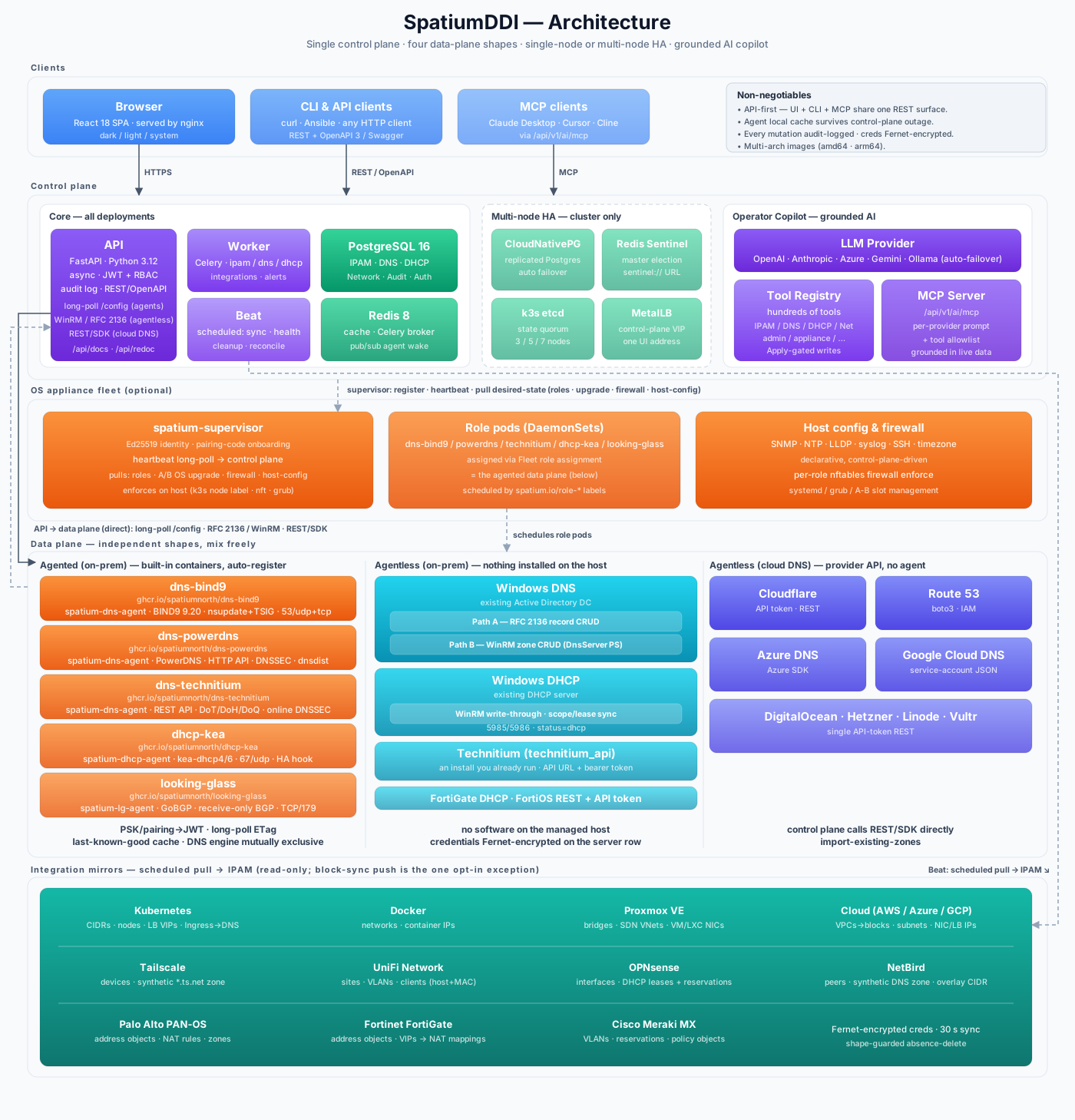
Control plane — FastAPI + PostgreSQL 16 + Redis 8 + Celery. Single source of truth for everything (IPAM tree, DNS records, DHCP scopes, auth, audit log). Exposes a REST API; the web UI and any Ansible / CLI / MCP integration all speak the same API. Runs single-node by default; on the OS appliance it can scale to a 3/5/7-node HA cluster — replicated PostgreSQL (CloudNativePG), Redis Sentinel, k3s embedded-etcd quorum, and a MetalLB control-plane VIP. The Operator Copilot (multi-vendor LLM + hundreds of tools in the registry + MCP HTTP endpoint) is grounded in this same live data.
Data plane — four independent shapes (mix freely):
Agented, on-prem (BIND9 or PowerDNS or Technitium, plus Kea) — one container per service. Each bakes in a sidecar agent (
spatium-dns-agent/spatium-dhcp-agent) that (1) bootstraps with a PSK or pairing code → rotating JWT, (2) long-polls/configwith an ETag (woken over a Redis pub/sub channel), (3) caches the last-known-good bundle on disk so the service keeps serving if the control plane is unreachable — and reverts to it, quarantines the bad etag and reports that upward when a bundle renders config the daemon rejects, because a reverted agent otherwise keeps serving and keeps heartbeating while the zone or scope you saved is live nowhere, (4) drains record / config ops over loopback (nsupdate + TSIG for BIND9; REST API for PowerDNS / Technitium; REST Control Agent for Kea). Structural changes reload the daemon; record changes do not. The DNS engine is mutually exclusive per server group.Agentless, on-prem (Windows DNS, Windows DHCP, Technitium) — no software on the managed host. The control plane speaks directly: RFC 2136 over UDP/TCP 53 (DNS record writes + AXFR), WinRM + PowerShell over 5985/5986 (DNS zone CRUD; DHCP scope, reservation and exclusion writes plus lease reads), and for
technitium_apithe server's own HTTP API with a permanent bearer token. Credentials are Fernet-encrypted on the server row.Agentless, cloud DNS (Cloudflare, Route 53, Azure DNS, Google Cloud DNS, plus DigitalOcean / Hetzner / Linode / Vultr) — first-class drivers that call the provider's REST API / SDK directly, with import-existing-zones. No agent, no daemon.
Read-only integration mirrors (Kubernetes, Docker, Proxmox VE, Cloud AWS/Azure/GCP, Tailscale, NetBird, UniFi, OPNsense, Palo Alto, Fortinet, Meraki) — scheduled pulls reconcile external state into IPAM; never written back. The single exception is active block sync, an opt-in, off-by-default enforcement path that pushes a SpatiumDDI-owned block set (and only that) to an OPNsense alias / UniFi client / Palo Alto DAG / Meraki client policy, or serves it as a feed the firewall polls.
On the OS appliance, a host-side spatium-supervisor (Ed25519 identity, pairing-code onboarding, heartbeat long-poll) orchestrates the local k3s node — it picks up role assignments, atomic A/B OS upgrades, and firewall + host-config (SNMP / NTP / LLDP / syslog / SSH) from the control plane and enforces them on the host.
The driver abstraction is backend-neutral — services speak to DNSDriver / DHCPDriver, never to BIND9 / PowerDNS / Technitium / Kea / PowerShell / cloud-SDK specifics.
Tech stack: Python 3.12 · FastAPI · SQLAlchemy 2.x (async) · PostgreSQL 16 · Redis 8 · Celery · React 18 · TypeScript · Tailwind · shadcn/ui · pywinrm · dnspython · cloud provider SDKs · Docker · Kubernetes + Helm · k3s (appliance)
Getting Started
📘 For the full setup order (servers → zones/scopes → subnets → addresses) see docs/GETTING_STARTED.md. For Windows DC integration see docs/deployment/WINDOWS.md. The step-by-step appliance walkthrough, with screenshots of each installer screen, is docs/deployment/APPLIANCE_INSTALL.md.
Try the demo in GitHub Codespaces

One click brings up a full SpatiumDDI stack in a fresh Codespace, builds the images from main, runs migrations, and seeds realistic IPAM / DNS / DHCP / network-modeling demo data so every screen has something to look at. Sign in with admin / admin.
The demo Codespace runs in DEMO_MODE — abusable surfaces are server-side locked: nmap, packet capture, the AI Copilot, every read-only integration mirror (Kubernetes / Docker / Proxmox / Tailscale / NetBird / UniFi / Cloud / OPNsense / Palo Alto / Fortinet / Meraki), active block sync and firewall feeds, webhook subscriptions, backup target creation, factory reset, and password change all return 403. IPAM / DNS / DHCP CRUD on the seeded data stays open so you can play with it.
Cold start is ~5–8 minutes (image build) on a 4-core machine; the Codespace's free-tier hours come from your own GitHub account, and trashing the data only affects your own copy. To start fresh, delete the Codespace and click the badge again.
Quick start with the OS appliance ISO (recommended)
The fastest way to a working SpatiumDDI install. Boot a single ISO, answer a handful of wizard prompts, and you're on HTTPS with the full stack running in 2-5 minutes. No Docker setup, no Kubernetes setup, no Python virtualenv. The ISO is a self-contained Debian 13 image with k3s embedded — a single-binary Kubernetes distribution — so the same SpatiumDDI containers that ship as a Helm chart deploy on the appliance via HelmChart CRDs. Operators get a real Kubernetes node without managing one.
New to Kubernetes? Don't let that stop you. You never have to touch it — the guided installer, the
/applianceweb UI, and one-click atomic upgrades hide k3s completely; there are nokubectlordockercommands to learn. If you're curious why we picked embedded k3s over plain Docker Compose — flexibility, growing a single box into a real high-availability cluster, and never hand-running container commands — here's the plain-English rationale: Why k3s, not Docker Compose?
What you get out of the box
- Single-node k3s cluster (~70 MB static binary, no daemons to chase).
- SpatiumDDI control plane (API, frontend, worker, beat, PostgreSQL, Redis, migrate Job) running as Pods.
- HTTPS on
:443from first boot — a self-signed cert with the host's globally-scoped IPs in the SAN list. Replace with your own pasted PEM / CSR-on-server / Let's Encrypt cert whenever you're ready. - A dedicated
/appliancemanagement hub that handles everything you'd otherwise need SSH for: a live Cluster health dashboard (pod inspection + log streaming + node vitals + etcd snapshots), TLS cert manager, atomic A/B OS slot upgrades, firmware-pending banner, fleet management for remote agents, NTP / SNMP host config, a realtime firewall-log viewer, journalctl viewer, self-test runner, one-click diagnostic bundle, maintenance mode, host reboot / shutdown. - A Talos-style operations cockpit on the appliance's physical / serial console — a KPI ribbon (cluster / etcd / Postgres / API / platform / slot), live vitals, pod health, a journalctl tail, and an F7 health drill-down with guarded recovery actions — useful when the web UI is down.
- Atomic A/B slot OS upgrades: every appliance has two
identical root partitions; an upgrade dd's the new image
into the inactive one, reboots, and auto-reverts on
/health/livefailure. Worst case is one wasted reboot. - Scale to a 3/5/7-node HA control plane by promoting more appliances from the Fleet UI — embedded-etcd quorum, replicated PostgreSQL (CloudNativePG) + Redis Sentinel, and a MetalLB control-plane VIP, all configured from the web UI (see below).
Get the ISO
Pre-built: grab the ISO for your architecture from the latest release:
Architecture ISO Firmware x86-64 (Intel/AMD) spatiumddi-appliance-<version>-amd64.isoBIOS or UEFI arm64 (Apple Silicon, Graviton, Ampere) spatiumddi-appliance-<version>-arm64.isoUEFI only The arm64 image is UEFI-only because AArch64 has no BIOS boot path — there is no legacy firmware mode to fall back to, and the installer refuses rather than completing an install that could never boot. Both are also published under un-versioned names (
spatiumddi-appliance-<arch>.iso) thatreleases/latest/download/…always points at.Nightly: every night that
mainmoves, a pre-release taggednightly-YYYY.MM.DDships the same artifacts a real release does — container images, the appliance ISO and the A/B slot image, assembled by the same reusable workflow the release runs, so a break in the assembly surfaces the next morning rather than at the cut. Kept for 7 days. Useful for testing a fix before it's tagged; not for production — nightlies are never tagged:latest.Build from source:
make appliance-dev-isoproduces an ISO inappliance/build/. AddAPPLIANCE_ARCH=linux/arm64for the arm64 image — on an Apple Silicon Mac that is a NATIVE build, which is also the quickest way to test the appliance locally (UTM, Apple Virtualization backend). Seedocs/deployment/APPLIANCE.mdfor prerequisites.
Install
Attach the ISO as a CD-ROM in your hypervisor (Proxmox / VMware / Hyper-V / QEMU), or
ddit to a USB stick for bare metal. amd64 or arm64 (UEFI only).Hard floor (installer refuses below this): 32 GiB disk — the A/B atomic-upgrade layout needs two 8 GiB OS slots that each carry the full container image set for air-gapped boot, and
/varmust hold the k3s image store + database + logs. (The floor was 24 GiB; it was raised to 32 because the Control plane's first boot otherwise tipped the kubelet DiskPressure threshold into an eviction storm — issue #312.)Recommended per role:
Role vCPU RAM Disk Control plane (api + worker + frontend + Postgres + Redis + k3s etcd) 4 8 GiB 40 GiB SSD Appliance (DNS / DHCP agent box) 2 4 GiB 32 GiB SSD Each control-plane HA node sizes the same as a single control plane (4 vCPU / 8 GiB) — every member runs a full api / worker / Postgres replica / Redis. SSD strongly preferred for the etcd + Postgres write path. When you pick the Control plane role on a box below the recommended 40 GiB / 8 GiB, the installer shows a sizing warning before proceeding. Measured figures, the minimums and the 48 GiB disk advice for a three-node control plane: Requirements, Memory / CPU.
Boot. The installer wizard asks for:
- Role — Control plane (the required first install: control plane on this box + the k3s etcd seed; DNS / DHCP are off at install and enabled later per node from the Fleet UI) or Appliance (DNS / DHCP agent box; pairs against a remote control plane and can later be promoted to join the control-plane cluster).
- Target disk, hostname, admin password, network (DHCP or static), timezone.
- For Appliance, also control plane URL and a bootstrap method — see "Joining DNS / DHCP agents" below.
The installer partitions, installs GRUB, and reboots. First boot generates secrets, bakes a self-signed cert, and starts k3s + the helm-controller. The helm-controller reconciles the baked HelmChart CR; in 30-90 s every spatium pod is in Running state.
Access
Browse to https://<appliance-ip>/. Accept the self-signed
cert warning (you'll replace it through Appliance → Fleet →
Web UI Certificate as soon as you're logged in). Sign in with
admin / admin — you'll be forced to set a real password on
first login.
The default port is :443 (HTTPS); :80 redirects to it. If
you replace the cert with Let's Encrypt or a corp-CA cert, the
nginx pod reloads automatically — no operator action needed
beyond pasting the new cert in the UI.
Joining DNS / DHCP agents
For distributed deployments (control plane on one box, DNS and DHCP on others), install the Appliance role on each agent box. Each agent needs a bootstrap secret to register with the control plane. Two ways to provide it:
Point agents at the VIP, not a node IP. When the installer asks for the control-plane URL, and the control plane is (or will become) a multi-node HA cluster, use the MetalLB control-plane VIP — not any single node's address. An agent pinned to one node's IP loses its control plane whenever that node is down, even though the cluster is healthy on the survivors. (Control-plane cluster members need no such care — their supervisor automatically heartbeats the in-cluster API Service rather than any fixed node IP.)
Pairing code (recommended). Easy to type, even over an IPMI / serial console.
- On the control plane, open Appliance → Pairing and click New pairing code. Pick the agent kind (DNS / DHCP / DNS + DHCP for combined boxes), an optional server group, and an expiry (15 min default).
- The UI shows an 8-digit code with a live countdown.
- On the agent appliance's installer, pick "Pairing code" at the Bootstrap method prompt and type the 8 digits. The agent redeems the code for the real key on first boot and registers itself.
Bootstrap key (advanced). For re-installs, air-gapped sites with a saved key, or when a pairing code expired before you got to the installer. Reveal the 64-char hex key on the control plane via Settings → Security → Agent bootstrap keys and paste it.
The agent appliance's console dashboard shows a Pairing row — green ✓ when registered, yellow while in progress, red with a regenerate-the-code hint on failure.
Once paired, the agent shows up on Appliance → Fleet.
The operator approves the row (signs the agent's cert),
then picks roles (dns-bind9 / dns-powerdns /
dns-technitium / dhcp — DNS engines are mutually
exclusive). The supervisor on the
agent labels the k3s node (spatium.io/role-<role>=true)
and the matching DaemonSet schedules the role pod. Total
time from click to running pod: typically 25-35 s.
Control-plane high availability (multi-node)
A single appliance is a one-node control plane. To survive a node loss, promote more appliances into the control-plane cluster from Appliance → Fleet → Manage control plane cluster…. Pick the boxes to add and confirm — embedded-etcd HA wants an odd member count, so you grow 1 → 3 → 5 → 7 (the API refuses a batch that would land on an even total).
Promotion is hands-off. The supervisor on each promoted node does a full k3s cluster-identity reset and rejoins the seed's embedded-etcd cluster; within ~60 s the data layer scales itself to the new member count:
- PostgreSQL (CloudNativePG) grows from one instance to a primary + streaming replicas with automatic failover.
- Redis runs in Sentinel mode — each member pairs a
redis-server with a sentinel that elects a master and fails
over; the app resolves the live master via a
sentinel://URL. - api / frontend / worker spread to one replica per node.
One Web UI, one address. Set a MetalLB L2 address pool + a floating control-plane VIP in Appliance → Network & Host; the frontend Service moves onto the VIP so the UI (and every agent heartbeat) hits one stable address regardless of which node is up. The self-signed Web UI cert auto-grows its SAN list to cover every member's hostname + IP and the VIP, so it validates on any node — unless you've uploaded your own cert, which is never touched.
Roll back by demoting members the same way (the etcd seed can't be demoted, and demoting to an even count is refused). A control-plane node can't be revoked until it's been demoted — revoking a live etcd member would break quorum. Control-plane workloads are pinned to control-plane nodes by a per-role node label, so promoting a DNS-only appliance never accidentally schedules Postgres onto it.
Multi-node HA shipped in #272; the live shake-out validated a 1 → 3 promote end-to-end. See
docs/deployment/APPLIANCE.mdfor the architecture + the HA topologies indocs/deployment/TOPOLOGIES.md.
Managing the appliance
The Appliance section in the sidebar opens a management hub with six tabs. The host-only ones hide on Docker / Kubernetes control planes; Fleet stays so operators can still drive remote appliance agents.
- Fleet — the heart of it: a roster of every registered appliance
(control-plane nodes + service agents). Approve / reject pending
pairings, assign DNS / DHCP roles + server groups, watch per-service
health, schedule per-box atomic A/B OS slot upgrades + reboots,
re-key, and delete. Promote / demote control-plane cluster members
and set the MetalLB control-plane VIP from the roster drilldown (see
HA above). A left sidebar holds the fleet-wide config surfaces:
Pairing codes (single-use onboarding codes), Rolling Upgrade
(coordinated one-node-at-a-time OS+app upgrade of the whole cluster
— preflight → CNPG switchover → drain → slot apply → reboot →
health-gate → uncordon → chart
image.tagbump → migrate Job; air-gap mirror PVC or GitHub-release source; Halt / Resume / Abort — plus the GitHub release catalog), Upgrade images (air-gap slot-image mirror), Web UI Certificate (pasted PEM + key, in-server CSR, or Let's Encrypt — nginx reloads in ~15 s), NTP (chrony, propagates to every agent), and SNMP (v2c community + CIDR allowlist, or v3 USM). - Cluster — the k3s cluster underneath: a Pods view (running workloads with per-pod restart + SSE live logs) and etcd snapshots (disaster-recovery state + guided single-node restore), both driven off the in-cluster kube-API via the api pod's ServiceAccount. (Appliance host only.)
- Firewall — declarative per-role / per-appliance nftables policy
compiled into each node's drop-in, with a staged-preview diff of any
node's effective merged ruleset, an enforcement master switch that
cuts LAN-wide etcd / kubelet exposure, and a realtime firewall-log
viewer. (Module-gated on
appliance.firewall.) - Logs & Diagnostics — host-log viewer, the self-test runner (DNS
resolution + kube-API reachability + pod health + role presence), a
one-click diagnostic bundle (secrets redacted), and the Web UI
reachability self-check: would a new, off-box TCP connection to
443 (and 80) actually be accepted? Curling your own LAN IP rides
iif lo acceptand succeeds even when the port is firewalled. It reads the live nftables ruleset at first boot, every 5 minutes, and after every firewall apply; an accept scoped byweb_ui_allowed_cidrsreports scoped, never blocked, anything the model can't reason about degrades to indeterminate, and only a genuine block renders — bold red on the console next to the Web UI URL it invalidates. (Appliance host only.) - Maintenance — maintenance-mode toggle (drains DNS / DHCP traffic before host work) plus reboot / shutdown with confirmation. (Appliance host only.)
- Network & Host — hostname, DNS resolvers, IPv4 / IPv6 mode (DHCP or static), the nftables drop-in editor, SSH-key upload, proxy config, console-mode selector, and a reboot-pending banner. (Appliance host only.)
The console cockpit on the appliance's physical or serial console
shows a 6-box KPI ribbon (cluster / etcd / Postgres / API / platform /
slot), live vitals, pod health, and a journalctl tail. F-keys give you
local-login (F1), htop (F2), kubectl get pods -A (F3 — pod log
viewer), nmtui for networking (F4), confirmed reboot / shutdown
(F5 / F6), and a health drill-down with guarded recovery actions (F7).
The post-boot console (dashboard / verbose dashboard / plain login) is
selectable from Appliance → Network & Host.
Stuck without a working web UI? SSH in as the OS admin user you
created during install. kubectl is on PATH (with bash completion + a
k alias); kubectl get pods -A is the fastest "what's broken"
diagnostic. journalctl -u spatiumddi-firstboot shows the first-boot
setup log; kubectl -n spatium logs <pod> for any pod's stdout/stderr.
The appliance is beta — see issue #134
- #183 for the roadmap and
docs/deployment/APPLIANCE.mdfor the full design, build pipeline, k3s architecture, and known limitations.
Quick start with Docker Compose
If you'd rather run on existing Docker infrastructure, the same SpatiumDDI containers ship as a docker-compose stack. Useful for dev work, small single-host production where you want full control of the OS, or environments where Kubernetes overhead is unwanted.
git clone https://github.com/spatiumnorth/spatiumddi.git
cd spatiumddi
cp .env.example .env
# Required env vars in .env:
#   POSTGRES_PASSWORD=<set this>
#   SECRET_KEY=$(openssl rand -hex 32)
#   DNS_AGENT_KEY=$(openssl rand -hex 32)   # needed if running the DNS container
docker compose pull
docker compose run --rm migrate
docker compose up -d
Open http://localhost:8077 and log in with admin / admin (you're forced to change the password on first login).
Seeding demo data
To populate a fresh install with a representative dataset (DNS group + zones + records, DHCP scope + pool, ASNs + BGP peerings, VRFs, IP space + blocks + subnets + ~30 IPs, SNMP-stubbed network devices, VLANs, domains, custom fields, IPAM templates, alert rules, and a few shared AI prompts) — useful for screenshots, demos, or kicking the tyres on the AI Copilot:
python3 scripts/seed_demo.py http://localhost:8000 admin <your-password>
Idempotent — re-running the seed swallows 409s and PATCHes existing rows so foreign-key pointers converge as new entities are added in later releases. Any other refused request is printed as it happens and listed again at the end, and the script then exits 2 instead of reporting Seed complete. Out of scope: AI providers (secrets), webhooks (per-deployment URLs), audit-forward targets, API tokens — those need real credentials from you.
Upgrading
SpatiumDDI ships every component (api, worker, beat, frontend,
dns-bind9, dhcp-kea) at the same tag. Releases up to the bridge are
CalVer (YYYY.MM.DD-N); from 1.0.0 they are SemVer
(MAJOR.MINOR.PATCH), and every SemVer release is newer than every
CalVer one. The image tag is controlled by SPATIUMDDI_VERSION in
your .env.
Reaching 1.0.0 from a CalVer release. Upgrade to the bridge — the last CalVer release — first. The code that decides whether a version is newer runs in the version you upgrade from, and only the bridge and later know that
1.0.0comes after2026.x: an older install is never offered 1.0.0, and its upgrade preflight refuses it. The 1.0.0 release notes name the bridge.
Track latest (default — your .env ships with SPATIUMDDI_VERSION=latest):
cd spatiumddi
git pull                              # refresh docker-compose.yml + .env.example for any new fields
docker compose pull                   # fetch the newest images
docker compose run --rm migrate       # apply any new alembic migrations (idempotent — no-op if up to date)
docker compose up -d                  # recreate api/worker/beat/frontend on the new images
Pin to a specific release (recommended for production — reproducible, no surprise upgrades):
Pin with the current
docker-compose.yml: it pulls fromghcr.io/spatiumnorth/, where every release tag is published. A copy taken from a release tag up to and including2026.09.04-1, or from a checkout older than the organization move (#1100), namesghcr.io/spatiumddi/instead, which now answersdenied—git pullfirst, or changeghcr.io/spatiumddi/toghcr.io/spatiumnorth/in your copy.
# In your .env:
SPATIUMDDI_VERSION=2026.06.25-1

# Then:
docker compose pull
docker compose run --rm migrate
docker compose up -d
Bump the pinned version when you're ready to upgrade and re-run the same three commands.
Notes:
- Take a backup before upgrading. Click
Administration → Backup → Build + downloadand save the archive somewhere off the host (or pick a configured remote destination'sRun now). If the upgrade goes sideways the archive is your one-click rollback. Ten destination kinds ship today — local volume / S3 / SCP / Azure Blob / SMB / FTP / GCS / WebDAV / NFS / HTTPS PUT — plus selective per-section restore + cross-install secret rewrap + alembic upgrade-on-restore. See the in-app page for the security-model details. docker compose run --rm migrateruns alembic against your current schema — safe to run every upgrade. It exits as a no-op if there are no new migrations.- Downgrades are not supported. Database migrations are forward-only; if a release introduces a schema change you can't roll back to a tag that predates it without restoring a database backup. Always snapshot Postgres before a major-version upgrade you're not sure about.
- Watch the CHANGELOG.md entry for your target version for any release-specific upgrade notes (e.g. "operators on Kea HA must read this before upgrading").
- The sidebar shows the running version in the bottom-left corner and surfaces an
update availablebadge when a newer GitHub release exists — the version probe runs hourly.
Running the built-in BIND9 / PowerDNS / Technitium / Kea containers
The managed-service containers ship under Compose profiles — opt in when you want them:
docker compose --profile dns-bind9 up -d                 # BIND9 (default)
docker compose --profile dns-powerdns up -d              # PowerDNS (issue #127)
docker compose --profile dns-technitium up -d            # Technitium (issue #746)
docker compose --profile dns-bind9 --profile dhcp up -d  # BIND9 + DHCP
--profile dns still works as a back-compat alias for dns-bind9. Pick whichever DNS driver matches the server group on the control plane — every driver-specific feature (PowerDNS ALIAS / LUA, Technitium DoQ and encrypted-HTTPS/QUIC forwarding, BIND9 views and RPZ) gates on every server in the group running that driver.
Or set COMPOSE_PROFILES=dns-bind9,dhcp in your .env so plain docker compose up -d enables both automatically.
That starts dns-bind9 bound to host port 1053 (udp + tcp), dns-powerdns on 5453, or dns-technitium on 6053. The agent registers with the control plane automatically using DNS_AGENT_KEY from your .env and appears in the UI under DNS → Server Groups.
Upgrading from a release that used port 5353? The DNS host port default changed from
5353to1053in release2026.05.11-1because 5353 is the well-known mDNS port and collides with avahi (default-on in Ubuntu desktop / Fedora / most lab distros). Either point your clients at the new port (dig -p 1053 …), or pin the old behaviour withDNS_HOST_PORT=5353in your.envand recreate the container.
Create a zone + record in the UI, then verify with dig:
dig @127.0.0.1 -p 1053 <your-record>.<your-zone> A +short
dig @127.0.0.1 -p 1053 -x <your-ip> +short    # reverse (PTR)
Record changes propagate to BIND9 via RFC 2136 — typically sub-second, no daemon restart. Zone / ACL / view changes trigger a config reload.
Production: point the agent at your real control plane, expose 53/udp + 53/tcp, and run one container per DNS server you want in the cluster. All servers in a group share the same TSIG key for dynamic updates.
Encrypted DNS (DoT / DoH)
Turn it on per group under DNS → Server Groups → Options → Encrypted
transports, after linking a TLS certificate (upload one, or issue it
from Let's Encrypt under Appliance → Fleet → Web UI Certificate;
on a Docker or Kubernetes control plane the same store is Fleet → TLS
certificates, or POST /api/v1/appliance/tls/upload /
POST /api/v1/appliance/acme/issue). Both
listeners are additive — plain DNS on :53 keeps working.
The listener port lives in the database; what you change to make it reachable depends on how you deploy:
| Deployment | What to do |
|---|---|
| OS appliance | Nothing. The DNS workload is hostNetwork and the supervisor opens the firewall port automatically when you enable a listener. |
| Docker Compose | Add the overlay: -f docker-compose.dns-encrypted.yml. It publishes 1853→853 (DoT) and 8443→443 (DoH); tune with DNS_DOT_HOST_PORT / DNS_DOH_HOST_PORT, and if you changed the port in the UI match it with DNS_DOT_PORT / DNS_DOH_PORT. |
| Kubernetes / Helm | Set dnsBind9.dotPort / dnsBind9.dohPort (appliance chart) or per-server dotPort / dohPort (umbrella chart). |
docker compose -f docker-compose.yml \
               -f docker-compose.dns-encrypted.yml \
               --profile dns-bind9 up -d
The ports live in an overlay rather than the base file because Compose
can't publish conditionally — binding 853/443 unconditionally would break
up -d on any host already using them, for a feature that ships off.
# DoT
dig +tls +tls-hostname=dns.example.com @127.0.0.1 -p 1853 www.example.com A +short
# DoH
dig +https=/dns-query +tls-hostname=dns.example.com @127.0.0.1 -p 8443 www.example.com A +short
DoH and port 443. 443 is the RFC 8484 default and is what the UI starts with, but on an appliance the web UI already owns it — the API rejects
443there, so pick8443and hand clients a DoH URL with the port in it. On Compose there's no clash: the frontend publishes8077→80and never binds 443, and the container-side 443 is private to the DNS container.
PowerDNS: pdns Authoritative speaks neither protocol, so DoT/DoH runs
on the dnsdist front — bring up both the dns-powerdns and
dns-powerdns-with-dnsdist profiles and point clients at the front
(5853 / 5444). The standalone docker-compose.agent-dns-powerdns.yml
has no front, so encrypted transports aren't available there.
BIND9 and Technitium need no sidecar — both serve natively. Upstream forwarding is where they part: BIND9 forwards over DoT only (9.20 has no client-side HTTP or QUIC transport), Technitium forwards over DoT, DoH and DoQ, and pdns doesn't forward at all.
Add an on-prem LLM for the Operator Copilot (Ollama)
The Copilot works with hosted APIs (OpenAI, Anthropic, Azure OpenAI, Google Gemini) or fully on-prem through any OpenAI-compatible server. Ollama in five minutes (provider failover, tool allowlists, the tool registry and the chat surface are in the Copilot reference):
# On the Ollama host:
docker run -d --gpus all -p 11434:11434 \
  -e OLLAMA_CONTEXT_LENGTH=32768 \
  -e OLLAMA_KEEP_ALIVE=30m \
  -v ollama:/root/.ollama --name ollama ollama/ollama:latest

docker exec ollama ollama pull qwen3.5:latest
Then in SpatiumDDI: Admin → AI Providers → New → kind: openai_compat, base_url: http://<ollama-host>:11434/v1, default_model: qwen3.5:latest, save → click the floating "Ask AI" button. OLLAMA_CONTEXT_LENGTH is required — Ollama defaults to 2048 tokens which silently truncates the system prompt + tool schemas; the result is a model that hallucinates tool names. We recommend qwen3.5:latest for tool calling on the small open-weight class. The driver also forwards options.num_ctx / num_predict / extra_body, so the context window can be set per provider instead of on the server.
API & interactive docs
The FastAPI backend auto-generates OpenAPI / Swagger:
| Path | What |
|---|---|
http://localhost:8077/api/docs |
Swagger UI — try endpoints directly from the browser |
http://localhost:8077/api/redoc |
ReDoc — cleaner reference layout |
http://localhost:8077/api/openapi.json |
Raw OpenAPI 3 spec (for code generators) |
The same document is attached to every release as openapi.json, so an out-of-repo client can generate against an exact server version instead of whatever main happens to be:
curl -LO https://github.com/spatiumnorth/spatiumddi/releases/download/<tag>/openapi.json
make openapi VERSION=<tag>     # reproduces the identical bytes locally
Two things the published document guarantees, both because a generated client fails quietly rather than loudly: nullable properties are the plain schema with the property absent from required — not OpenAPI 3.1's null union, whose unmodellable arm makes strict generators drop the whole property with a warning — and timestamps are RFC 3339 with exactly three fractional digits, since the six Python emits (and the none it emits on a whole second) are what most generated decoders reject. See docs/API.md §2.
Every UI action is a REST call, so anything you do in the UI you can do via curl or your own client. Log in to the UI first to obtain a bearer token, then use Authorization: Bearer <token>.
Reset the admin password
docker compose exec api python - <<'EOF'
import asyncio
from sqlalchemy import update
from app.core.security import hash_password
from app.db import AsyncSessionLocal
from app.models.auth import User

async def reset():
    async with AsyncSessionLocal() as db:
        await db.execute(update(User).where(User.username == "admin")
            .values(hashed_password=hash_password("NewPass!"), force_password_change=True))
        await db.commit()

asyncio.run(reset())
EOF
Requirements
- Docker 24+ and Docker Compose v2, or
- Kubernetes with Helm: CI tests the charts on Kubernetes 1.36 with Helm 4 (k3s 1.36 on the appliance); the umbrella chart declares
kubeVersion: >=1.31, or - The SpatiumDDI OS appliance on bare metal or a VM (see APPLIANCE.md); running directly on a host OS without Docker is planned, not implemented
Memory / CPU
Measured on running appliances (amd64 VMs, 1.0 pre-release builds): at rest, under light and realistic load, through upgrades and HA drills, and over a 3-day soak. Docker Compose and Kubernetes were measured at rest and under light load (amd64 and arm64). The numbers behind each row, the rule that turns them into a Minimum and a Recommended, what is not measured yet and how to measure your own install are in docs/deployment/SIZING.md.
| Deployment | Minimum | Recommended |
|---|---|---|
| Appliance, one node (control plane, with or without DNS / DHCP) | 4 vCPU, 6 GiB RAM, 40 GiB disk | 4 vCPU, 8 GiB RAM, 40 GiB SSD |
| Appliance, three-node control plane | first node 4 vCPU / 8 GiB, the others 2 vCPU / 6 GiB, 40 GiB disks | every node 4 vCPU, 8 GiB RAM, 48 GiB SSD |
| Appliance role (DNS / DHCP agent box) | 3 GiB RAM (its pods do not schedule below that) | 2 vCPU, 4 GiB RAM, 32 GiB SSD (not measured yet) |
| Docker Compose (one host) | 2 vCPU, 4 GiB RAM (from use measured on amd64 and arm64) | 4 vCPU, 8 GiB RAM (derived) |
| Kubernetes (umbrella chart) | one node: 4 vCPU, 6 GiB RAM (measured, amd64; arm64 alike) | 4 vCPU, 8 GiB per node |
One node at rest used 3.3 GiB, and the busiest suites took it to 4.1 GiB: at this data size the memory is mostly the stack itself, not the load. For about 1M devices give every control-plane node 64 GiB of disk or more. On Kubernetes the chart's api and worker defaults are sized from these measurements, and its api autoscaler stays at 2 replicas at rest (#3110).
Deployment Options
| Method | Use case | Status |
|---|---|---|
| Docker Compose | Dev, small single-host production — docker compose up -d |
✅ Supported |
| Kubernetes + Helm | Multi-node production, scalable | ✅ Umbrella chart (charts/spatiumddi, published OCI to ghcr.io/spatiumnorth/charts/spatiumddi). See docs/deployment/KUBERNETES.md |
| Bare metal / VM (Ansible) | On-prem without containers | 📋 Planned — no Ansible playbooks yet. For bare-metal today use Docker Compose on a host or the OS appliance: see docs/deployment/BAREMETAL.md |
| OS Appliance (ISO / qcow2) | Easiest deploy, air-gapped, dedicated /appliance management hub |
🔄 Beta — Debian 13 + embedded k3s + full stack as HelmChart CRs, hybrid USB/CD ISO for amd64 and arm64, installable onto a RAID1 mirror, installer wizard, atomic A/B slot upgrades, in-UI TLS / releases / pods / logs / diagnostics / maintenance. Build with make appliance-dev-iso. See Getting Started, docs/deployment/APPLIANCE.md + issues #134 / #183 |
Documentation
Full docs at www.spatiumddi.com — republished automatically on every push to main. The feature tables in What's in the box are the summary; these are the specs behind them.
| Document | Description |
|---|---|
| Getting Started | Recommended setup order — from server groups down to allocating an IP |
| Changelog | What changed in each release, including upgrade notes |
| Architecture | System topology, control plane / data plane split, agent contract, HA design |
| Data Model | Database models grouped by domain, key relationships, shared conventions |
| REST API | API conventions — pagination, filtering, error format, auth, versioning |
| Development Guide | Coding standards, lint/test stack, CI gate, migration workflow |
| IPAM Features | IP space, block, subnet, address management |
| DHCP Features | DHCP server management — Kea, Windows DHCP |
| DNS Features | DNS zones, views, server groups, blocking lists, Windows DNS, PowerDNS, Technitium, Cloud DNS |
| Integrations | Read-only mirrors — Kubernetes, Docker, Proxmox, Cloud, Tailscale, NetBird, UniFi, OPNsense, Palo Alto, Fortinet, Meraki — plus active block sync + firewall feeds (the one write path) |
| Migration / Import | One-shot DNS + DHCP + NetBox importers (BIND9 / Windows / PowerDNS / Technitium / Kea / ISC dhcpd), plus the guided Windows → SpatiumDDI cutover |
| ACME DNS-01 | acme-dns-compatible provider for Let's Encrypt / public-CA cert issuance |
| Vertical network awareness | AV-over-IP (Dante / AES67 / SMPTE 2110), BACnet/IP device-instance registry + BBMD conformity, Industrial-OT inventory + Purdue zoning, DICOM AE Title registry + peer-association map — plus the un-gated fragile-device do_not_probe flag |
| Auth & Permissions | LDAP, OIDC, SAML, RADIUS, TACACS+, roles, scoped permissions |
| Permissions (RBAC) | Permission grammar, builtin roles, wildcards, group-scoped access |
| System Admin | Health dashboard, backup, notifications |
| Observability | Logging, metrics, alerting |
| Deployment Topologies | Six reference topologies — single VM through HA cloud + on-prem hybrid — with diagrams |
| Sizing | Measured memory, CPU and disk per deployment shape, Minimum and Recommended, and how to measure your own install |
| Windows Server Setup | WinRM, service accounts, firewall — Windows-side checklist |
| DNS Agent Design | Agent protocol, auto-registration, config sync |
| DNS Driver Spec | BIND9 + PowerDNS + Technitium (agent-managed and agentless) + Windows DNS + cloud (Route 53 / Azure DNS / Cloudflare / Google) driver internals |
| DHCP Driver Spec | Kea + Windows DHCP driver internals |
| Docker Compose | Compose setup, ports, first-time setup, TLS, HA, password reset |
| Kubernetes | Umbrella Helm chart walkthrough — HPA, Ingress / LoadBalancer, CloudNativePG + Redis Sentinel HA |
| Bare Metal | Bare-metal / VM paths — Docker Compose on a host, OS appliance (the Compose Patroni overlay is unsupported in 1.0) |
| Appliance Deployment | OS appliance ISO — base OS selection, build pipeline, first-boot orchestration, /appliance management hub spec |
| Troubleshooting | Recovery recipes — deleted agent rows, password reset, subnet-delete refused |
| Third-Party Components | Every bundled engine, library and OS package — license, artifact it ships in, and why it's there |
| Appliance Install | Step-by-step install walkthrough — ISO, installer screens, first boot, adding DNS / DHCP nodes, growing to HA |
| Reverse Proxy | Running behind your own proxy — External URL, trusted-proxy CIDRs, required headers, nginx / Caddy / Traefik / HAProxy / Ingress examples |
| BGP Looking Glass | Receive-only GoBGP collector, Sessions + Routes grids, IPAM / ASN / VRF linkage, bgp_lg_* alerts |
| E911 dispatchable location | SpatiumDDI as a Location Information Server — ERLs, bindings, HELD / PIDF-LO, DHCP options 99 / 123 |
| Operator Copilot | Provider failover, per-provider prompts and tool allowlists, the tool registry, MCP endpoint, chat surface, reliability guards, token caps |
| Privacy | The privacy statement, and the normative table of every outbound connection the software can make — its default and what it sends |
Support the project
SpatiumDDI is built by SpatiumNorth, a Montréal-based software company that builds infrastructure software in the open. The whole product ships under Apache 2.0 — every feature, free wherever you run it — and the company charges for the part that actually costs something: support, deployment and migration, from the people who wrote the code. The code lives here, in the open, as it always has. If it's saving your team work and you want to back it, there are two ways, depending on who you are.
Organizations — if your team runs SpatiumDDI in production, the way to back the project is the support your operators will want anyway: that's what SpatiumNorth sells. See pricing or contact us; managed service providers can partner to run it for their clients. Want to sponsor a specific feature or just say hi? Still happy to talk — open an issue.
Individuals — small tips help cover the boring stuff (a domain, a homelab SSD, the occasional cloud VM I spin up to test a deploy topology I don't have locally). No tier system, no perks list, no obligation — just a "thanks, here's a coffee" button if the project saved you an afternoon. Every contribution is genuinely appreciated.

Project Status
| Phase | Focus | Status |
|---|---|---|
| Phase 1 | Core IPAM, auth, user management, audit log, Docker Compose | ✅ Done — LDAP/OIDC/SAML + RADIUS/TACACS+, group-based RBAC, bulk-edit, inheritance, mobile-responsive UI, and full IPv6 /next-address (EUI-64 + random /128 + sequential) all shipped |
| Phase 2 | DHCP (Kea), DNS (BIND9), DDNS, zone/subnet tree UI | ✅ Done — DNS, Kea DHCPv4, subnet-level DDNS, agent-side Kea DDNS, block/space DDNS inheritance, per-server zone serial reporting all shipped |
| Phase 3 | DNS views, server groups, blocking lists, VLAN/VXLAN, system admin, Kea HA | ✅ Done — DNS features + health dashboard + alerts framework + group-centric Kea HA (self-healing peer-IP drift + supervised daemons) + DNS Views end-to-end split-horizon + multi-node control-plane HA (CloudNativePG + Redis Sentinel + MetalLB VIP, operator promote/demote) all shipped |
| Phase 4 | OS appliance, Terraform provider, SAML, backup/restore, ACME | 🔄 SAML + full backup/restore + factory-reset + OS appliance beta (Debian 13 ISO + embedded k3s + Helm orchestration, /appliance management hub with TLS upload + CSR-on-server, GitHub release apply, kubeapi-driven Pods tab + live SSE logs, host log viewer + self-test + diagnostic bundle, maintenance mode + reboot, web first-boot wizard, atomic A/B slot upgrades, multi-node rolling cluster upgrade with CNPG switchover + lease-mutex + preflight + air-gap mirror PVC, consolidated Cluster tab (Pods + etcd + live SSE health dashboard), realtime firewall-log viewer, Talos-style console cockpit) + the ACME DNS-01 provider (acme-dns-compatible, for external certbot / lego / acme.sh clients) + the ACME embedded client (hand-rolled RFC 8555 — auto-issues a CA-trusted Let's Encrypt cert for SpatiumDDI's own Web UI via DNS-01 / HTTP-01, with auto-renewal) all landed. Terraform / Ansible providers still pending |
| Phase 5 | Multi-tenancy, IP request workflows, import/export, advanced reporting | 🔄 In Progress — import/export (DNS + DHCP + NetBox importers, IPAM CSV/JSON/XLSX, the guided Windows cutover), advanced reporting (Top-N, utilization history, compliance PDF) and the self-service request portal landed; multi-tenancy still pending |
See CHANGELOG.md for the per-release feature list and CLAUDE.md for the authoritative spec.
Contributing
Contributions are welcome.
- Please read CONTRIBUTING.md before opening a PR. Every commit needs a DCO sign-off (
git commit -s), explained there - Good first tasks are tagged on the issue tracker
- Design discussion happens in GitHub Discussions
Contributors
Thanks to everyone who has opened a pull request against SpatiumDDI.
| Contributor | Area | |
|---|---|---|
 |
@mzac | Maintainer |
 |
@amoona6 | Appliance unattended installer, firewall sole-etcd-member fix, control-plane node-loss HA recovery |
 |
@tristanbob | authlib.jose → joserfc migration, pairing-code prune fix |
 |
@Cmonnich | Technitium DNS driver |
 |
@waza-ari | Agentless FortiGate cloud DHCP driver |
 |
@stefanriegel | Multi-node appliance field testing and fixes: Technitium zone types and blocklists, cloud DNS health, DHCP server groups, blocklist feed memory, alert evaluator |
 |
@containerguy | Hetzner DNS driver on the Hetzner Cloud API, Raspberry Pi 5 appliance profile |
 |
@AlexeyShalaev | Time-partitioned query, activity and RPZ log tables |
Opened a PR and not listed? That is an oversight, not a judgement — please
say so on the issue tracker
and it will be fixed. The list is still written by hand, as part of merging
each contributor's first PR; a weekly check
(.github/workflows/contributors-check.yml) opens an issue when someone who
has opened a PR is missing.
License
Released under the Apache 2.0 License.
Bundled components (BIND9, PowerDNS, Technitium, ISC Kea, k3s, and the appliance's Debian userland) are distributed under their own licenses. See NOTICE for the attribution manifest, and Third-Party Components for the full catalogue — what each component is, which artifact it ships in, and what its license means in practice.
Built with ❤️ by SpatiumNorth and the SpatiumDDI community · docs · spatiumnorth.com